Atom-beautify: Atom-beautify not woking with PHP-CS-Fixer
Description
l installed "Atom beatify" and "php-cs-fixer" in Atom.
And I also instaled "php-cs-fixer"
at
https://github.com/FriendsOfPHP/PHP-CS-Fixer#installation
which is in my pc.
The file name of it is "php-cs-fixer-v2.phar" which of course is
in my pc(c:¥xampp¥php¥php-cs-fixer-v2.phar)
And in Atom
my path is "c:¥xampp¥php¥php-cs-fixer-v2.phar".(Excuatbles▶︎PHP-CS-Fixer)
the other path is "c:¥xampp¥php.exe".
(Excuatbles▶︎PHP)
l don't why lt's not working.
l geuss setting is no problem becuse
"linter-php" is working.
Actual Output
The beautified code actually looked like this:
<<?php

$num = 10;

   $dsn = 'mysql:host=localhost;dbname=bbs;charset=utf8';
$user = 'tennisuser';

   $page = 0;


    if (isset($_GET['page']) && $_GET['page'] > 0) {
        $page = intval($_GET['page'])-1;
    }

    try {
        $db = new PDO($dsn, $user, $password);
        $db->setAttribute(PDO::ATTR_EMULATE_PREPARES, false);

        $stmt = $db ->prepare("
    SELECT * FROM bbs ORDER BY date DESC LIMIT :page, :num
    ");

        $page = $page * $num;
        $stmt->bindParam(':page', $page, PDO::PARAM_INT);
        $stmt->bindParam(':num', $num, PDO::PARAM_INT);

        $stmt ->execute();
    } catch (PDOException $e) {
        die('エラー:'.$e->getMessage());
    }
?>
<!DOCTYPE html>
<html lang="en" dir="ltr">
  <head>
    <meta http-equiv="content-type" content="text/html; charset=utf-8">
    <title>掲示板</title>
     </head>
  <body>
       <p><a href="index.php">トップページに戻る</a></p>
    <form class="" action="write.html" method="post">
          <p>名前:<input type="text" name="name"></p>
      <p>タイトル:<input type="text" name="title"></p>
      <textarea name="body"></textarea>
      <p>削除パスワード(数字4文字):<input type="text" name="pass"></p>
      <p><input type="submit" value="書き込む"></p>

    </form>
  </body>
</html>
>
Steps to Reproduce
- Add code to Atom editor
- Run command
Atom Beautify: Beautify Editor - This beautified code does not look right!
Debug
Here is a link to the debug.md Gist: https://gist.github.com/YutaNakai/d17fa7e3d81b7eea52a0e36f4070f442#file-atom
Checklist
I have:
- [x] Tried uninstalling and reinstalling Atom Beautify to ensure it installed properly
- [x] Reloaded (or restarted) Atom to ensure it is not a caching issue
- [x] Searched through existing Atom Beautify Issues at https://github.com/Glavin001/atom-beautify/issues
so I know this is not a duplicate issue - [x] Filled out the Input, Expected, and Actual sections above or have edited/removed them in a way that fully describes the issue.
- [x] Generated debugging information by executing
Atom Beautify: Help Debug Editorcommand in Atom and added link fordebug.mdGist to this issue
 YutaNakai
All 39 comments
This is where "php-cs-fixer-v2.phar" is.

YutaNakai
on 5 Aug 2018
This is my path in Atom.

YutaNakai
on 5 Aug 2018
@YutaNakai again, you need to create a configuration file for php-cs-fixer. Create a file with the name .php_cs.dist with contents of:
<?php

return PhpCsFixer\Config::create()
    ->setRules([
        'indentation_type' => true
    ])
    ->setIndent("\t")
    ->setFinder(
        PhpCsFixer\Finder::create()
        ->exclude('vendor')
        ->in(__DIR__)
    )
;
 stevenzeck
on 5 Aug 2018
stevenzeck
on 5 Aug 2018
Thank you. I really appreciate you replying.
I did. Did I do it right?

YutaNakai
on 5 Aug 2018
Yes that looks right, try beautifying again.
stevenzeck
on 5 Aug 2018
Still not working.
I installed PHP through Xampp.
Is it a problem? or Version?

YutaNakai
on 6 Aug 2018
Run the debug command again and create a gist of the results.
stevenzeck
on 6 Aug 2018
Okay. I did.
https://gist.github.com/YutaNakai/c612aac982d0ab71a08cb7a1f5dfcb7f#file-gistfile1-txt
YutaNakai
on 6 Aug 2018
The config file: "C:\xampp\htdocs\clearphp\.php_cs.dist" does not return a "PhpCsFixer\ConfigInterface" instance. G
  ot: "integer".
Interesting, your .php_cs.dist looks fine to me. I'll have to find a Windows machine and try it.
stevenzeck
on 6 Aug 2018
You mean there isn't anything I can do about
it?
YutaNakai
on 6 Aug 2018
The files that I'm trying to get beautified are all in "htdocs".
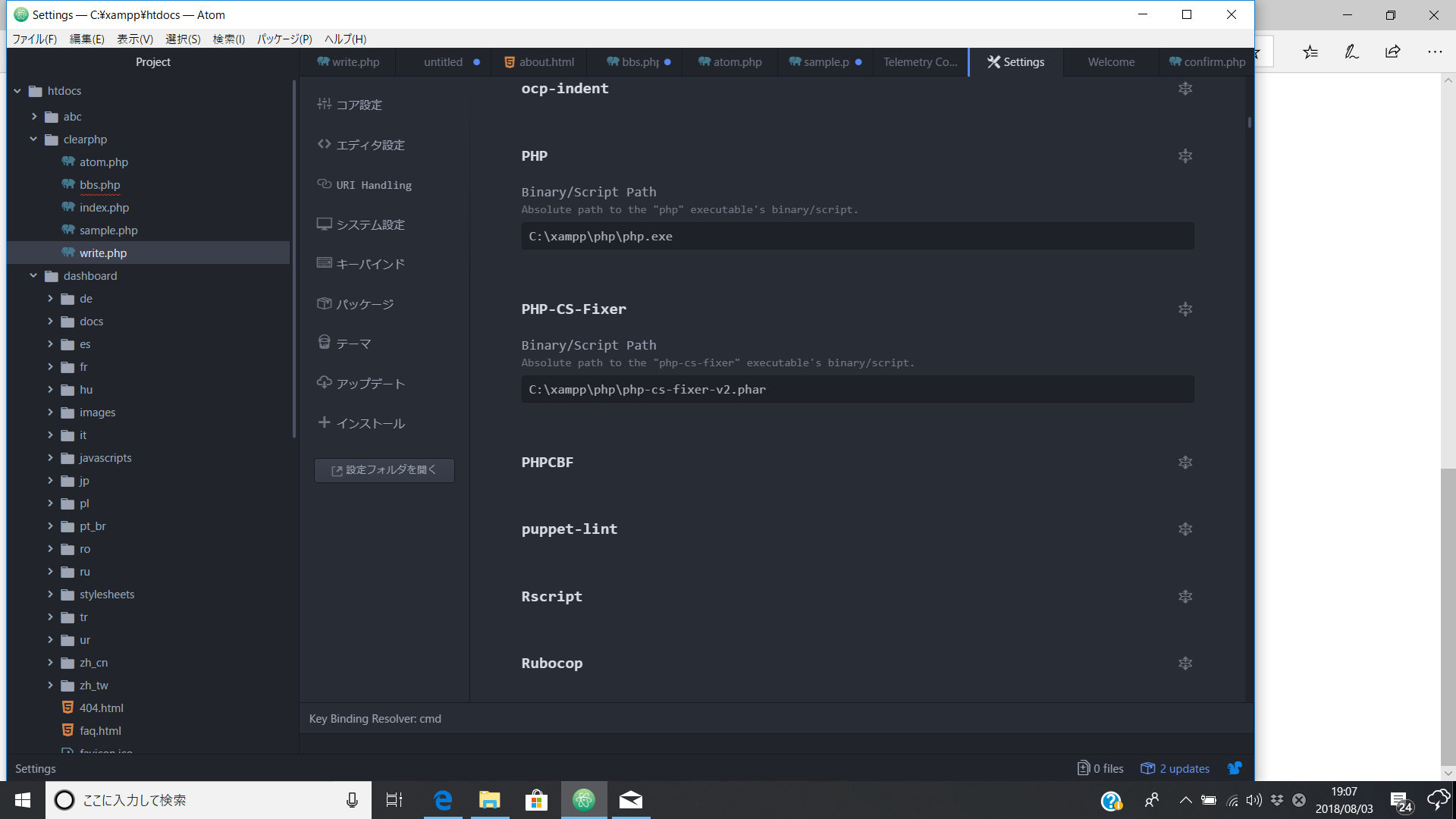
But my path in "Executable" do no include the word "htdocs"
Is my path correct?
Here is the picture of my path again.
YutaNakai
on 6 Aug 2018
Your paths are fine, it is attempting to beautify your files but can't because of that error in my previous comment. Try this just to see that it is working:
- Delete the
.php_cs.distfile - Create a php file with these contents
<?php
$d = True;
if ($a) {
return 1;
}else if ($b) {return 2;}
- Run Beautify
stevenzeck
on 6 Aug 2018
I can't tell how appreciative I am.
It works.
But it doesn't work in the other files.
Do you know why?
YutaNakai
on 6 Aug 2018
Because it needs a proper configuration so it knows how to format it the way it is supposed to. I don't know why your .php_cs.dist causes this error:
The config file: "C:\xampp\htdocs\clearphp\.php_cs.dist" does not return a "PhpCsFixer\ConfigInterface" instance. Got: "integer".
It might be an issue on Windows, and I don't have a Windows machine to test readily available. I need some time to test it out.
stevenzeck
on 6 Aug 2018
Thank you.
What should I do?
YutaNakai
on 6 Aug 2018
Try creating a new .php_cs.dist file again. Once I find a Windows machine I'll try and troubleshoot.
stevenzeck
on 6 Aug 2018
Thank you.
FYI I did again. The results was the same.
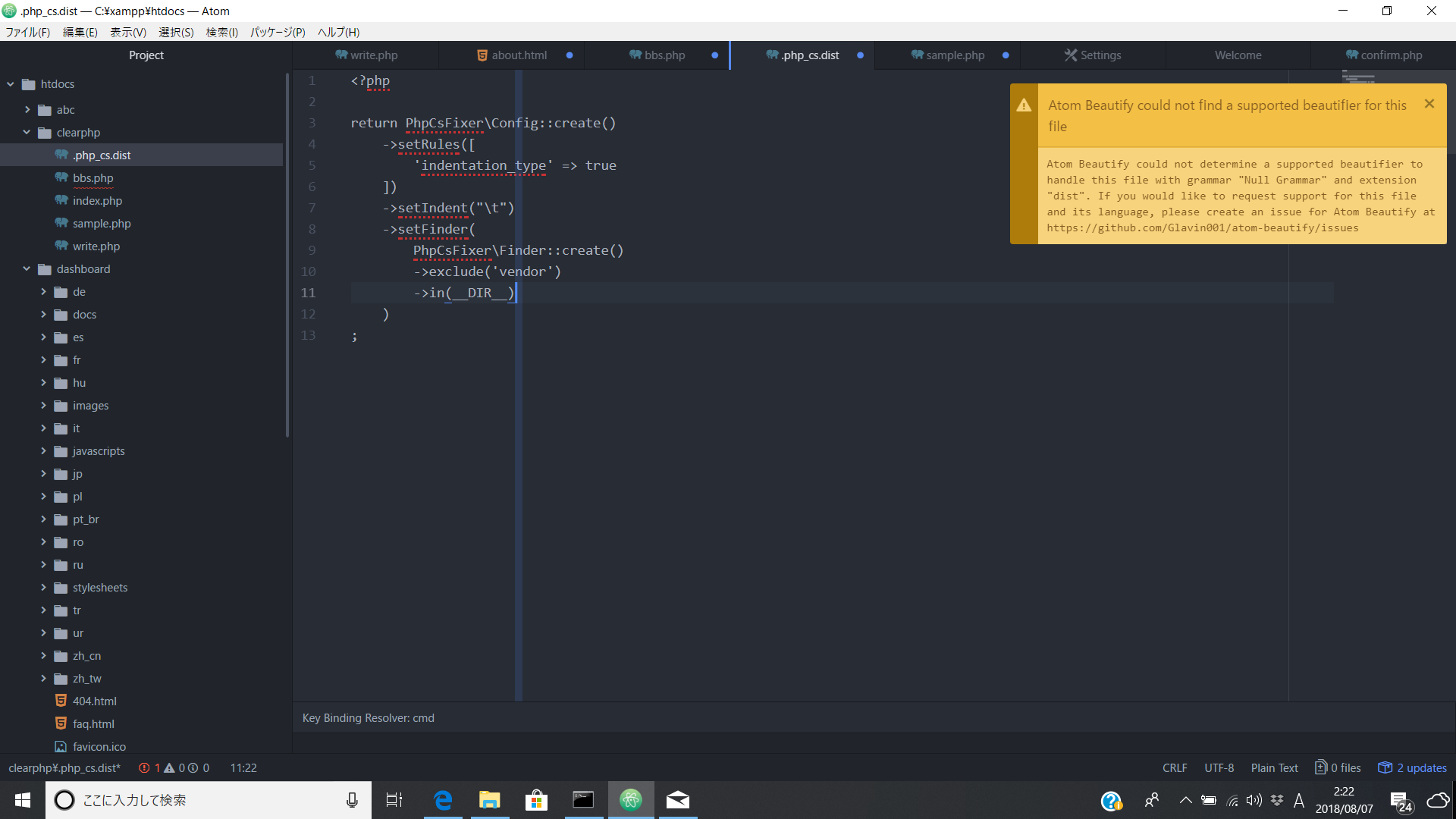
YutaNakai
on 6 Aug 2018
It won't do anything on that file, only .php files.
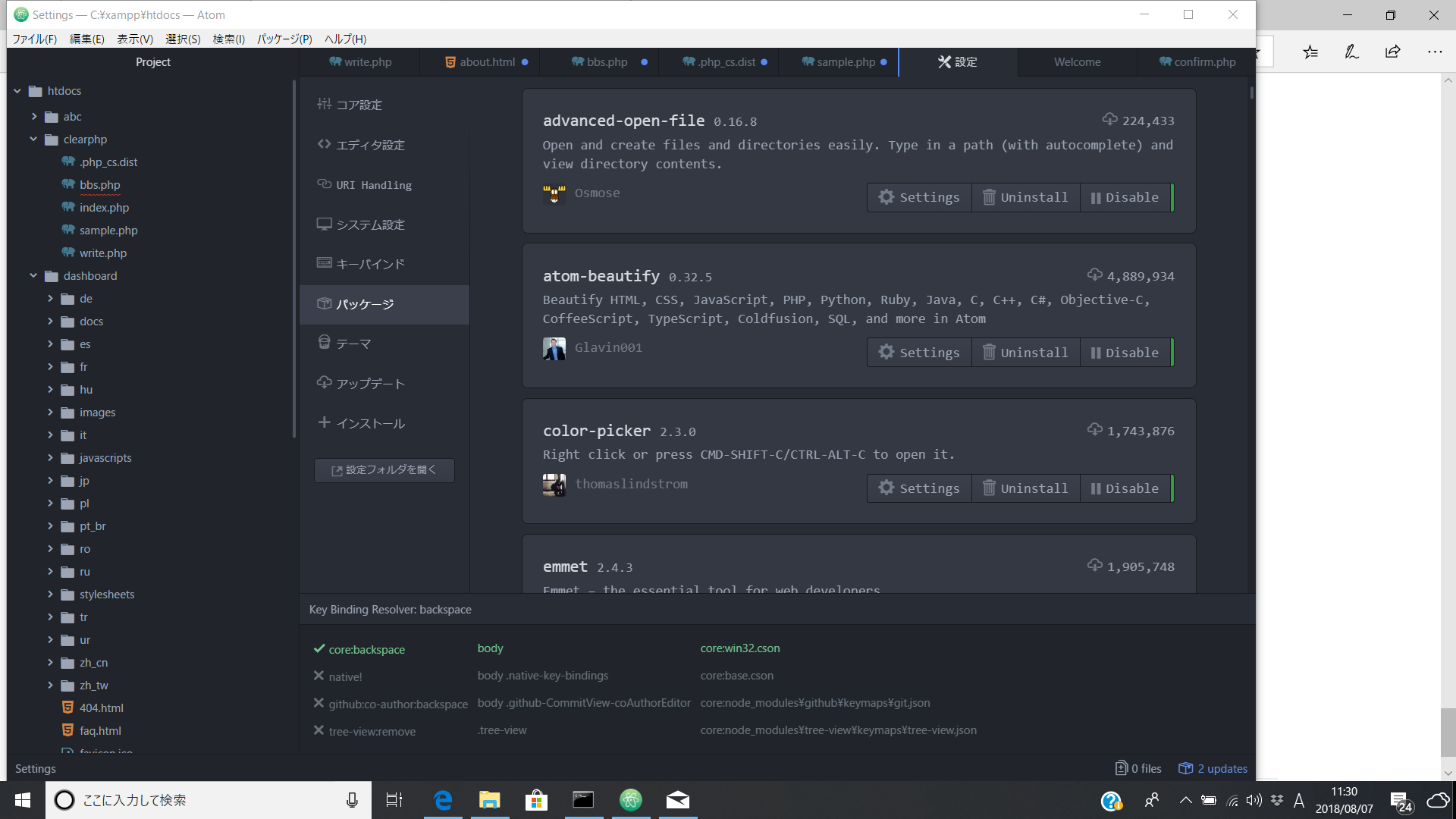
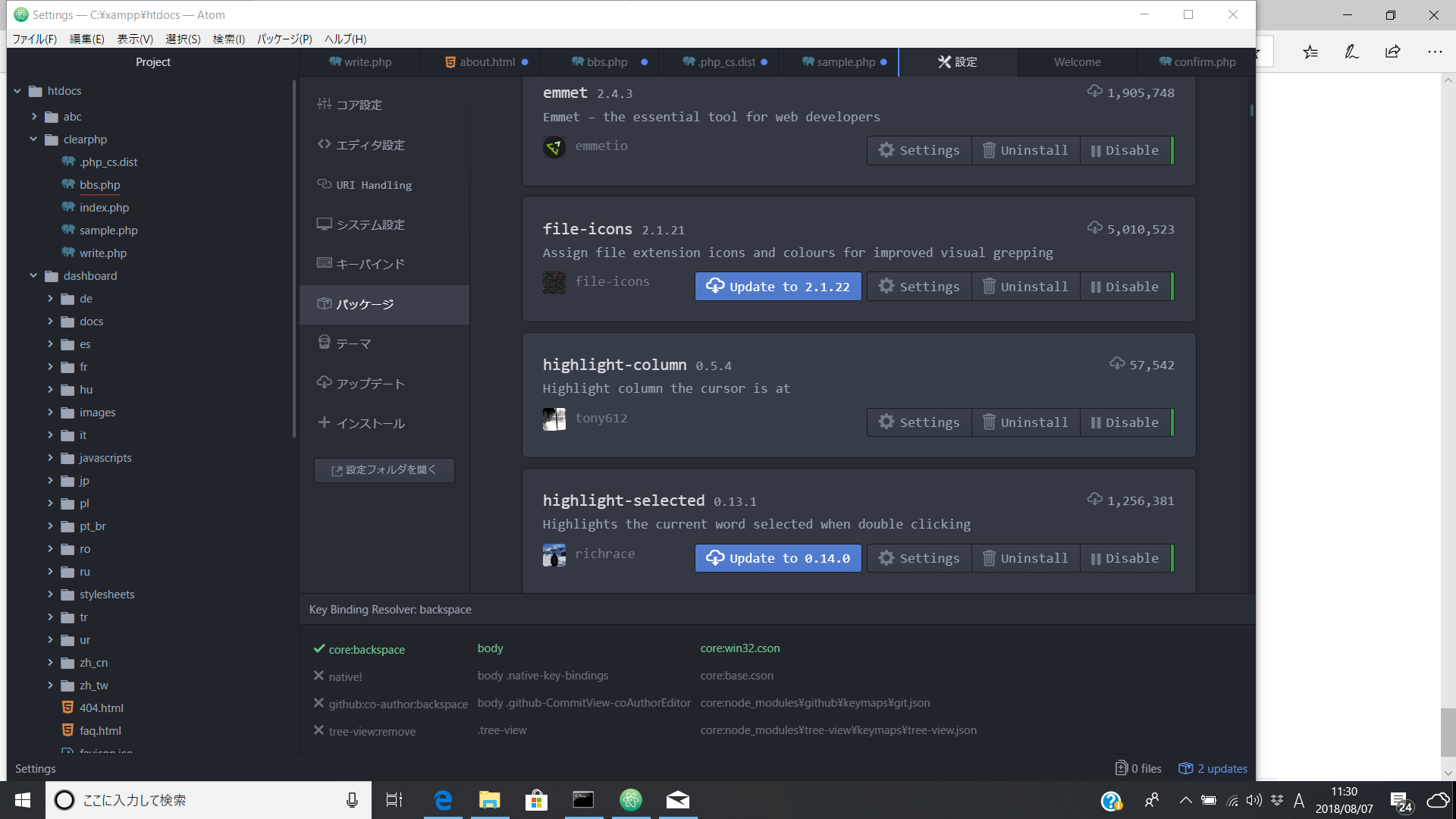
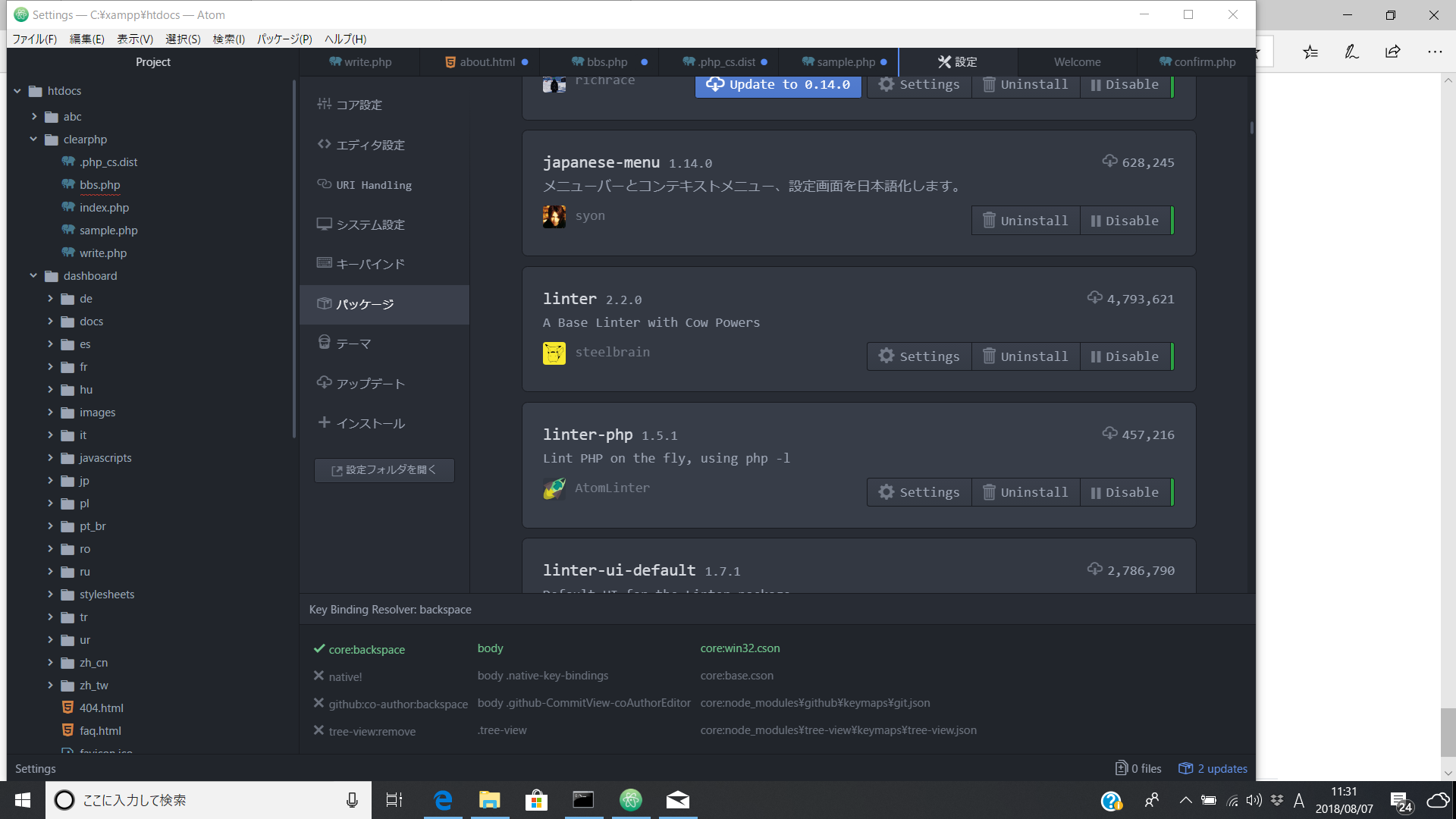
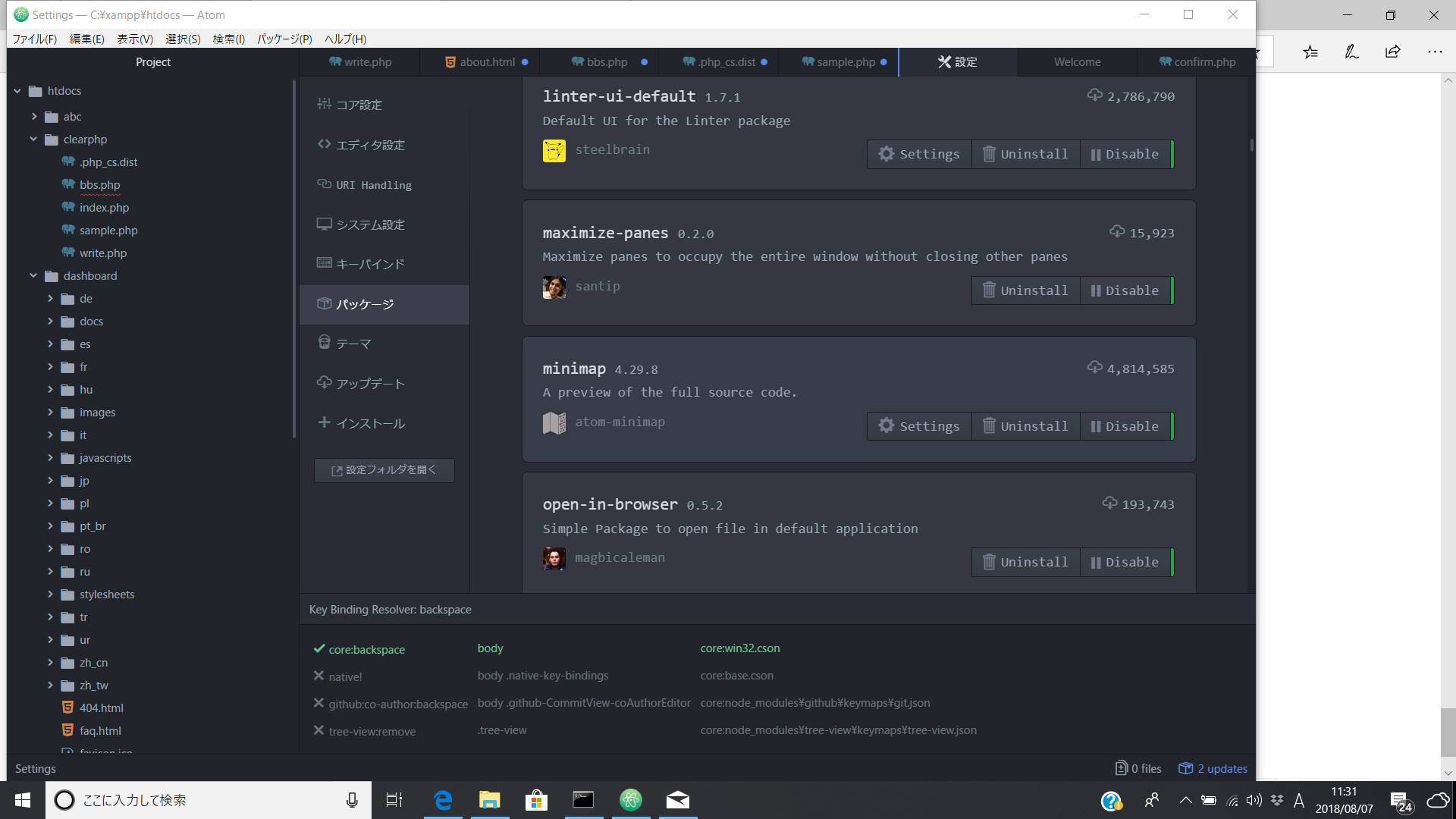
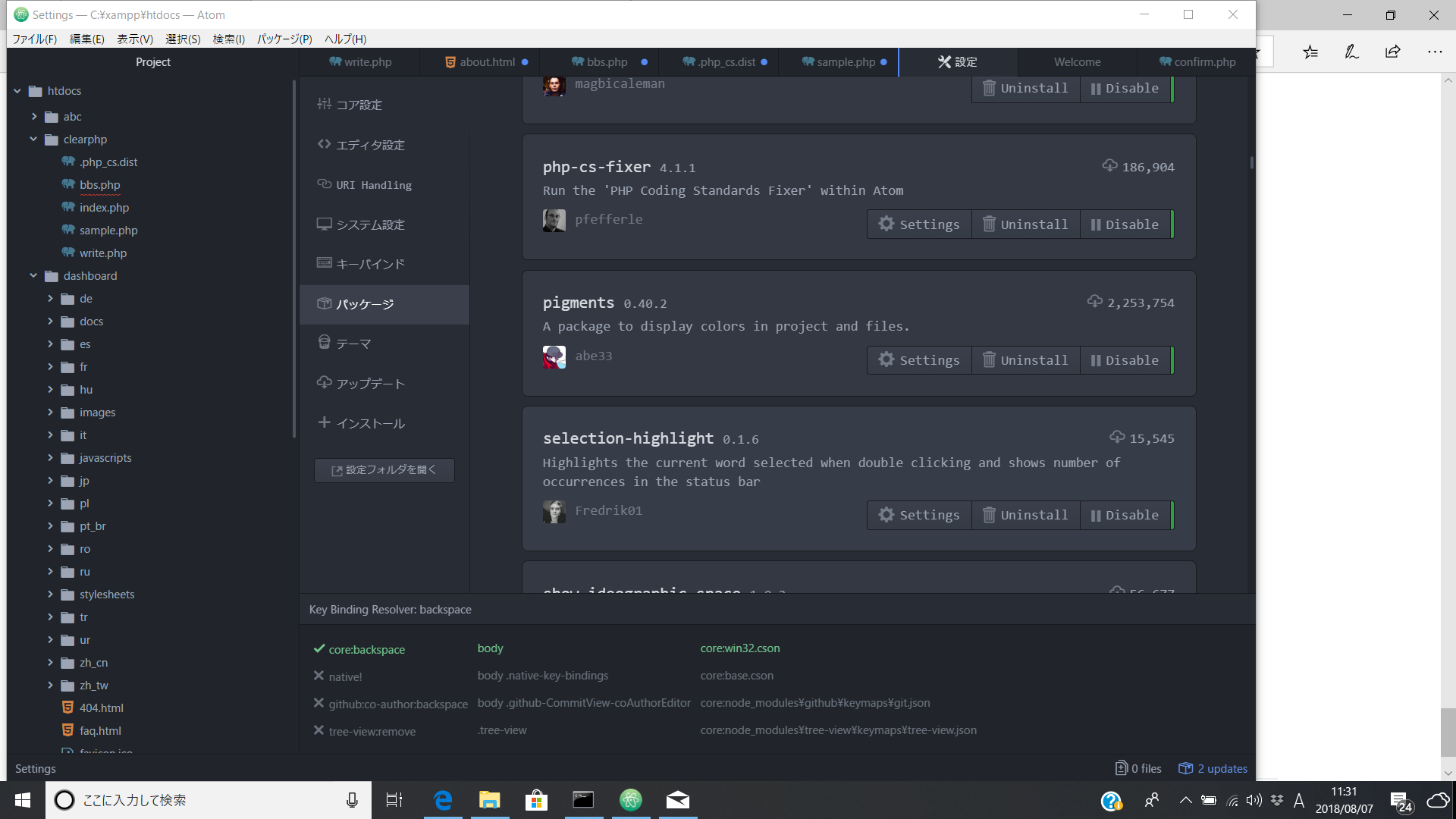
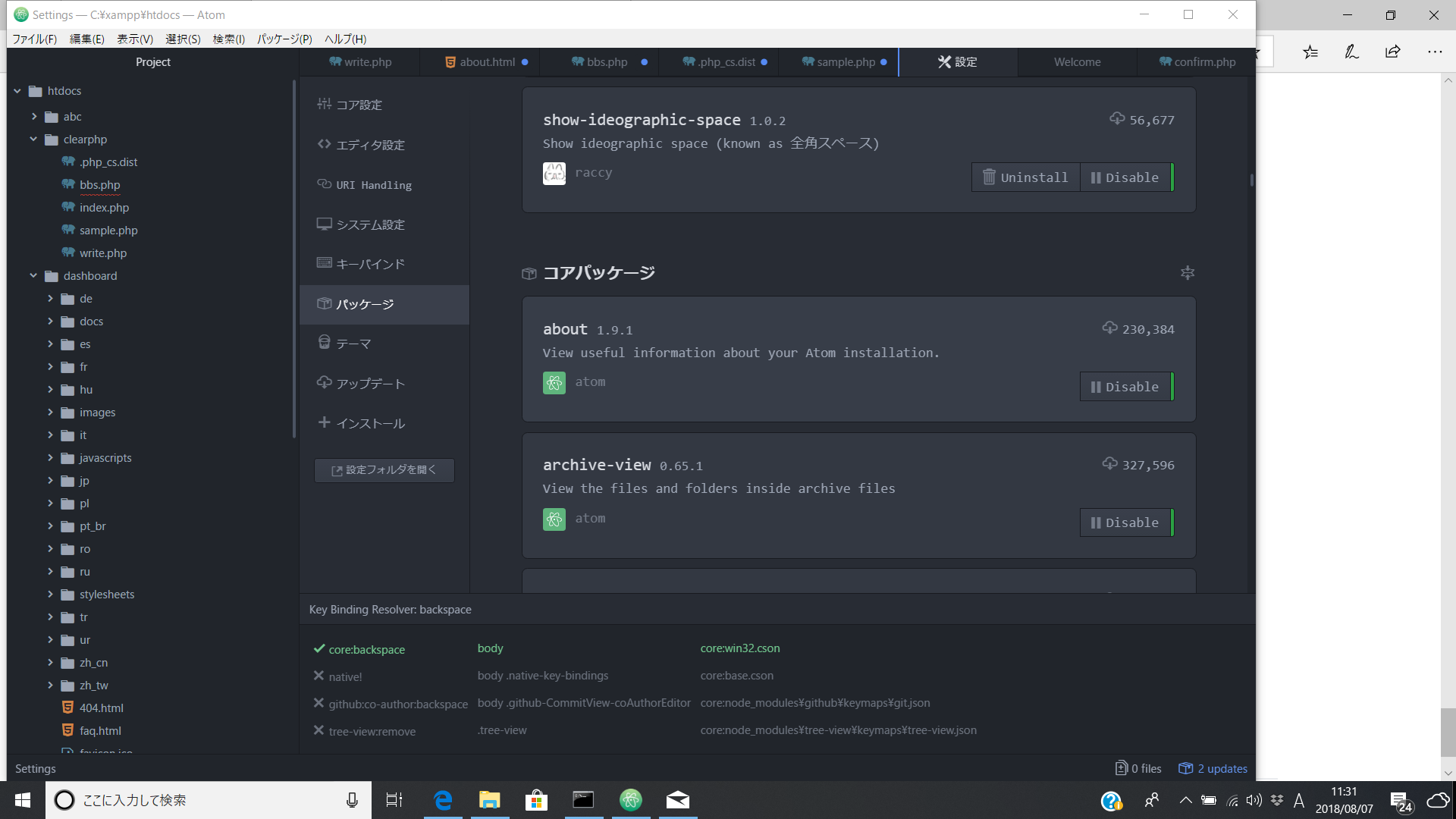
Also, what other packages do you have installed in Atom?
stevenzeck
on 6 Aug 2018
Thank you.
What do you mean by 'It won't do anything on that file, only .php files.'?
I'm not supposed to beautify on that file?
These are pictures of all my packages.
YutaNakai
on 7 Aug 2018
It did work a little bit on other files.
But it woks sometimes and sometimes doesn't.
And I tryied making the code mess on purpose on the file below.
Some of the code got beautified but still not working prpperly.
`
$name = $_POST['name'];
      $title =$_POST['title'];
$body =$_POST['body'];
$pass =$_POST['pass'];
                           if ($name == '' || $bpdy == '') {
        header('Location: bbs.php');
  exit();
}
      if (!preg_match("/^[0-9]{4}$/", $pass)) {
  header('Location: bbs.php');
  exit();
}
$dsn = 'mysql:host=localhost;dbname=bbs;charset=utf8';
$user = 'tennisuser';
$password = 'password';
try {
$db = new PDO($dsn, $user, $password);
$db->setAttribute(PDO::ATTR_EMULATE_PREPARES, false);
  $stmt = $db ->prepare(
    "
  INSERT INTO bbs (name,title,body,date,pass)
  VALUES (:name,:title,:bpdy,now(),:pass)"
);

         $stmt->bindParam(':name', $name, PDO::PARAM_STR);
  $stmt->bindParam(':title', $name, PDO::PARAM_STR);
     $stmt->bindParam(':body', $name, PDO::PARAM_STR);
  $stmt->bindParam(':pass', $name, PDO::PARAM_STR);

  $stmt->execute();

  header('Location: bbs.php');
  exit();
} catch (PDOException $e) {
die('エラー:'.$e->getMessage());
}
`
YutaNakai
on 7 Aug 2018
Yes it runs properly when there is no configuration file, but it doesn't change much of the text with the default settings.
stevenzeck
on 7 Aug 2018
What sould I do sir?
YutaNakai
on 7 Aug 2018
I'm sorry.
But I want to know if you are trying to do something to get this work.
YutaNakai
on 8 Aug 2018
@YutaNakai I can't do anything to troubleshoot this right now. As I said, I need to get in front of a Windows machine and see if that is causing the issue, and I don't have one around.
stevenzeck
on 8 Aug 2018
Okay.
ls all I can do just to wait?
YutaNakai
on 8 Aug 2018
What do you mean by 'It won't do anything on that file, only .php files.'?
@YutaNakai To your comment https://github.com/Glavin001/atom-beautify/issues/2195#issuecomment-410784918
The error message is:
Atom Beautify could not find a supported beautifier for this file
... grammar "Null Grammar" and extension "dist" ...
The file you had selected was .php_cs.dist (see the tab) and was using Plain Text grammar (see bottom right corner of your screenshot).
See https://flight-manual.atom.io/using-atom/sections/grammar/ for details.
You can manually change the grammar of .php_cs.dist to be PHP, read the Atom documentation to learn how.
Some of the code got beautified but still not working prpperly.
@YutaNakai Please post a link to a new debug.md Gist file so we can help you debug. Posting code without more info like in https://github.com/Glavin001/atom-beautify/issues/2195#issuecomment-410933575 is not enough for us to debug 😄.
Also, it may be an issue with PHP-CS-Fixer itself. If Atom-Beautify is working, then your code is being sent to PHP-CS-Fixer and beautified -- whatever that looks. If you are having partially beautified files, this sounds like a PHP-CS-Fixer problem. Once we have the debug.md Gist we can determine this 😃 .
 Glavin001
on 9 Aug 2018
Glavin001
on 9 Aug 2018
Thank you. I tried changing grammar but 'PHP' is already selected.

YutaNakai
on 9 Aug 2018
YutaNakai
on 9 Aug 2018
@YutaNakai Please change gistfile1.txt to debug.md (note the .md extension) in your Gist so it is rendered as Markdown.
Glavin001
on 9 Aug 2018
@YutaNakai in your logs I see:
2018-08-09T04:22:00.749Z - debug: [] spawn done 0 Loaded config default from "C:\xampp\htdocs\clearphp\.php_cs.dist".
Paths from configuration file have been overridden by paths provided as command arguments.

Files that were not fixed due to errors reported during linting before fixing:
   1) C:\Users\kjlwn\AppData\Local\Temp\temp11879-16156-1k5ii07.5pyd.php

Fixed all files in 0.033 seconds, 8.000 MB memory used
Looks like it is definitely a problem with your PHP file and/or PHP-CS-Fixer itself, and Atom-Beautify is currently working as expected.
I recommend taking a look at PHP-CS-Fixer issues such as https://github.com/FriendsOfPHP/PHP-CS-Fixer/issues/1364
Glavin001
on 9 Aug 2018
Thank you and I'm sorry.
I looked but I don't exactly know what to do.
Is there something that you think I have to try?
YutaNakai
on 9 Aug 2018
Is my path correct?


YutaNakai
on 9 Aug 2018
@YutaNakai You're path is already correct, Atom-Beautify is working correctly.
I recommend you ask further questions over at https://github.com/FriendsOfPHP/PHP-CS-Fixer/issues/ such as https://github.com/FriendsOfPHP/PHP-CS-Fixer/issues/1364 .
The error message PHP-CS-Fixer is giving you is:
Files that were not fixed due to errors reported during linting before fixing:
Provide this error message to the PHP-CS-Fixer team and your code file. Work with them to figure it out.
Glavin001
on 9 Aug 2018
I did ask for the help at https://github.com/FriendsOfPHP/PHP-CS-Fixer/issues/3967
They said to me that I have to change Atom to something diffrent or ask foe the help to Atom team.
I don't know what's going on here.
YutaNakai
on 10 Aug 2018
They asked you to show how to reproduce issue with PHP CS Fixer standalone, without any IDE
 keradus
on 10 Aug 2018
keradus
on 10 Aug 2018
@YutaNakai excuse me but u can solve this issue?, i have the same problem and i triying for 3 days and i cant got it =S plssss somebody help me...
 squirtle34
on 1 Sep 2018
squirtle34
on 1 Sep 2018
This issue has been automatically marked as stale because it has not had recent activity. If this is still an issue, please add a comment. It will be closed if no further activity occurs. Thank you for your contributions.
![stale[bot] picture](https://avatars.githubusercontent.com/in/1724?v=4&s=40) stale[bot]
on 31 Oct 2018
stale[bot]
on 31 Oct 2018
got this issue some time ago ,
just go to beautify setting,
remove cs-fixer phar path from exutable, and put into php setting,
at this point beautify will notice you that is deprecated,
just go to to you user folder (i'm assuming you are uing win10) ".../.atom\packages\atom-beautify\src\beautifiers" and edit file "php-cs-fixer.coffee" at line 46 from "cs_fixer_path: true" to "cs_fixer_path: false"
and it should work again
 alko79
on 18 Oct 2019
alko79
on 18 Oct 2019
The issue for me was originally installing with composer. Composer does not put a .phar file into the /bin folder.
Download the .phar file (https://github.com/FriendsOfPHP/PHP-CS-Fixer#locally) and place it somewhere explicitly, then put that location in settings->executables->PHP-CS-Fixer path
 bpedroza
on 15 Apr 2020
bpedroza
on 15 Apr 2020
Related issues
 suienzan
·
3Comments
suienzan
·
3Comments
 maxbrunsfeld
·
4Comments
maxbrunsfeld
·
4Comments
 callmeyesh
·
3Comments
callmeyesh
·
3Comments
 seanoldfield
·
5Comments
seanoldfield
·
5Comments
 kuzyn
·
3Comments
kuzyn
·
3Comments
Most helpful comment
@YutaNakai again, you need to create a configuration file for php-cs-fixer. Create a file with the name
.php_cs.distwith contents of: