Atom-beautify: Could not find 'php-cs-fixer'. The program may not be installed.
https://resmim.net/f/uJs1cO.png
I have a problem with the above link in my Atom.io editor. How can I solve this problem? I installed the plug-in, but the problem was not resolved.
 musayazlik
All 20 comments
What OS are you on and how did you install PHP-CS-Fixer? Do you also have PHP installed?
 stevenzeck
on 4 Apr 2018
stevenzeck
on 4 Apr 2018
I am using windows 10. From the upload location in the program. xampp is installed.
musayazlik
on 4 Apr 2018
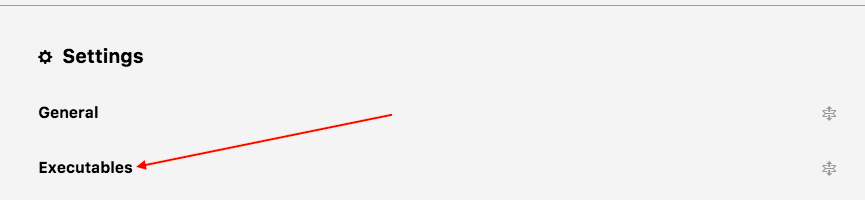
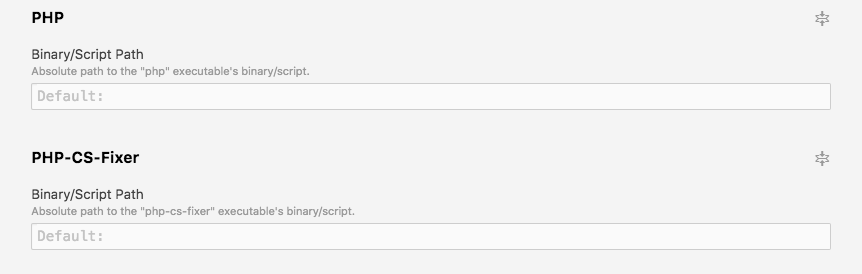
You'll need to specify the path to PHP and PHP-CS-Fixer binary/script. Go to Packages -> Atom Beautify -> Settings and expand Executables. Scroll down until you see PHP and right under that PHP-CS-Fixer. Expand both of those and put the path to each there.
stevenzeck
on 4 Apr 2018
https://resmim.net/f/Bpho04.png Is that it?
musayazlik
on 4 Apr 2018
No you scrolled down a bit too far.
stevenzeck
on 4 Apr 2018
https://resmim.net/f/2WxAtW.png Now I've found the right place. I filled it like this. The problem is solved, but automatic correction is not working.
https://resmim.net/f/WdzH7u.png Like this one. What is keyboard shortcut?
musayazlik
on 4 Apr 2018
Run the debug command and copy/paste its contents to a GitHub gist and link it here to this issue.
Packages -> Atom Beautify -> Debug -> Hit OK button a couple of times. It will generate a new editor tab to copy/paste.
stevenzeck
on 4 Apr 2018
OK. The file was created. I have my own custom codes in the file. https://resmim.net/f/FOv7Zz.png
musayazlik
on 4 Apr 2018
@musayazlik I need the whole file. Please copy and paste those contents into a GitHub gist (https://gist.github.com/) and link that gist to this issue.
stevenzeck
on 4 Apr 2018
@szeck87 OK I did it. https://gist.github.com/musayazlik/7fc0f7cf92df7da89b3804735415c909
musayazlik
on 4 Apr 2018
Under Executables -> PHP-CS-Fixer you have the script going to C:\\xampp\\php\\php.exe. That script is only for PHP, you need to put the path to PHP-CS-Fixer there.
        "php": {
            "path": "C:\\xampp\\php\\php.exe"   // this is good
        },
        "php-cs-fixer": {
            "path": "C:\\xampp\\php\\php.exe"   //this is incorrect
        },
Please follow the issue template provided. More specifically, adding a link to the required debug.md Gist which includes debugging information that answers our most commonly asked questions.
Thank you.
 Glavin001
on 4 Apr 2018
Glavin001
on 4 Apr 2018
@musayazlik : In the future, please copy text as text (not images) into this GitHub issue or a Gist, as this allows us to search through the text and copy & paste when necessary. Also images can be uploaded to GitHub directly as well instead of using https://resmim.net/ : https://help.github.com/articles/file-attachments-on-issues-and-pull-requests/
Glavin001
on 4 Apr 2018
@Glavin001 I did not know how to upload pictures. I learned now. Thank you.
musayazlik
on 4 Apr 2018

You're talking about the location where the plugin is loaded.
musayazlik
on 4 Apr 2018
@musayazlik you need to install PHP-CS-Fixer itself, not the Atom extension. https://github.com/FriendsOfPHP/PHP-CS-Fixer/#installation
stevenzeck
on 4 Apr 2018
What did you write in the php-cs-fixer section? Could you send a screenshot? I am using windows. how to install.
musayazlik
on 4 Apr 2018
This issue has been automatically marked as stale because it has not had recent activity. If this is still an issue, please add a comment. It will be closed if no further activity occurs. Thank you for your contributions.
![stale[bot] picture](https://avatars.githubusercontent.com/in/1724?v=4&s=40) stale[bot]
on 4 Jun 2018
stale[bot]
on 4 Jun 2018
What did you write in the php-cs-fixer section? Could you send a screenshot? I am using windows. how to install.
Not sure if you still need help, but at least this might help someone else using windows with xampp.
Once you are here: https://resmim.net/f/2WxAtW.png
On php write this: [this is your install location]\xampp\php\php.exe
and for the PHP-CS-Fixer, first go here: https://github.com/FriendsOfPHP/PHP-CS-Fixer/#installation
download php-cs-fixer.phar, place that file as it is in the same location that php.exe is (the location you just wrote above) and then you can complete the PHP-CS-Fixer tab with it.
For example: [this is your install location]\xampp\php\php-cs-fixer-v2.phar
This is how i have it: https://i.imgur.com/ftTAahZ.png
 andres-conforti
on 21 Nov 2018
andres-conforti
on 21 Nov 2018
¿Qué escribiste en la sección php-cs-fixer? ¿Podrías enviar una captura de pantalla? Estoy usando ventanas. cómo instalar.
No estoy seguro de si aún necesita ayuda, pero al menos esto podría ayudar a otra persona a usar Windows con xampp.
Una vez que esté aquí: https://resmim.net/f/2WxAtW.png
En php escriba esto: [esta es su ubicación de instalación] \ xampp \ php \ php.exe
y para PHP-CS-Fixer, primero vaya aquí : https://github.com/FriendsOfPHP/PHP-CS-Fixer/#installation
descarga php-cs-fixer.phar, coloque ese archivo como está en la misma ubicación que php.exe (la ubicación que acaba de escribir arriba) ) y luego puede completar la pestaña PHP-CS-Fixer con él.
Por ejemplo: [esta es su ubicación de instalación] \ xampp \ php \ php-cs-fixer-v2.pharAsí es como lo tengo: https://i.imgur.com/ftTAahZ.png
@andres-conforti I did what you mentioned, the problem that said php cs fixer was not installed was corrected, however the code was not indented.
This is the debug information of atom-beautify:
"executables": {
"php": {
"path": "C:\xampp\php\php.exe"
},
"php-cs-fixer": {
"path": "C:\xampp\php\php-cs-fixer-v2.phar"
},
Do you know another way to make atom-beautify work?
 Rovert88
on 8 May 2019
Rovert88
on 8 May 2019
Related issues
 maxbrunsfeld
·
4Comments
maxbrunsfeld
·
4Comments
 jcollum
·
4Comments
jcollum
·
4Comments
 CorentinAndre
·
4Comments
CorentinAndre
·
4Comments
 PolGuixe
·
3Comments
PolGuixe
·
3Comments
 derwaldgeist
·
4Comments
derwaldgeist
·
4Comments
Most helpful comment
Not sure if you still need help, but at least this might help someone else using windows with xampp.
Once you are here: https://resmim.net/f/2WxAtW.png
On php write this: [this is your install location]\xampp\php\php.exe
and for the PHP-CS-Fixer, first go here: https://github.com/FriendsOfPHP/PHP-CS-Fixer/#installation
download php-cs-fixer.phar, place that file as it is in the same location that php.exe is (the location you just wrote above) and then you can complete the PHP-CS-Fixer tab with it.
For example: [this is your install location]\xampp\php\php-cs-fixer-v2.phar
This is how i have it: https://i.imgur.com/ftTAahZ.png