Atom-beautify: Beautify/Uncrustify always indents 8 spaces instead of 4
In Atom, I have my current editor settings set up so my tab length is set to 4 spaces.

However, after installing Atom-Beautify and Uncrustify, the package indents with a tab length of 8 spaces (or it might just be 2 tabs of 4).
I want to universally make my tab length of 4 at all times for any given file. I tried changing the indent size in ~/.atom/packages/atom-beautify/src/.jsbeautifyrc many times, but I still get a tab length of 8 when I beautify a file.
It is initially set as "indent_size": 2, but no matter the numerical value, I still get a tab length of 8.
How can I fix this issue?
 prospecs
All 15 comments
What type of file are you trying to format and which beautifier are you using? Can you run the Atom Beautify Debug command against that file and copy/paste the lines Platform through Selected Beautifier (lines 20-40 roughly)? Should look something like this:
**Platform**: darwin

## Versions

**Atom Version**: 1.23.3

**Atom Beautify Version**: 0.30.9

## Original file to be beautified

**Original File Path**: `undefined`

**Original File Grammar**: HTML

**Original File Language**: HTML

**Language namespace**: html

**Supported Beautifiers**: JS Beautify, Pretty Diff

**Selected Beautifier**: JS Beautify
 stevenzeck
on 26 Jan 2018
stevenzeck
on 26 Jan 2018
```# Atom Beautify - Debugging information
The following debugging information was generated by Atom Beautify on Fri Jan 26 2018 17:23:13 GMT-0500 (EST).
Table Of Contents
Platform: darwin
Versions
Atom Version: 1.23.3
Atom Beautify Version: 0.30.9
Original file to be beautified
Original File Path:
Original File Grammar: C++
Original File Language: C++
Language namespace: cpp
Supported Beautifiers: Uncrustify, clang-format
Selected Beautifier: Uncrustify
```
This is my second time installing Atom and Atom-Beautify again. I never ran into an issue during my first installation but after some update, I was unable to use Atom-Beautify until I installed Uncrustify. Maybe that's the issue?
prospecs
on 26 Jan 2018
In order to format C++ files, you need to have either Uncrustify or clang-format installed. If you use the latter, you also have to change the default beautifier to it in atom beautify's settings for C++. Maybe you were formatting other types of files before and that's why you didn't have an issue?
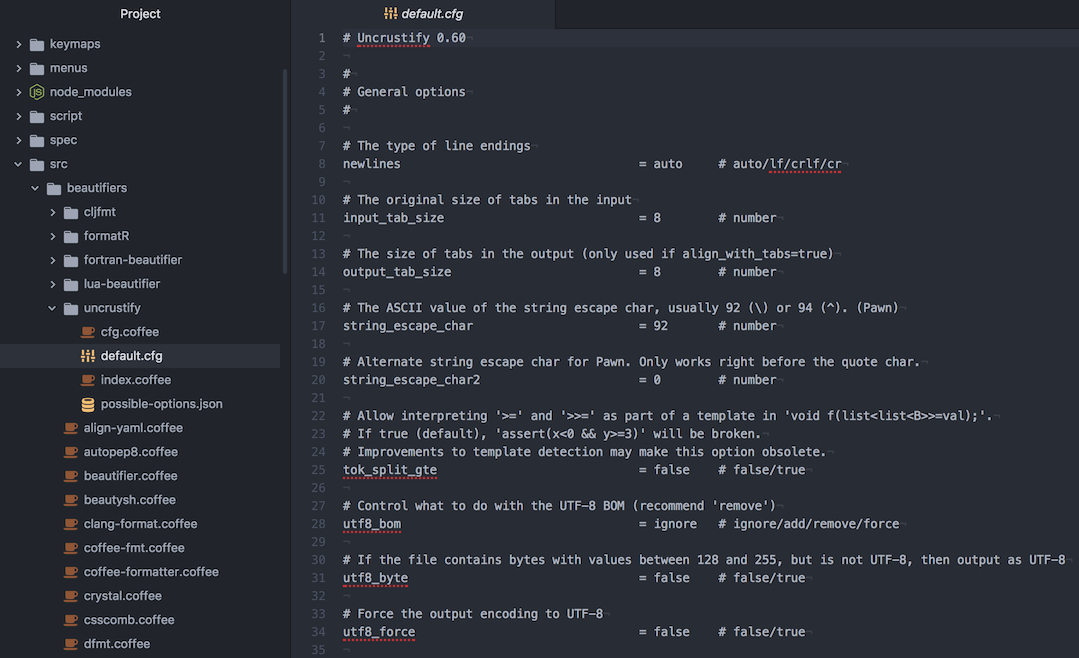
But I don't think . jsbeautifyrc config files have any effect on Uncrustify or C++ files, Uncrustify only supports a .cfg file. If you're using one, you would see it in Atom Beautify's Settings -> C++ in the Config Path field. If you are using one, it's there where you need to change indent size.
I also searched through old issues and found https://github.com/Glavin001/atom-beautify/issues/682#issuecomment-297772369, if you're on a Unix that may be worth a try.
stevenzeck
on 27 Jan 2018
What's confusing is that I'm using JS Beautify for HTML and indents to 4 spaces (1 tab), but the .jsbeautifyrc config file in /atom-beautify/src/ is defaulted to an indent size of 2.

And for C++, I've changed the .cfg file multiple times but it doesn't have any effect, either.
I don't remember going through such a tedious process before, especially installing Uncrustify or clang-format (I installed Uncrustify only recently).
prospecs
on 4 Feb 2018
Please follow the issue template provided. More specifically, adding a link to the required debug.md Gist which includes debugging information that answers our most commonly asked questions.
Thank you.
 Glavin001
on 4 Feb 2018
Glavin001
on 4 Feb 2018
This issue has been automatically marked as stale because it has not had recent activity. If this is still an issue, please add a comment. It will be closed if no further activity occurs. Thank you for your contributions.
![stale[bot] picture](https://avatars.githubusercontent.com/in/1724?v=4&s=40) stale[bot]
on 5 Apr 2018
stale[bot]
on 5 Apr 2018
if you want to change the tab width from 8(Unix default) to 4:
$ atom ~/.atom/packages/atom-beautify/src/beautifiers/uncrustify/default.cfg
(You can find deafult.cfg by going to atom-beautify settings and then click view code )
output_tab_size = 4 # (edit about line 14)
indent_columns = 4 # (edit about line 42)
then change path of the C and C++ setting of atom-beautify:
~/.atom/packages/atom-beautify/src/beautifiers/uncrustify/default.cfg
+
comment out the align_number_left
(in default.cfg , otherwise it will give an error)
 Kailash23
on 23 Jul 2018
Kailash23
on 23 Jul 2018
@Kailash23 You sir are a gentleman and a scholar.
 petermirmo
on 17 Oct 2018
petermirmo
on 17 Oct 2018
I've set the output_tab_size and the indent_columns size to 2 but uncrustify still indents 8 spaces each time. Can you explain what you mean when you say "change path of C and C++..."? I'm editing a java file and in the beautify settings my java beautifier is set to uncrustify.
 AlexMarshaall
on 15 Nov 2018
AlexMarshaall
on 15 Nov 2018
Just below the 'Default Beautifier', that you set to 'uncrustify'. There is a field named 'Config Path' just paste this in that field -
~/.atom/packages/atom-beautify/src/beautifiers/uncrustify/default.cfg
Kailash23
on 17 Nov 2018
Thanks man, that's fixed my indent problem :), didn't realise it was just below haha
AlexMarshaall
on 17 Nov 2018
I wrote ~/.atom/packages/atom-beautify/src/beautifiers/uncrustify/default.cfg
But permission denied
 YakovlevKonstantin
on 3 Feb 2019
YakovlevKonstantin
on 3 Feb 2019
@YakovlevKonstantin Still showing permission denied?
Kailash23
on 9 Feb 2019
@Kailash23 I'm getting these errors
/home/nabagata/.atom/packages/atom-beautify/src/beautifiers/uncrustify/default.cfg:103 Unknown symbol 'indent_ctor_init_leading'
/home/nabagata/.atom/packages/atom-beautify/src/beautifiers/uncrustify/default.cfg:120 Unknown symbol 'indent_func_def_force_col1'
/home/nabagata/.atom/packages/atom-beautify/src/beautifiers/uncrustify/default.cfg:218 Unknown symbol 'indent_oc_block'
/home/nabagata/.atom/packages/atom-beautify/src/beautifiers/uncrustify/default.cfg:222 Unknown symbol 'indent_oc_block_msg'
/home/nabagata/.atom/packages/atom-beautify/src/beautifiers/uncrustify/default.cfg:225 Unknown symbol 'indent_oc_msg_colon'
/home/nabagata/.atom/packages/atom-beautify/src/beautifiers/uncrustify/default.cfg:238 Unknown symbol 'sp_cpp_lambda_assign'
/home/nabagata/.atom/packages/atom-beautify/src/beautifiers/uncrustify/default.cfg:241 Unknown symbol 'sp_cpp_lambda_paren'
/home/nabagata/.atom/packages/atom-beautify/src/beautifiers/uncrustify/default.cfg:268 Unknown symbol 'sp_before_pp_stringify'
/home/nabagata/.atom/packages/atom-beautify/src/beautifiers/uncrustify/default.cfg:305 Unknown symbol 'sp_ptr_star_paren'
/home/nabagata/.atom/packages/atom-beautify/src/beautifiers/uncrustify/default.cfg:330 Unknown symbol 'sp_before_template_paren'
/home/nabagata/.atom/packages/atom-beautify/src/beautifiers/uncrustify/default.cfg:356 Unknown symbol 'sp_permit_cpp11_shift'
/home/nabagata/.atom/packages/atom-beautify/src/beautifiers/uncrustify/default.cfg:368 Unknown symbol 'sp_inside_sparen_open'
/home/nabagata/.atom/packages/atom-beautify/src/beautifiers/uncrustify/default.cfg:483 Unknown symbol 'sp_inside_tparen'
/home/nabagata/.atom/packages/atom-beautify/src/beautifiers/uncrustify/default.cfg:486 Unknown symbol 'sp_after_tparen_close'
/home/nabagata/.atom/packages/atom-beautify/src/beautifiers/uncrustify/default.cfg:521 Unknown symbol 'sp_after_throw'
/home/nabagata/.atom/packages/atom-beautify/src/beautifiers/uncrustify/default.cfg:616 Unknown symbol 'sp_after_oc_dict_colon'
/home/nabagata/.atom/packages/atom-beautify/src/beautifiers/uncrustify/default.cfg:620 Unknown symbol 'sp_before_oc_dict_colon'
/home/nabagata/.atom/packages/atom-beautify/src/beautifiers/uncrustify/default.cfg:662 Unknown symbol 'sp_after_oc_msg_receiver'
/home/nabagata/.atom/packages/atom-beautify/src/beautifiers/uncrustify/default.cfg:665 Unknown symbol 'sp_after_oc_property'
/home/nabagata/.atom/packages/atom-beautify/src/beautifiers/uncrustify/default.cfg:680 Unknown symbol 'sp_after_for_colon'
/home/nabagata/.atom/packages/atom-beautify/src/beautifiers/uncrustify/default.cfg:683 Unknown symbol 'sp_before_for_colon'
/home/nabagata/.atom/packages/atom-beautify/src/beautifiers/uncrustify/default.cfg:686 Unknown symbol 'sp_extern_paren'
/home/nabagata/.atom/packages/atom-beautify/src/beautifiers/uncrustify/default.cfg:704 Unknown symbol 'sp_annotation_paren'
/home/nabagata/.atom/packages/atom-beautify/src/beautifiers/uncrustify/default.cfg:851 Unknown symbol 'align_pp_define_together'
/home/nabagata/.atom/packages/atom-beautify/src/beautifiers/uncrustify/default.cfg:866 Unknown symbol 'align_oc_msg_colon_first'
/home/nabagata/.atom/packages/atom-beautify/src/beautifiers/uncrustify/default.cfg:897 Unknown symbol 'nl_oc_msg_leave_one_liner'
/home/nabagata/.atom/packages/atom-beautify/src/beautifiers/uncrustify/default.cfg:926 Unknown symbol 'nl_typedef_blk_start'
/home/nabagata/.atom/packages/atom-beautify/src/beautifiers/uncrustify/default.cfg:930 Unknown symbol 'nl_typedef_blk_end'
/home/nabagata/.atom/packages/atom-beautify/src/beautifiers/uncrustify/default.cfg:934 Unknown symbol 'nl_typedef_blk_in'
/home/nabagata/.atom/packages/atom-beautify/src/beautifiers/uncrustify/default.cfg:938 Unknown symbol 'nl_var_def_blk_start'
/home/nabagata/.atom/packages/atom-beautify/src/beautifiers/uncrustify/default.cfg:942 Unknown symbol 'nl_var_def_blk_end'
/home/nabagata/.atom/packages/atom-beautify/src/beautifiers/uncrustify/default.cfg:946 Unknown symbol 'nl_var_def_blk_in'
/home/nabagata/.atom/packages/atom-beautify/src/beautifiers/uncrustify/default.cfg:1002 Unknown symbol 'nl_scope_brace'
/home/nabagata/.atom/packages/atom-beautify/src/beautifiers/uncrustify/default.cfg:1005 Unknown symbol 'nl_unittest_brace'
/home/nabagata/.atom/packages/atom-beautify/src/beautifiers/uncrustify/default.cfg:1008 Unknown symbol 'nl_version_brace'
/home/nabagata/.atom/packages/atom-beautify/src/beautifiers/uncrustify/default.cfg:1115 Unknown symbol 'nl_oc_msg_args'
/home/nabagata/.atom/packages/atom-beautify/src/beautifiers/uncrustify/default.cfg:1152 Unknown symbol 'nl_brace_struct_var'
/home/nabagata/.atom/packages/atom-beautify/src/beautifiers/uncrustify/default.cfg:1256 Unknown symbol 'ls_code_width'
/home/nabagata/.atom/packages/atom-beautify/src/beautifiers/uncrustify/default.cfg:1339 Unknown symbol 'nl_remove_extra_newlines'
/home/nabagata/.atom/packages/atom-beautify/src/beautifiers/uncrustify/default.cfg:1342 Unknown symbol 'nl_before_return'
/home/nabagata/.atom/packages/atom-beautify/src/beautifiers/uncrustify/default.cfg:1349 Unknown symbol 'nl_after_annotation'
/home/nabagata/.atom/packages/atom-beautify/src/beautifiers/uncrustify/default.cfg:1352 Unknown symbol 'nl_between_annotation'
Parsing: input119225-672-1ffwuf5.1rnr.cpp as language CPP
 Nabagata
on 25 Mar 2019
Nabagata
on 25 Mar 2019
if you want to change the tab width from 8(Unix default) to 4:
$ atom ~/.atom/packages/atom-beautify/src/beautifiers/uncrustify/default.cfg
(You can find deafult.cfg by going to atom-beautify settings and then click view code )output_tab_size = 4 # (edit about line 14)
indent_columns = 4 # (edit about line 42)then change path of the C and C++ setting of atom-beautify:
~/.atom/packages/atom-beautify/src/beautifiers/uncrustify/default.cfg+
comment out the align_number_left
(in default.cfg , otherwise it will give an error)
You are so awesome! It works! Thank you so much!
 fangzhou-xie
on 29 Jul 2019
fangzhou-xie
on 29 Jul 2019
Related issues
 jasonivers
·
4Comments
jasonivers
·
4Comments
 callmeyesh
·
3Comments
callmeyesh
·
3Comments
 seanoldfield
·
5Comments
seanoldfield
·
5Comments
 bartocc
·
5Comments
bartocc
·
5Comments
 jcollum
·
4Comments
jcollum
·
4Comments
Most helpful comment
+
comment out the align_number_left