Atom-beautify: PHP-CS-Fixer Path configuration option has been deprecated
I'm a PHP developer, One day, I used atom-beautify, There's a problem, The error of a yellow toolbox was reported.
_The "PHP - PHP-CS-Fixer Path (cs_fixer_path)" configuration option has been deprecated. Please switch to using the option in section "Executables" (near the top) in subsection "PHP-CS-Fixer" labelled "Path" in Atom-Beautify package settings._
It's all available before.
So, I wonder what the reason is?How do I do that?
thinks
 tangzhibo317
All 11 comments
ok,I meet the same problem too
But the problem does not seem to prevent atom-beautify formatting our php code,If that can solve the problem that is the best :D
oh,my english is not very good ,so i can see you mean ,but i dont know how to say, i have to need
google help me ,sry my friend
 MorrowindAJi
on 31 Aug 2017
MorrowindAJi
on 31 Aug 2017
Have the same problem...
 Axel186
on 31 Aug 2017
Axel186
on 31 Aug 2017
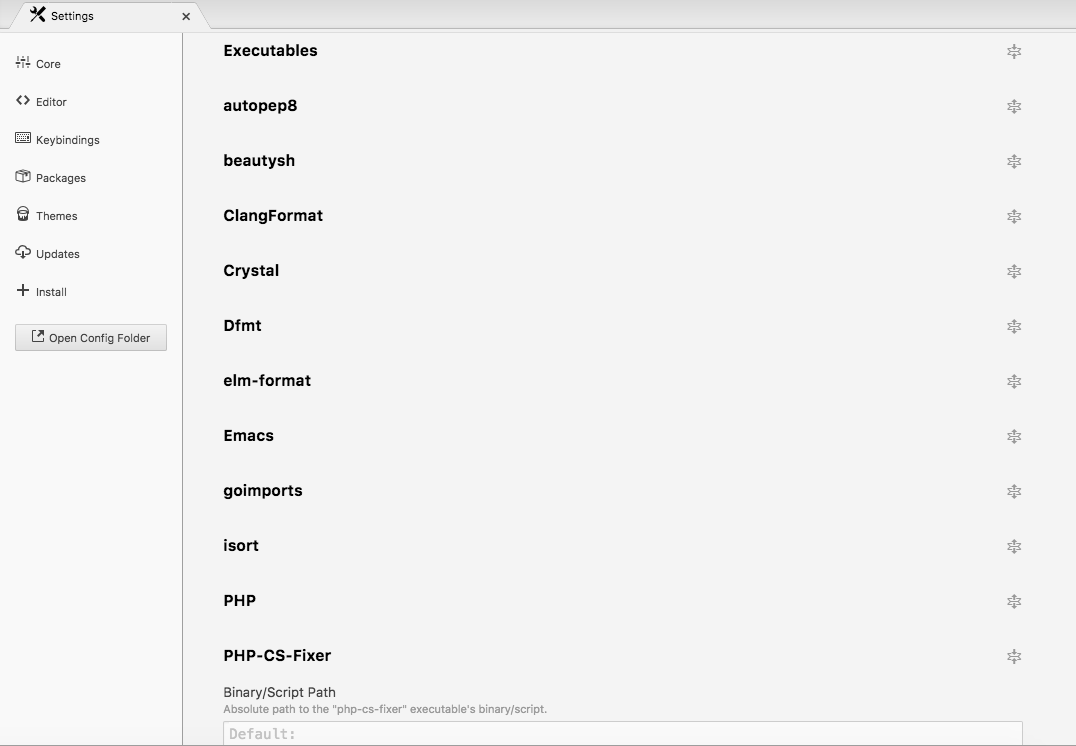
It's in the Atom preferences -> Atom Beautify settings. If you click on Executables it will list a bunch of languages and packages. Click on PHP-CS-Fixer and it will have one text box for the path.
 stevenzeck
on 5 Sep 2017
stevenzeck
on 5 Sep 2017
@tangzhibo317 @MorrowindAJi @Axel186 Did those directions fix the deprecation warning?
stevenzeck
on 12 Sep 2017
Still getting this error - I think I have to reinstall my Atom. Maybe it's some OS issues (I am using Linux)...
But any way, you can see that PHP-CS-Fixer path is there, and the file is really exists and works.

Or maybe I missing something else?
Axel186
on 12 Sep 2017
@Axel186 Try putting the path in the Executables setting PHP-CS-Fixer (like screenshot from my previous comment) and not under the PHP setting where you have it.
stevenzeck
on 12 Sep 2017
This issue has been automatically marked as stale because it has not had recent activity. If this is still an issue, please add a comment. It will be closed if no further activity occurs. Thank you for your contributions.
![stale[bot] picture](https://avatars.githubusercontent.com/in/1724?v=4&s=40) stale[bot]
on 11 Nov 2017
stale[bot]
on 11 Nov 2017
@szeck87, You're right! That was confusing...
The issue fixed for me, thank you!
Axel186
on 12 Nov 2017
I have the same issue in windows and i tried all the options above
 raaams
on 5 Dec 2017
raaams
on 5 Dec 2017
This issue has been automatically marked as stale because it has not had recent activity. If this is still an issue, please add a comment. It will be closed if no further activity occurs. Thank you for your contributions.
stale[bot]
on 3 Feb 2018
it was to enter the path (C: / user / ....) in the executables option PHP-CS-FIXER and not in settings-PHP
 softmvlz
on 17 Apr 2019
softmvlz
on 17 Apr 2019
Related issues
 maxbrunsfeld
·
4Comments
maxbrunsfeld
·
4Comments
 jasonivers
·
4Comments
jasonivers
·
4Comments
 PolGuixe
·
3Comments
PolGuixe
·
3Comments
 ghost
·
4Comments
ghost
·
4Comments
 philippelesaux
·
4Comments
philippelesaux
·
4Comments
Most helpful comment
It's in the Atom preferences -> Atom Beautify settings. If you click on Executables it will list a bunch of languages and packages. Click on PHP-CS-Fixer and it will have one text box for the path.