Atom-beautify: react-native files jsx code ~ bad format
class weeweefree extends Component {
  render() {
    return (
      <View style={styles.container}>
        <Text style={styles.welcome}>
          Welcome to React Native!
        </Text>
        <Text style={styles.instructions}>
          To get started, edit index.ios.js
        </Text>
        <Text style={styles.instructions}>
          Press Cmd+R to reload,{'\n'}
          Cmd+D or shake for dev menu
        </Text>
      </View>
    );
  }
}
beautify to
class weeweefree extends Component {
    render() {
        return ( < View style = {
                styles.container
            } >
            < Text style = {
                styles.welcome
            } >
            Welcome to React Native!
            < /Text> < Text style = {
                styles.instructions
            } >
            To get started, edit index.ios.js < /Text> < Text style = {
                styles.instructions
            } >
            Press Cmd + R to reload, {
                '\n'
            }
            Cmd + D or shake
            for dev menu < /Text> < /View>
        );
    }
}
indent size = 4
so bad. How do I need to setting?
 94cstyles
All 18 comments
The code is beautified as JavaScript and not JSX. Are you using .js for your file extension instead of .jsx? Pretty Diff is the default beautifier for JSX in Atom Beautify and it appears to be working when I process the sample code at http://prettydiff.com/?m=beautify&l=jsx
 prettydiff
on 13 Jan 2016
prettydiff
on 13 Jan 2016
That's right. The file suffix is .js. But I would like to know the.Js file also supports JSX beautifier how to set up
94cstyles
on 14 Jan 2016
I am not sure how to make the code beautify as JSX with a .js file extension. Maybe @Glavin001 would have some additional information. Saving the file as .jsx would solve this problem though.
prettydiff
on 14 Jan 2016
The Atom file grammar takes precedence over file extension. If you want to use extension .js and be recognized as JSX then you should change your file's grammar within Atom.
See https://github.com/atom/grammar-selector for details.
 Glavin001
on 14 Jan 2016
Glavin001
on 14 Jan 2016
@Glavin001 I looked, but did not see an Atom grammar for JSX format.
prettydiff
on 14 Jan 2016
It wouldn't be built-in to Atom, you will likely have to install a package. This one adds JSX grammar: https://github.com/Icehunter/language-jsx/blob/master/grammars/jsx.cson#L7
This one won't work because the grammar name is different: https://github.com/subtleGradient/language-javascript-jsx/blob/master/grammars/JavaScript%20with%20JSX.cson#L7
So that could be added support for with a pull request changing https://github.com/Glavin001/atom-beautify/blob/master/src/languages/jsx.coffee#L10-L13
Glavin001
on 14 Jan 2016
@Glavin001 @prettydiff Thank you. The problem is solved.
94cstyles
on 14 Jan 2016
Excellent to hear! You're very welcome. Enjoy!
Glavin001
on 14 Jan 2016
@Glavin001 i have the same issue with *.jsx files. I've tryed atom-react and language-jsx for grammars, but always same result, as in first message here:
class Test extends React.Component {
                render() {
                                return <div>
                                                test
                                </div>
                }
}
Also, when i set file extension to .js and grammar to JavaScript, beautifier creates different result:
class Test extends React.Component {
    render() {
        return <div >
            chat < /div>
    }
}
 ewgenius
on 2 Feb 2016
ewgenius
on 2 Feb 2016
@ewgenius The first result is demonstrating correct beautification and the second one is broken. The only problem with the first code sample is the indentation is really big (16 spaces). Have you changed any settings regarding beautification size or use of soft-tabs or anything like that?
prettydiff
on 2 Feb 2016
@prettydiff oh, there was an .editorconfig file in my project with 'tab' seetting for identation, what i have not noticed, so there is no problem now. Thank you for your answer!
ewgenius
on 3 Feb 2016
@TOP-Chao can you please explain how did you solved your problem.
 niranjan-b-prajapati
on 18 Oct 2016
niranjan-b-prajapati
on 18 Oct 2016
@niranjan-b-prajapati : Package language-babel does NOT compatible with my current version of Atom (1.12.2). I removed it and used package react instead. Additionally, I installed page file-types, set file .js extension defaults to JSX via the configuration (menu Edit > Config)
  "file-types":
    js: "source.js.jsx"
It works! Hope this will help you out.
 anhldbk
on 30 Nov 2016
anhldbk
on 30 Nov 2016
@anhldbk
Can anyone give full answer to this? Trying to use with react-native / react and not much luck.
So far I tried:
installed atom-beautify
updated 'prettydiff.coffee' neverflatten (https://github.com/Glavin001/atom-beautify/issues/1454)
Getting Atom to recognize JS as JSX language:
installed language-jsx (https://github.com/Icehunter/language-jsx)
installed file-types and configured as instructed above
Also I tried: http://flight-manual.atom.io/using-atom/sections/basic-customization/#customizing-language-recognition:
"*":
  core:
    customFileTypes:
     "source.jsx": [
       "js"
     ]
Cannot seem to get it working well, this would really be helpful :) https://github.com/Glavin001/atom-beautify/issues/1493
 indivisable
on 30 Jan 2017
indivisable
on 30 Jan 2017
Thanks to @Glavin001 ! Just add these package to atom:
 njwangchuan
on 10 May 2017
njwangchuan
on 10 May 2017
I'm also having this problem.
 tayfunyasar
on 21 Aug 2017
tayfunyasar
on 21 Aug 2017
@tayfunyasar then read the comments about the solution. it has some reason it is closed.
 mpathy
on 12 Oct 2017
mpathy
on 12 Oct 2017
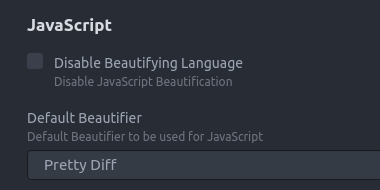
i had the same but could do two things:
one is per file change what kind of file it is (in the right bottom of the screen click file type and change it:
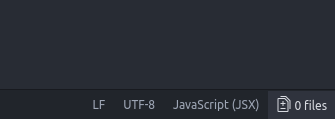
or change the format type of js files in the settings:
 tibistibi
on 24 Nov 2017
tibistibi
on 24 Nov 2017
Related issues
 philippelesaux
·
4Comments
philippelesaux
·
4Comments
 suienzan
·
3Comments
suienzan
·
3Comments
 seanoldfield
·
5Comments
seanoldfield
·
5Comments
 maxbrunsfeld
·
4Comments
maxbrunsfeld
·
4Comments
 callmeyesh
·
3Comments
callmeyesh
·
3Comments