Atom-beautify: Add support for Elixir
 kyledecot
All 64 comments
Any additional information you could provide would be helpful. I have no idea what Elixir is.
 prettydiff
on 11 Sep 2015
prettydiff
on 11 Sep 2015
+1
 jvanek
on 17 Sep 2015
jvanek
on 17 Sep 2015
+1
 Tonkonozhenko
on 29 Sep 2015
Tonkonozhenko
on 29 Sep 2015
I am guessing Elixir is this: http://elixir-lang.org/
prettydiff
on 29 Sep 2015
@prettydiff, exactly
Tonkonozhenko
on 29 Sep 2015
+1
 nateless
on 15 Nov 2015
nateless
on 15 Nov 2015
+1
 e-fu
on 30 Nov 2015
e-fu
on 30 Nov 2015
+1
 davidmoshal
on 5 Dec 2015
davidmoshal
on 5 Dec 2015
+1
 jeromedoyle
on 4 Jan 2016
jeromedoyle
on 4 Jan 2016
+1
 agelin
on 16 Jan 2016
agelin
on 16 Jan 2016
+1
 thewolf
on 26 Jan 2016
thewolf
on 26 Jan 2016
thewolf
on 26 Jan 2016
thewolf
on 26 Jan 2016
- 1
 greentornado
on 11 Feb 2016
greentornado
on 11 Feb 2016
+1
 rakirox
on 13 Feb 2016
rakirox
on 13 Feb 2016
+1
 mintuhouse
on 24 Feb 2016
mintuhouse
on 24 Feb 2016
+1
 JohnBat26
on 13 Apr 2016
JohnBat26
on 13 Apr 2016
+1
 gohackfelipe
on 13 May 2016
gohackfelipe
on 13 May 2016
+1
 sergiorivas
on 31 May 2016
sergiorivas
on 31 May 2016
+1
 dephora
on 31 May 2016
dephora
on 31 May 2016
+1
 chrisjowen
on 22 Jun 2016
chrisjowen
on 22 Jun 2016
Is anybody able to recommend a Elixir beautifier?
prettydiff
on 22 Jun 2016
+10
 ssijak
on 7 Jul 2016
ssijak
on 7 Jul 2016
Somebody on Hacker News suggested https://github.com/rrrene/credo/
Does anybody have experience with that tool and does it make for a good beautifier?
prettydiff
on 12 Jul 2016
@prettydiff: credo looks like it only works for linting. Do you see in their documentation how to force editing the file?
 Glavin001
on 12 Jul 2016
Glavin001
on 12 Jul 2016
No, I honestly did not look closely at it. There are many people observing this issue who are familiar with Elixir applications, so I wondering if anybody else had better information.
prettydiff
on 12 Jul 2016
I see 20 participants for this Issue.
Everyone who is interested in this feature being supported, no more +1s are necessary. Adding support is definitely something we want to do. What you can do to help, and what is required to make this happen, is find a third-party beautifier to integrate Atom-Beautify with.
Glavin001
on 12 Jul 2016
Can this help ? It is intellj elixir plugin
https://github.com/KronicDeth/intellij-elixir
greentornado
on 19 Jul 2016
There is no linter in elixir for a reason,part of the core team (or at least, member of elixir-lang-talk) thinks there should be no enforcement or a code formatting tool for elixir.
You can check out this thread on Google Groups: https://groups.google.com/forum/#!msg/elixir-lang-talk/CfYVmQpKPIw/A5anDI4gBgAJ
+1 On an issue on a project about linting is not gonna work, I think.
 agustif
on 5 Aug 2016
agustif
on 5 Aug 2016
+1
 rubencaro
on 17 Aug 2016
rubencaro
on 17 Aug 2016
Also looking for elixir support. For note the vim plugin vim-elixir has support for reformatting elixir source, it can be used as an example implementation.
 OvermindDL1
on 30 Aug 2016
OvermindDL1
on 30 Aug 2016
+1
JohnBat26
on 29 Sep 2016
+1
 nietaki
on 4 Oct 2016
nietaki
on 4 Oct 2016
+1
 benjamingb
on 11 Oct 2016
benjamingb
on 11 Oct 2016
+1
 a-tsvil
on 21 Oct 2016
a-tsvil
on 21 Oct 2016
+1
 piotrv
on 5 Nov 2016
piotrv
on 5 Nov 2016
+1
 taorg
on 7 Nov 2016
taorg
on 7 Nov 2016
@prettydiff: I'm not professional or core developer in Elixir, but I know it and I can try to help you.
As you should know Elixir is functional language.
It also has syntax inspired by Ruby and runs on the Erlang virtual machine (BEAM).
I am guessing Elixir is this: http://elixir-lang.org/
Exactly
Somebody on Hacker News suggested https://github.com/rrrene/credo/
Does anybody have experience with that tool and does it make for a good beautifier?
Yes, it's really good tool. I use it and recommend.
The project README.md file have link to: Credo's Elixir Style Guide. You can find all really useful rules and it would be awesome if you implement Credo messages resolving.
There is no linter in elixir for a reason,part of the core team (or at least, member of elixir-lang-talk) thinks there should be no enforcement or a code formatting tool for elixir.
You can check out this thread on Google Groups: https://groups.google.com/forum/#!msg/elixir-lang-talk/CfYVmQpKPIw/A5anDI4gBgAJ
Maybe it's because Elixir is designed to be beautiful? 😃
But not all Elixir developers can accept him opinion. For example it's really good feature for beginners that don't know language so good, but they are happy on any tips.
From same topic:
So what are you guys waiting for? Jose has always been very open to accepting community contributions! Get on that so we have an official formatting tool! You're the "they" in this case (as in "they should build an official formatting tool").
I think describe it: "Official formatting tool in José Valim way" is not a best choose. Look at Contributors list - there are no info about "Elixir master" support. Of course I don't check all messages, issues etc., but we can describe it like: "Elixir formatting tool insipred by Credo". Of course it's not so important. 😄
I recommend also José Valim answer in Elixir features inspired or modelled after other languages thread on official Elixir forum, whole forum, official website and docs page on it. You are welcome to add any newbie question in Elixir forum. We will try help you as good as we can. 😄
Any more questions?
 Eiji7
on 23 Nov 2016
Eiji7
on 23 Nov 2016
Thanks @Eiji7 that is very helpful. I just need to find a dedicated Elixir user who is willing to do the work to get an appropriate beautifier integrated. There is clearly enough demand that I am sure we could find a bunch of people willing to test it and lend assistance.
prettydiff
on 23 Nov 2016
@prettydiff: We have new topic on our forum for Elixir style guide. I asked for merge this with previous Credo style guide that I linked. After this I will create a git repo with sample code to test on it + code as expected results. We have lots of rules, so it needs more work than on for example JavaScript beautifier implementation.
Edit: José Valim shared info about Elixir style guide that is used by core developers. I think we should start from it and ask other contributors (of different style guides) to add PR to style guide linked by José and with this we will upgrade beautifier when this one style guide is changed.
Eiji7
on 23 Nov 2016
@prettydiff: Hey, I added first examples in my fork. Can you wrote what do you think about them before I create rest examples?
Eiji7
on 23 Nov 2016
@Glavin001 Would you mind reviewing and providing guidance upon these examples: https://github.com/Eiji7/atom-beautify/tree/master/examples/elixir-examples
prettydiff
on 23 Nov 2016
+1
 nardopessoa
on 25 Nov 2016
nardopessoa
on 25 Nov 2016
@prettydiff: I check it every day ... when should I expect response?
I don't want to start work on other projects when I can expect to do rest of examples in next days ...
Eiji7
on 26 Nov 2016
Would you mind reviewing and providing guidance upon these examples
The directory structure for examples to be used in tests is incorrect.
For example,
- Currently is:
examples/elixir-examples/lexmag_elixir-style-guide/1_source_code_layout/01_spaces-indentation/expected.ex - Should be:
examples/nested-jsbeautifyrc/elixir/expected/01_space-indentation.ex
when should I expect response?
I'm currently finishing off two big projects for work and also starting my final exams. I should be more responsive after December 15th. Thank you for your patience. I intend on doing a major push on Atom-Beautify over the holidays.
Glavin001
on 27 Nov 2016
@Glavin001: Yes, I know lots of developers are busy, so I ask (not require reviewing now) when I should expect your response. I started other projects too. You selected time after 15tth December, so I will continue writing and fixing examples near this date and at now I will focus on one of my projects that I should also finish to mid of December. Thanks for your time.
I can't add number at start of file due to module and file name conventions (not required, but we should keep proper names as conventions describes), so fixed version will have files unsorted (relating to linked style guide)..
btw. I wish you good luck on your exams. 😄
Eiji7
on 27 Nov 2016
EDIT
@Glavin001: I created a PR for all rules (I defined modules with docs + README.md + simple script to check if we can compile these files - groups, rules, description, source, license with all needed links) with file structure that you provided.
Eiji7
on 16 Dec 2016
+1
 awwong1
on 18 Feb 2017
awwong1
on 18 Feb 2017
+1
 xbinxu
on 21 Mar 2017
xbinxu
on 21 Mar 2017
PLEASE DO NOT POST A +1 COMMENT
Please 👍 on the main Issue above (see screenshot if you are confused). Only post constructive comments. Thanks.

With regards to finding a formatter to use, it looks like there are not many options available right now:
- https://groups.google.com/forum/#!topic/elixir-lang-talk/CfYVmQpKPIw
Elixir users who want this should go to https://groups.google.com/forum/#!topic/elixir-lang-talk/CfYVmQpKPIw and other forums to encourage the Elixir community to develop such a tool. Once the tool exists, post a link back here and we can get it integrated into Atom-Beautify.
Glavin001
on 16 Apr 2017
There is a pretty new project: https://github.com/lpil/exfmt
While it may be a really good candidate, it's still in alpha stage and doesn't work correctly in some cases
 kumekay
on 6 Jun 2017
kumekay
on 6 Jun 2017
Awesome, @pinya!
As always, Pull Requests welcome! Please let me know if you have any questions. See https://github.com/Glavin001/atom-beautify/blob/master/docs/add-languages-and-beautifiers.md for current instructions.
Glavin001
on 6 Jun 2017
@pinya Just curious, will this support Elixir embedded in another file (i.e., .html.eex)?
 mattdanna
on 30 Jun 2017
mattdanna
on 30 Jun 2017
To elaborate on @mattdanna Elixir's template format (files ending in .eex) have an extension before them (in @mattdanna's example of .html) to make the full format of .<templatefiletype>.eex, so like .html.eex. The file is normal content of whatever the filetype is (like html, json, xml, text, whatever) and the elixir code in it is delinated by <% and %> blocks, so something like <% a = 42 %> sets the binding a to 42, and <%# this is a comment %> is a comment and <%= "blah" %> returns the result of the expression converted to text if not already and puts it in the template (safely and escaped depending on the filetype). But inside the <% and %> delinaters you can have any and all elixir code, and it can span multiple ones as well, like:
<body>
  <%= for item <- @items do %>
    <%= if item.active do %>
      Item is active:  <%= item.name %>
    <%= else %>
      Item is not active:  <%= "#{item.name}:  #{item.inactiveReason} %>
    <% end %>
  <% end %>
</body>
And so forth.
OvermindDL1
on 30 Jun 2017
Hi all! I'm working on an Elixir formatter over here. It's still in alpha stage but if you're interested please do check it out and open an issue for any feedback you might have. There's atom integration through another plugin, hopefully we'll also have support for this one soon. :)
@mattdanna I hadn't considered eex support. If you'd like that feature please open an issue with some examples of the kind of behaviour you'd be after.
edit: Oops, just noticed that @pinya linked the project above :)
 lpil
on 1 Aug 2017
lpil
on 1 Aug 2017
@lpil: How your version will work? Did you looked at my test examples that should pass? If so then please ping me if you need to update them, because I saw that in linked style guide were merged lots of PRs, so my examples needs update. Fell free if you have any questions for each rule.
Eiji7
on 2 Aug 2017
The formatter largely aims to implement lexmag's style guide, though this is a work in progress that will not be complete any time soon.
I think it would be counter-productive to attempt to replicate exfmt's test suite in this project as the output style is not the responsibility of this project, and work would need to go into maintaining it as exfmt's output style develops over time.
lpil
on 3 Aug 2017
I recently released an Elixir source code formatter for Atom. It automatically formats Elixir code using the new formatter coming in Elixir 1.6.
 rgreenjr
on 17 Oct 2017
rgreenjr
on 17 Oct 2017
@rgreenjr Ron, did you figure out how to build elixir 1.6 from master on travis?
kumekay
on 18 Oct 2017
If you use the asdf version manager it has a command for installing the master branch. That was the easiest way that I tried. :)
lpil
on 18 Oct 2017
Hi @kumekay – You have a couple of options. You can download and compile the master branch of Elixir directly:
git clone https://github.com/elixir-lang/elixir.git
cd elixir
make clean test
Or use the asdf version manager, like @lpil mentioned:
asdf install elixir master-otp-20
Either way, make sure to go to the atom-elixir-formatter settings in Atom and set Elixir Executable and Mix Executable to the absolute paths of the elixir and mix executables.
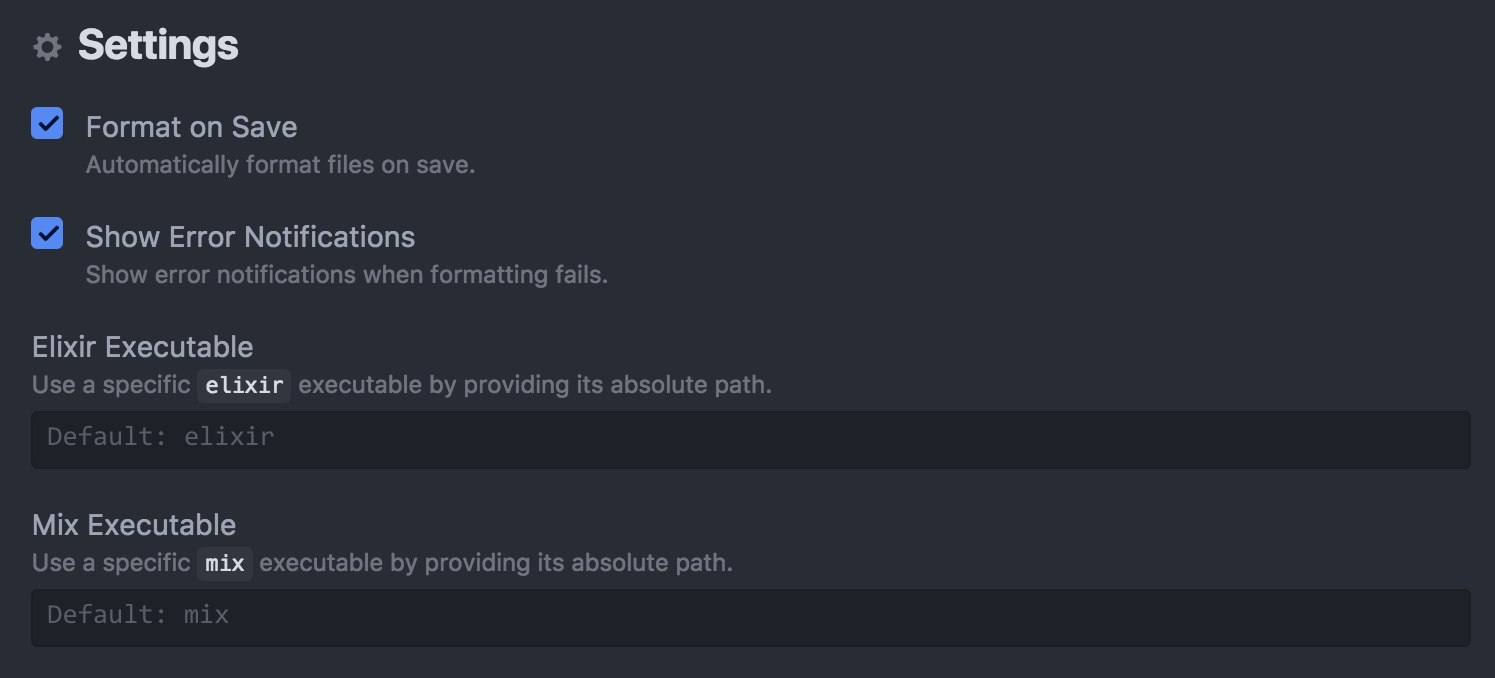
rgreenjr
on 18 Oct 2017
For those interesting in adding Elixir support to Atom-Beautify, please see https://github.com/Glavin001/atom-beautify/pull/1738 and help by submitting a Pull Request with changes and/or testing the existing Pull Request. With your help, hopefully, this will be coming soon!
Glavin001
on 29 Mar 2018
my current workaround in ~/.atom/init.coffee (i have atom-elixir installed for goto def)
# Formats/Indents files on save.
atom.workspace.observeTextEditors (editor) ->
  currentGrammar = editor.getGrammar()?.scopeName

  editor.buffer.onWillSave ->
    sourceGrammars = ['text.html.elixir']
    return unless currentGrammar in sourceGrammars
    editor.autoIndentBufferRows 0, editor.getBuffer().getLineCount() - 1

  editor.buffer.onDidSave ->
    sourceGrammars = ['source.elixir']
    return unless currentGrammar in sourceGrammars
    ChildProcess = require('child_process')
    if currentGrammar == 'source.elixir'
      ChildProcess.spawnSync('mix', ['format', editor.buffer.file.path])
 peterromfeldhk
on 16 May 2018
peterromfeldhk
on 16 May 2018
@peterromfeldhk, your workaround is appreciated :) I used atom-elixir-formatter before, but it doesn't respect .formatter.exs settings due to the way it's implemented.
Had to make the following change though, for the mix format command to run in the correct context:
     return unless currentGrammar in sourceGrammars
     ChildProcess = require('child_process')
     if currentGrammar == 'source.elixir'
-      ChildProcess.spawnSync('mix', ['format', editor.buffer.file.path])
+      # Set CWD to the project root so 'mix format' picks up .formatter.exs settings
+      options = { cwd: atom.project.relativizePath(editor.getPath()).shift() }
+      ChildProcess.spawnSync('mix', ['format', editor.buffer.file.path], options)
 jwarlander
on 25 Jun 2018
jwarlander
on 25 Jun 2018
i did had some issues with undo after that format, please let me know if
you figure out something. Im currently not working with elixir sadly :( but
its one of my favourite langs!
On Mon, Jun 25, 2018 at 7:08 PM, Johan Wärlander notifications@github.com
wrote:
@peterromfeldhk https://github.com/peterromfeldhk, your workaround is
appreciated :) I used atom-elixir-formatter before, but it doesn't
respect .formatter.exs settings due to the way it's implemented.Had to make the following change though, for the mix format command to
run in the correct context:@@ -57,10 +57,7 @@ atom.workspace.observeTextEditors (editor) ->
return unless currentGrammar in sourceGrammars
ChildProcess = require('child_process')
if currentGrammar == 'source.elixir'+ ChildProcess.spawnSync('mix', ['format', editor.buffer.file.path])- # Set CWD to the project root so 'mix format' picks up .formatter.exs settings- options = { cwd: atom.project.relativizePath(editor.getPath()).shift() }- ChildProcess.spawnSync('mix', ['format', editor.buffer.file.path], options)—
You are receiving this because you were mentioned.
Reply to this email directly, view it on GitHub
https://github.com/Glavin001/atom-beautify/issues/545#issuecomment-399915356,
or mute the thread
https://github.com/notifications/unsubscribe-auth/AFQpu_Svma2uGkt9aU3M3k3HthWnDU5fks5uAMSzgaJpZM4F70DC
.
peterromfeldhk
on 3 Jul 2018
Related issues
 ghost
·
4Comments
ghost
·
4Comments
 suienzan
·
3Comments
suienzan
·
3Comments
 physcocode
·
3Comments
physcocode
·
3Comments
 seanoldfield
·
5Comments
seanoldfield
·
5Comments
 jasonivers
·
4Comments
jasonivers
·
4Comments
Most helpful comment
There is a pretty new project: https://github.com/lpil/exfmt
While it may be a really good candidate, it's still in alpha stage and doesn't work correctly in some cases