Atmosphere: fusee (secondary) fails to power on ccplex
if this is a global issue (aka not just with my console or builds) this should be fixed before #182
 ThatNerdyPikachu
All 70 comments
Please provide further details such as your console's firmware version. As explained in #173 the latest changes have only been tested in firmwares 2.x and below.
 hexkyz
on 19 Aug 2018
hexkyz
on 19 Aug 2018
Ah, alright, sorry.
Console Version: 5.1.0
Fuses burnt: 6
(Sidenote: I do need exosphere.bin on the root of my SDMC, correct? If not, where does it (fusee secondary) load exo from?)
ThatNerdyPikachu
on 19 Aug 2018
Can you get me a build of atmosphere from the last commit? I'd want to test it.
(Can't build, 32 bit unsupported stuff...)
 mariogamer2
on 19 Aug 2018
mariogamer2
on 19 Aug 2018
@mariogamer2 of fusee?
dm me on discord: Pika#2849
ThatNerdyPikachu
on 19 Aug 2018
@ThatNerdyPikachu Thanks!
Yes, this is indeed an issue with fusee that I'm investigating and it's probably the same issue @SciresM was facing some time ago (there's some misconfiguration on 4.x+ firmwares).
About exosphere.bin, you don't need it on the root of your SD card. Fusee works by embedding exosphere and stratosphere (only the Loader, SM and PM kips) into fusee-secondary so all you need is to have fusee-secondary.bin on the root of the SD card and fusee-primary.bin being launched as a RCM payload.
Right now I'm trying to evaluate the minimum firmware version where the latest fusee is able to run without issues, so any tests with different firmware versions would be really helpful.
If you wish to run Atmosphère under an older firmware version I advise to create a "BCT.ini" file on the root of your SD card with the following contents:
BCT0
[stage1]
stage2_path = fusee-secondary.bin
stage2_addr = 0xF0000000
stage2_entrypoint = 0xF0000000
[exosphere]
target_firmware = [YOUR FIRMWARE NUMBER HERE]
Your firmware number will range from 1 (1.0.0) to 5 (5.0.0-5.1.0) and it must be specified using this file. However, I intend to add automatic firmware version detection before the 0.7 release.
hexkyz
on 19 Aug 2018
@hexkyz Thanks for that detailed explanation, that's pretty cool!
Sidenote, fusee secondary's path can be changed by either editing the default config in the source, or creating a BCT.ini, correct?
Lastly, I'd love to help with ATMS in any way, so if I can be of any assistance, that'd be great!
ThatNerdyPikachu
on 19 Aug 2018
@hexkyz I did a pretty heavy amount of testing last night...there's definitely something weird going on MMIO-wise on newer firmwares. I know exosphere's code is solid, I don't think it's the problem.
From what I can tell, on 5.x fusee is successfully launching exosphere, which is getting stuck waiting for a synchronization with fusee for the finished state -- a panic performed just before the sync_with_nx_bootloader succeeds, just after does not.
For its part, fusee is not writing the finished state to iram because it, too, is getting stuck -- it is never getting past the loop where it checks if SECMON_AWAKE.
If I comment out that SECMON_AWAKE loop, boot still does not succeed, although exosphere becomes able to panic after the synchronization. This is suggestive to me of a more underlying MMIO correctness problem.
Any ideas?
 SciresM
on 21 Aug 2018
SciresM
on 21 Aug 2018
@ThatNerdyPikachu Correct, fusee-secondary's path can be set by creating a BCT.ini file. Changing the default BCT in source code would work as well, but it's preferable/cleaner to use an external file in this case.
Please feel free to ask any questions and take a look around the open issues. We really appreciate the help. For now, testing out the fusee components on different firmware versions is the main priority. Once that's ironed out and 0.7 is released we will provide proper documentation and instructions for anyone who wishes to learn and help.
@SciresM I have a rough idea of what could be failing. Exosphere is definitely not the issue as it works fine on it's own on 5.x+.
I'm pretty sure I missed some MMIO configurations that changed for 4.x+, so I'll revise everything again and report back. Thanks for the extensive testing!
hexkyz
on 22 Aug 2018
The latest change fixed a wrong register definition that could've been causing issues. Any improvements?
hexkyz
on 24 Aug 2018
I won't be able to test until Sunday...
I'll report back then!
ThatNerdyPikachu
on 24 Aug 2018
@hexkyz Same issue post-commit, on my end.
SciresM
on 25 Aug 2018
Could everyone who tested for issue #173 please try again?
The current situation is that firmware versions 1.0.0 and 2.x boot successfully, but 5.x is failing and gets stuck when powering on the CCPLEX.
I'm very interested in knowing exactly what's happening in intermediate firmware versions such as 3.x and 4.x.
hexkyz
on 26 Aug 2018
5.x now powers on the CCPLEX, or atleast it gets further then before, as now it goes to a black screen instead of freezing at the log entry.
ThatNerdyPikachu
on 26 Aug 2018
Hello,
I'm on 4.1.0 with no exfat and I have a black screen after [NXBOOT]: Powering on the CCPLEX...
Don't know if it's usefull.
Tested with atmosphere-patched-1cbbdb4 and atmosphere-unpatched-1cbbdb4.
 W34P0n-X
on 27 Aug 2018
W34P0n-X
on 27 Aug 2018
Bonjour,
same issue with last built on 4.1.0 noexfat, eFuses burnt=5
No splashscreen is display,
backlight turn off,
display end.
If I want to display the value of MAILBOX_NX_BOOTLOADER_IS_SECMON_AWAKE do I have to use %lld ?
W34P0n-X
on 30 Aug 2018
@W34P0n-X Thank you for testing! Could you please try out the latest changes?
Also, I'm still very interested in knowing what happens on 3.x console.
hexkyz
on 30 Aug 2018
after loading everything correctly the nintendo logo appears and then becomes a black screen
the load is very clean and fast
I've tried it on 3.0.0
 pplatoon
on 30 Aug 2018
pplatoon
on 30 Aug 2018
The payload injects and runs successfully for me, but then I get stuck at a black screen, no qlaunch or switch/nintendo logo.
edit: with the kips I get this issue, and a freeze.

 CaptinNemrac
on 30 Aug 2018
CaptinNemrac
on 30 Aug 2018
@hexkyz same issue on 4.1.0
no splash screen
backlight turn off
display end
exosphere is loaded at 0x4002d000
loop in the while waiting for exosphere to wake up
On hekate, my switch boot correctly with the Atmosphere (hekate) config.
W34P0n-X
on 31 Aug 2018
Thank you all for testing!
So far, there are 3 scenarios here:
1.0.0 to 2.3.0: Everything works.
3.0.0 to 3.0.2: Fusee and Exosphere work, but something crashes after the main logo.
4.0.0 to 5.1.0: Fusee is not working.
@W34P0n-X Sorry, I forgot to answer your question about MAILBOX_NX_BOOTLOADER_IS_SECMON_AWAKE. Yes you can use %lld to display it, however it seems that fusee never sees the value changing from 0 to 1 (and gets locked waiting).
@SciresM Is it possible that PM could be causing the 3.x issue described? I don't remember if PM was working on all firmware versions.
hexkyz
on 31 Aug 2018
Just in case, I've removed PM from the list of built-in Stratosphère system modules (as far as I can tell no hekate based solutions use it).
@pplatoon Could you try 3.0.0 again, please?
hexkyz
on 31 Aug 2018
@hexkyz hi, same result as yesterday, everything loads well appears the logo of nintendo and then black screen
I leave a video
https://mega.nz/#!MS5FmDwC!I40LwoL2DPqR18LjiwUFpZ7YVcj4ZwHFnOn1sGAtbGI
pplatoon
on 31 Aug 2018
@pplatoon Thanks!
I've fixed a few minor bugs. It might have impacted this issue, but it's unlikely.
hexkyz
on 1 Sep 2018
Fwiw I use PM with Hekate on 5.1 without issues.
 fincs
on 1 Sep 2018
fincs
on 1 Sep 2018
@hexkyz Can we talk on discord ?
 ppmario
on 1 Sep 2018
ppmario
on 1 Sep 2018
@hexkyz As far as I know, PM shouldn't be an issue in any way.
SciresM
on 1 Sep 2018
I have tried with the small fixes and follow the same results, as SciresM says it does not seem to have to do with PM, let's see if you get it,
pplatoon
on 1 Sep 2018
@fincs, @SciresM, @pplatoon Thanks. Indeed, PM can't be an issue on 3.x at all.
hexkyz
on 3 Sep 2018
There was a bug in cluster.c. Any improvements?
hexkyz
on 4 Sep 2018
@hexkyz I have tried again with the changes and now it does something different look, it shows a key error but it jumps and it seems to load it to end up giving black screen after nintendo logo
Watch the video
https://mega.nz/#!MKIS2AwY!l1l3e51Sa7ytiFqPdxJIQ_A4sfvh5O9q0aw4ilglhXI
pplatoon
on 4 Sep 2018
I tried the new build and the issue is the same as I described in my last comment on firmware 4.1.0
W34P0n-X
on 5 Sep 2018
The latest fixes may have changed something for firmware versions 4.x+.
It seems hekate sets MAILBOX_NX_BOOTLOADER_SETUP_STATE to 2 on every firmware, but we were setting it to 3 on firmware versions 4.x+. This means exosphere would lock (waiting for fusee) differently.
hexkyz
on 5 Sep 2018
5.1.0: we have no nintendo logo, black screen
ThatNerdyPikachu
on 5 Sep 2018
@hexkyz I've tried with the added changes and it does the same. I would say it charges something faster. after nintendo logo appear....black screen
i leave a video
https://mega.nz/#!VfIhVIQZ!bkEvU2vPGNi56ArZ05FOZGZXr_5KQQumIMUPuv233PQ
pplatoon
on 5 Sep 2018
I get the same issue with the last build with firmware 4.1.0, waiting for exosphere to wake up.
I test exosphere with hekate (Atmosphere (hekate) config.) it boot but when I put the console in sleep mode it goes to black screen then backligth turn on, the only thing I can do is turn off the switch by pressing the power button during 12 seconds.
W34P0n-X
on 6 Sep 2018
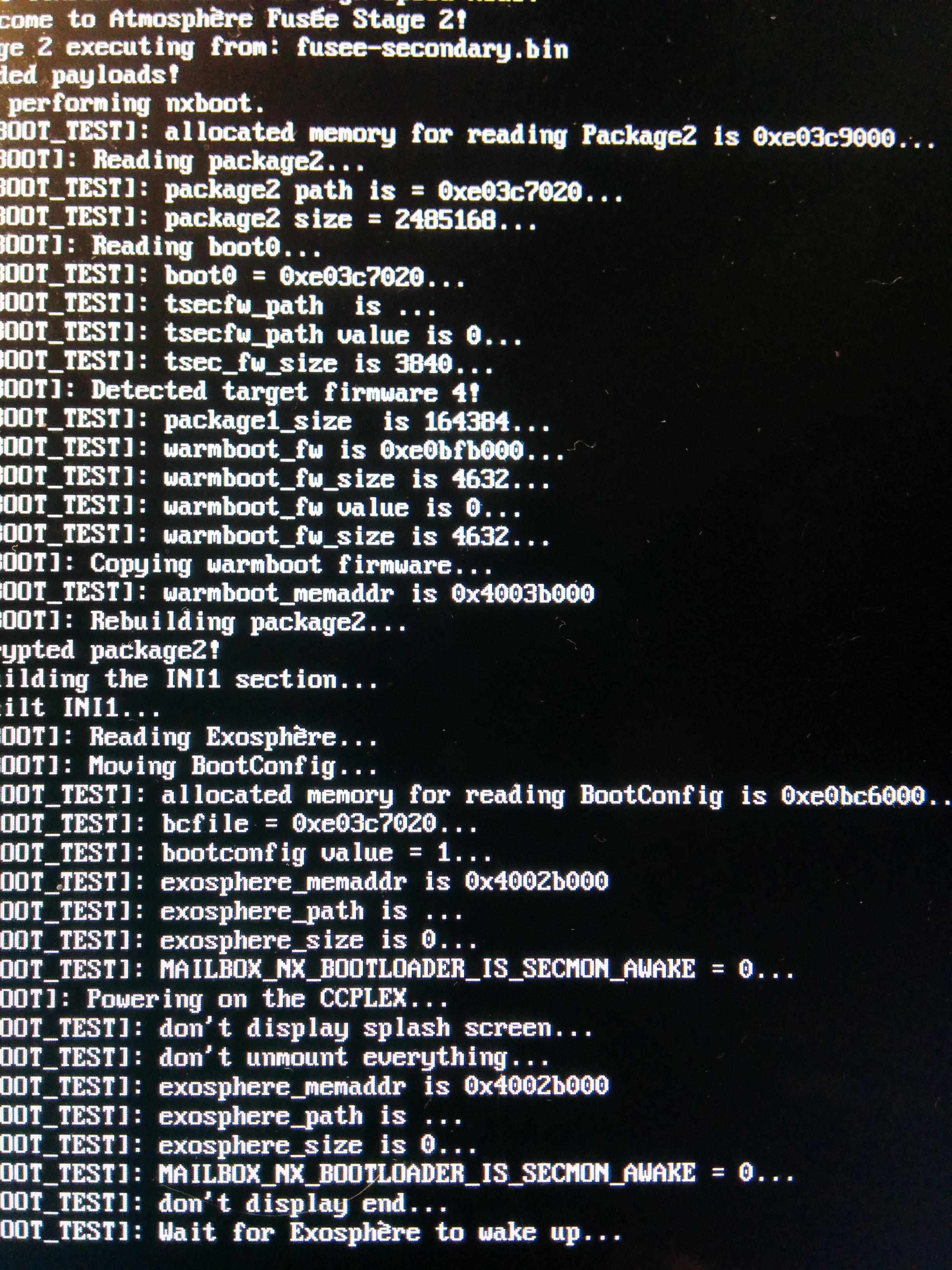
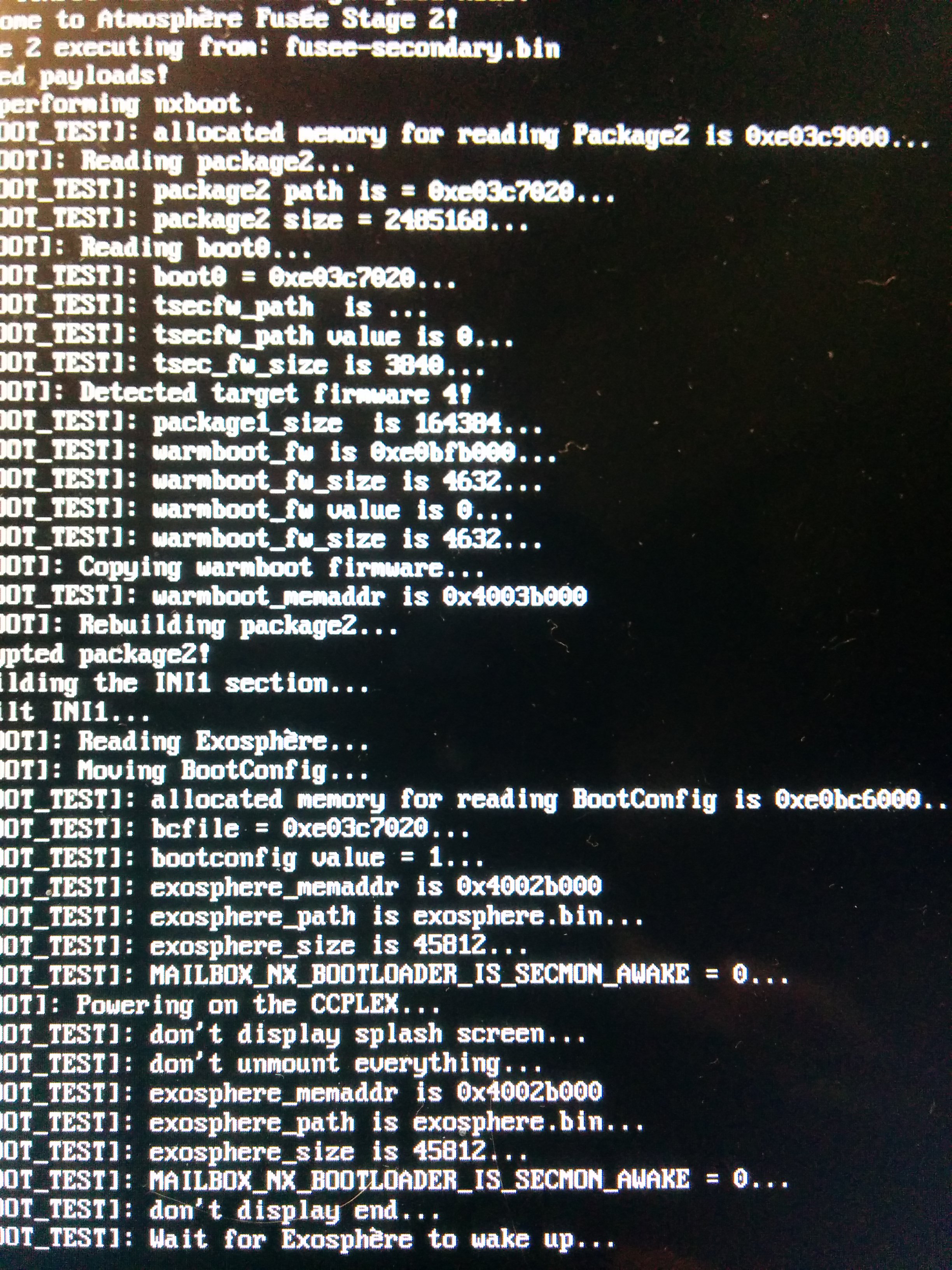
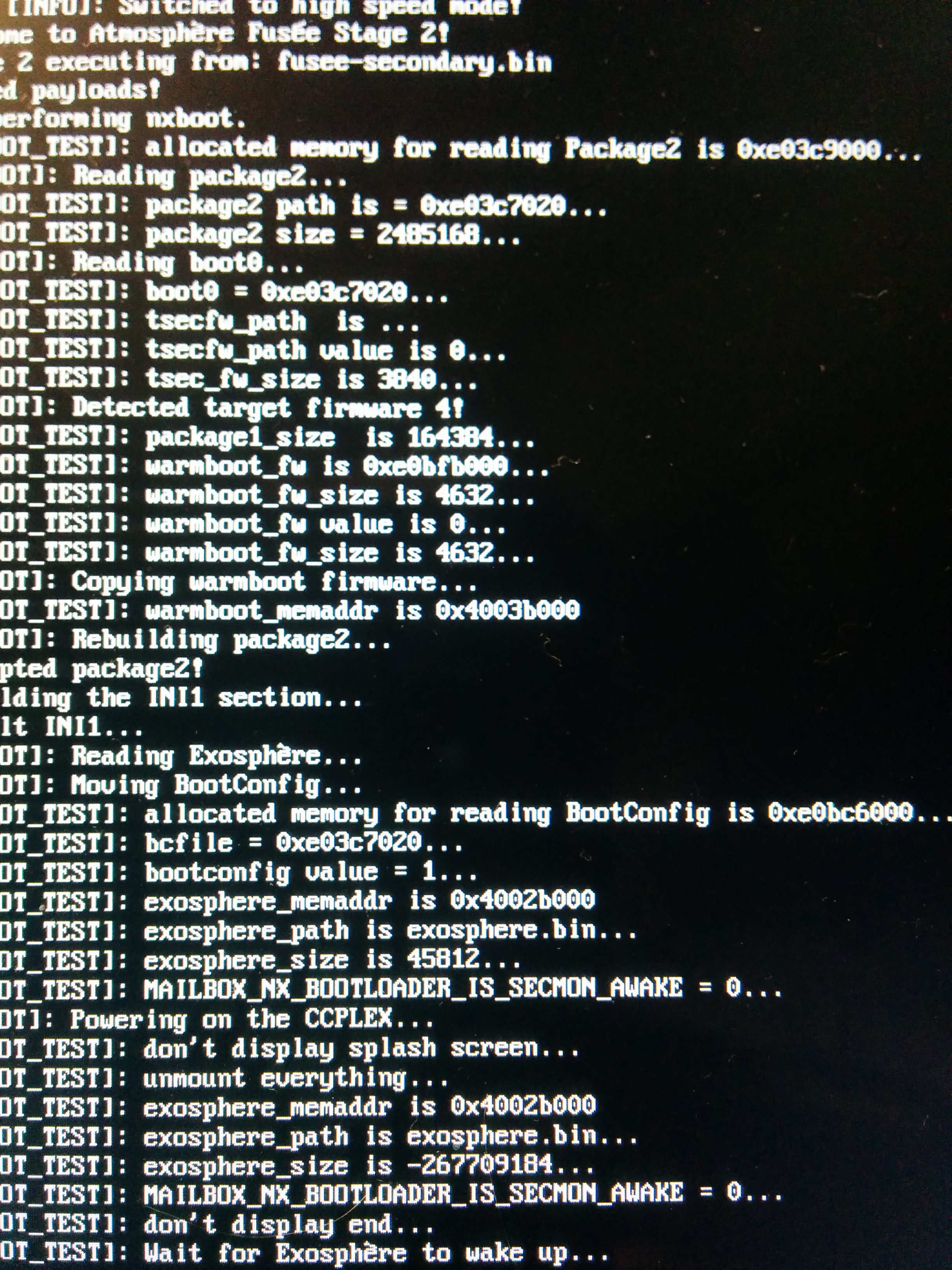
@hexkyz don't know if it can help but I add some printf() in the nxboot.c file
without exosphere.bin on the root of the SD and don't unmounting everything:
With exosphere.bin on the root of the SD and don't unmounting everything:
With exosphere.bin on the root of the SD and unmounting everything:
W34P0n-X
on 7 Sep 2018
@ThatNerdyPikachu, @pplatoon, @W34P0n-X Thank you all for testing!
@W34P0n-X Thank you for the extra details! As you can see, MAILBOX_NX_BOOTLOADER_IS_SECMON_AWAKE is always 0 and we need it to change to 1 after the CCPLEX is powered. :/
hexkyz
on 8 Sep 2018
@hexkyz Hello,
I'm not a developer, I'm just trying to understand how it works and English is not my first language
If you do not have the time to answer it does not matter
The state of this variable (MAILBOX_NX_BOOTLOADER_IS_SECMON_AWAKE) changed here ?
and the value of this variable is addressed at "0x40002EFC" ?
value that will be an unsigned 32bit integer?
I do not know if it would change anything but would it be possible to treat this variable as a booleen?
I also asked myself the question... With the good library, would it be possible to add a "printf" in the file above without breaking anything?
Have a nice week end
W34P0n-X
on 8 Sep 2018
@W34P0n-X Yes, MAILBOX_NX_BOOTLOADER_IS_SECMON_AWAKE is supposed to be changed by exosphere in this line: https://github.com/Atmosphere-NX/Atmosphere/blob/master/exosphere/src/package2.c#L511
The address is indeed 0x40002EFC and treating it's value as a boolean wouldn't matter here because we effectively treat it as an unsigned int.
In the above file (package2.c) you won't be able to use "printf". Instead, you must use a "panic" function from here: https://github.com/Atmosphere-NX/Atmosphere/blob/master/exosphere/src/utils.c
hexkyz
on 11 Sep 2018
@hexkyz yes I try things with booleen with same result, in fact true=1, false=0 but the thing I was interesting with was the NULL.
The thing I don't understand it's the 0x40002EFC and the 0x40002EFCULL address, one is 32bits, the other is 64bits ?
I try to built with some printf in the package2.c) the error that bother me is that I have to declare %ld to see the MAILBOX_NX_BOOTLOADER_IS_SECMON_AWAKE's value as I have to declare a %lld in nxboot.c but that just me and I will try with the link you give me above.
by the way thank for the response.
W34P0n-X
on 11 Sep 2018
ULL in an address? That is confusing. These are HEX and hex only uses 0-9 and a-f. Perhaps null got tacked onto the en somehow
 fennectech
on 11 Sep 2018
fennectech
on 11 Sep 2018
ULL = unsigned long long = 64 bits.
The problem doesn't appear to be that IS_SECMON_AWAKE never gets set, but rather that the BPMP freezes when Exosphere sets things up. (Described in #169) It still appears to be triggered by bootup_misc_mmio.
 encounter
on 11 Sep 2018
encounter
on 11 Sep 2018
I think more like a "technician in industrial automation", more "binary", so if the progress of the program blocks waiting for a variable to be modified, where is it changed? And is it modified?
my question is:
"we" define a volatile long long int variable that points to 0x40002EFC in nxboot.h, (iram?)
#define MAILBOX_NX_BOOTLOADER_IS_SECMON_AWAKE MAKE_MAILBOX_NX_BOOTLOADER_REG (0xEFC)
and on package2.h it's the same but on 0x40002EFCULL, it's the same place, it's like 0x40000000000000002EFC?
#define MAILBOX_NX_BOOTLOADER_IS_SECMON_AWAKE MAKE_REG32(MAILBOX_NX_BOOTLOADER_BASE + 0xEFCULL)
#define MAKE_REG32(a) (*(volatile uint32_t *)(a))
After I admit that the concept of memory is complicated for me.
And this is only a kind of container that contains 0 or 1.
Hats off to the artists who designed this.
W34P0n-X
on 12 Sep 2018
Hello, if I add after this line here
something like
if (MAILBOX_NX_BOOTLOADER_IS_SECMON_AWAKE == 1) {
generic panic()
}
it reboot,
if (MAILBOX_NX_BOOTLOADER_IS_SECMON_AWAKE == 0) {
generic panic()
}
it freeze at [NXBOOT]: Powering on the CCPLEX...
W34P0n-X
on 15 Sep 2018
Could everyone please try the latest changes? It appears the issue is a bit more intricate so we're now trying to execute the last part of nxboot in IRAM (instead of DRAM).
@W34P0n-X Sorry for the delay. 0x40002EFCULL is still 0x40002EFC, but it will look like 0x0000000040002EFC in memory so that won't be a problem.
Regarding the reboot/freeze, that would be the normal behaviour. When you check if MAILBOX_NX_BOOTLOADER_IS_SECMON_AWAKE is 1 right after it was set to 1 in line 511 it will call the generic_panic() you placed (which results in a reboot to a black screen if you have AutoRCM).
hexkyz
on 15 Sep 2018
@hexkyz We have a boot!!
5.1.0
sleep mode works
ThatNerdyPikachu
on 15 Sep 2018
@ThatNerdyPikachu :D Any issues while running (graphics, audio, etc)?
hexkyz
on 15 Sep 2018
It's also booting on 5.1.0 for me, though the first time I got "Key derivation failed" and to power off and back on. I have a BCT.ini with target_firmware=5, is this required or could it be the cause of this error?
Basic audio, graphics, etc seem to work. I'll play some games here shortly, but would we expect it to be different then?
 romracer
on 15 Sep 2018
romracer
on 15 Sep 2018
the same results as before in my 3.0.0 tested with the "build provided by Thomleg50"
after the nintendo logo black screen
pplatoon
on 16 Sep 2018
@hexkyz Nope!!
@pplatoon Please stop lying, lmao
You are Thomleg
You've asked several people (including myself) to get you a build of the latest commit to test...
Edit: He actually DMd me again, but after getting a build, he deleted it!
Edit edit: https://there-are-no-underscores-here-but-this-is-still-an.underscore.party/NSudbqdH.png
ThatNerdyPikachu
on 16 Sep 2018
tested on my 4.1.0 and booted
Build provided thomleg50
Just to add the sleep mode not working
 jacobfernando
on 16 Sep 2018
jacobfernando
on 16 Sep 2018
It work on 4.1.0 with no issue while trying game but reboot to RCM mode when enter to sleep mode manualy (power button, touchscreen, long press on the home button).
W34P0n-X
on 16 Sep 2018
@hexkyz Nope!!
@pplatoon Please stop lying, lmao
You _are_ Thomleg
You've asked several people (including myself) to get you a build of the latest commit to test...Edit: He actually DMd me again, but after getting a build, he deleted it!
Edit edit: https://there-are-no-underscores-here-but-this-is-still-an.underscore.party/NSudbqdH.png
Hello @ThatNerdyPikachu you have confused @pplatoon It's not thomleg, the damn one used the name of my friend in discord, I just came to say that you have unfairly blocked him, I have evidence to prove it.
 D3fau4
on 16 Sep 2018
D3fau4
on 16 Sep 2018
Pplatoon isn’t thomleg btw, they’re just good friends.
CaptinNemrac
on 16 Sep 2018
@D3fau4 @CaptinNemrac let's keep this issue on-topic.
 xorinzor
on 16 Sep 2018
xorinzor
on 16 Sep 2018
Just what I wanted to say
Just as another 3.0.0 tester:
Stuck after the Nintendo Logo with current hekate and fusee-primary payload.
All self compiled binarys, up to date.
 Resaec
on 16 Sep 2018
Resaec
on 16 Sep 2018
3.0.0 here, same results as stated above. Oddly enough there was one time where I very briefly saw the lock screen before my switch crashed. I'll try to see if I can get it to happen again on camera, but so far I haven't been able to replicate it.
 HylianMedia
on 17 Sep 2018
HylianMedia
on 17 Sep 2018
I've confirmed the 3.x issue myself. It appears to be an issue unrelated to fusee, but we're currently investigating it.
Regarding the occasional "Key derivation failed" error, this results from an unstable memory state in the Security Engine and may happen from time to time. Rebooting should solve it.
hexkyz
on 17 Sep 2018
Not sure how this should work and if it is related.
When booting with with the splash screen commit the splash is shown, but is replaced with the Nintendo logo for a second before it turns to the black screen and locks up.
I expected the Atmosphère splash to be shown until the lockscreen pops up, am I wrong?
Resaec
on 17 Sep 2018
@Resaec That is indeed what should happen.
Originally, it was the NX bootloader (which fusee replaces) that was responsible for displaying the coldboot "Nintendo" logo. However, on 3.x+ this was moved into the "boot" sysmodule.
Until our "boot" sysmodule replacement is finished, both logos (Atmosphère and Nintendo) will show up before the final "Nintendo Switch" logo (which is displayed by the AM sysmodule).
hexkyz
on 18 Sep 2018
After some testing, it appears that the 3.x issue is actually a bug in exosphere and not in fusee.
Could someone please check if exosphere boots with hekate on 3.x? Should be just a matter of copying exosphere.bin to the SD card and changing hekate's configuration (secmon=[path to exosphere]).
hexkyz
on 20 Sep 2018
The SDFiles config comes with secmon configured
[Atmosphere (Hekate)]
secmon=modules/atmosphere/exosphere.bin
kip1=modules/atmosphere/loader.kip
kip1=modules/atmosphere/sm.kip
kip1=modules/atmosphere/fs_mitm.kip
kip1=modules/atmosphere/pm.kip
atmosphere=1
This is the config I tried booting Atmosphere with when not testing fusee.
I tried modules/atmosphere/exosphere.bin and exosphere.bin at the root of the SD card with the current commits of Atmosphere and hekate.
It wont boot past the known black screen after the Nintendo logo.
Resaec
on 20 Sep 2018
@Resaec Can you please try the latest commit? 3.x should boot now with fusee (or hekate).
hexkyz
on 20 Sep 2018
Booting fine using fusee (does fusee load kip's too?)
Not booting with hekate, stuck after the N logo
Resaec
on 20 Sep 2018
Booting from hekate without loading sm and pm causes my Switch to loose RCM connection, which does not happen when loading all kip's.
When only booting with loader.kip I can boot from hekate.
I will test some more which kip is locking up
Resaec
on 20 Sep 2018
Booting w/o :
sm -> black screen lockup
pm -> rcm lost / after a while an unrecognizable USB device pops up (trying to force shut off + VOL+)
fs_mitm -> booting
If you need i can check fs+sm / fs+pm too but i guess this should help for now.
EDIT:
Testing without fs+* is stupid as fs was identified as the culprit.
Did it anyway, booting fine as long as fs is not loaded.
EDIT2:
Removing the atmosphere folder at the root of the SD or removing all titles inside won't fix it.
Resaec
on 21 Sep 2018
@Resaec Thank you for testing! Fusee does indeed load the kips too (they are part of fusee-secondary), so it appears the issue you're getting with hekate is either specific to hekate or perhaps some clash with the kip files. Either way, I believe this issue can now be closed?
hexkyz
on 21 Sep 2018
Since it boots using fusee, yes.
For now it seems like the problem is an incompatibility issue with hekate. So it's worth to keep it in mind in case CTCaer can't find a problem on his side.
Resaec
on 22 Sep 2018
0.7 is on the Horizon!
ThatNerdyPikachu
on 22 Sep 2018
Atmosphere Fusee on the air 👍
 RyuSeisuke1992
on 22 Sep 2018
RyuSeisuke1992
on 22 Sep 2018
Related issues
 NaturalHarmonia
·
3Comments
NaturalHarmonia
·
3Comments
 melsbacksfriend
·
3Comments
melsbacksfriend
·
3Comments
 ghost
·
3Comments
SciresM
·
4Comments
ghost
·
3Comments
SciresM
·
4Comments
 MySTiXX666
·
4Comments
MySTiXX666
·
4Comments
Most helpful comment
0.7 is on the Horizon!