Async-storage: Error: [@RNC/AsyncStorage]: NativeModule: AsyncStorage is null
When I run npm start the following error is generated.
Details:
- I have already tried running
npx react-native link @react-native-community/async-storageand restarted the build with all the options shown in the screen.
while running pod install there are still errors
- ERROR | attributes: Missing required attributehomepage.
- WARN | source: The version should be included in the Git tag.
- WARN | description: The description is equal to the summary.
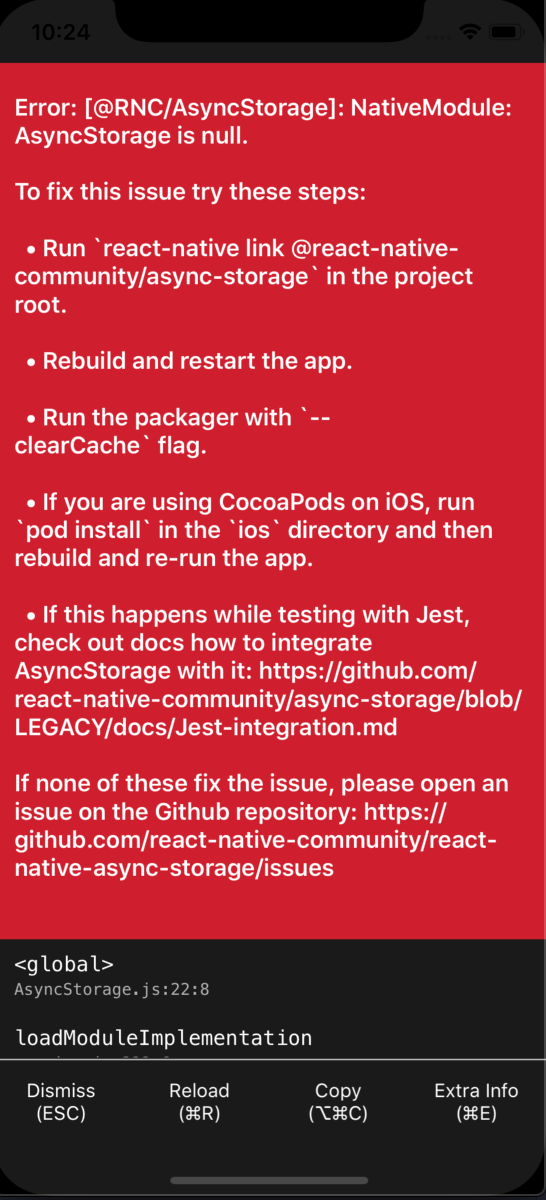
Can anyone help, what's wrong with the steps?
 nikeshk
All 12 comments
@nikeshk Hey,
What RN version you use?
 Krizzu
on 3 Feb 2020
Krizzu
on 3 Feb 2020
Same here.
"react-native": "0.61.5",
EDIT
using use_native_modules! on pod worked!
 luco
on 3 Feb 2020
luco
on 3 Feb 2020
@Krizzu
The react-native version is:
"react-native": "0.61.5"
@luco How can I use native_framework ??
nikeshk
on 4 Feb 2020
@nikeshk
With version 0.60+, you should not use link feature, because there's auto-linking in place. Please checkout the RN template's Podfile and compare it with yours. use_native_modules! makes auto-linking work (remember to import it through require_relative at the top of the file).
Krizzu
on 5 Feb 2020
@nikeshk I'm sorry, I miswrote it. It's use_native_modules!. You should put it before the end section of your target on your podfile.
luco
on 7 Feb 2020
I have this error when trying to debug a RN app in Expo on Android.
I don't have a podfile to use a use_native_modules! line in (podfiles are for iOS only, afaik).
 jessegranger
on 18 Feb 2020
jessegranger
on 18 Feb 2020
I'm having the same exact issue.
I installed same version as you for react native.
Here's my package.json
{
"scripts": {
"android": "react-native run-android",
"ios": "react-native run-ios",
"web": "expo start --web",
"start": "react-native start",
"test": "jest"
},
"dependencies": {
"@react-native-community/async-storage": "^1.8.0",
"@signalwire/react-native": "^1.0.1",
"expo": "~36.0.0",
"react": "~16.9.0",
"react-dom": "~16.9.0",
"react-native": "~0.61.5",
"react-native-gesture-handler": "~1.5.0",
"react-native-incall-manager": "^3.2.7",
"react-native-reanimated": "~1.4.0",
"react-native-screens": "2.0.0-alpha.12",
"react-native-unimodules": "~0.7.0",
"react-native-web": "~0.11.7",
"react-native-webrtc": "^1.75.3"
},
"devDependencies": {
"@babel/core": "~7.6.0",
"babel-jest": "~24.9.0",
"jest": "~24.9.0",
"metro-react-native-babel-preset": "~0.56.0",
"react-test-renderer": "~16.9.0"
},
"jest": {
"preset": "react-native"
},
"private": true
}
and I added the use_native_modules! right before end, then stopped and expo started and still same issue.
 NashidB
on 19 Feb 2020
NashidB
on 19 Feb 2020
Added use_native_modules! at the end. Added require_relative '../node_modules/@react-native-community/cli-platform-ios/native_modules' right in the beginning of the Podfile. Getting a ld: 520 duplicate symbols for architecture x86_64 error in xcode on build :/
react-native version 0.61.4
 roscioli
on 21 Feb 2020
roscioli
on 21 Feb 2020
- add this in Podfile :
pod 'RNCAsyncStorage', :path => '../node_modules/@react-native-community/async-storage' - cd ios && pod install
 yassati
on 26 Feb 2020
yassati
on 26 Feb 2020
Having this issue on Android, how can I fix it ?
using rn 0.61.5 and @react-native-community/async-storage 1.7.1
 ShyamPanchal
on 11 Mar 2020
ShyamPanchal
on 11 Mar 2020
@nikeshk
With version 0.60+, you should not uselinkfeature, because there's auto-linking in place. Please checkout the RN template's Podfile and compare it with yours.use_native_modules!makes auto-linking work (remember to import it throughrequire_relativeat the top of the file).
where to use-native-modules exact place for andriod rn version 0.61.5 and where to import require relative exact place and line
 eman-star
on 21 Mar 2020
eman-star
on 21 Mar 2020
@jessegranger were you able to solve the issue. I am also testing on android and there's no podfile for android to work on.
 rbsharma
on 1 Apr 2020
rbsharma
on 1 Apr 2020
Related issues
 burhanahmed92
·
27Comments
burhanahmed92
·
27Comments
 cpojer
·
34Comments
cpojer
·
34Comments
 santhanakrishnanstark
·
67Comments
santhanakrishnanstark
·
67Comments
 StevenMasini
·
22Comments
StevenMasini
·
22Comments
 alex-mironov
·
71Comments
alex-mironov
·
71Comments
Most helpful comment
Same here.
"react-native": "0.61.5",EDIT
using
use_native_modules!on pod worked!