Async-storage: AsyncStorage iOS not Work RN V0.59.2
You want to:
Details

 cristianmgb
All 15 comments
Hey @cristianmgb ,
Did you follow the points listen in the red screen?
 Krizzu
on 4 Apr 2019
Krizzu
on 4 Apr 2019
yes, i did. And didnt work out. but the problem is only in IOS because in android works perfectly.
im using the version RN 0.59.2.
cristianmgb
on 4 Apr 2019
@cristianmgb
This error comes from the fact that Async Storage is not linked, and if linked, you'd need to rebuild native part.
Try this:
- Stop packager
- Run
react-native link @react-native-community/async-storageonce again, to make sure it's linked (no errors, just message saying it's already done) - run
react-native run-iosto get fresh build - run the packager with
--clearCacheflag
Let me know how did it go.
Krizzu
on 4 Apr 2019
i follow all the steps and still not work.
i created a new project whit all the step you give me and still not work.
this is my pod file.

cristianmgb
on 4 Apr 2019
@cristianmgb I just hit this same issue. The guide is missing the rather important point of react-native link then cd ios pod install.
Inside your xCode you should see:

Hope this helps
 Sam-Hoult
on 4 Apr 2019
Sam-Hoult
on 4 Apr 2019
@cristianmgb I just hit this same issue. The guide is missing the rather important point of
react-native linkthencd iospod install.Inside your xCode you should see:
Hope this helps

the issues continues. And now show this Error: jest-haste-map: Haste module naming collision:
Duplicate module name: react-native
This error is caused by hasteImpl returning the same name for different files.
cristianmgb
on 4 Apr 2019
@cristianmgb Hmm. I think my podfile already accounts for that madness from AppCenter doing the same to me:
target 'RN_app' do
# Uncomment the next line if you're using Swift or would like to use dynamic frameworks
# use_frameworks!
platform :ios, '9.0'
pod 'AppCenter/Crashes', '~> 1.14.0'
pod 'AppCenter/Analytics', '~> 1.14.0'
pod 'AppCenterReactNativeShared', '~> 1.13.0'
node_modules_path = '../node_modules'
pod 'yoga', path: "#{node_modules_path}/react-native/ReactCommon/yoga/yoga.podspec"
pod 'React', path: "#{node_modules_path}/react-native"
pod 'ReactNativeSocketMobile', path: "#{node_modules_path}/@getgreenline/react-native-socket-mobile/ios"
pod 'RNDeviceInfo', :path => '../node_modules/react-native-device-info'
pod 'SentryReactNative', :path => '../node_modules/react-native-sentry'
pod 'react-native-async-storage', :path => '../node_modules/@react-native-community/async-storage'
end
post_install do |installer|
installer.pods_project.targets.each do |target|
if target.name == "React"
target.remove_from_project
end
end
end
First, thanks for replying us :)
I'm also having this issue here :( ( I've followed every step several times.)
 clucasalcantara
on 5 Apr 2019
clucasalcantara
on 5 Apr 2019
I have the same problem
 QShengW
on 5 Apr 2019
QShengW
on 5 Apr 2019
Hey,
Are you using pods by any chance?
Krizzu
on 5 Apr 2019
Hey,
Are you using
podsby any chance?
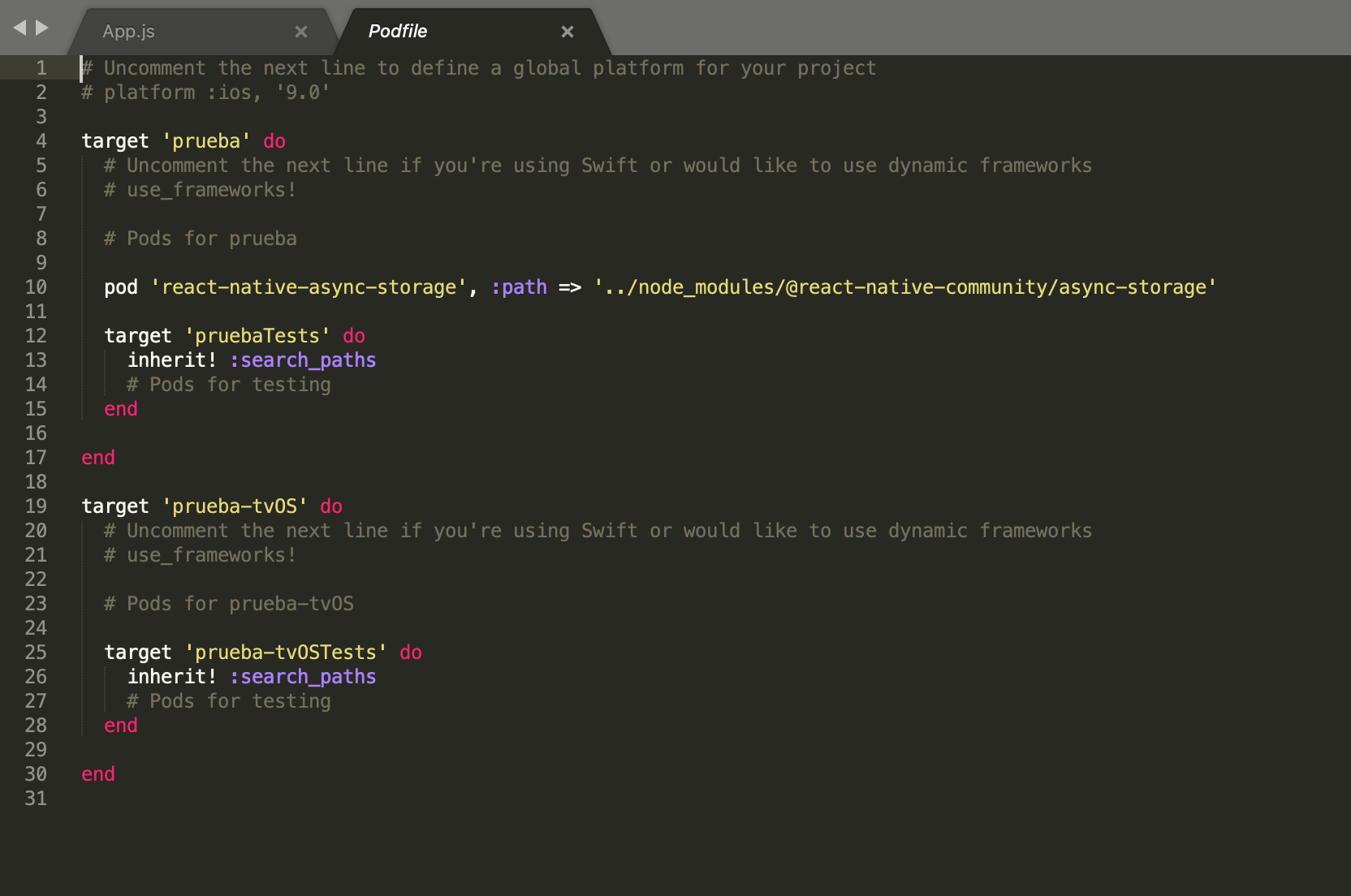
This is my pod file.
cristianmgb
on 5 Apr 2019

cristianmgb
on 5 Apr 2019
I've initialized a new RN project (RN 0.59.1) to test it out. I was able to successfully link and run the app (with and without pods).
Here're the steps I did:
- Init project
- Add
@react-native-community/async-storageviayarn add - Go to
ios/,pod init - My
Podfile, before linking:
target 'YOUR_PROJECT_NAME_HERE' do
  # Uncomment the next line if you're using Swift or would like to use dynamic frameworks
  # use_frameworks!
  platform :ios, '9.0'


  node_modules_path = '../node_modules'

  pod 'yoga', path: "#{node_modules_path}/react-native/ReactCommon/yoga/yoga.podspec"
  pod 'React', path: "#{node_modules_path}/react-native"

end

post_install do |installer|
  installer.pods_project.targets.each do |target|
    if target.name == "React"
      target.remove_from_project
    end
  end
end
- Run
react-native link @react-native-community/async-storagein root directory
Command adds a line inPodfile, just belowpod 'React':
pod 'react-native-async-storage', :path => '../node_modules/@react-native-community/async-storage'`
- Run
pod installinios/ - Open
ios/ProjectName.xcworkspace(mind .xcworkspace extension) and pressrunOR runreact-native run-iosin root
If anyone still have some issues, before you post that you got the same problem - please provide some more info/repro steps.
Please check if problem exists for you if in a new RN app - it might mean that you're missing some steps, like pod installing, in your original project.
thanks.
Krizzu
on 7 Apr 2019
I've initialized a new RN project (RN 0.59.1) to test it out. I was able to successfully link and run the app (with and without pods).
Here're the steps I did:
- Init project
- Add
@react-native-community/async-storageviayarn add- Go to
ios/,pod init- My
Podfile, before linking:target 'YOUR_PROJECT_NAME_HERE' do # Uncomment the next line if you're using Swift or would like to use dynamic frameworks # use_frameworks! platform :ios, '9.0' node_modules_path = '../node_modules' pod 'yoga', path: "#{node_modules_path}/react-native/ReactCommon/yoga/yoga.podspec" pod 'React', path: "#{node_modules_path}/react-native" end post_install do |installer| installer.pods_project.targets.each do |target| if target.name == "React" target.remove_from_project end end end
- Run
react-native link @react-native-community/async-storagein root directory
Command adds a line inPodfile, just belowpod 'React':pod 'react-native-async-storage', :path => '../node_modules/@react-native-community/async-storage'`
- Run
pod installinios/- Open
ios/ProjectName.xcworkspace(mind .xcworkspace extension) and pressrunOR runreact-native run-iosin rootIf anyone still have some issues, before you post that you got the same problem - please provide some more info/repro steps.
Please check if problem exists for you if in a new RN app - it might mean that you're missing some steps, like pod installing, in your original project.thanks.
work for me. 👍
cristianmgb
on 8 Apr 2019
We've updated the docs. Closing this for now.
thanks.
Krizzu
on 11 Apr 2019
Related issues
 cpojer
·
34Comments
cpojer
·
34Comments
 alex-mironov
·
71Comments
alex-mironov
·
71Comments
 srivatsav
·
26Comments
Krizzu
·
36Comments
srivatsav
·
26Comments
Krizzu
·
36Comments
 StevenMasini
·
22Comments
StevenMasini
·
22Comments
Most helpful comment
I've initialized a new RN project (RN 0.59.1) to test it out. I was able to successfully link and run the app (with and without pods).
Here're the steps I did:
@react-native-community/async-storageviayarn addios/,pod initPodfile, before linking:react-native link @react-native-community/async-storagein root directoryCommand adds a line in
Podfile, just belowpod 'React':pod installinios/ios/ProjectName.xcworkspace(mind .xcworkspace extension) and pressrunOR runreact-native run-iosin rootIf anyone still have some issues, before you post that you got the same problem - please provide some more info/repro steps.
Please check if problem exists for you if in a new RN app - it might mean that you're missing some steps, like pod installing, in your original project.
thanks.