Assimp: Viseme/Blend Shape support for imports
Hello! I’d love to see Assimp have support for importing blend shapes/visemes.
 Casuallynoted
All 26 comments
@kimkulling Hello, kimkulling,could you give me a sample code how to get the shape datas of fbx's blendshapes ? Thanks!
 superowner
on 13 Mar 2019
superowner
on 13 Mar 2019
@kimkulling Hello, kimkulling,could you give me a sample code how to get the shape datas of fbx's blendshapes ? Thanks!
@superowner “Using the Blender ASCII FBX exporter with a very simple model (12 verts), the following format is used to define blend shapes (only relevant parts included):
Objects: {
Model: "Model::Cylinder", "Mesh" {
Shape: "twist" {
Indexes: 1,3,5,7,8,9,10,11
Vertices: -0.866025,-0.500000,0.000000,-0.500000,0.866025,0.000000,0.866026,0.500000,0.000000,0.500000,-0.866025,0.000000,
-0.500000,-0.133975,0.000000,-0.133975,0.500000,0.000000,0.500000,0.133975,0.000000,0.133975,-0.500000,0.000000
Normals: 0,0,0,0,0,0,0,0,0,0,0,0,
0,0,0,0,0,0,0,0,0,0,0,0
}
}
}
The locations of the vertices are relative to their original locations.”
Not sure if this helps! :)
Sent with GitHawk
Casuallynoted
on 13 Mar 2019
The code for blend shapes is already in assimp.
See anim mesh section.
 fire
on 13 Mar 2019
fire
on 13 Mar 2019
I was going to make issue on this, but looks like @Casuallynoted was faster! :)
I have some sample models with some more details on this. The main issue is that the blend shape support in Assimp is incomplete, particularly for FBX models. It seems that multi-material meshes in particular don't have the blend shape data converted to anim meshes at all. I'm including some problematic files for testing here, I'll get some more soon:
https://solidata.blob.core.windows.net/public-downloads/BlendShapesAssimp.7z
Wolf.fbx - Uses single material, Blend Shapes are converted from the FBX's structure correctly to aiAnimMesh instances (this gets converted by the ConvertMeshSingleMaterial function in FBXConverter.cpp). This file works correctly, adding this for reference. The Blend Shapes seem to be a bit messed up, but that's consistent in Blender and Unity as well.
BeastBoy.fbx - The main mesh has two materials, which is processed by the ConvertMeshMultiMaterial function in the FBXConverter.cpp file. The BlendShapes seem to be correctly read and constructed in the FBXDeformer.cpp file, but after the import finished they the number of aiAnimMesh instances is still zero. Importing this file in Blender makes the Blend Shapes appear correctly.
guy_with_suit.dae - The import fails with "ERROR: Failed to load file: Morhing target mesh must be a single". Importing to Blender works correctly and has BlendShapes as well. Some of them are messed up in the model, but "Blink Happy" is a good visual test.
 Frooxius
on 15 Mar 2019
Frooxius
on 15 Mar 2019
I was going to make issue on this, but looks like @Casuallynoted was faster! :)
I have some sample models with some more details on this. The main issue is that the blend shape support in Assimp is incomplete, particularly for FBX models. It seems that multi-material meshes in particular don't have the blend shape data converted to anim meshes at all. I'm including some problematic files for testing here, I'll get some more soon:
https://solidata.blob.core.windows.net/public-downloads/BlendShapesAssimp.7z
Wolf.fbx - Uses single material, Blend Shapes are converted from the FBX's structure correctly to aiAnimMesh instances (this gets converted by the ConvertMeshSingleMaterial function in FBXConverter.cpp). This file works correctly, adding this for reference. The Blend Shapes seem to be a bit messed up, but that's consistent in Blender and Unity as well.
BeastBoy.fbx - The main mesh has two materials, which is processed by the ConvertMeshMultiMaterial function in the FBXConverter.cpp file. The BlendShapes seem to be correctly read and constructed in the FBXDeformer.cpp file, but after the import finished they the number of aiAnimMesh instances is still zero. Importing this file in Blender makes the Blend Shapes appear correctly.
guy_with_suit.dae - The import fails with "ERROR: Failed to load file: Morhing target mesh must be a single". Importing to Blender works correctly and has BlendShapes as well. Some of them are messed up in the model, but "Blink Happy" is a good visual test.
Now, although I dump out the blendshapes information of ASCII and binary FBX int fbx2012-2013, I'm not sure if it is consistent with the vertex ordering of assimp.
superowner
on 17 Mar 2019
I have just set my patron to donate 10$ same first name a month to you and would like to request expedition of blendshapes , visimes, shape keys please. In reference to @Frooxius 's post. its very important to the experince <3
:3 thank you!!
 kaileiBubble
on 8 Apr 2019
kaileiBubble
on 8 Apr 2019
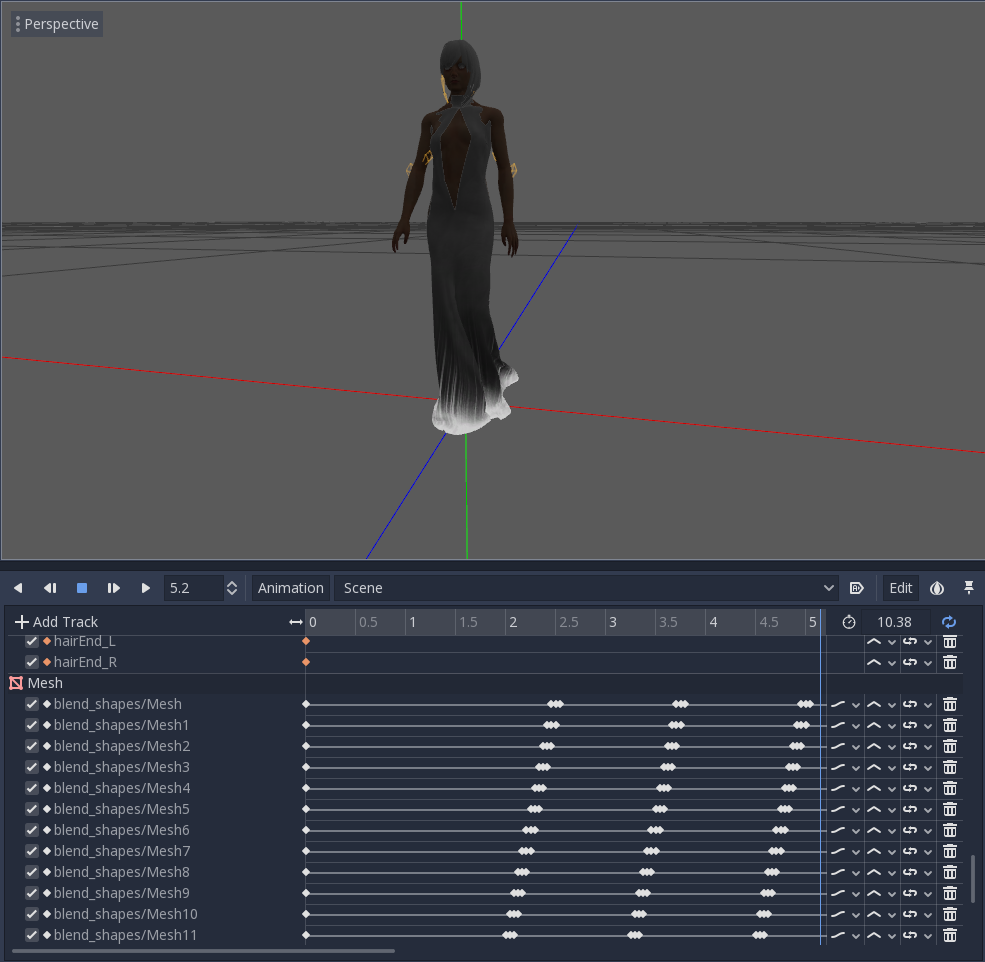
If it helps, I have integrated the FBX importer including animating blend shapes to Godot Game Engine:
fire
on 8 Apr 2019
Likewise, am also on the patreon for this feature :)
Sent with GitHawk
Casuallynoted
on 8 Apr 2019
Hi, thanks for all the preparations. I will do my very best!
 kkulling
on 10 Apr 2019
kkulling
on 10 Apr 2019
Just signed up to the $10 tier and would also like to vote for this feature.
 ProbablePrime
on 26 Apr 2019
ProbablePrime
on 26 Apr 2019
I'm a $10 tier, voting for this issues to be worked on.
 0utsider8989
on 16 May 2019
0utsider8989
on 16 May 2019
Got it, I will work on it. Where can I get the Godot plugin?
 kimkulling
on 24 May 2019
kimkulling
on 24 May 2019
Godot engine master uses https://github.com/godotengine/godot/tree/master, while I have a fork that is more experimental https://github.com/fire/godot/tree/assimp_fixes here.
https://docs.godotengine.org/en/3.1/development/compiling/compiling_for_windows.html
I believe the above problems exists in the assimp viewer too.
fire
on 24 May 2019
Hi Kim, I’ve just contributed my support level of $25 per month in reference to @Frooxius ‘s post of this issue. It is indeed very important to the experience as mentioned prior :) I hope this helps!
 SecretHippo1
on 30 May 2019
SecretHippo1
on 30 May 2019
Looks complicated. At the moment I try to get it. Even with multi-amterials the aiAnimMeshes will be generated ( for BeastBoy.fbx ). But the handling for MultiMaterialMeshes will never been called.
One question: the multiMaterial feature is for instances? Or what is the base idea behind this.
kimkulling
on 18 Jun 2019
Looks complicated. At the moment I try to get it. Even with multi-amterials the aiAnimMeshes will be generated ( for BeastBoy.fbx ). But the handling for MultiMaterialMeshes will never been called.
One question: the multiMaterial feature is for instances? Or what is the base idea behind this.
As far as I know, it's essentially just a way to group multiple sub-meshes and consider them one, for example when you want to have multiple materials on a single mesh. I think this lets them share some vertice data, although it's not a requirement.
It seems that Assimp simply converts them into multiple meshes on the same node. For example for the BeastBoy.fbx after import there are two meshes under the "Body" node. I believe this is done by the ConvertMeshMultiMaterial function, but it lacks the conversion routine for the decoded BlendShapes (which ConvertMeshSingleMaterial has). This means they don't end up in the Assimp data model, although they seem to be decoded.
Does this help? I can have a look and get some more data or meshes to test with.
Frooxius
on 18 Jun 2019
@kimkulling I've got some more information for you based on what I found out. I've used the latest commit on the master branch for this to make sure it's all up to date: https://github.com/assimp/assimp/commit/3929ea064468dfe54b0d2de7e45aa4702d5a8f12
I run the assimp_cmd to test with the sample file, using "info TestFile.fbx" command so it just prints out diagnostic information and I place breakpoints in various parts of the code to see what's going on.
Wolf.fbx - single material, blendshapes convert correctly to anim meshes.
After import, contains single mesh, mesh->mNumAnimMeshes indicates 101.
If you place breakpoint at line 1164 in the FBXConverter.cpp file ( https://github.com/assimp/assimp/blob/3929ea064468dfe54b0d2de7e45aa4702d5a8f12/code/FBX/FBXConverter.cpp#L1164 ), you can see this iterates over imported blendshapes and converts them to aiAnimMesh.
BeastBoy.fbx - multi-material, blendshapes are not converted to anim meshes.
After import, contains 4 meshes, all have mesh->mNumAnimMeshes equaling to 0.
The source file contains 2 single-material meshes without blendshapes (those can be ignored) and 1 mesh with two materials which has the blendshapes that should be converted.
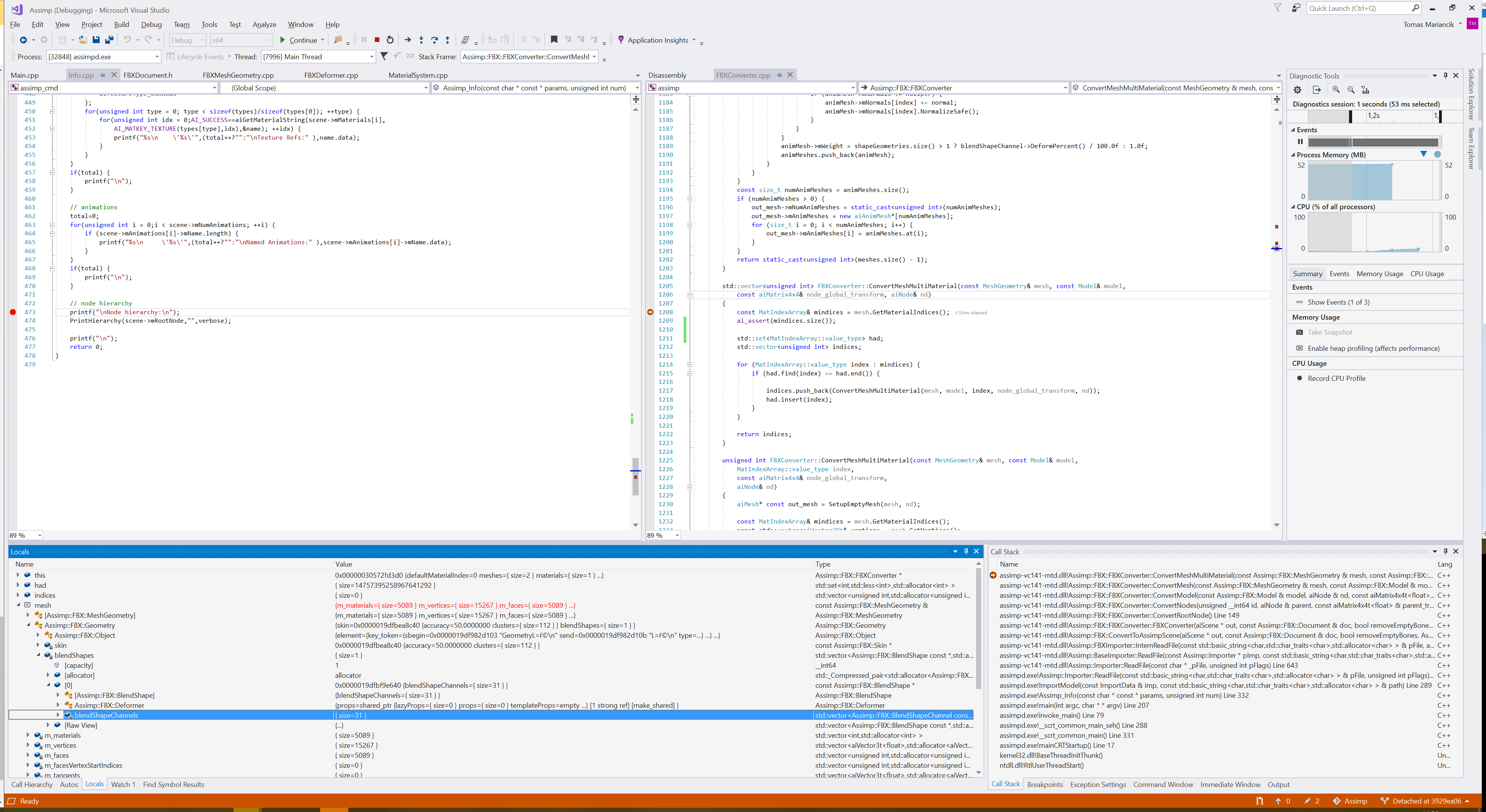
If you place breakpoint at line 1208 in the FBXConverter.cpp ( https://github.com/assimp/assimp/blob/3929ea064468dfe54b0d2de7e45aa4702d5a8f12/code/FBX/FBXConverter.cpp#L1208 ), you can see that the function ConvertMeshMultiMaterial is called for one of the meshes instead of ConvertMeshSingleMaterial.
If you examine the MeshGeometry& mesh instance with debugger, you can see that it contains 31 blendShapeChannels (see the screenshot below). The function calls ConvertMeshMultiMaterial at line 1225 twice, which generates two aiMesh structures.
However unlike ConvertMeshSingleMaterial this doesn't convert the blend shapes at all, so no aiAnimMesh are generated, even though they seem to be decoded in the MeshGeometry instance.
I'm not too familiar with Assimp's internals to judge this, but it seems like ConvertMeshMultiMaterial just needs the blend shape to aiAnimMesh conversion that ConvertMeshSingleMaterial has to make this work, so that the resulting aiMesh instances will have them as if they were separate single-material meshes.
I've tried simply copy-pasting the conversion from ConvertMeshSingleMaterial, but this ends up in the code accessing out of bounds memory, so I assume that it needs to somehow recalculate the indices (it seems to do that for normals, tangents and other data), but I'd need to study the code a lot more to see how is this done.
I hope this helps though!
Frooxius
on 19 Jun 2019
Edit: Corrent, there is no blend-shape conversion be done when parsing a multi-material-mesh.
kimkulling
on 19 Jun 2019
So, I just tried to generate a anim-mesh instance for the mesh with a new material, but there occurrs a memory issue. I need to understand this to give you an update.
kkulling
on 21 Jun 2019
I would like to mention I have been happy to see you are now spending more time on this aspect of the project, and have therefor reinstated my monthly donation of $10 to you. if you had a higher $ tier i would have even chosen that. Please make this work <3 thank you
kaileiBubble
on 25 Jun 2019
Thanks a lot for the support. It is complicated at the moment to spend the time with a day-job and a family. So sometimes there is not so much progress and I am unhappy with this situation as well. SO sorry for that.
I am trying my very best, that what I can promise :-).
kkulling
on 25 Jun 2019
So, if I get this right:
- In FBX meshes can have more than one material, in assimp a mesh is directly assigned to one material ( 1... 1 relation)
- When more that one material will be used in the mesh the corresponding faces with this special material will be created, which contains only the vertices / normals / texture-coords for the deticated material used in this mesh
When doing just an ordinary copy op for the blendshapes all the vertices for this mesh will take into account even if there are not part of the new generated mesh for this special material. So after splitting the original mesh with 2000 vertices we will get 2 meshes with 1500 vertices and one with 500 vertices. When doing the normal copy I will get a crash because of a out-of-bound exception or a currupted heap because I will write at an invalid position.
The error I have reported about is caused by the fact that the getting og the vertex is using std::vector
This is my current state of the crash I got. As I said before: complicated :-) ...
kkulling
on 26 Jun 2019
Yes, I would definitely want to say thanks for your hard work on this too (not just this issue, but the whole library), especially since you do it in your free time. We want to keep support this project with what we can, even beyond this issue.
Also I think your assessment is correct. Since Assimp has 1 to 1 relation between meshes and materials, it's splitting the 1 to many mesh into several meshes, each with their own material and splitting the mesh data seems where it gets hairy.
To provide a little more context, in my project, I translate the mesh back into a multi-material one (Assimp puts the meshes onto a single node), so that works well enough. In a game engine that makes the rendering more efficient, as it's considered as one object, so culling and other per-object processing doesn't need to be done for each submesh individually.
Frooxius
on 27 Jun 2019
I guess the reason for that 1 ... 1 relation between mesh and material makes things complicated not only at this place. But I am not sure. Any other opinions?
kkulling
on 27 Jun 2019
On my end the 1 ... 1 relation is mostly fine, it's easier to put back together as I just append the mesh data. It might be interesting if Assimp supported multi-material meshes natively in the future, but that sounds like a major change to the whole API/ABI.
If the blendshape data is split into the individual meshes correctly (the normals, UV's and so on have to be too I imagine) then it's perfect on my end.
Frooxius
on 27 Jun 2019
Shall be fixed now!
kkulling
on 4 Jul 2019
Related issues
 junjiaokou
·
4Comments
kimkulling
·
5Comments
junjiaokou
·
4Comments
kimkulling
·
5Comments
 krupitskas
·
3Comments
krupitskas
·
3Comments
 outfrost
·
7Comments
outfrost
·
7Comments
 astrand130
·
6Comments
astrand130
·
6Comments
Most helpful comment
Hi, thanks for all the preparations. I will do my very best!