Aspnetcore: Blazor wasm authentication issue getting token to call api - .NET 5 RC1 - AD b2c
Client: https://localhost:5001
API: https://localhost:5002
When using
.AddHttpMessageHandler<BaseAddressAuthorizationMessageHandler>();
I get a 401 error, so I created a
.AddHttpMessageHandler<CustomAuthorizationMessageHandler>();
    public class CustomAuthorizationMessageHandler : AuthorizationMessageHandler
    {
        public CustomAuthorizationMessageHandler(IAccessTokenProvider provider,
            NavigationManager navigationManager)
            : base(provider, navigationManager)
        {
            ConfigureHandler(
                authorizedUrls: new[] { "https://localhost:5002" },
                scopes: new[] { "https://bla.onmicrosoft.com/{guidhere}/API.Access" });
        }
    }
Client: Programs.cs
builder.Services.AddScoped<CustomAuthorizationMessageHandler>();

builder.Services.AddScoped(sp => new HttpClient { BaseAddress = new Uri("https://localhost:5002") });

builder.Services.AddHttpClient("API", client => client.BaseAddress = new Uri("https://localhost:5002"))
                          .AddHttpMessageHandler<CustomAuthorizationMessageHandler>();

builder.Services.AddScoped(sp => sp.GetRequiredService<IHttpClientFactory>()
                .CreateClient("API"));

builder.Services.AddMsalAuthentication<AuthState>(options =>
{
                builder.Configuration.Bind("AzureAdB2C", options.ProviderOptions.Authentication);
                options.ProviderOptions.LoginMode = "redirect";
                options.ProviderOptions.DefaultAccessTokenScopes.Add("https://bla.onmicrosoft.com/{guidhere}/API.Access");
                options.AuthenticationPaths.LogOutSucceededPath = "";
});
I am getting this error.
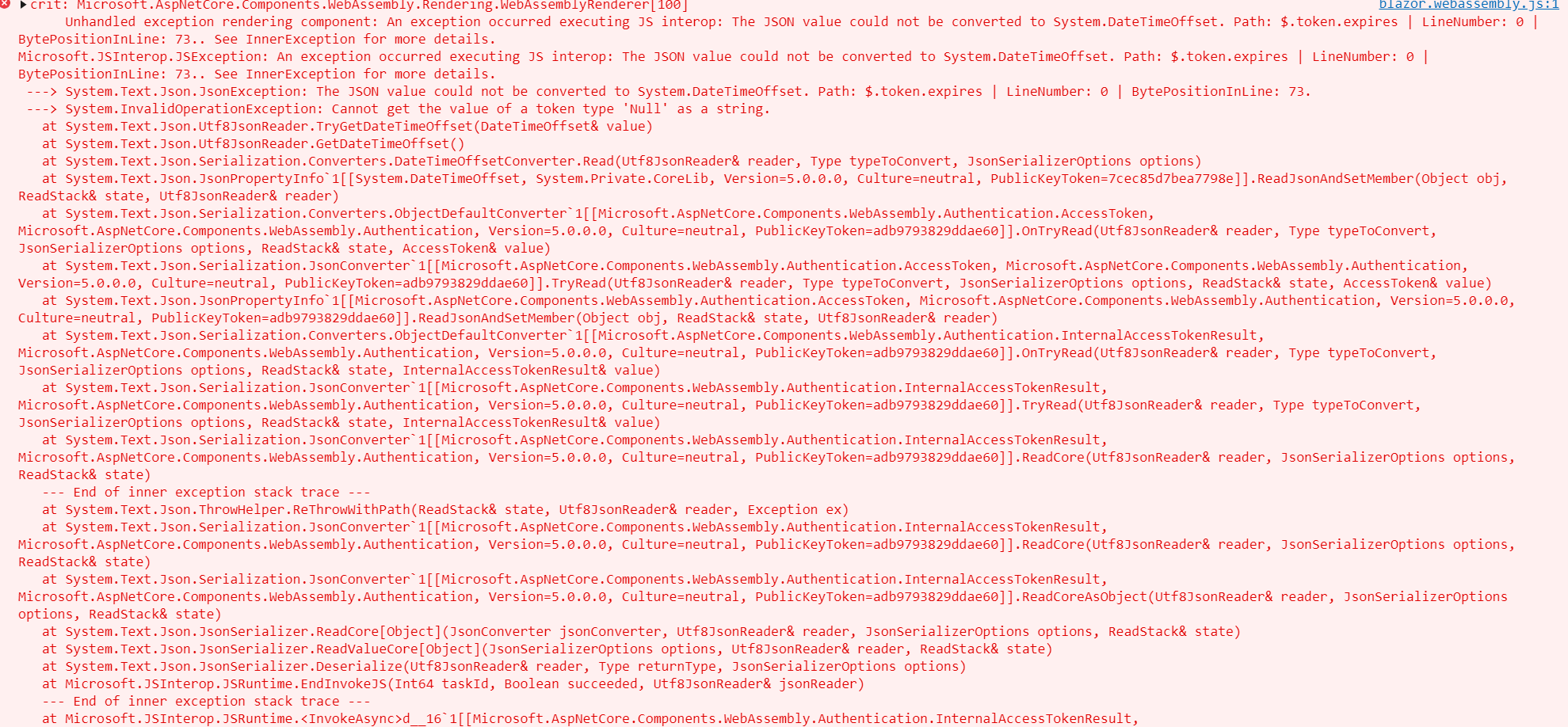
NOTE: Azure b2c application is setup as SPA, not WEB and this is what it should be with the very latest. (I am able to login just fine.)

I've tried everything. I either get a 401 error or the error above if I use CustomAuthorizationMessageHandler above.
Either this is a bug or I need to be pointed in the direction of some code on how to setup Program.cs for the client and Startup.cs for the WebAPI project for B2C [Authorize]
 BruceHunter
All 5 comments
Thanks for reporting this issue, @BruceHunter.
Can you confirm that the client B2C app is granted permissions to the API in Azure portal?
 captainsafia
on 28 Sep 2020
captainsafia
on 28 Sep 2020
@captainsafia
I have confirmed that this is not an issue. This "json" error above happens when you do not add a permission and grant consent under "Applications" -> API permissions.
To all other developers, the full scope URI value in the CustomAuthorizationMessageHandler class is needed and make sure it matches.
Feature?
I think that logic should be added that hints to this maybe? Throws a better error? I'm sure the logic can determine if this is MSFT AD B2C or not and switch off that?
Documentation Addition about this step?
https://docs.microsoft.com/en-us/aspnet/core/blazor/security/webassembly/hosted-with-azure-active-directory-b2c?view=aspnetcore-5.0
At the end of the day I got it working.
BruceHunter
on 28 Sep 2020
@BruceHunter
Feature?
I think that logic should be added that hints to this maybe? Throws a better error? I'm sure the logic can determine if this is MSFT AD B2C or not and switch off that?
Unfortunately the layer that handles that is agnostic to Azure AD or Azure AD B2C and we wouldn't add that type of logic there.
Documentation Addition about this step?
One one hand I hear you and want to add this to the docs, on the other hand, it's problematic because that creates a maintenance cost for us if this ever changes in the future.
I'm not sure if there are other libraries that handle this differently, but from what I can tell/remember, you always specified the full URL for the scope for msal.js and MSAL.NET, and that's what the AAD docs and the portal UI indicate.
@guardrex maybe we can cross-link some docs here to Azure AD and Azure AD B2C docs?
 javiercn
on 29 Sep 2020
javiercn
on 29 Sep 2020
I'm closing this issue since there is no more action for us to take here at the moment.
javiercn
on 29 Sep 2020
@BruceHunter ... Can you open a docs issue for this so that we can discuss it further? I'm a bit buried in code at the moment ⛰️⛏️, but we can talk about this at some point in the next few days (or a week! 🏃😅). Open a new issue from the bottom of the topic ... and all you need to do for the body of the issue is place a cross-link to this issue. I'll triage it and then ping u back to discuss asap.
 guardrex
on 29 Sep 2020
guardrex
on 29 Sep 2020
Related issues
 ermithun
·
3Comments
ermithun
·
3Comments
 Kevenvz
·
3Comments
Kevenvz
·
3Comments
 UweKeim
·
3Comments
UweKeim
·
3Comments
 TanvirArjel
·
3Comments
TanvirArjel
·
3Comments
 groogiam
·
3Comments
groogiam
·
3Comments