Aspnetcore: Debug-level configuration not respected by logger in blazor wasm
To reproduce
- Create a new Blazor WASM project.
$ dotnet new blazorwasm -o logger-repro
- Create a
wwwroot/appsettings.jsonfile with the following contents:
{
  "Logging": {
    "LogLevel": {
      "Default": "Warning"
    }
  }
}
- Create a
wwwroot/appsettings.Development.jsonfile with the following contents:
{
  "Logging": {
    "LogLevel": {
      "Default": "Trace"
    }
  }
}
- Add package reference to
logger-repro.csproj:
<Project Sdk="Microsoft.NET.Sdk.Web">

  <PropertyGroup>
    <TargetFramework>net5.0</TargetFramework>
    <RuntimeIdentifier>browser-wasm</RuntimeIdentifier>
    <UseBlazorWebAssembly>true</UseBlazorWebAssembly>
  </PropertyGroup>

  <ItemGroup>
    <PackageReference Include="Microsoft.AspNetCore.Components.WebAssembly" Version="5.0.0-preview.7.20365.19" />
    <PackageReference Include="Microsoft.AspNetCore.Components.WebAssembly.DevServer" Version="5.0.0-preview.7.20365.19" PrivateAssets="all" />
    <PackageReference Include="System.Net.Http.Json" Version="5.0.0-preview.7.20364.11" />

    <PackageReference Include="Microsoft.Extensions.Logging.Configuration" Version="5.0.0-preview.7.20364.11" />
  </ItemGroup>

</Project>
- Setup logging in
Program.csby adding the following line:
builder.Logging.AddConfiguration(builder.Configuration.GetSection("Logging"));
- Add a set of logging statements to the Counter component.
@page "/counter"

@using Microsoft.Extensions.Logging
@inject ILogger<Counter> logger;

<h1>Counter</h1>

<p>Current count: @currentCount</p>

<button class="btn btn-primary" @onclick="IncrementCount">Click me</button>

@code {
    private int currentCount = 0;

    private void IncrementCount()
    {
        logger.Log(LogLevel.Critical, "This is critical.");
        logger.Log(LogLevel.Error, "This is error.");
        logger.Log(LogLevel.Warning, "This is warning.");
        logger.Log(LogLevel.Information, "This is info.");
        logger.Log(LogLevel.Debug, "This is debug.");
        logger.Log(LogLevel.Trace, "This is trace.");
        currentCount++;
    }
}
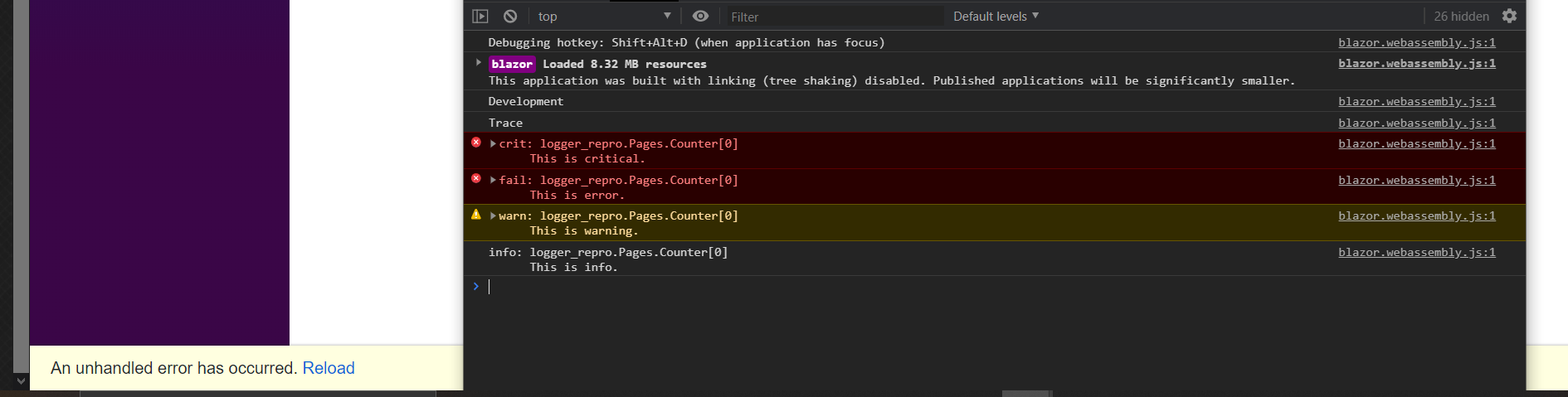
- Run the app and observe that when you click the increment button the critical, error, warning, and information log levels are displayed. Although the log level is set to trace the debug and trace messages are missing.
To ensure that the environment is correct and the correct log level is loaded in the configuration, I added this two lines to the Program.cs file:
Console.WriteLine(builder.HostEnvironment.Environment);
Console.WriteLine(builder.Configuration.GetValue<string>("Logging:LogLevel:Default"));
It also looks like the app is crashing...
Environement:
$ dotnet --info
.NET SDK (reflecting any global.json):
 Version:   5.0.100-preview.7.20366.6
 Commit:    0684df3a5b

Runtime Environment:
 OS Name:     Windows
 OS Version:  10.0.18362
 OS Platform: Windows
 RID:         win10-x64
 Base Path:   C:\Program Files\dotnet\sdk\5.0.100-preview.7.20366.6\

Host (useful for support):
  Version: 5.0.0-preview.7.20364.11
  Commit:  53976d38b1
 msschl
All 7 comments
FYI @captainsafia
 pranavkm
on 10 Aug 2020
pranavkm
on 10 Aug 2020
It also looks like the app is crashing...
That's intentional. We trigger that when the user logs a critical error.
Run the app and observe that when you click the increment button the critical, error, warning, and information log levels are displayed. Although the log level is set to trace the debug and trace messages are missing.
Hm. We have a test validating this scenario that I added in https://github.com/dotnet/aspnetcore/pull/20973 after running into the same issue while validating (https://github.com/dotnet/aspnetcore/issues/20969).
Does it work if you do this?
{
  "Logging": {
    "WebAssemblyConsoleLoggerProvider": {
        "LogLevel": {
              "Default": "Trace"
         }
     }
  }
}
 captainsafia
on 11 Aug 2020
captainsafia
on 11 Aug 2020
No it's still not working...
{
  "Logging": {
    "WebAssemblyConsoleLoggerProvider": {
        "LogLevel": {
              "Default": "Trace"
         }
     }
  }
}
It also looks like the test LogsUsingCustomLogger only asserts for log levels Info, Warning, and Severe.
I found this comment though:
None of these severity levels are displayed by default, so at the end we'll continue to see "Test log message" as the most recent output
msschl
on 11 Aug 2020
None of these severity levels are displayed by default, so at the end we'll continue to see "Test log message" as the most recent output
Yep -- this is the test. We set the default log level on the PrependMessage logger to "Warning". The default log level on the ConsoleLogger remains at "Info". Then we check to see if the PrependMessage logger did not print out the warning level log and the info logger did.
Perhaps there's something going on with setting the log level on the default logger that needs to be investigated here.
Marking this as help wanted and moving it to Backlog since it's a good candidate for sprint participation.
@msschl If you're interested in helping resolve this bug, consider participating in this Thursday's sprint.
captainsafia
on 11 Aug 2020
We've moved this issue to the Backlog milestone. This means that it is not going to be worked on for the coming release. We will reassess the backlog following the current release and consider this item at that time. To learn more about our issue management process and to have better expectation regarding different types of issues you can read our Triage Process.
![msftbot[bot] picture](https://avatars2.githubusercontent.com/in/26612?v=4&s=40) msftbot[bot]
on 11 Aug 2020
msftbot[bot]
on 11 Aug 2020
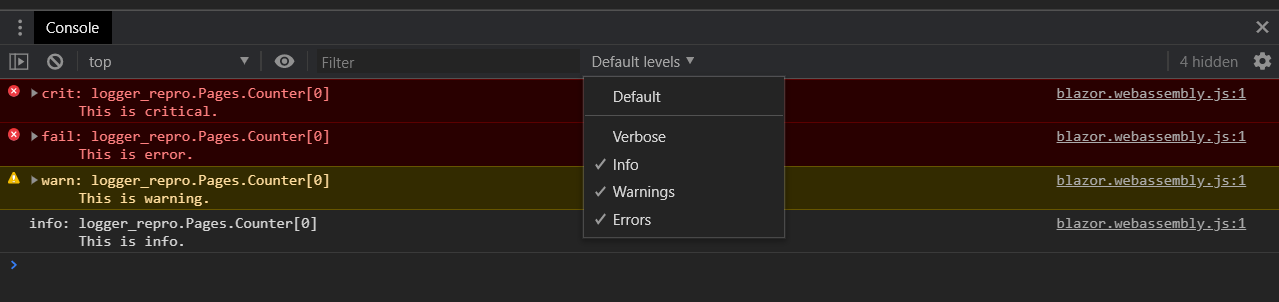
Closing this issue since I found the cause of my problem. :see_no_evil:
For all having the same issue: Check the log level in the chrome browser console. The default setting only shows messages with a log level of info, warning and errors.
msschl
on 25 Aug 2020
Related issues
 githubgitgit
·
3Comments
githubgitgit
·
3Comments
 fayezmm
·
3Comments
fayezmm
·
3Comments
 markrendle
·
3Comments
markrendle
·
3Comments
 TanvirArjel
·
3Comments
TanvirArjel
·
3Comments
 guardrex
·
3Comments
guardrex
·
3Comments
Most helpful comment
Closing this issue since I found the cause of my problem. :see_no_evil:
For all having the same issue: Check the log level in the chrome browser console. The default setting only shows messages with a log level of info, warning and errors.
