Aspnetcore: In Production, a non-GET request returns 400 Bad Request instead of 500 when a server error happens
Describe the bug
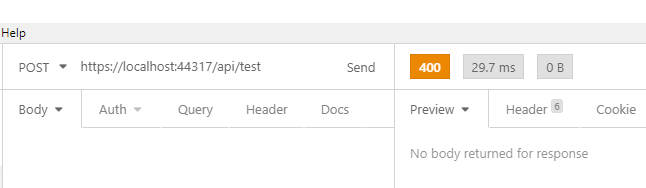
In a ASP.NET Core Website project with Razor Pages (and then add API Controller), if a non-GET request failed due to unhandled exception, 400 Bad Request respond is returned instead of 500.
To Reproduce
It's very simple to reproduce:
Create a new project with Web Application template (does not happen to API Template).
Add a new API Controller with simple actions that just throw any exception like in the repo file.
Add
endpoints.MapControllers();so Controllers work. Optionally removeapp.UseDeveloperExceptionPage();to prove that in Development, the problem does not happen even with this page disabled.Set the Debug Environment Variable
ASPNETCORE_ENVIRONMENTtoProductionTry to access the endpoint with different verbs, only GET returns 500 while POST, PUT and DELETE returns 400.


Exceptions (if any)
None
Further technical details
ASP.NET Core version: 3.1.0
Include the output of
dotnet --info
.NET Core SDK (reflecting any global.json):
 Version:   3.1.301
 Commit:    7feb845744

Runtime Environment:
 OS Name:     Windows
 OS Version:  10.0.18363
 OS Platform: Windows
 RID:         win10-x64
 Base Path:   C:\Program Files\dotnet\sdk\3.1.301\

Host (useful for support):
  Version: 3.1.5
  Commit:  65cd789777

.NET Core SDKs installed:
  2.2.207 [C:\Program Files\dotnet\sdk]
  3.1.201 [C:\Program Files\dotnet\sdk]
  3.1.301 [C:\Program Files\dotnet\sdk]

.NET Core runtimes installed:
  Microsoft.AspNetCore.All 2.1.19 [C:\Program Files\dotnet\shared\Microsoft.AspNetCore.All]
  Microsoft.AspNetCore.All 2.2.8 [C:\Program Files\dotnet\shared\Microsoft.AspNetCore.All]
  Microsoft.AspNetCore.App 2.1.19 [C:\Program Files\dotnet\shared\Microsoft.AspNetCore.App]
  Microsoft.AspNetCore.App 2.2.8 [C:\Program Files\dotnet\shared\Microsoft.AspNetCore.App]
  Microsoft.AspNetCore.App 3.1.3 [C:\Program Files\dotnet\shared\Microsoft.AspNetCore.App]
  Microsoft.AspNetCore.App 3.1.5 [C:\Program Files\dotnet\shared\Microsoft.AspNetCore.App]
  Microsoft.NETCore.App 2.1.19 [C:\Program Files\dotnet\shared\Microsoft.NETCore.App]
  Microsoft.NETCore.App 2.2.8 [C:\Program Files\dotnet\shared\Microsoft.NETCore.App]
  Microsoft.NETCore.App 3.1.3 [C:\Program Files\dotnet\shared\Microsoft.NETCore.App]
  Microsoft.NETCore.App 3.1.5 [C:\Program Files\dotnet\shared\Microsoft.NETCore.App]
  Microsoft.WindowsDesktop.App 3.1.5 [C:\Program Files\dotnet\shared\Microsoft.WindowsDesktop.App]
- The IDE (VS / VS Code/ VS4Mac) you're running on, and it's version: VS 2019 16.6.3 on Windows 10 1909.
 datvm
datvm
All 7 comments
What do the server logs say?
 Tratcher
on 8 Jul 2020
Tratcher
on 8 Jul 2020
Similar to all other unhandled exception in requests:
fail: Microsoft.AspNetCore.Diagnostics.ExceptionHandlerMiddleware[1]

      An unhandled exception has occurred while executing the request.

System.IO.IOException: I/O error occurred.

   at WebApplication2.Controllers.TestController.PostSomething() in C:\Users\datvm\source\repos\WebApplication1\WebApplication2\Controllers\TestController.cs:line 25

   at lambda_method(Closure , Object , Object[] )

   at Microsoft.Extensions.Internal.ObjectMethodExecutor.Execute(Object target, Object[] parameters)

   at Microsoft.AspNetCore.Mvc.Infrastructure.ActionMethodExecutor.SyncActionResultExecutor.Execute(IActionResultTypeMapper mapper, ObjectMethodExecutor executor, Object controller, Object[] arguments)

   at Microsoft.AspNetCore.Mvc.Infrastructure.ControllerActionInvoker.InvokeActionMethodAsync()

   at Microsoft.AspNetCore.Mvc.Infrastructure.ControllerActionInvoker.Next(State& next, Scope& scope, Object& state, Boolean& isCompleted)

   at Microsoft.AspNetCore.Mvc.Infrastructure.ControllerActionInvoker.InvokeNextActionFilterAsync()

--- End of stack trace from previous location where exception was thrown ---

   at Microsoft.AspNetCore.Mvc.Infrastructure.ControllerActionInvoker.Rethrow(ActionExecutedContextSealed context)

   at Microsoft.AspNetCore.Mvc.Infrastructure.ControllerActionInvoker.Next(State& next, Scope& scope, Object& state, Boolean& isCompleted)

   at Microsoft.AspNetCore.Mvc.Infrastructure.ControllerActionInvoker.InvokeInnerFilterAsync()

--- End of stack trace from previous location where exception was thrown ---

   at Microsoft.AspNetCore.Mvc.Infrastructure.ResourceInvoker.<InvokeNextResourceFilter>g__Awaited|24_0(ResourceInvoker invoker, Task lastTask, State next, Scope scope, Object state, Boolean isCompleted)

   at Microsoft.AspNetCore.Mvc.Infrastructure.ResourceInvoker.Rethrow(ResourceExecutedContextSealed context)

   at Microsoft.AspNetCore.Mvc.Infrastructure.ResourceInvoker.Next(State& next, Scope& scope, Object& state, Boolean& isCompleted)

   at Microsoft.AspNetCore.Mvc.Infrastructure.ResourceInvoker.InvokeFilterPipelineAsync()

--- End of stack trace from previous location where exception was thrown ---

   at Microsoft.AspNetCore.Mvc.Infrastructure.ResourceInvoker.<InvokeAsync>g__Awaited|17_0(ResourceInvoker invoker, Task task, IDisposable scope)

   at Microsoft.AspNetCore.Routing.EndpointMiddleware.<Invoke>g__AwaitRequestTask|6_0(Endpoint endpoint, Task requestTask, ILogger logger)

   at Microsoft.AspNetCore.Authorization.AuthorizationMiddleware.Invoke(HttpContext context)

   at Microsoft.AspNetCore.Diagnostics.ExceptionHandlerMiddleware.<Invoke>g__Awaited|6_0(ExceptionHandlerMiddleware middleware, HttpContext context, Task task)
This is related to https://github.com/dotnet/aspnetcore/issues/18186. The HTTP verb from the initial request is used when executing the error handler /Pages/Error.cshtml. For non-GET and HEAD requests, Razor Pages will attempt to validate antiforgery tokens. Skipping those should help here.
    [ResponseCache(Duration = 0, Location = ResponseCacheLocation.None, NoStore = true)]
+   [IgnoreAntiforgeryToken]
    public class ErrorModel : PageModel
I suppose we should do this in the templates by default if we aren't planning on addressing the linked issue for 5.0.
 pranavkm
on 8 Jul 2020
pranavkm
on 8 Jul 2020
This is related to #18186. The HTTP verb from the initial request is used when executing the error handler
/Pages/Error.cshtml. For non-GET and HEAD requests, Razor Pages will attempt to validate antiforgery tokens. Skipping those should help here.[ResponseCache(Duration = 0, Location = ResponseCacheLocation.None, NoStore = true)] + [IgnoreAntiforgeryToken] public class ErrorModel : PageModelI suppose we should do this in the templates by default if we aren't planning on addressing the linked issue for 5.0.
Thanks, can confirm this works and is correct. Also explains why the API template does not have this problem.
However it's strange that the problem does not happen in Development even with UseDeveloperExceptionPage removed. It caused me quite a bit of trouble finding the problem because it only happened to one of my solution when it's on production server.
datvm
on 9 Jul 2020
That's likely because AddExceptionHandler is only added in non-Development environment. If you were to unconditionally add it in lieu of the developer exception page, you would see this fail locally.
pranavkm
on 9 Jul 2020
We've moved this issue to the Backlog milestone. This means that it is not going to be worked on for the coming release. We will reassess the backlog following the current release and consider this item at that time. To learn more about our issue management process and to have better expectation regarding different types of issues you can read our Triage Process.
![msftbot[bot] picture](https://avatars2.githubusercontent.com/in/26612?v=4&s=40) msftbot[bot]
on 21 Jul 2020
msftbot[bot]
on 21 Jul 2020
A fix for this would be add [IgnoreAntiforgeryToken] to https://github.com/dotnet/aspnetcore/blob/master/src/ProjectTemplates/Web.ProjectTemplates/content/RazorPagesWeb-CSharp/Pages/Error.cshtml.cs#L13
pranavkm
on 21 Jul 2020
Related issues
 FourLeafClover
·
3Comments
FourLeafClover
·
3Comments
 Kevenvz
·
3Comments
Kevenvz
·
3Comments
 TanvirArjel
·
3Comments
TanvirArjel
·
3Comments
 aurokk
·
3Comments
aurokk
·
3Comments
 bgribaudo
·
3Comments
bgribaudo
·
3Comments