Aspnetcore: Downloading the file from azure file storage gets hanged in blazor web assembly
Describe the bug
Trying to download the file from azure file storage in blazor web assembly application. when checking whether cloudFileShare.Exists(), application gets hanged.
To Reproduce
Code snippet to reproduce the issue.
string fileReference = "GiantPanda.docx";
CloudStorageAccount cloudStorageAccount = CloudStorageAccount.Parse(connectionString);
CloudFileClient fileClient = cloudStorageAccount.CreateCloudFileClient();
//Get file share
CloudFileShare cloudFileShare = fileClient.GetShareReference(shareReference);
if (cloudFileShare.Exists())
{
//Get the related directory
CloudFileDirectory dir = cloudFileShare.GetRootDirectoryReference();
if (dir.Exists())
{
//Get the file reference
CloudFile file = dir.GetFileReference(fileReference);
FileStream memoryStream = new FileStream("wwwroot/sample-data/GiantPandasaved.docx", FileMode.OpenOrCreate, FileAccess.ReadWrite);
//Download file to local disk
await file.DownloadToStreamAsync(memoryStream);
}
}
Microsoft.Azure.Storage.File - 11.1.6
Microsoft.AspNetCore.Components.WebAssembly - 3.2.0-preview2.20160.5
Exceptions (if any)
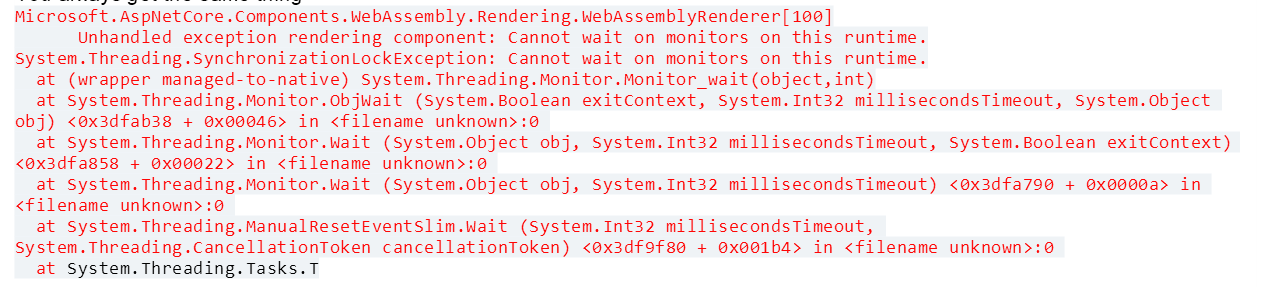
Further technical details
NET Core SDK (reflecting any global.json):
Version: 3.1.300
Runtime Environment:
OS Name: Windows
OS Version: 10.0.18362
OS Platform: Windows
Host (useful for support):
 harinichellappa1921
All 8 comments
@pakrym do you want to create a new issue tracking this on your side?
 mkArtakMSFT
on 4 Jun 2020
mkArtakMSFT
on 4 Jun 2020
@harinichellappa1921 if you switch to the async implementation of the APIs you're using, things may get fixed. Try to use ExistsAsync() instead.
mkArtakMSFT
on 4 Jun 2020
I think it's the case of using sync APIs that end up doing sync-over-async because of lack of better alternatives.
 pakrym
on 4 Jun 2020
pakrym
on 4 Jun 2020
ExistsAsync doesn't work in this case. Maybe change in the nuget package?
 Oredna
on 4 Jun 2020
Oredna
on 4 Jun 2020
Why doesn't ExistsAsync work? Do you get the same error?
pakrym
on 4 Jun 2020
Oh, wait, my bad, you are using version 11 of the package. There is a new set of storage client libraries that do work with blazor, take a look at https://www.nuget.org/packages/Azure.Storage.Blobs / https://www.nuget.org/packages/Azure.Storage.Files
pakrym
on 4 Jun 2020
Yes it works for me now, i dont know for @harinichellappa1921. It wasn't Azure.Storage.Files, but Azure.Storage.Files.Shares that did the trick. Thank you.
Oredna
on 4 Jun 2020
This issue has been automatically marked as stale because it has been marked as requiring author feedback but has not had any activity for 4 days. It will be closed if no further activity occurs within 3 days of this comment. If it is closed, feel free to comment when you are able to provide the additional information and we will re-investigate.
See our Issue Management Policies for more information.
![msftbot[bot] picture](https://avatars2.githubusercontent.com/in/26612?v=4&s=40) msftbot[bot]
on 8 Jun 2020
msftbot[bot]
on 8 Jun 2020
Related issues
 markrendle
·
3Comments
markrendle
·
3Comments
 mj1856
·
3Comments
mj1856
·
3Comments
 rbanks54
·
3Comments
rbanks54
·
3Comments
 UweKeim
·
3Comments
UweKeim
·
3Comments
 groogiam
·
3Comments
groogiam
·
3Comments
Most helpful comment
Oh, wait, my bad, you are using version 11 of the package. There is a new set of storage client libraries that do work with blazor, take a look at https://www.nuget.org/packages/Azure.Storage.Blobs / https://www.nuget.org/packages/Azure.Storage.Files