Aspnetcore: Blazor EditContext.OnFieldChanged notify wrong item when a list is filter or sorted
Describe the bug
When the an EditForm's model contains a list of stuff and we have an UI allowing the user to filter or sort this list. The event EditContext.OnFieldChanged will contains the item at index of the not filtered nor sorted list modified and not the good one.
To Reproduce
@using System.ComponentModel.DataAnnotations

<EditForm EditContext="_editContext" OnValidSubmit="HandleValidSubmit">
    <DataAnnotationsValidator />
    <ValidationSummary />
    @foreach (var stuff in _model.List)
    {
        <div>
            @stuff.Id
            <InputText @bind-Value="stuff.Name" />
        </div>
    }
    <button type="submit">Submit</button>
</EditForm>
<button type="button" @onclick="Sort">Sort</button>
@code {
    private EditContext _editContext = new EditContext(new Model
    {
        List = new List<Stuff>
        {
                new Stuff(),
                new Stuff(),
                new Stuff(),
        }
    });

    private StuffComparer _stuffComparer = new StuffComparer();

    private Model _model => _editContext.Model as Model;

    private void Sort()
    {
        ((Model)_editContext.Model).List.Sort(_stuffComparer);
        StateHasChanged();
    }

    protected override void OnInitialized()
    {
        _editContext.OnFieldChanged += (sender, e) =>
        {
            Console.WriteLine((e.FieldIdentifier.Model as Stuff).Id);
        };
    }

    private void HandleValidSubmit()
    {
    }

    class Stuff
    {
        public string Id { get; set; } = Guid.NewGuid().ToString();

        [Required]
        public string Name { get; set; }
    }

    class Model
    {
        public List<Stuff> List { get; set; }
    }

    class StuffComparer : IComparer<Stuff>
    {
        bool desc;
        public int Compare(Stuff x, Stuff y)
        {
            desc = !desc;
            if (desc)
            {
                return y.Id.CompareTo(x.Id);
            }
            return x.Id.CompareTo(y.Id);
        }
    }
}

Further technical details
- Blazor 3.2
 aguacongas
All 4 comments
Hi,
Check out this link: https://blazor-university.com/components/render-trees/optimising-using-key/
When using a collection/loop and you are dynamically adding components within that loop you need to use the @key attribute to correctly identify each item.
Modify your code to include the @key attribute on the <InputText /> component. This will then track the correct component instances with the correct item from the collection.
E.g.
<InputText @bind-Value="stuff.Name" @key="stuff.Id" />
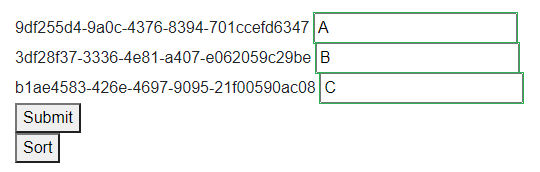
Before clicking the Sort button
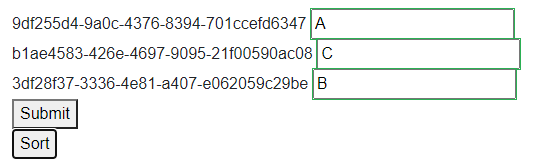
After clicking the Sort button
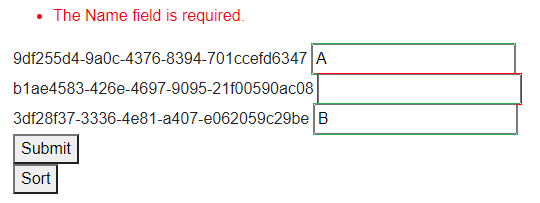
After clearing the "C" from middle TextInput component - validation fires correctly
 adrianwright109
on 29 May 2020
adrianwright109
on 29 May 2020
That fix the issue
aguacongas
on 29 May 2020
@aguacongas Please re-open this ticket. @key should be for optimising updates to make the deltas smaller, not for making the UI work correctly. This is a bug.
PS: I've simplified the example to eliminate the possibility of coder error.
@page "/"
@using System.ComponentModel.DataAnnotations

<EditForm Model=@_model>
    <DataAnnotationsValidator />
    <ValidationSummary />
    @foreach (var stuff in _model.List)
    {
        <div>
            @stuff.Id
            <InputText @bind-Value="stuff.Name" class="@stuff.Id" />
        </div>
    }
    <button type="submit">Submit</button>
</EditForm>
<button type="button" @onclick="Sort">Sort</button>

@code {
    private Model _model = new Model
    {
        List = Enumerable.Range(1, 3)
            .Reverse()
            .Select(x => new Stuff() { Id = x})
            .ToList()
    };

    private void Sort()
    {
        _model.List = _model.List.OrderBy(x => x.Id).ToList();
        StateHasChanged();
    }

    class Stuff
    {
        public int Id { get; set; }

        [Required]
        public string Name { get; set; }
    }

    class Model
    {
        public List<Stuff> List { get; set; }
    }
}
 mrpmorris
on 30 May 2020
mrpmorris
on 30 May 2020
We've moved this issue to the Backlog milestone. This means that it is not going to be worked on for the coming release. We will reassess the backlog following the current release and consider this item at that time. To learn more about our issue management process and to have better expectation regarding different types of issues you can read our Triage Process.
![msftbot[bot] picture](https://avatars2.githubusercontent.com/in/26612?v=4&s=40) msftbot[bot]
on 22 Sep 2020
msftbot[bot]
on 22 Sep 2020
Related issues
 ermithun
·
3Comments
ermithun
·
3Comments
 fayezmm
·
3Comments
fayezmm
·
3Comments
 Pixel-Lord
·
3Comments
Pixel-Lord
·
3Comments
 FourLeafClover
·
3Comments
FourLeafClover
·
3Comments
 bgribaudo
·
3Comments
bgribaudo
·
3Comments
Most helpful comment
Hi,
Check out this link: https://blazor-university.com/components/render-trees/optimising-using-key/
When using a collection/loop and you are dynamically adding components within that loop you need to use the
@keyattribute to correctly identify each item.Modify your code to include the
@keyattribute on the<InputText />component. This will then track the correct component instances with the correct item from the collection.E.g.
<InputText @bind-Value="stuff.Name" @key="stuff.Id" />Before clicking the Sort button

After clicking the Sort button

After clearing the "C" from middle TextInput component - validation fires correctly
