Aspnetcore: Regression - PWA manifest version no longer varies
A while ago, we fixed https://github.com/dotnet/aspnetcore/issues/19882 by adding a hash to service-worker.js, computed by combining the hashes of all the files listed in the assets manifest, during publish.
Unfortunately it looks like our logic for this has regressed. During one of the refactorings related to precompression just before we released, we changed the metadata name from %(FileHash) to %(Integrity), but this line was not updated:
The result is that, instead of combining all the hashes, it now combines a set of empty strings, which results in another empty string, and then we hash that to produce a fixed value (47DEQpj8). Since this value never changes, the browser doesn't try to fetch updates.
It's troubling that this was not caught by tests. We do have build/publish tests that check that some hash was produced, but we can't really check it's the right hash without actually replicating all the build logic. What we should probably do is extend the build/publish test to publish once, then modify a source file, publish again, and verify that the hash actually changed. We do have some publish tests that do this kind of thing.
 SteveSandersonMS
All 18 comments
Just a note for anyone experiencing this issue - a workaround for now is simply to manually add a line to the end of the file service-worker.published.js and update it before you publish.
e.g. /* updated 2020-05-01 11:19 */
This will be enough to trigger an update in the browser for now.
 SQL-MisterMagoo
on 1 Jun 2020
SQL-MisterMagoo
on 1 Jun 2020
Will this fix be released officially in a 3.x Blazor version?
 akorchev
on 15 Jun 2020
akorchev
on 15 Jun 2020
@akorchev Yes, we are planning to include a fix in the next patch release, whenever that happens. In the meantime you can use @SQL-MisterMagoo's workaround above.
SteveSandersonMS
on 15 Jun 2020
Found multiple "ServiceWorkerAssetsManifest.targets" files under nuget package i.e
C:\Users\XXXX.nuget\packages\microsoft.aspnetcore.components.webassembly.build\3.2.0\targets
Tried to look for "Lines="@(_ServiceWorkerAssetsManifestItemWithHash->'%(FileHash)')" but could not find it.
On the contrary i am finding this
<_ServiceWorkerAssetsManifestItemWithHash Include="%(Identity)">
gave it a try by changing it to FileHash, but the problem still persists
 nssidhu
on 26 Jun 2020
nssidhu
on 26 Jun 2020
Do not change the file, use the workaround provided here as suggested. A fix will be available in the next patch release.
 javiercn
on 26 Jun 2020
javiercn
on 26 Jun 2020
Tried that as well, it does not fix
Here is the how the service-worker.js looks after editing.
// In development, always fetch from the network and do not enable offline support.
// This is because caching would make development more difficult (changes would not
// be reflected on the first load after each change).
self.addEventListener('fetch', () => { });
//for testing
/* updated 2020-06-26 11:19 */
nssidhu
on 26 Jun 2020
May be that will work on new browsing, but how do i get out of mess where user has already added PWA to the home screen ?
nssidhu
on 26 Jun 2020
@nssidhu clear the application state through the developer tools or uninstall the PWA
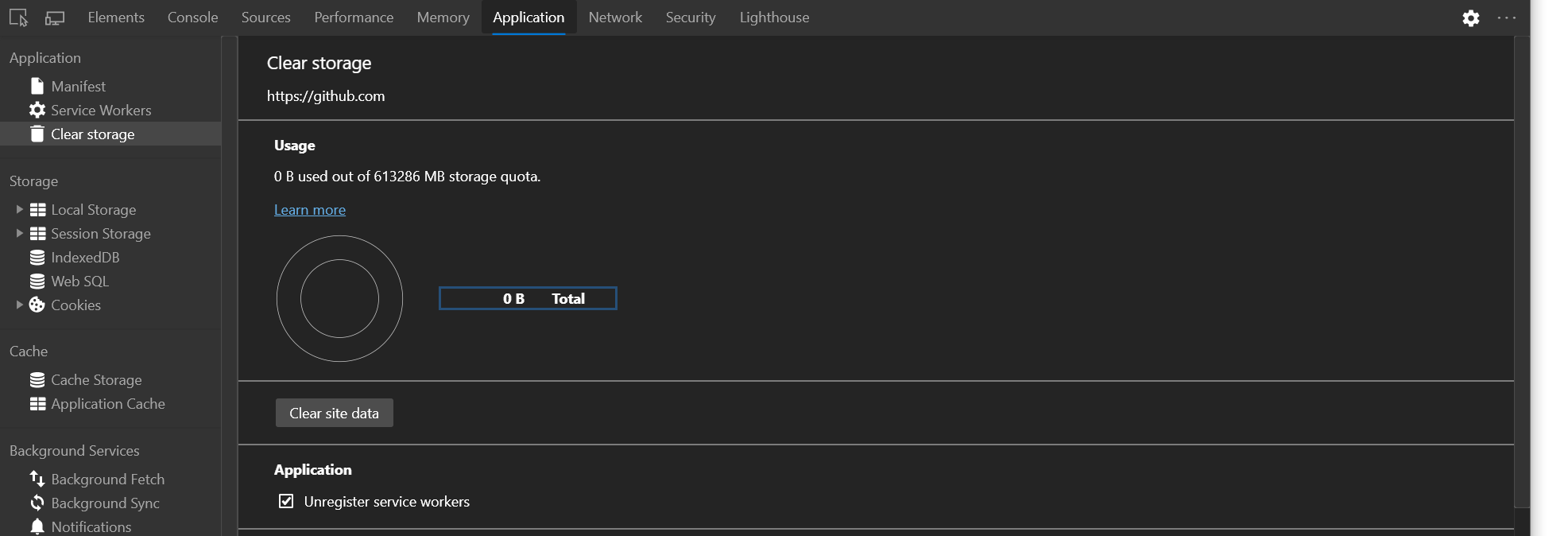
javiercn
on 26 Jun 2020
@javiercn on the Desktop yes i can clear the cache, have been doing that.
This is more on Mobile IPhone X Max where user added the App to Home screen in IOS,
I tried deleting the App on IOS and added it again t Home Screen and it adds the old App.
When i browse the app using safari on IPhone, it still show the old app.
nssidhu
on 26 Jun 2020
@nssidhu Did you edit service-worker.js (as you said you did previously) ?
It should be service-worker.published.js that you update before you publish.
SQL-MisterMagoo
on 26 Jun 2020
yes made a mistake there.
I did update the service-worker.published.js now, still no effect on the Iphone.
Even when i browse in safari it shows the old site.
Let me clarify the problem occurs on Iphone(I have not tried android yet) where i had previously added the app to Home screen.
here is the content of the service-worker.published.js after editing.
const cacheName = `${cacheNamePrefix}${self.assetsManifest.version}`;
const offlineAssetsInclude = [ /\.dll$/, /\.pdb$/, /\.wasm/, /\.html/, /\.js$/, /\.json$/, /\.css$/, /\.woff$/, /\.png$/, /\.jpe?g$/, /\.gif$/, /\.ico$/ ];
const offlineAssetsExclude = [ /^service-worker\.js$/ ];

async function onInstall(event) {
    console.info('Service worker: Install');

    // Fetch and cache all matching items from the assets manifest
    const assetsRequests = self.assetsManifest.assets
        .filter(asset => offlineAssetsInclude.some(pattern => pattern.test(asset.url)))
        .filter(asset => !offlineAssetsExclude.some(pattern => pattern.test(asset.url)))
        .map(asset => new Request(asset.url, { integrity: asset.hash }));
    await caches.open(cacheName).then(cache => cache.addAll(assetsRequests));
}

async function onActivate(event) {
    console.info('Service worker: Activate');

    // Delete unused caches
    const cacheKeys = await caches.keys();
    await Promise.all(cacheKeys
        .filter(key => key.startsWith(cacheNamePrefix) && key !== cacheName)
        .map(key => caches.delete(key)));
}

async function onFetch(event) {
    let cachedResponse = null;
    if (event.request.method === 'GET') {
        // For all navigation requests, try to serve index.html from cache
        // If you need some URLs to be server-rendered, edit the following check to exclude those URLs
        const shouldServeIndexHtml = event.request.mode === 'navigate';

        const request = shouldServeIndexHtml ? 'index.html' : event.request;
        const cache = await caches.open(cacheName);
        cachedResponse = await cache.match(request);
    }

    return cachedResponse || fetch(event.request);
}

/* updated 2020-06-26 11:19 */
OK, looks like it worked, may be there was some delay in fetching new files and it might have taken some time.
nssidhu
on 26 Jun 2020
So i am assuming every time i make changes to the website, i will have to update service-worker.published.js file with new timestamp, correct ?
nssidhu
on 26 Jun 2020
Until you get the patch release that fixes this, yes. For publishing that is - it doesn’t affect development.
SteveSandersonMS
on 26 Jun 2020
It worked once, but is no longer working for the second time.
This is very annoying, as there is no way of knowing if the App added on the Iphone Home Screen is the running the latest published version. In my case since there is a visual element change it is easy to figure out that it is not the latest one.
nssidhu
on 28 Jun 2020
@nssidhu The update process is controlled entirely by your service-worker.published.js, not by Blazor. As long as you've modified its content, the browser will recognize there's a new version available, and then the update logic is controlled by you within that file. As far as I'm aware the default service-worker.published.js does work correctly, though people do tend to get confused about the exact mechanics by which PWAs work as standard. We wrote this doc to help clarify how browsers behave.
SteveSandersonMS
on 1 Jul 2020
@SteveSandersonMS I looked up the article and understand the intricacies with PWA.
I have some dll in the shared Project but are only needed on server side code.
Is there a way to prevent the download of those specific dll to the client or should i move them out from shared project ?
I tried editing service-wroker.published.js like beloow, but i can still see that those files ended up in Cache on client.
I cleaned the cache manually and put the files in excluded list, but those files still gets downloaded to client.
const cacheNamePrefix = 'offline-cache-';
const cacheName = `${cacheNamePrefix}${self.assetsManifest.version}`;
const offlineAssetsInclude = [ /\.dll$/, /\.pdb$/, /\.wasm/, /\.html/, /\.js$/, /\.json$/, /\.css$/, /\.woff$/, /\.png$/, /\.jpe?g$/, /\.gif$/, /\.ico$/ ];
const offlineAssetsExclude = [/^service-worker\.js$/, /(Braintree.dll)/,/(Microsoft.EntityFrameworkCore.dll)/,/(SendGrid.dll)/,/(Stripe.net.dll)/ ];
@nssidhu You might want to use the JavaScript debugger to see what's going on inside your onInstall function and why you're not filtering out the URLs that you mean to filter out.
SteveSandersonMS
on 6 Jul 2020
Related issues
 rbanks54
·
3Comments
rbanks54
·
3Comments
 mj1856
·
3Comments
mj1856
·
3Comments
 UweKeim
·
3Comments
UweKeim
·
3Comments
 rynowak
·
3Comments
rynowak
·
3Comments
 githubgitgit
·
3Comments
githubgitgit
·
3Comments
Most helpful comment
Just a note for anyone experiencing this issue - a workaround for now is simply to manually add a line to the end of the file
service-worker.published.jsand update it before you publish.e.g.
/* updated 2020-05-01 11:19 */This will be enough to trigger an update in the browser for now.