Aspnetcore: HTTP Cookie Header returned with commas instead of Semi-colons on HTTPS Requests
I have an ASP.NET Core application that's forwarding some of the raw request headers information to another backend server for processing. So I collect all server variables, client headers form data etc and pass them forward. It's critical that in this scenario the raw headers sent from the browser stay intact as there's internal logic to process the request data to do for example cookie processing which is expecting in this case semi-colon separated cookie values as required per HTTP spec.
I noticed that there's a problem with the HTTP_COOKIE header behavior - it appears that when using an HTTPS request the header is returned with cookies separated by , but for HTTP requests the header is returned (properly) with semicolons.
I added the following code to echo back all the headers:
            foreach (var header in Request.Headers)
            {
                WriteServerVariable($"HTTP_{header.Key.ToUpper()}", header.Value.ToString());

                Console.WriteLine($"HTTP_{header.Key.ToUpper()}" + ": " +  header.Value);
            }
which for an https request yields:

Notice that the HTTP_COOKIE returns the cookies in use separated by comma which is not the raw header value. The header uses ; separators. Also note that the comma version strips the spaces following the ; .
If I run this same request using an http:// url I get:
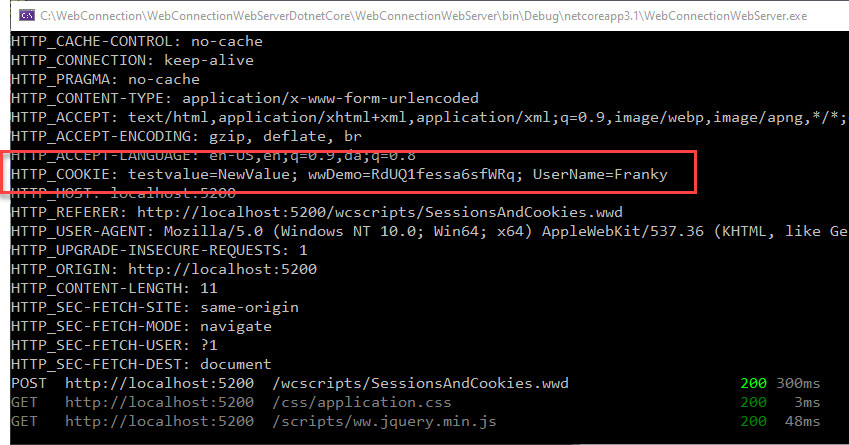
Notice now the request is returning the data properly with semi-colons. This is what I would expect to be returned.
In the debugger I see the same for the https request:
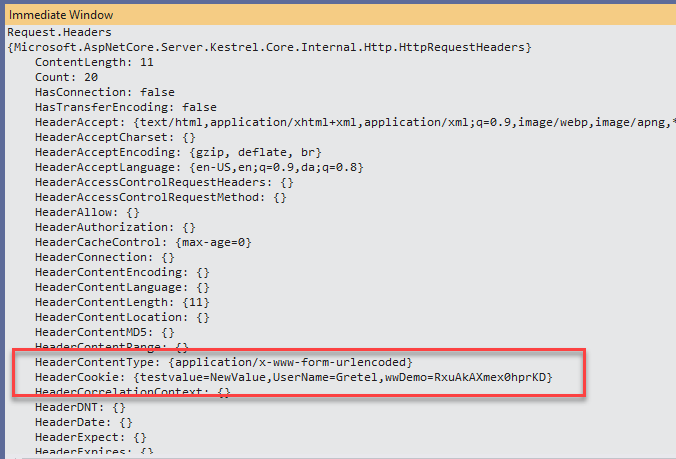
Doing the same in an non https request results in semi-colons.
Request going over the wire is sending the the proper cookie string (semi-colons):

The cookies in this case are showing up properly with semi-colons in the BrowserDevTools and the client is correctly sending them to the server using semi-colons. Something in the ASP.NET Core pipeline is munging the semi-colons into commas.
So what the heck is happening here that would cause this discreprancy?
The server is raw Kestrel running as a standalone EXE.
Is there a better way to get a hold of the raw value than .ToString() which is what is implicitly in the code above is writing out the value?
Further technical details
- ASP.NET Core version 3.1.4 (x64)
```
.NET Core SDK (reflecting any global.json):
Version: 3.1.300
Commit: b2475c1295
Runtime Environment:
OS Name: Windows
OS Version: 10.0.19041
OS Platform: Windows
RID: win10-x64
Base Path: C:\Program Files\dotnet\sdk\3.1.300\
Host (useful for support):
Version: 3.1.4
Commit: 0c2e69caa6
.NET Core SDKs installed:
2.1.511 [C:\Program Files\dotnet\sdk]
2.1.512 [C:\Program Files\dotnet\sdk]
2.1.514 [C:\Program Files\dotnet\sdk]
2.2.402 [C:\Program Files\dotnet\sdk]
3.0.100 [C:\Program Files\dotnet\sdk]
3.1.102 [C:\Program Files\dotnet\sdk]
3.1.300 [C:\Program Files\dotnet\sdk]
.NET Core runtimes installed:
Microsoft.AspNetCore.All 2.1.15 [C:\Program Files\dotnet\shared\Microsoft.AspNetCore.All]
Microsoft.AspNetCore.All 2.1.16 [C:\Program Files\dotnet\shared\Microsoft.AspNetCore.All]
Microsoft.AspNetCore.All 2.1.18 [C:\Program Files\dotnet\shared\Microsoft.AspNetCore.All]
Microsoft.AspNetCore.All 2.2.7 [C:\Program Files\dotnet\shared\Microsoft.AspNetCore.All]
Microsoft.AspNetCore.All 2.2.8 [C:\Program Files\dotnet\shared\Microsoft.AspNetCore.All]
Microsoft.AspNetCore.App 2.1.13 [C:\Program Files\dotnet\shared\Microsoft.AspNetCore.App]
Microsoft.AspNetCore.App 2.1.15 [C:\Program Files\dotnet\shared\Microsoft.AspNetCore.App]
Microsoft.AspNetCore.App 2.1.16 [C:\Program Files\dotnet\shared\Microsoft.AspNetCore.App]
Microsoft.AspNetCore.App 2.1.18 [C:\Program Files\dotnet\shared\Microsoft.AspNetCore.App]
Microsoft.AspNetCore.App 2.2.7 [C:\Program Files\dotnet\shared\Microsoft.AspNetCore.App]
Microsoft.AspNetCore.App 2.2.8 [C:\Program Files\dotnet\shared\Microsoft.AspNetCore.App]
Microsoft.AspNetCore.App 3.0.0 [C:\Program Files\dotnet\shared\Microsoft.AspNetCore.App]
Microsoft.AspNetCore.App 3.1.2 [C:\Program Files\dotnet\shared\Microsoft.AspNetCore.App]
Microsoft.AspNetCore.App 3.1.4 [C:\Program Files\dotnet\shared\Microsoft.AspNetCore.App]
Microsoft.NETCore.App 2.1.13 [C:\Program Files\dotnet\shared\Microsoft.NETCore.App]
Microsoft.NETCore.App 2.1.15 [C:\Program Files\dotnet\shared\Microsoft.NETCore.App]
Microsoft.NETCore.App 2.1.16 [C:\Program Files\dotnet\shared\Microsoft.NETCore.App]
Microsoft.NETCore.App 2.1.18 [C:\Program Files\dotnet\shared\Microsoft.NETCore.App]
Microsoft.NETCore.App 2.2.7 [C:\Program Files\dotnet\shared\Microsoft.NETCore.App]
Microsoft.NETCore.App 2.2.8 [C:\Program Files\dotnet\shared\Microsoft.NETCore.App]
Microsoft.NETCore.App 3.0.0 [C:\Program Files\dotnet\shared\Microsoft.NETCore.App]
Microsoft.NETCore.App 3.1.2 [C:\Program Files\dotnet\shared\Microsoft.NETCore.App]
Microsoft.NETCore.App 3.1.4 [C:\Program Files\dotnet\shared\Microsoft.NETCore.App]
Microsoft.WindowsDesktop.App 3.0.0 [C:\Program Files\dotnet\shared\Microsoft.WindowsDesktop.App]
Microsoft.WindowsDesktop.App 3.1.2 [C:\Program Files\dotnet\shared\Microsoft.WindowsDesktop.App]
Microsoft.WindowsDesktop.App 3.1.4 [C:\Program Files\dotnet\shared\Microsoft.WindowsDesktop.App]
````
 RickStrahl
All 6 comments
So here's a simple repro:
- Create a new Empty Web Project
- Add the following Configure()
```cs
// This method gets called by the runtime. Use this method to configure the HTTP request pipeline.
public void Configure(IApplicationBuilder app, IWebHostEnvironment env)
{
app.Run(async context =>
{
context.Response.Cookies.Append("Name", "Rick");
context.Response.Cookies.Append("Custom", "Custom value");
context.Response.ContentType = "text/plain";
            var cookies = context.Request.Headers["Cookie"].ToString();
            await context.Response.WriteAsync(cookies);
        });
     }
````
Then start the app and go to:
https://localhost:5001
http://localhost:5000
You'll see the following:
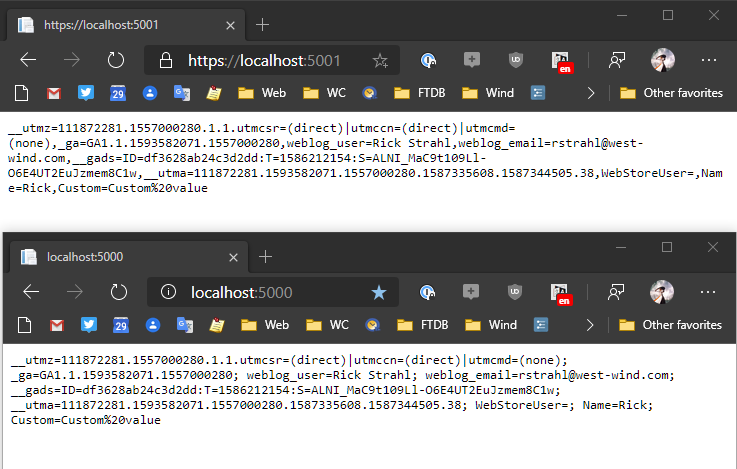
Note top (https) has commas, bottom (http) has proper semi-colons.
RickStrahl
on 29 May 2020
Kestrel does not remove ; or insert ,, and it doesn't processes headers any differently for https vs http (unless HTTP/2 gets involved). There are several other things going on here.
I'm suspicious of that Fiddler trace, use Connection Logging to capture the raw request that Kestrel received.
context.Request.Headers["Cookie"] returns a StringValues object that represents an array of header values. That's because HTTP allows you to list headers both like this:
Header: value1, value2, value3
And like this:
Header: value1
Header: value2
Header: value3
And per spec the two are considered equivalent. The cookie header is prone to breaking specs and sending Header: value1; value2; value3, but Kestrel wouldn't do anything to change that format. Kestrel preserves the original format as much as possible. For the first case you'll get a StringValue with an array length of 1 and the [0] value of value1, value2, value3. For the second case you'll get an array length of 3 with separate values.
The surprise commas come from StringValue.ToString() which combines the array values into the equivalent comma separated format. To forward headers in the original mulit-header format you need to foreach over the StringValues and add a new header for each entry or explicitly add the value as an array.
https://github.com/microsoft/reverse-proxy/blob/86f9c12a78a1cd79298d3e22fd92f524be052e0f/src/ReverseProxy/Service/Proxy/HttpProxy.cs#L405-L420
The unresolved question here is why you're receiving
Cookie: cookie1; cookie2; cookie3
for http requests and
Cookie: cookie1
Cookie: cookie2
Cookie: cookie3
for http requests.
 Tratcher
on 29 May 2020
Tratcher
on 29 May 2020
This issue caught my eye on Twitter, and although I'm not in any way an expert I thought I'd share my test results:
So far I have been able to reproduce the issue using the Edge (Chromium based) browser with the code sample you've shared.
But...
When I try to do the same thing as near to the protocol bare metals as possible, i.e. using curl, I am not able to create the problem.
CURL + set cookie + HTTP endpoint:
~ ❯ curl -v --cookie 'Name=Kia;Family=Panahi Rad;cookie_1=123;  cookie_2= abc' http://localhost:5000/
*   Trying ::1...
* TCP_NODELAY set
* Connected to localhost (::1) port 5000 (#0)
> GET / HTTP/1.1
> Host: localhost:5000
> User-Agent: curl/7.55.1
> Accept: */*
> Cookie: Name=Kia;Family=Panahi Rad;cookie_1=123;  cookie_2= abc
>
< HTTP/1.1 200 OK
< Date: Fri, 29 May 2020 16:23:59 GMT
< Content-Type: text/plain
< Server: Kestrel
< Transfer-Encoding: chunked
< Set-Cookie: Name=Rick; path=/
< Set-Cookie: Custom=Custom%20value; path=/
<
Name=Kia;Family=Panahi Rad;cookie_1=123;  cookie_2= abc* Connection #0 to host localhost left intact
CURL + set cookie + HTTPS endpoint:
~ ❯ curl -v --cookie 'Name=Kia;Family=Panahi Rad;cookie_1=123;  cookie_2= abc' https://localhost:5001/
*   Trying ::1...
* TCP_NODELAY set
* Connected to localhost (::1) port 5001 (#0)
* schannel: SSL/TLS connection with localhost port 5001 (step 1/3)
* schannel: checking server certificate revocation
* schannel: sending initial handshake data: sending 180 bytes...
* schannel: sent initial handshake data: sent 180 bytes
* schannel: SSL/TLS connection with localhost port 5001 (step 2/3)
* schannel: encrypted data got 1253
* schannel: encrypted data buffer: offset 1253 length 4096
* schannel: sending next handshake data: sending 158 bytes...
* schannel: SSL/TLS connection with localhost port 5001 (step 2/3)
* schannel: encrypted data got 51
* schannel: encrypted data buffer: offset 51 length 4096
* schannel: SSL/TLS handshake complete
* schannel: SSL/TLS connection with localhost port 5001 (step 3/3)
* schannel: stored credential handle in session cache
> GET / HTTP/1.1
> Host: localhost:5001
> User-Agent: curl/7.55.1
> Accept: */*
> Cookie: Name=Kia;Family=Panahi Rad;cookie_1=123;  cookie_2= abc
>
* schannel: client wants to read 102400 bytes
* schannel: encdata_buffer resized 103424
* schannel: encrypted data buffer: offset 0 length 103424
* schannel: encrypted data got 325
* schannel: encrypted data buffer: offset 325 length 103424
* schannel: decrypted data length: 262
* schannel: decrypted data added: 262
* schannel: decrypted data cached: offset 262 length 102400
* schannel: encrypted data length: 34
* schannel: encrypted data cached: offset 34 length 103424
* schannel: decrypted data length: 5
* schannel: decrypted data added: 5
* schannel: decrypted data cached: offset 267 length 102400
* schannel: encrypted data buffer: offset 0 length 103424
* schannel: decrypted data buffer: offset 267 length 102400
* schannel: schannel_recv cleanup
* schannel: decrypted data returned 267
* schannel: decrypted data buffer: offset 0 length 102400
< HTTP/1.1 200 OK
< Date: Fri, 29 May 2020 16:26:45 GMT
< Content-Type: text/plain
< Server: Kestrel
< Transfer-Encoding: chunked
< Set-Cookie: Name=Rick; path=/
< Set-Cookie: Custom=Custom%20value; path=/
<
Name=Kia;Family=Panahi Rad;cookie_1=123;  cookie_2= abc* Connection #0 to host localhost left intact
You may notice that the responses (last line of each code block) are exactly the same.
Is it maybe that - as per @Tratcher's notes - the browser (or enhanced HTTP utilities like Postman) are acting differently on setting _Cookie_ header based on the URI scheme (HTTP/HTTPS)?
PS: This is the Fiddler intercept result for both requests fired from the browser:
HTTP
GET http://localhost:5000/ HTTP/1.1
Host: localhost:5000
Connection: keep-alive
Pragma: no-cache
Cache-Control: no-cache
Upgrade-Insecure-Requests: 1
User-Agent: Mozilla/5.0 (Windows NT 10.0; Win64; x64) AppleWebKit/537.36 (KHTML, like Gecko) Chrome/83.0.4103.61 Safari/537.36 Edg/83.0.478.37
Accept: text/html,application/xhtml+xml,application/xml;q=0.9,image/webp,image/apng,*/*;q=0.8,application/signed-exchange;v=b3;q=0.9
Sec-Fetch-Site: none
Sec-Fetch-Mode: navigate
Sec-Fetch-User: ?1
Sec-Fetch-Dest: document
Accept-Encoding: gzip, deflate, br
Accept-Language: en-US,en;q=0.9,fa;q=0.8
Cookie: Name=Rick; Custom=Custom%20value

HTTP/1.1 200 OK
Date: Fri, 29 May 2020 16:36:46 GMT
Content-Type: text/plain
Server: Kestrel
Set-Cookie: Name=Rick; path=/
Set-Cookie: Custom=Custom%20value; path=/
Content-Length: 32

Name=Rick; Custom=Custom%20value
HTTPS
GET https://localhost:5001/ HTTP/1.1
Host: localhost:5001
Connection: keep-alive
Pragma: no-cache
Cache-Control: no-cache
Upgrade-Insecure-Requests: 1
User-Agent: Mozilla/5.0 (Windows NT 10.0; Win64; x64) AppleWebKit/537.36 (KHTML, like Gecko) Chrome/83.0.4103.61 Safari/537.36 Edg/83.0.478.37
Accept: text/html,application/xhtml+xml,application/xml;q=0.9,image/webp,image/apng,*/*;q=0.8,application/signed-exchange;v=b3;q=0.9
Sec-Fetch-Site: none
Sec-Fetch-Mode: navigate
Sec-Fetch-User: ?1
Sec-Fetch-Dest: document
Accept-Encoding: gzip, deflate, br
Accept-Language: en-US,en;q=0.9,fa;q=0.8
Cookie: Name=Rick; Custom=Custom%20value

HTTP/1.1 200 OK
Date: Fri, 29 May 2020 16:36:48 GMT
Content-Type: text/plain
Server: Kestrel
Set-Cookie: Name=Rick; path=/
Set-Cookie: Custom=Custom%20value; path=/
Content-Length: 32

Name=Rick; Custom=Custom%20value
 kiapanahi
on 29 May 2020
kiapanahi
on 29 May 2020
@Tratcher, not sure why you would question Fiddler for not displaying the raw data correctly? All Fiddler does is capture the raw request and forwards it. AFAIK the Raw view only fixes up the URL - the rest is the actual headers from the request.
I'm pretty sure the comma delimited list is not coming from the browser (i can dupe this in Edge, Chrome and Firefox) and the fact that the results are different for HTTP and HTTPS suggest that ASP.NET Core is processing this using different code paths. There's some discrepancy there.
But whatever is happening it's very strange and inconsistent. As @kiapanahi describes if I use any browser (Edge, FireFox, Chrome) I see the behavior I describe above: Semi-colons for http and commas for https.
But if I use WebSurge (raw HTTP requests) - even with the same headers that FireFox appears to be sending - I get different results:

Maybe this is splitting hairs over behavior that overall doesn't matter. For 99% of the cases the collection behavior is what you want. My case is special here in that I need the actual raw value. I have a workaround in just fixing up the collection with the right delimiter, but I feel that this really shouldn't be necessary. There should be some way to retrieve the raw header value as the browser sends it.
How do I get the RAW Cookie HTTP Header
To put this in perspective of my application scenario: I'm trying to capture the raw server headers and forward them, so I'm running through all the headers in a foreach and capturing the value. Currently I'm using ToString() because that really seems to be the only tool available to me here to get close to the raw values, other than explicitly looping through all the values.
RickStrahl
on 29 May 2020
Connection Logging really is the best proof for checking what the server receives, it logs the exact bytes in hex. That you're only experiencing this with one out of three clients indicates an issue outside the server.
I'm pretty sure the comma delimited list is not coming from the browser
I didn't say it was. I expect the server is receiving this in some cases:
Cookie: cookie1
Cookie: cookie2
Cookie: cookie3
That's what I want to check in the connection logs.
Tratcher
on 29 May 2020
This issue has been automatically marked as stale because it has been marked as requiring author feedback but has not had any activity for 4 days. It will be closed if no further activity occurs within 3 days of this comment. If it is closed, feel free to comment when you are able to provide the additional information and we will re-investigate.
See our Issue Management Policies for more information.
![msftbot[bot] picture](https://avatars2.githubusercontent.com/in/26612?v=4&s=40) msftbot[bot]
on 3 Jun 2020
msftbot[bot]
on 3 Jun 2020
Related issues
 TanvirArjel
·
3Comments
TanvirArjel
·
3Comments
 rynowak
·
3Comments
rynowak
·
3Comments
 farhadibehnam
·
3Comments
farhadibehnam
·
3Comments
 Pixel-Lord
·
3Comments
Pixel-Lord
·
3Comments
 ermithun
·
3Comments
ermithun
·
3Comments
Most helpful comment
So here's a simple repro:
```cs
// This method gets called by the runtime. Use this method to configure the HTTP request pipeline.
public void Configure(IApplicationBuilder app, IWebHostEnvironment env)
{
app.Run(async context =>
{
context.Response.Cookies.Append("Name", "Rick");
context.Response.Cookies.Append("Custom", "Custom value");
context.Response.ContentType = "text/plain";
````
Then start the app and go to:
https://localhost:5001
http://localhost:5000
You'll see the following:
Note top (https) has commas, bottom (http) has proper semi-colons.