Aspnetcore: "Launch Browser" only works when using port 5001
Describe the bug
I am using ASP.NET Core 3.1 with Kestrel. I have checked (activated) the "Launch Browser" option in the project settings so that when I run my Kestrel project, Chrome boots up and loads my apps url. However, this only works when the app is using port 5001. When I change it to 5000, 5002, 5003, 5000 +/- n it does not work.
Here is a sample code snippet
public static IHostBuilder CreateHostBuilder (string[] args) =>
    Host.CreateDefaultBuilder (args)
    .ConfigureWebHostDefaults (webBuilder => {
        webBuilder.UseStartup<Startup> ();

        string env = Environment.GetEnvironmentVariable ("ASPNETCORE_ENVIRONMENT");

        if (env is "Production") {
            // "Launch Browser" works fine here since it's port 5001.
            webBuilder.UseUrls ("https://localhost:5001");
        } else {
            webBuilder.UseUrls ("https://localhost:5000");
        }
    });
To Reproduce
Create an empty / templated ASP.NET Core 3.1 project using Visual Studio 2019, select Web Application and leave defaults on right column. Load the application, and modify your CreateHostBuilder() method in Program.cs so that you are calling webBuilder.UseUrls("siteURL") and use a port other than 5001. I've managed to replicate with these steps.
Further technical details
- ASP.NET Core version 3.1
- Visual Studio 2019 v16.5.4
result of dotnet --info:
.NET Core SDK (reflecting any global.json):
 Version:   3.1.201
 Commit:    b1768b4ae7

Runtime Environment:
 OS Name:     Windows
 OS Version:  10.0.18362
 OS Platform: Windows
 RID:         win10-x64
 Base Path:   C:\Program Files\dotnet\sdk\3.1.201\

Host (useful for support):
  Version: 3.1.3
  Commit:  4a9f85e9f8

.NET Core SDKs installed:
  3.1.100-preview3-014645 [C:\Program Files\dotnet\sdk]
  3.1.201 [C:\Program Files\dotnet\sdk]

.NET Core runtimes installed:
  Microsoft.AspNetCore.All 2.1.13 [C:\Program Files\dotnet\shared\Microsoft.AspNetCore.All]
  Microsoft.AspNetCore.All 2.1.17 [C:\Program Files\dotnet\shared\Microsoft.AspNetCore.All]
  Microsoft.AspNetCore.App 2.1.13 [C:\Program Files\dotnet\shared\Microsoft.AspNetCore.App]
  Microsoft.AspNetCore.App 2.1.17 [C:\Program Files\dotnet\shared\Microsoft.AspNetCore.App]
  Microsoft.AspNetCore.App 3.1.0-preview3.19555.2 [C:\Program Files\dotnet\shared\Microsoft.AspNetCore.App]
  Microsoft.AspNetCore.App 3.1.3 [C:\Program Files\dotnet\shared\Microsoft.AspNetCore.App]
  Microsoft.NETCore.App 2.1.13 [C:\Program Files\dotnet\shared\Microsoft.NETCore.App]
  Microsoft.NETCore.App 2.1.17 [C:\Program Files\dotnet\shared\Microsoft.NETCore.App]
  Microsoft.NETCore.App 3.1.0-preview3.19553.2 [C:\Program Files\dotnet\shared\Microsoft.NETCore.App]
  Microsoft.NETCore.App 3.1.3 [C:\Program Files\dotnet\shared\Microsoft.NETCore.App]
  Microsoft.WindowsDesktop.App 3.1.0-preview3.19553.2 [C:\Program Files\dotnet\shared\Microsoft.WindowsDesktop.App]
  Microsoft.WindowsDesktop.App 3.1.3 [C:\Program Files\dotnet\shared\Microsoft.WindowsDesktop.App]
 dmtomczyk
All 11 comments
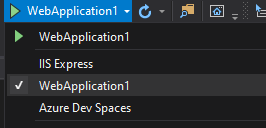
Correct me if I'm wrong but I believe that if you use .UseUrls("");, this only changes bindings via kestrel. If you're hosting via IIS, you need to change the IIS binding options which can be managed via the project properties.
You also have to manage the SSL port for both Kestrel and IIS Express.
 KieranDevvs
on 20 May 2020
KieranDevvs
on 20 May 2020
@vijayrkn - should this actually be a tooling issue?
 Pilchie
on 20 May 2020
Pilchie
on 20 May 2020
@KieranDevvs I am using / running the app via Kestrel.
If I manually open the browser and navigate to the website, it is serving content successfully, but that's not the issue. The browser, as far as I understand it, is supposed to open to the address where the app is running _if_ you have "Launch Browser" enabled, however it only opens successfully if the port is set to 5001. I may be missing something as far as configuration goes, but it's not obvious to me, and I would love to have that pointed out if that's the case.
So as I saw @Pilchie mention, if this isn't due to my ignorance / oversight, this may be on the tooling side, but that's far outside the scope of my knowledge, hence my issue.
Any more questions feel free to ask, this is obviously more of a nuisance rather than something that is not 'work-around-able'.
dmtomczyk
on 21 May 2020
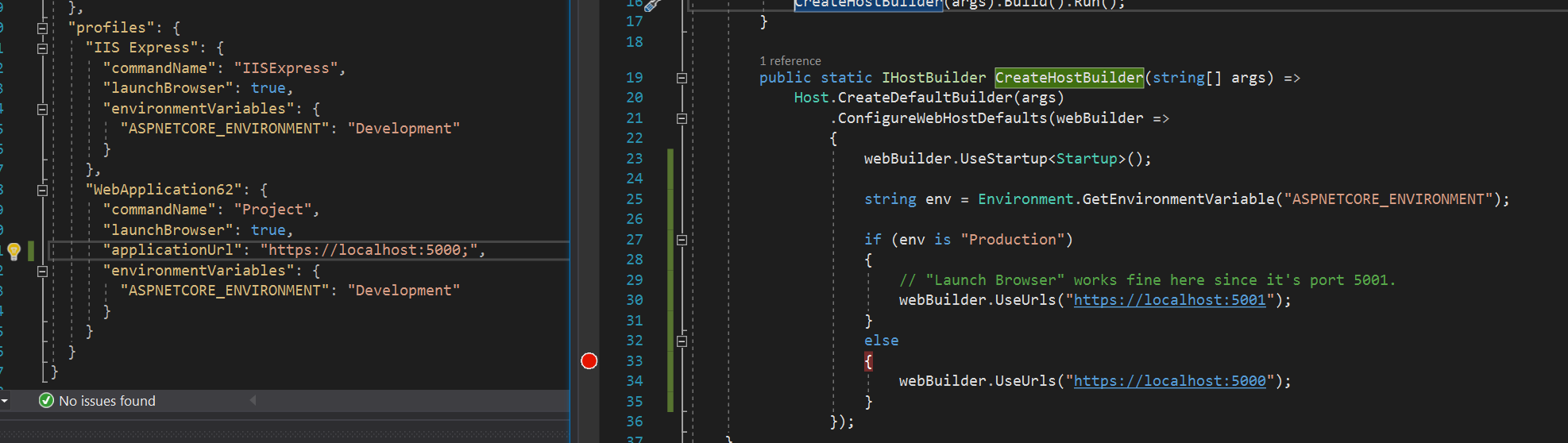
@dmtomczyk - Are you also changing the applicationUrl in the launchSettings.json?
 vijayrkn
on 21 May 2020
vijayrkn
on 21 May 2020
@vijayrkn I am not. I was under the impression that implementingwebBuilder.UseUrls() in the CreateHostBuilder method was programmatically setting the applicationUrl.
How should I be approaching this?
Thanks
Edit: One other thing to note is that if I have an empty string set for"applicationUrl": "" within the `hostSettings.json file, my browser will still open to the correct applicationUrl, but only when set to 5001. If it's anything else, the browser doesn't open.
dmtomczyk
on 21 May 2020
If you are using a different appUrl, I think you need to specify it in launchSettings.json. If nothing is specified then tooling might be picking the default. Bill is the expert in this area and should be able to provide more details.
vijayrkn
on 21 May 2020
@dmtomczyk, @vijayrkn
Visual Studio does not parse the hostSettings.Json to determine the url. It uses the value(s) set in the applicationUrl property in LaunchSettings.json. Normally, whatever is set in there is set in the ASPNETCORE_URLs environment variable when the webserver is launched and these are the URL's Kestrel will configure itself with. If applicationUrl is not set Visual Studios assumes the default values.
If you don't want Visual Studio to set the ASPNETCORE_URLs environment variable, you can add the externalUrlConfiguration : true property to the profile in launchsettings.json. If this is set, VS will not set the environment variable and will assume some other configuration, like hostSettins.json or in code, is being used. However, VS still needs to know what URL to launch the browser on. So you should still set the applicationUrl property in launchSetting.json to the Url's you have configured Kestrel to run on.
eg entry in launchsettings.json assuming you have configured Kestrel to run on https://locahost:5008):
"Kestrel": {
  "commandName": "Project",
  "launchBrowser": true,
  "applicationUrl": "https://localhost:5008;http://localhost:5007",
  "externalUrlConfiguration" :  true,
  "environmentVariables": {
    "ASPNETCORE_ENVIRONMENT": "Development"
  }
}
 BillHiebert
on 21 May 2020
BillHiebert
on 21 May 2020
@BillHiebert Thanks for the in-depth response here Bill.
Is there an intelligent way to programatically change the applicationUrl in launchSettings.json? I would like to reduce the number of properties that I need to change when swapping from a Development build to a Production build.
Currently, I'm just modifying the ASPNETCORE_ENVIRONMENT variable to accomplish most of this, but I haven't found an elegant solution, let alone any solution, that will allow me to change applicationUrl stored in launchSettings.json based on the value set in ASPNETCORE_ENVIRONMENT yet.
I've tried something like below where I'm setting, or at least attempting to set ASPNETCORE_URLS programatically, but this doesn't work:
public static IHostBuilder CreateHostBuilder (string[] args) =>
    Host.CreateDefaultBuilder (args)
    .ConfigureWebHostDefaults (webBuilder => {
        webBuilder.UseStartup<Startup> ();

        string env = Environment.GetEnvironmentVariable ("ASPNETCORE_ENVIRONMENT");

        if (env is "Production") {
            // "Launch Browser" works fine here since it's port 5001.
            Environment.SetEnvironmentVariable ("ASPNETCORE_URLS", "https://localhost:5001");
            webBuilder.UseUrls ("https://localhost:5001");
        } else {
            Environment.SetEnvironmentVariable ("ASPNETCORE_URLS", "https://localhost:5111");
            webBuilder.UseUrls ("https://localhost:5111");
        }
    });
Any insight on this?
dmtomczyk
on 21 May 2020
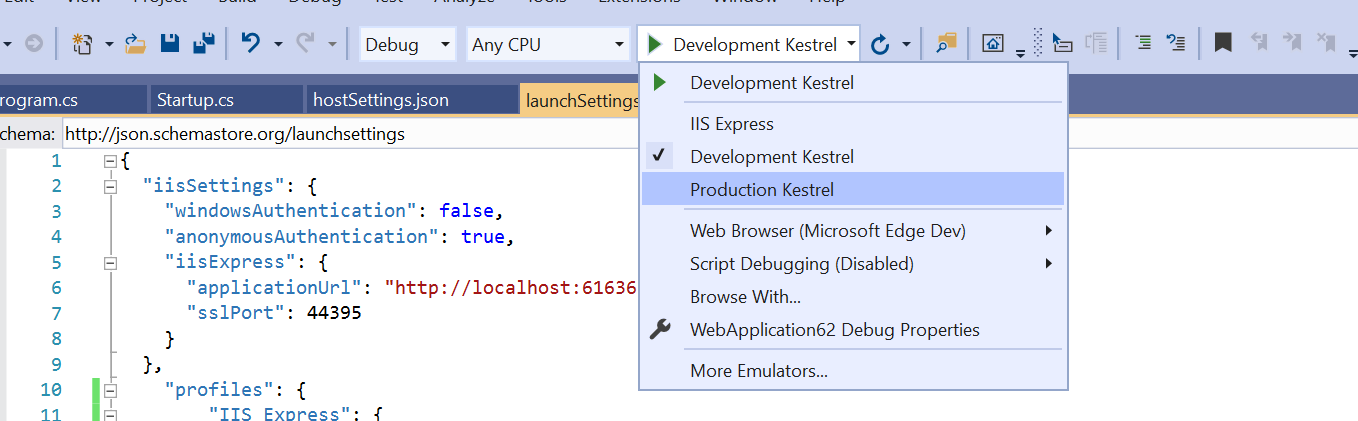
@dmtomczyk Probably the simplest is to add a 2nd profile similar to the following:
        "Development Kestrel": {
            "commandName": "Project",
            "launchBrowser": true,
            "applicationUrl": "https://localhost:5001",
            "externalUrlConfiguration": true,
            "environmentVariables": {
                "ASPNETCORE_ENVIRONMENT": "Development"
            }
        },
        "Production Kestrel": {
            "commandName": "Project",
            "launchBrowser": true,
            "applicationUrl": "https://localhost:5111",
            "externalUrlConfiguration": true,
            "environmentVariables": {
                "ASPNETCORE_ENVIRONMENT": "Production"
            }
        }
The profiles in launchsettings.json are reflected in the debug dropdown so you can switch between them. This also has the advantage of allowing you to switch env variables to match what you expect for production.
@Tratcher who may be able to suggest better options for configuring the URLsfor Kestrel. Setting the environment variable in code seems a bit awkward to me.
BillHiebert
on 21 May 2020
@BillHiebert's suggestion is the best option here. The Launch Browser feature is controlled exclusively from launchsettings.json, you can't configure it from your app C# code. With applicationUrl set in the launchsettings you don't need to call UseUrls.
 Tratcher
on 21 May 2020
Tratcher
on 21 May 2020
@BillHiebert Ah! I had honestly not thought to do that. That setup makes more sense to me anyhow.
Thanks for the help all!
Closing the issue now.
dmtomczyk
on 21 May 2020
Related issues
 TanvirArjel
·
3Comments
TanvirArjel
·
3Comments
 Kevenvz
·
3Comments
Kevenvz
·
3Comments
 snebjorn
·
3Comments
snebjorn
·
3Comments
 ipinak
·
3Comments
ipinak
·
3Comments
 farhadibehnam
·
3Comments
farhadibehnam
·
3Comments