Aspnetcore: Blazor: Getting the location (line number) of specific components in a .razor files
For bUnit, I want to enable the "click to go to test" feature in Visual Studio Test Explorer for razor-based tests (i.e. where tests are defined in razor components).
This is an example of a razor-based test component, named ComponentWithTwoTests, with two test cases inside:
 L1: @inherits TestComponentBase
 L2:
 L3: <SnapshotTest Description="A snapshot test">
 L4:    <TestInput>...</TestInput>
 L5:    <ExpectedOutput>...</ExpectedOutput>
 L6: </SnapshotTest>
 L7:
 L8: <Fixture Description="A fixture test" Test="TestAssertion">
 L9:    <ComponentUnderTest>...</ComponentUnderTest>
L10: </Fixture>
L11:
L12: @code {
L13:    void TestAssertion(Fixture f)
L14:    {
L15:        // ...
L16:    }
L17: }
These are shown in the like this in the Test Explorer:
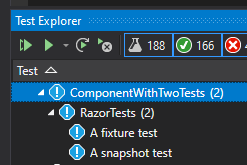
If I double-click on either "A fixture test" or "A snapshot test", I want VS to take the user to the ComponentWithTwoTests.razor file, and put the marker on line 8 for the fixture test or line 3 for the snapshot test.
I already have a way to find the source file, so double-clicking a test does take users to the right file. What is missing is placing the marker on the right line number.
My current approach is to read line-by-line in the razor file until I find something that looks like a component declaration for one of my "test case components". That's a little too much guesstimation than I like.
Describe what you'd like
Can I use the blazor/razor analyzer or parser to run the .razor file through and get the syntax tree and through that find the line number by querying the syntax tree for the test case types?
If so, I would love a hint for how to do this.
Alternative, when the .razor.g.cs files are generated by the blazor compiler, it could emit #line x ... directives info for each builder.OpenComponent<TComponent>() you insert. Then I could just look for all the line directives in the .razor.g.cs that are related to my test case components, and take it from there.
I am sure there are other options I haven't thought of.
Thanks, Egil
 egil
egil
All 5 comments
Thanks for contacting us.
@NTaylorMullen can you please look into this? Thanks!
 mkArtakMSFT
on 30 Apr 2020
mkArtakMSFT
on 30 Apr 2020
Can I use the blazor/razor analyzer or parser to run the .razor file through and get the syntax tree and through that find the line number by querying the syntax tree for the test case types?
Sadly you can't truly do this in the same type equivalent way that C# does it. You can do string comparisons on the generated type name of files though. If use our RazorProjectEngine to configure a project for Razor files and then parse the output you can inspect the parse output's (a RazorCodeDocument) intermediate representation and query it for its ClassDeclarationIntermediateNode. That's within a namespace declaration intermediate node both of which you can do string comparisons against.
 NTaylorMullen
on 1 May 2020
NTaylorMullen
on 1 May 2020
Thanks @NTaylorMullen. Where is the best place to find a sample for how to use the RazorProjectEngine?
A quick look at the code I see a lot of compile phases and "features" being added in the default configuration I won't need in my case. I guess I can skip those and just do with DefaultRazorParsingPhase and DefaultRazorSyntaxTreePhase?
egil
on 1 May 2020
To be honest there isn't a lot of samples for it. Here's one for generating non-MVC views with it: https://github.com/dotnet/aspnetcore-tooling/blob/master/src/Razor/src/RazorPageGenerator/Program.cs
Given your scenario requires our IR phase to run I'd recommend using almost all of the default configurations. Removing others wont improve your performance by much. The only piece you could technically remove is the CSharpLoweringPhase; however, I'd also leave that and only remove it when you see there's a perf problem to address.
NTaylorMullen
on 1 May 2020
Thanks. I'll take a look and report back later if I need more input. Thanks again.
egil
on 1 May 2020
Related issues
 farhadibehnam
·
3Comments
farhadibehnam
·
3Comments
 aurokk
·
3Comments
aurokk
·
3Comments
 mj1856
·
3Comments
mj1856
·
3Comments
 bgribaudo
·
3Comments
bgribaudo
·
3Comments
 fayezmm
·
3Comments
fayezmm
·
3Comments