Aspnetcore: Cannot add additional claims to Blazor WebAssembly 3.2.0 Preview 4 application
I created a Asp.Net Core hosted Blazor webassembly 3.2.0 Preview 3 application with the authentication option of In-App accounts. I then added a few additional attributes to the ApplicationUser class, and migrated these changes to the database, and registered a few users, which was successful. I then implemented a custom claims factory like so:
public class MyCustomUserClaimsPrincipalFactory : UserClaimsPrincipalFactory<ApplicationUser>
{
    public MyCustomUserClaimsPrincipalFactory(
        UserManager<ApplicationUser> userManager,
        IOptions<IdentityOptions> optionsAccessor)
            : base(userManager, optionsAccessor)
    {
    }
    protected override async Task<ClaimsIdentity> GenerateClaimsAsync(ApplicationUser user)
    {
        var identity = await base.GenerateClaimsAsync(user);
        identity.AddClaim(new Claim(ClaimTypes.GivenName, user.FirstName ?? string.Empty));
        .....

        return identity;
    }
}
and registered the claims factory in the server application like so:
services.AddDefaultIdentity<ApplicationUser>(options => options.SignIn.RequireConfirmedAccount = true)
            .AddEntityFrameworkStores<ApplicationDbContext>()
            .AddClaimsPrincipalFactory<MyCustomUserClaimsPrincipalFactory>();
However, when I list the claims in a client web app component, I do not see any of the additional claims I added in the custom claims factory. The code I am using to list the claims is:
<AuthorizeView>
   <Authorized>
    <ul>
        @foreach (var claim in context.User.Claims)
        {
            <li><span>@claim.Type</span><span>@claim.Value</span></li>
        }
    </ul>
   </Authorized>
</AuthorizeView>
I verified that the claims factory code is being called. How can I get the additional claims in the client web app?
Note: I have even tried using ClaimsTransformer (as suggested here) but I still do not see the additional claims
 bancroftway
All 21 comments
@bancroftway ... There's one more change that @javiercn supplied to me for the documentation. He has a JsonPropertyName attribute for the claim name in the UserAccount model. See the PR diff for his example ...
https://github.com/dotnet/AspNetCore.Docs/pull/17653/files#diff-bdc81c494716be6b883c9f5da3fb2f0fR143
 guardrex
on 17 Apr 2020
guardrex
on 17 Apr 2020
Hey guys, this issue is getting very confusing. Could you please provide a quick step by step guide on how to achieve adding a property to ApplicationUser and show this as an additional claim on the client web app.
bancroftway
on 17 Apr 2020
@bancroftway ... What I have from engineering thus far is on the PR. Start with Line 132 ...
https://github.com/dotnet/AspNetCore.Docs/pull/17653/files#diff-bdc81c494716be6b883c9f5da3fb2f0fR132
That PR has to be reviewed/updated/approved, then we can merge it and take it live in the topic. For now, work from the PR diff.
guardrex
on 17 Apr 2020
Thank you for contacting us. Due to a lack of activity on this discussion issue we're closing it in an effort to keep our backlog clean. If you believe there is a concern related to the ASP.NET Core framework, which hasn't been addressed yet, please file a new issue.
This issue will be locked after 30 more days of inactivity. If you still wish to discuss this subject after then, please create a new issue!
![msftbot[bot] picture](https://avatars2.githubusercontent.com/in/26612?v=4&s=40) msftbot[bot]
on 17 Jun 2020
msftbot[bot]
on 17 Jun 2020
I was also trying to add custom claims ("DisplayName") for the Blazor WASM (Hosted) project. I had already got Identity and AzureAD working following this guide: https://docs.microsoft.com/en-us/aspnet/core/security/blazor/webassembly/hosted-with-identity-server?view=aspnetcore-3.1&tabs=visual-studio
I had also found another article about adding custom claims for asp.net core by creating a custom IUserClaimsPrincipalFactory and registering it. i.e.
public class ApplicationClaimsPrincipalFactory :UserClaimsPrincipalFactory<ApplicationUser, ApplicationRole>
{
    public ApplicationClaimsPrincipalFactory(UserManager<ApplicationUser> userManager, RoleManager<ApplicationRole> roleManager, IOptions<IdentityOptions> optionsAccessor)
    : base(userManager, roleManager, optionsAccessor)
    {
    }


    protected override async Task<ClaimsIdentity> GenerateClaimsAsync(ApplicationUser user)
    {
        var identity = await base.GenerateClaimsAsync(user);
        identity.AddClaim(new Claim("DisplayName", $"{user.FirstName} {user.LastName}"));
        return identity;
    }
}


//.... register it. If using a custom SignInManager do it before that
services.AddDefaultIdentity<ApplicationUser>(options => options.SignIn.RequireConfirmedAccount = true)
    .AddRoles<ApplicationRole>()
    .AddEntityFrameworkStores<ApplicationDbContext>()
    .AddClaimsPrincipalFactory<ApplicationClaimsPrincipalFactory>()
    .AddSignInManager<ApplicationSiginInManager>();
This claim is available server side but not in the client. I tried many things without success but then I remembered the guide linked above tells your to create and register a IProfileService. So I thought I would see what would happen if I modified that.
public Task GetProfileDataAsync(ProfileDataRequestContext context)
{
   //...

    context.IssuedClaims.AddRange(context.Subject.FindAll("DisplayName"));

    return Task.CompletedTask;
}
Doing this worked. The claim was now available in the client. Not sure if this is the correct way to do it.
 dfkeenan
on 17 Jun 2020
dfkeenan
on 17 Jun 2020
I'm trying to add and retrieve additional claims as well.
When I follow this https://docs.microsoft.com/en-us/aspnet/core/security/blazor/webassembly/hosted-with-identity-server?view=aspnetcore-3.1&tabs=visual-studio#configure-identity-server
I even can't get the "Profile Service" to work, I only see the additional roles when I use "API authorization options" of the two options. Update: just got this working, it's all about the order of statements.
Now about adding and retrieving additional Blazor WASM claims, this is a problem. Not only here but at Stack Overflow as well.
3 unanswered questions:
- https://stackoverflow.com/questions/61105563/userclaimsprincipalfactory-not-working-in-blazor-webassembly-3-1-client
- https://stackoverflow.com/questions/61178681/how-to-add-additional-claims-to-blazor-webassembly-3-2-0-preview-3-application
- https://stackoverflow.com/questions/62434400/blazor-webassembly-identityserver-eventsink-and-httpcontext
 JeepNL
on 18 Jun 2020
JeepNL
on 18 Jun 2020
With your example @dfkeenan I got it working too, but I too don't know this is the correct way to do it. Anyone? Even this issue is already closed?
JeepNL
on 18 Jun 2020
We have docs for this here.
The same thing that is applied to roles can be applied to any other claim
 javiercn
on 18 Jun 2020
javiercn
on 18 Jun 2020
@javiercn Yep, that is the exact same link I followed and mentioned in my post here
I updated that post that I had it now working with the "Profile Service" option instead of the "API authorization options" but I think some cookies remained in cache, because it stopped working again. I thought it was the order of statements, but I have to try again.
For me it is now clear it's not only me. Or @dfkeenan. We're not the only ones having problems with this.
"We've docs for this" ... well, I disagree.
Update: I would like to remind you @javiercn that I've included 3 links to Stack Overflow with the same questions about claims and not _a single_ answer.. So, really ... "we've docs for this", doesn't cut it.
Thank you.
JeepNL
on 18 Jun 2020
@JeepNL Look at the Troubleshoot section of the doc ... I put some (IMO) _very helpful_ advice there to deal with that.
Yes! ... I lived thru sheer hell with lingering cookies during testing. My new approach with an automated inprivate/incognito browser that clears cookies for every change (new browser opens every run) is a _PURE JOY_ to work with. 🏖️
guardrex
on 18 Jun 2020
That _is_ a good suggestion @guardrex! I was so happy I got it working with the profile services and now I know i did something wrong.
JeepNL
on 18 Jun 2020
Update: I would like to remind you @javiercn that I've included 3 links to Stack Overflow with the same questions about claims and not _a single_ answer.. So, really ... "we've docs for this", doesn't cut it.
The posts you mention are based on an old preview version and are not relevant.
We have samples too, for example this one. The same approach used for roles can be used for other claims.
javiercn
on 18 Jun 2020
Old @javiercn? One is from yesterday(!). The other two are from 2 months ago. But that isn't my main point. The "not a single answer" part is.
"Not relevant". Come on.
JeepNL
on 18 Jun 2020
And about your sample, Yes, I've seen it. I followed this discussion towards that example.
I use now this
            services.AddIdentityServer()
                .AddApiAuthorization<ApplicationUser, ApplicationDbContext>(options => {
                    options.IdentityResources["openid"].UserClaims.Add("role");
                    options.ApiResources.Single().UserClaims.Add("role");
                });
And it works adding multiple roles to a user.
but somehow I don't get it to work with 'Profile service' as I mentioned in my post. When I use the 'profile service' option I can add additional claims, but when I do that, the roles are gone. Yes, I'm doing something wrong, I know. But I'm trying to figure it out.
JeepNL
on 18 Jun 2020
And in that issue @rubeesh is asking the same question: "_How can i add extra information like employee id, name to claims_"
But enough already, I'm not feeling particular wonderful with your short answers "we've docs for this", and "not relevant" is just plain arrogant in my humble opinion. I'm #nobody, but still a person.
JeepNL
on 18 Jun 2020
And in that issue @rubeesh is asking the same question: "_How can i add extra information like employee id, name to claims_"
But enough already, I'm not feeling particular wonderful with your short answers "we've docs for this", and "not relevant" is just plain arrogant in my humble opinion. I'm #nobody, but still a person.
@JeepNL I'm sorry if I came out as arrogant, I was trying to help you out while I was in the middle of other things and was just trying to give you a fast answer. Based on the issue title pointing to preview4 and one of the linked SO questions referring to preview 3 I interpreted that the questions where made in the context of the initial version we released, which we improved in later previews.
I hope you understand that I'm not trying to dispatch you, I only wanted to give you an answer as fast as possible and that I was doing so while handling other work. I'm a human too and it's been a long day for me too, so again I apologize if my answers came back as rude, it was not my intention.
I'll look at this in more detail in the following days and will try to provide a more complete/concrete answer.
Hope that helps.
javiercn
on 18 Jun 2020
@javiercn I know and understand you're busy. I love the work you and every team at Microsoft is doing on .NET/Blazor. Because I previously created a couple of issues at GitHub about Blazor/NET which I shouldn't have (figured it out myself later on, or I just didn't know what I was doing) I try to be very careful when I ask a question here at GitHub and do some research on the issue. I feel terrible if I'm wasting someone's time. Specially if they're professionals working on .NET. And yes we're both humans and not robots 😉 we may, can and will make mistakes. And with .NET as Open Source on GitHub I really do not know how you all do it.
I'm certainly not in a hurry. This is new tech, it's what I like most and with that comes the fact that I've to learn, take some hurdles and be patient. I really don't mind. I believe in Blazor/WASM and I think this will be the future of the web (and mobile for that matter).
JeepNL
on 18 Jun 2020
UPDATE (_June 25th 2020_): This is wrong.
I found something to use the 'Profile Service' instead of 'API authorization options' (explained here in Microsoft Docs)
Previously I didn't see the roles show up in the client interface when using the 'Profile Service'. When I change the code to this, it works (original lines commented out)
Server/ProfileService.cs
        public Task GetProfileDataAsync(ProfileDataRequestContext context)
        {
            //var nameClaim = context.Subject.FindAll(JwtClaimTypes.Name);
            //context.IssuedClaims.AddRange(nameClaim);

            //var roleClaims = context.Subject.FindAll(JwtClaimTypes.Role);
            //context.IssuedClaims.AddRange(roleClaims);

            context.IssuedClaims.AddRange(context.Subject.FindAll("name"));
            context.IssuedClaims.AddRange(context.Subject.FindAll("role"));

            return Task.CompletedTask;
        }
Next I'll try to add custom claims from the database table AspNetUsers which I've extended by extra fields to Server/Models/ApplicationUser.cs
using Microsoft.AspNetCore.Identity;

namespace OpenWiki.Server.Models
{
    public class ApplicationUser : IdentityUser
    {
        // See: https://docs.microsoft.com/en-us/aspnet/core/security/authentication/customize-identity-model#custom-user-data
        public long TwitterUserId { get; set; }
        public string TwitterConsumerKey { get; set; }
        public string TwitterConsumerSecret  { get; set; }
    }
}
I've read through this and I'm still none-the-wiser as to how you add additional claims to the HttpContext.User... I am able to add claims on the Wasm side easily, using JWT, and if I view those claims in Wasm, they appear fine. When I try to view the same claims in Core on the server, they don't appear.
I have Policies set based on the Claims, and these work on Wasm, but not on Core because the claims just aren't being inserted. I've tried creating a UserClaimsPrincipalFactory and adding the claims there, but that code doesn't seem to be hit, even though I add it in the AddIdentity part of Startup.
Does anyone have any suggestions, or sample code that works?
 elylv
on 24 Jun 2020
elylv
on 24 Jun 2020
I'm so close (I think) ...
I've extended the Identity AspNetUser Table with this: (_/Server/Models/ApplicationUser.cs_)
public class ApplicationUser : IdentityUser
{
    // See: https://docs.microsoft.com/en-us/aspnet/core/security/authentication/customize-identity-model#custom-user-data
    public long TwitterUserId { get; set; }
    public string TwitterConsumerKey { get; set; }
    public string TwitterConsumerSecret  { get; set; }
}
I've created this file _Server/MyUserClaimsPrincipalFactory.cs_
(I'm only using the TwitterConsumerKey to begin with, to test it)
public class MyUserClaimsPrincipalFactory : UserClaimsPrincipalFactory<ApplicationUser>
{
    public MyUserClaimsPrincipalFactory(
        UserManager<ApplicationUser> userManager,
        IOptions<IdentityOptions> optionsAccessor)
        : base(userManager, optionsAccessor)
    {
    }

    protected override async Task<ClaimsIdentity> GenerateClaimsAsync(ApplicationUser user)
    {
        var identity = await base.GenerateClaimsAsync(user);

        identity.AddClaim(new Claim("TwitterConsumerKey", user.TwitterConsumerKey ?? "[Edit TwitterConsumerKey]"));

        return identity;
    }
}
And call it here (_Server/Startup.cs_) See: https://korzh.com/blog/add-extra-user-claims-aspnet-core-webapp)
        services.AddDefaultIdentity<ApplicationUser>(options => options.SignIn.RequireConfirmedAccount = false)
            .AddRoles<IdentityRole>()
            .AddEntityFrameworkStores<OpenWikiDbContext>()
            .AddClaimsPrincipalFactory<MyUserClaimsPrincipalFactory>(); //<---- add this line

        services.AddIdentityServer()
            .AddApiAuthorization<ApplicationUser, OpenWikiDbContext>(options =>
            {
                options.IdentityResources["openid"].UserClaims.Add("role");
                options.ApiResources.Single().UserClaims.Add("role");
                options.IdentityResources["openid"].UserClaims.Add("TwitterConsumerKey");
                options.ApiResources.Single().UserClaims.Add("TwitterConsumerKey");
            });
        JwtSecurityTokenHandler.DefaultInboundClaimTypeMap.Remove("role");
And on the client I've added this to _Client/RolesClaimsPrincipalFactory.cs_
(Should end up in another file)
public class RolesClaimsPrincipalFactory : AccountClaimsPrincipalFactory<RemoteUserAccount>
{
    public RolesClaimsPrincipalFactory(IAccessTokenProviderAccessor accessor) : base(accessor)
    {
    }

    public override async ValueTask<ClaimsPrincipal> CreateUserAsync(RemoteUserAccount account, RemoteAuthenticationUserOptions options)
    {
        var user = await base.CreateUserAsync(account, options);
        if (user.Identity.IsAuthenticated)
        {
            var identity = (ClaimsIdentity)user.Identity;

            //  ADDED THIS
            string value = identity.FindFirst("TwitterConsumerKey")?.Value;
            identity.AddClaim(new Claim("TwitterConsumerKey", value));
            // END

            var roleClaims = identity.FindAll(identity.RoleClaimType);
            if (roleClaims != null && roleClaims.Any())
            {
                foreach (var existingClaim in roleClaims)
                {
                    identity.RemoveClaim(existingClaim);
                }

                var rolesElem = account.AdditionalProperties[identity.RoleClaimType];
                if (rolesElem is JsonElement roles)
                {
                    if (roles.ValueKind == JsonValueKind.Array)
                    {
                        foreach (var role in roles.EnumerateArray())
                        {
                            identity.AddClaim(new Claim(options.RoleClaim, role.GetString()));
                        }
                    }
                    else
                    {
                        identity.AddClaim(new Claim(options.RoleClaim, roles.GetString()));
                    }
                }
            }
        }
        return user;
    }
}
I see the value of the database field: TwitterConsumerKey in the client 😊
But all of the Roles values are gone 😢
When I delete (at Server/Startup.cs) the extra line .AddClaimsPrincipalFactory<MyUserClaimsPrincipalFactory>(); //<---- add this line) the Roles values are visible again.
JeepNL
on 25 Jun 2020
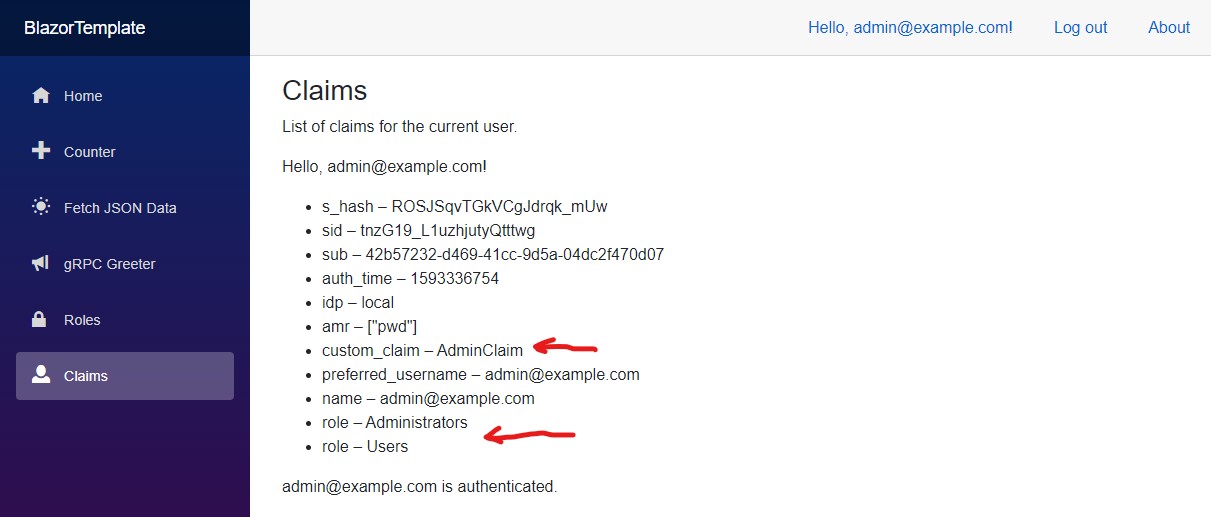
By George, I think I've got it!
(_As I thought, I was really close. Really REALLY close even._)
Source at: https://github.com/JeepNL/Blazor-WASM-Identity-gRPC
JeepNL
on 28 Jun 2020
Related issues
 bgribaudo
·
3Comments
bgribaudo
·
3Comments
 BrennanConroy
·
3Comments
BrennanConroy
·
3Comments
 ipinak
·
3Comments
guardrex
·
3Comments
ipinak
·
3Comments
guardrex
·
3Comments
 farhadibehnam
·
3Comments
farhadibehnam
·
3Comments
Most helpful comment
@JeepNL I'm sorry if I came out as arrogant, I was trying to help you out while I was in the middle of other things and was just trying to give you a fast answer. Based on the issue title pointing to preview4 and one of the linked SO questions referring to preview 3 I interpreted that the questions where made in the context of the initial version we released, which we improved in later previews.
I hope you understand that I'm not trying to dispatch you, I only wanted to give you an answer as fast as possible and that I was doing so while handling other work. I'm a human too and it's been a long day for me too, so again I apologize if my answers came back as rude, it was not my intention.
I'll look at this in more detail in the following days and will try to provide a more complete/concrete answer.
Hope that helps.