Aspnetcore: [Blazor] No Razor editor support
I updated to the newest VS preview 16.5 preview 3.
When I create a new Blazor WASM app I do not get any editor support for Razor. The editor shows razor code as if it were plain text - although it compiles and runs just fine.
 mrpmorris
All 13 comments
I was experiencing the same issue, so I repaired the VS installation but even then there was no razor syntax highlighting. I then closed the all razor files and re-opened them. then it was working again ???.
 AceTheWiz
on 23 Feb 2020
AceTheWiz
on 23 Feb 2020
Open/close didn't work for me. Uninstall / reinstall didn't work either.
mrpmorris
on 23 Feb 2020
Open/close didn't work for me. Uninstall / reinstall didn't work either.
I can't say I'm an expert here but have you installed the latest Blazor templates. ?
dotnet new -i Microsoft.AspNetCore.Blazor.Templates::3.2.0-preview1.20073.1
AceTheWiz
on 23 Feb 2020
@mrpmorris thanks for contacting us.
@ajaybhargavb @ryanbrandenburg @NTaylorMullen can you look into this?
 javiercn
on 24 Feb 2020
javiercn
on 24 Feb 2020
@NTaylorMullen did our "preview LSP" kicked in here?
 mkArtakMSFT
on 24 Feb 2020
mkArtakMSFT
on 24 Feb 2020
@NTaylorMullen did our "preview LSP" kicked in here?
Nope, impossible. Haven't inserted that into Visual Studio yet.
@mrpmorris & @AceTheWiz if you repair Visual Studio do you still see the issue? Also, do you happen to have the ASP.NET and web development workload checked?
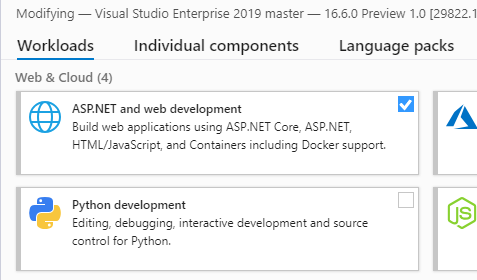
 NTaylorMullen
on 24 Feb 2020
NTaylorMullen
on 24 Feb 2020
No to the first question and yes to the second.
I am running Microsoft Visual Studio Community 2019 Preview
I had the issue just after I installed Version 16.5.0 Preview 3.0. Re-installing didn't fix the issue. I then closed the all razor files and re-opened them. Then it was working again ???.
Now it's back after installing Version 16.5.0 Preview 4.0 and my previous fix is not helping.
I get this error when starting VS.
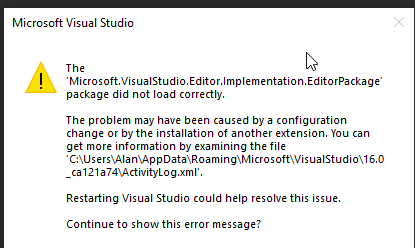
The ActivityLog has the foll errors:
270 | ERROR | Still unable to load MEF component DLL: Could not load file or assembly 'Microsoft.Windows.Simulator.Client, Version=16.0.0.0, Culture=neutral, PublicKeyToken=b03f5f7f11d50a3a' or one of its dependencies. The system cannot find the file specified. c:\program files (x86)\microsoft visual studio\2019\preview\common7\ide\commonextensions\platform\diagnosticshub\Microsoft.DiagnosticsHub.VisualStudio.Package.dll | | | Microsoft.VisualStudio.ComponentModelHost.VsShellComponentModelHost | 2020/03/01 19:00:34.032
-- | -- | -- | -- | -- | -- | --
502 | ERROR | SetSite failed for package [Microsoft.VisualStudio.Editor.Implementation.EditorPackage]Source: 'mscorlib' Description: Value was either too large or too small for an Int32. System.OverflowException: Value was either too large or too small for an Int32. at System.Convert.ToInt32(UInt32 value) at System.UInt32.System.IConvertible.ToInt32(IFormatProvider provider) at System.Convert.ToInt32(Object value, IFormatProvider provider) at Microsoft.VisualStudio.Editor.Implementation.EditorPackage.SetGlobalOptions(SettingsScope scope) at Microsoft.VisualStudio.Editor.Implementation.EditorPackage.
503 | ERROR | End package load [Microsoft.VisualStudio.Editor.Implementation.EditorPackage] | {E269B994-EF71-4CE0-8BCD-581C217372E8} | 80131516 | VisualStudio | 2020/03/01 19:00:36.695
AceTheWiz
on 1 Mar 2020
Hmm, super odd @AmadeusW would you be the right person to reach out to here or someone else on the CoreEditor team? I ask because this package load failure looks very suspicious and I'm not quite sure where to go from here.
NTaylorMullen
on 1 Mar 2020
Update: Did a Repair and then things were working again. The only other change, was to disable a 3rd party extension (not sure if it had any effect).
Hold thumbs, I'm going to update to Preview 5.
AceTheWiz
on 2 Mar 2020
Awesome, thanks for the follow up @AceTheWiz. Closing this out for now.
NTaylorMullen
on 3 Mar 2020
This is working in 16.5.0 @javiercn
mrpmorris
on 3 Mar 2020
Yes. also working in 16.5.0 Preview 5.0
Thanks for you time guys.
AceTheWiz
on 3 Mar 2020
Editor team has introduced this regression. It is resolved by repairing VS, which is what @AceTheWiz did. The fix is available in 16.5 Preview 5
 AmadeusW
on 3 Mar 2020
AmadeusW
on 3 Mar 2020
Related issues
 farhadibehnam
·
3Comments
farhadibehnam
·
3Comments
 FourLeafClover
·
3Comments
FourLeafClover
·
3Comments
 markrendle
·
3Comments
markrendle
·
3Comments
 mj1856
·
3Comments
mj1856
·
3Comments
 groogiam
·
3Comments
groogiam
·
3Comments