Aspnetcore: AuthorizeAttribute does not work with Roles and multiple AuthenticationSchemes
I can't get specifying roles via the AuthorizeAttribute to work in conjunction with specifying multiple AuthenticationSchemes.
So I'm doing something like this on the controller:
``` C#
    [HttpGet]
    [Authorize(Roles = "testRole")]
    public WeatherForecast Get()
    {
          // ...
    }
Here is what I do in `ConfigureServices`:

```C#
            services.AddAuthentication()
                .AddScheme<BasicAuthenticationOptions,
                           BasicAuthenticationHandler>
                    (BasicAuthenticationHandler.AuthenticationScheme,
                     options => { options.AcceptedPasswords =
                                      new [] { "asdf" };
                                  options.Roles =
                                      new string[] {}; })
                .AddScheme<BasicAuthenticationOptions,
                           BasicAuthenticationHandler>
                    (BasicAuthenticationHandler.AuthenticationScheme + 2,
                     options => { options.AcceptedPasswords =
                                      new [] { "qwer" };
                                  options.Roles =
                                      new [] { "testRole" }; });

            services
                .AddAuthorization(options =>
                {
                    options.DefaultPolicy = new AuthorizationPolicyBuilder
                        (BasicAuthenticationHandler
                            .AuthenticationScheme,
                         BasicAuthenticationHandler
                            .AuthenticationScheme + 2)
                        .RequireAuthenticatedUser()
                        .Build();
                });
When I do that I get an error message like so: No authenticationScheme was specified, and there was no DefaultChallengeScheme found. The default schemes can be set using either AddAuthentication(string defaultScheme) or AddAuthentication(Action<AuthenticationOptions> configureOptions).
When I then add a default authentication scheme via AddAuthentiction() like so:
```C#
services.AddAuthentication(BasicAuthenticationHandler.AuthenticationScheme)
.AddScheme
...
Then only the default scheme is used for authentication. If I specify a default challenge scheme I get a challenge but no authentication happens, whatsover.

I can get multiple authentication schemes to work with the `AuthorizeAttribute` when I don't specify roles. I.e. when I do:

```C#
        [HttpGet]
        [Authorize]
        public WeatherForecast Get()
        {
              // ...
        }
Seems like according to this https://docs.microsoft.com/en-us/aspnet/core/security/authorization/limitingidentitybyscheme?view=aspnetcore-2.2, what I'm trying to do should be possible?
.NET Core SDK (reflecting any global.json):
Version: 3.1.100
Commit: cd82f021f4
Runtime Environment:
OS Name: Windows
OS Version: 10.0.18363
OS Platform: Windows
RID: win10-x64
Base Path: C:\Program Files\dotnet\sdk\3.1.100\
Host (useful for support):
Version: 3.1.0
Commit: 65f04fb6db
.NET Core SDKs installed:
1.0.0-preview2-003121 [C:\Program Files\dotnet\sdk]
1.0.0-preview2-003131 [C:\Program Files\dotnet\sdk]
1.0.0 [C:\Program Files\dotnet\sdk]
1.0.3 [C:\Program Files\dotnet\sdk]
1.0.4 [C:\Program Files\dotnet\sdk]
1.1.0 [C:\Program Files\dotnet\sdk]
2.0.2 [C:\Program Files\dotnet\sdk]
2.1.4 [C:\Program Files\dotnet\sdk]
2.1.103 [C:\Program Files\dotnet\sdk]
2.1.104 [C:\Program Files\dotnet\sdk]
2.1.200 [C:\Program Files\dotnet\sdk]
2.1.201 [C:\Program Files\dotnet\sdk]
2.1.202 [C:\Program Files\dotnet\sdk]
2.1.500 [C:\Program Files\dotnet\sdk]
2.1.504 [C:\Program Files\dotnet\sdk]
2.1.505 [C:\Program Files\dotnet\sdk]
2.1.508 [C:\Program Files\dotnet\sdk]
2.1.602 [C:\Program Files\dotnet\sdk]
2.1.700 [C:\Program Files\dotnet\sdk]
2.1.701 [C:\Program Files\dotnet\sdk]
2.1.801 [C:\Program Files\dotnet\sdk]
2.2.300 [C:\Program Files\dotnet\sdk]
2.2.301 [C:\Program Files\dotnet\sdk]
2.2.401 [C:\Program Files\dotnet\sdk]
3.0.100 [C:\Program Files\dotnet\sdk]
3.1.100 [C:\Program Files\dotnet\sdk]
.NET Core runtimes installed:
Microsoft.AspNetCore.All 2.1.6 [C:\Program Files\dotnet\shared\Microsoft.AspNetCore.All]
Microsoft.AspNetCore.All 2.1.8 [C:\Program Files\dotnet\shared\Microsoft.AspNetCore.All]
Microsoft.AspNetCore.All 2.1.9 [C:\Program Files\dotnet\shared\Microsoft.AspNetCore.All]
Microsoft.AspNetCore.All 2.1.11 [C:\Program Files\dotnet\shared\Microsoft.AspNetCore.All]
Microsoft.AspNetCore.All 2.1.12 [C:\Program Files\dotnet\shared\Microsoft.AspNetCore.All]
Microsoft.AspNetCore.All 2.1.14 [C:\Program Files\dotnet\shared\Microsoft.AspNetCore.All]
Microsoft.AspNetCore.All 2.2.5 [C:\Program Files\dotnet\shared\Microsoft.AspNetCore.All]
Microsoft.AspNetCore.All 2.2.6 [C:\Program Files\dotnet\shared\Microsoft.AspNetCore.All]
Microsoft.AspNetCore.All 2.2.8 [C:\Program Files\dotnet\shared\Microsoft.AspNetCore.All]
Microsoft.AspNetCore.App 2.1.6 [C:\Program Files\dotnet\shared\Microsoft.AspNetCore.App]
Microsoft.AspNetCore.App 2.1.8 [C:\Program Files\dotnet\shared\Microsoft.AspNetCore.App]
Microsoft.AspNetCore.App 2.1.9 [C:\Program Files\dotnet\shared\Microsoft.AspNetCore.App]
Microsoft.AspNetCore.App 2.1.11 [C:\Program Files\dotnet\shared\Microsoft.AspNetCore.App]
Microsoft.AspNetCore.App 2.1.12 [C:\Program Files\dotnet\shared\Microsoft.AspNetCore.App]
Microsoft.AspNetCore.App 2.1.14 [C:\Program Files\dotnet\shared\Microsoft.AspNetCore.App]
Microsoft.AspNetCore.App 2.2.5 [C:\Program Files\dotnet\shared\Microsoft.AspNetCore.App]
Microsoft.AspNetCore.App 2.2.6 [C:\Program Files\dotnet\shared\Microsoft.AspNetCore.App]
Microsoft.AspNetCore.App 2.2.8 [C:\Program Files\dotnet\shared\Microsoft.AspNetCore.App]
Microsoft.AspNetCore.App 3.1.0 [C:\Program Files\dotnet\shared\Microsoft.AspNetCore.App]
Microsoft.NETCore.App 1.0.0 [C:\Program Files\dotnet\shared\Microsoft.NETCore.App]
Microsoft.NETCore.App 1.0.1 [C:\Program Files\dotnet\shared\Microsoft.NETCore.App]
Microsoft.NETCore.App 1.0.4 [C:\Program Files\dotnet\shared\Microsoft.NETCore.App]
Microsoft.NETCore.App 1.0.5 [C:\Program Files\dotnet\shared\Microsoft.NETCore.App]
Microsoft.NETCore.App 1.1.1 [C:\Program Files\dotnet\shared\Microsoft.NETCore.App]
Microsoft.NETCore.App 1.1.2 [C:\Program Files\dotnet\shared\Microsoft.NETCore.App]
Microsoft.NETCore.App 2.0.0 [C:\Program Files\dotnet\shared\Microsoft.NETCore.App]
Microsoft.NETCore.App 2.0.5 [C:\Program Files\dotnet\shared\Microsoft.NETCore.App]
Microsoft.NETCore.App 2.0.6 [C:\Program Files\dotnet\shared\Microsoft.NETCore.App]
Microsoft.NETCore.App 2.0.7 [C:\Program Files\dotnet\shared\Microsoft.NETCore.App]
Microsoft.NETCore.App 2.0.9 [C:\Program Files\dotnet\shared\Microsoft.NETCore.App]
Microsoft.NETCore.App 2.1.6 [C:\Program Files\dotnet\shared\Microsoft.NETCore.App]
Microsoft.NETCore.App 2.1.8 [C:\Program Files\dotnet\shared\Microsoft.NETCore.App]
Microsoft.NETCore.App 2.1.9 [C:\Program Files\dotnet\shared\Microsoft.NETCore.App]
Microsoft.NETCore.App 2.1.11 [C:\Program Files\dotnet\shared\Microsoft.NETCore.App]
Microsoft.NETCore.App 2.1.12 [C:\Program Files\dotnet\shared\Microsoft.NETCore.App]
Microsoft.NETCore.App 2.1.14 [C:\Program Files\dotnet\shared\Microsoft.NETCore.App]
Microsoft.NETCore.App 2.2.5 [C:\Program Files\dotnet\shared\Microsoft.NETCore.App]
Microsoft.NETCore.App 2.2.6 [C:\Program Files\dotnet\shared\Microsoft.NETCore.App]
Microsoft.NETCore.App 2.2.8 [C:\Program Files\dotnet\shared\Microsoft.NETCore.App]
Microsoft.NETCore.App 3.1.0 [C:\Program Files\dotnet\shared\Microsoft.NETCore.App]
Microsoft.WindowsDesktop.App 3.1.0 [C:\Program Files\dotnet\shared\Microsoft.WindowsDesktop.App]
 breggles
All 16 comments
PS: I can also get it to work when I specify the role on a named policy and then specify the policy on the AuthorizeAttribute.
breggles
on 11 Feb 2020
Does this happen with any of the official authorization handlers?
 blowdart
on 11 Feb 2020
blowdart
on 11 Feb 2020
Yes (assuming i'm doing everything correctly). I adapted the cookie sample from here: https://github.com/aspnet/AspNetCore.Docs/tree/master/aspnetcore/security/authentication/cookie/samples/3.x/CookieSample
I got this in ConfigureServices:
```C#
services.AddAuthentication()
.AddCookie(CookieAuthenticationDefaults.AuthenticationScheme)
.AddCookie(CookieAuthenticationDefaults.AuthenticationScheme + 2);
#endregion
        services.AddAuthorization(options => options.DefaultPolicy =
            new AuthorizationPolicyBuilder
                (CookieAuthenticationDefaults.AuthenticationScheme,
                 CookieAuthenticationDefaults.AuthenticationScheme + 2)
                .RequireAuthenticatedUser()
                .Build());
and this on a controller action:
```C#
        [Authorize(Roles = "Administrator")]
        public IActionResult Index()
        {
            return View();
        }
I then get the same error, wrapped up slightly differently (presumably because this is MVC and my other test app was Web API?):
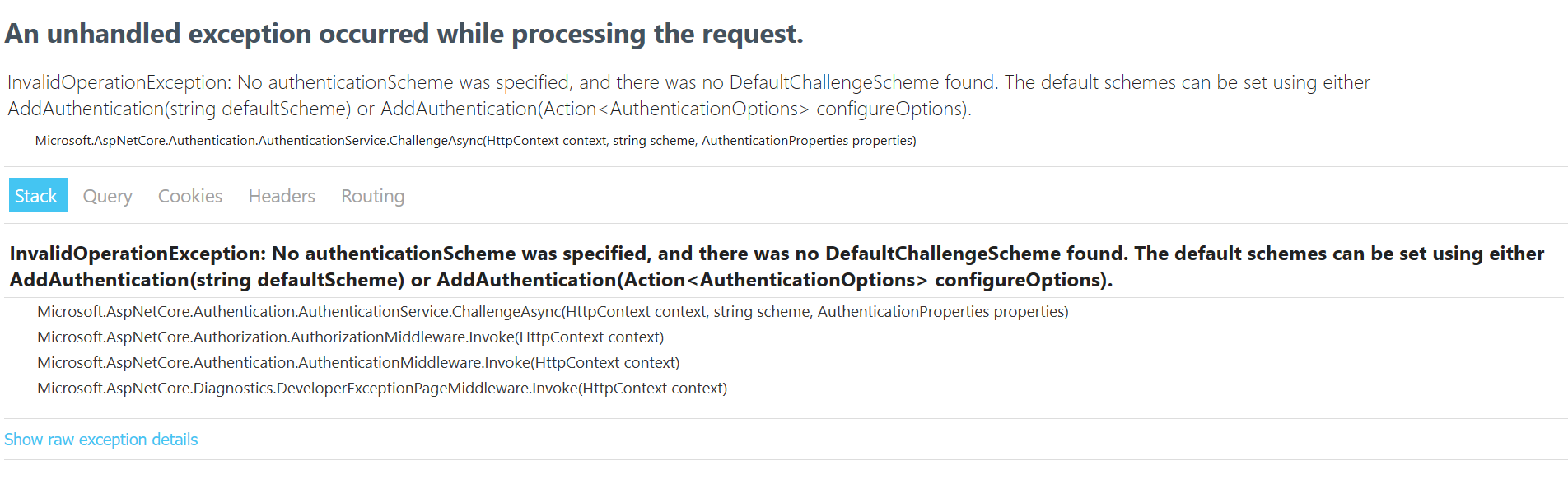
If I don't specify the role it works, although I have not tested whether I can authenticate against either scheme, as I'm not sure how I would do that.
It also works with the role if I specify a default scheme in AddAuthentication(), but again, I have not tested that I can authenticate against either scheme. I am assuming that it will only authenticate against the default scheme in this case, like with our custom authentication handler.
Here is my adapted sample proj:
CookieSample.zip
breggles
on 12 Feb 2020
@HaoK
blowdart
on 12 Feb 2020
Are you saying that the following doesn't work?
[Authorize(AuthenticationSchemes = { BasicAuthenticationHandler.AuthenticationScheme, BasicAuthenticationHandler.AuthenticationScheme + 2 }, Roles = "testRole")] doesn't work?
 HaoK
on 12 Feb 2020
HaoK
on 12 Feb 2020
No, that's not what I'm saying. When I do that, it works. Sorry, should've mentioned that before.
What I'm saying is that if I configure my app as described above authentication works via both auth schemes when I don't specify a role on the AuthenticationAttribute. I can log in with password 'asdf' and password 'qwer'. But when I do specify a role then I get the aforementioned error.
We were hoping to avoid specifying the schemes explicitly on every AuthenticationAttribute and have ASP.NET Core try all schemes configured in the default policy, to avoid having to update many places when we add or remove schemes. This does seem to work when no role is specified, but not when one is specified.
Ideally, we wouldn't even have to specify a default policy and it would just try all configured authentication schemes, by default. Or one should be able to specify a policy option that says 'include all configured schemes' to avoid having to list all the schemes, again.
breggles
on 13 Feb 2020
Any news on this? Were you able to reproduce the problem?
I dug around the code a bit, and it seems to me that this line https://github.com/dotnet/aspnetcore/blob/master/src/Security/Authorization/Core/src/AuthorizationPolicy.cs#L157 combined with this line https://github.com/dotnet/aspnetcore/blob/master/src/Security/Authorization/Policy/src/AuthorizationMiddleware.cs#L71 explains the difference in behaviour between when roles are specified and when they are not. When roles are specified, the specified default policy does not get combined with the policy builder, hence there are no AuthenticationSchemes on the policy, which results in ChallengeAsync() being called without a scheme. ChallengeAsync() then looks for the default authentication scheme, but there is none. When no roles are specified, the default policy is combined with the policy builder and hence the resulting policy has all the authentication schemes defined on the default policy on it. Theses schemes are then explicitly passed to ChallengeAsync() preventing the check for a default authentication scheme.
breggles
on 18 Feb 2020
Yeah that behavior is expected, the default policy is only used when nothing else is specified. Specifying roles means you shouldn't rely on the default policy
HaoK
on 18 Feb 2020
Fair enough, but it would be good if there was a way to specify multiple authentication schemes in one place, when specifying roles via AuthorizeAttributes. Having to specify those schemes on each AuthorizeAttribute individually creates a fair bit of boilerplate and potential maintenance overhead. Plus it introduces room for error when people add new AuthorizeAttributes and forget to specify the auth schemes.
As suggested above, maybe if no authentication schemes are specified on an AuthorizeAttribute, just use all configured schemes?
Also, the documentation could be improved in this area :)
breggles
on 19 Feb 2020
Um... how was this answered? I took your point that specifying roles means you shouldn't rely on the default policy. However, my original point remains that there is no way to specify multiple authentication schemes when also using AuthorizeAttributes with Roles.
breggles
on 27 Mar 2020
There's nothing preventing you from specifying multiple schemes and requiring a specific role on the default policy, just pass the schemes to the constructor and call RequireRole on the policy builder.
HaoK
on 27 Mar 2020
Yes, but I want to be able to specify different roles for different actions/controllers, and the easiest way to do that is via the AuthorizeAttribute; not having to create lots of boilerplate policies.
breggles
on 27 Mar 2020
@breggles @HaoK I am also experiencing similar kind of problem. I think what @breggles is saying correct. Rather than specifying schemes in every Authorization, it is better to use all configured schemes if no scheme if defined.
 gihanwijesinghe
on 15 Apr 2020
gihanwijesinghe
on 15 Apr 2020
I agree with @breggles. This needs a fix/workaround! The "by design" behavior does not make sense. Authentication should be separated from Authorization. I could authenticate using any authentication scheme I want, create a list of claims which should then be picked up by the authorization mechanism. The two should be loosely coupled. When I specify Roles, in the Authorize attribute, it should not care how the claims for the roles have been created and by what authentication scheme.
@breggles, I found that using a separate [Authorize] attribute in addition to the attribute containing roles works. It looks like this and is an ok workaround to specifying multiple schemes:
[Authorize]
[Authorize(Roles = "Admin")]
This works because in this case both Authorize attributes are "in play" and both must be satisfied, meaning that the user must be in the Admin role.
 ibasin
on 6 May 2020
ibasin
on 6 May 2020
thx @ibasin, i'll give that workaround a go when i get a minute :)
breggles
on 6 May 2020
@breggles, this workaround looks even better as a single line and it works well (I have re-tested it yesterday before posting):
[Authorize, Authorize(Roles = "Admin")]
The line above will do exactly what you want: authorize regardless of the authentication scheme if you use multiple schemes.
ibasin
on 6 May 2020
Related issues
 fayezmm
·
3Comments
fayezmm
·
3Comments
 ermithun
·
3Comments
ermithun
·
3Comments
 BrennanConroy
·
3Comments
BrennanConroy
·
3Comments
 TanvirArjel
·
3Comments
TanvirArjel
·
3Comments
 mj1856
·
3Comments
mj1856
·
3Comments