Aspnetcore: Visual Studio warning about razor component closing tag
I have a razor component named Link. When I try to use it Visual Studio keeps warning me that it cannot have closing tag. I guess the IntelliSense is thinking it is a regular html tag named link which is a lower-cased. I know the Blazor team has allowed us to have razor components that are named with upper-case a few month ago, so it's strange for me why this is not working.
Example:

*EDIT: The component works just fine, it's just that the VS is raising the warning.
 stsrki
All 10 comments
Thanks for contacting us.
@NTaylorMullen can you please look into this? Thanks!
 mkArtakMSFT
on 30 Jan 2020
mkArtakMSFT
on 30 Jan 2020
@ToddGrun You guys look to be ignoring the componentization of </Link> here. Would this be an easy, trivial fix to perform? If not, this work will be solved by LSPification.
 NTaylorMullen
on 30 Jan 2020
NTaylorMullen
on 30 Jan 2020
I wouldn't say it's a trivial change. There appear to be both classification and error issues that need to be changed to understand razor components. Adding @jodavis to help determine whether this is high enough priority to fix before the LSPification.
 ToddGrun
on 31 Jan 2020
ToddGrun
on 31 Jan 2020
If there was a simple short-term fix, I would say go for it. But since we already have the right long-term fix on the roadmap, and the impact of the issue, while annoying, isn't blocking anything, I think we should wait for the right fix. Let me know if there's something that makes this more severe than my current read on it.
 jodavis
on 4 Feb 2020
jodavis
on 4 Feb 2020
I would like to mention that while the warning for the <Link> was not blocking me from using it in the client-side app, it was giving me a compile error when trying to use it in another class-library project.


So to workaround the error I had to define full path to the component, including the namespace. eg

I agree that the issue is not a blocker, but I also think this should be addressed as soon as possible as it would allow something that in other client-side libraries already works.
stsrki
on 4 Feb 2020
I don't think those errors are coming from the editor. The editor creates a warning with the text "Closing tag supplied for self-closing element. Remove closing tag." But it would only be noise when the file is open in the VS editor. It would never cause build-time errors.
@NTaylorMullen Does the Blazor parser have any special logic around "link" tags? It looks like it's failing to match up the start and end tags, since there are errors for both "missing end tag" and "unexpected end tag."
jodavis
on 4 Feb 2020
Does not have any special logic around Link tags surprisingly. @strski that's definitely worrisome and I agree with @jodavis. If you're getting compile time errors that would be a separate issue. If you could provide a repro app I'd be happy to take a look.
NTaylorMullen
on 4 Feb 2020
@NTaylorMullen I have created a repro project: https://github.com/stsrki/BlazorClosingTagIssue
Also I found out what triggers the error. It is happening every time that <Link> is placed inside of @if( ) { } statement. Example in the screen-shot:
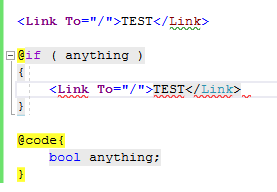
Without the if statement only the warning is raised. Very weird. Anyways, If you need anything else please let me know. tnx
stsrki
on 4 Feb 2020
Thanks for the repro @stsrki.
@mkArtakMSFT I can reproduce this in VS and in VSCode. It's definitely a parser issue. Seems like our parser is treating the Link tag as the void element link instead of the Component Link. I'll leave this in the next sprint planning (and unassigning myself) for you to decide if it's worth fixing (given this is the first report we've had of this) since the issue has existed since v1.0 of Blazor/components.
To workaround your issue for now if you are to change your component to something other than Link all should work fine.
NTaylorMullen
on 5 Feb 2020
@NTaylorMullen Thank you for committing to this issue. I will leave it as a Link but I will advise it to the users of my library to always write it as Blazorise.Link. So once the issue is fixed I will just remove the note from my documentation.
stsrki
on 5 Feb 2020
Related issues
 ermithun
·
3Comments
ermithun
·
3Comments
 ipinak
·
3Comments
ipinak
·
3Comments
 UweKeim
·
3Comments
UweKeim
·
3Comments
 FourLeafClover
·
3Comments
FourLeafClover
·
3Comments
 rynowak
·
3Comments
rynowak
·
3Comments
Most helpful comment
Thanks for the repro @stsrki.
@mkArtakMSFT I can reproduce this in VS and in VSCode. It's definitely a parser issue. Seems like our parser is treating the
Linktag as the void elementlinkinstead of the ComponentLink. I'll leave this in the next sprint planning (and unassigning myself) for you to decide if it's worth fixing (given this is the first report we've had of this) since the issue has existed since v1.0 of Blazor/components.To workaround your issue for now if you are to change your component to something other than
Linkall should work fine.