Aspnetcore: Updating Microsoft.AspNetCore.Authentication.AzureAD.UI to v3.1.1 breaks app, prevents startup
Describe the bug
Dependabot suggested an update of Microsoft.AspNetCore.Authentication.AzureAD.UI from v3.1.0 to v3.1.1. I figured it was a minor version bump & took it since my unit & integration tests passed.
However, I then had to roll back this change because my container was throwing 500 errors.
When investigating this further locally, I believe I was able to isolate it to the update to Microsoft.AspNetCore.Authentication.AzureAD.UI (v3.1.0 works, 3.1.1 does not).
When failing locally, I see the following error:
System.IO.FileNotFoundException
HResult=0x80070002
Message=Could not load file or assembly 'Microsoft.AspNetCore.Razor.Runtime, Version=3.1.1.0, Culture=neutral, PublicKeyToken=adb9793829ddae60'. The system cannot find the file specified.
Source=
StackTrace:

To Reproduce
A PR that demonstrates the issue can be found at: https://github.com/excellalabs/xluhco/pull/230
I can isolate it further if need be but I think this is hopefully small enough to look at.
Further technical details
ASP.NET Core version: 3.1.100 I believe? That's what
dotnet --versionoutputs, and I'm targetingnetcoreapp3.1Include the output of
dotnet --info
.NET Core SDK (reflecting any global.json):
 Version:   3.1.100
 Commit:    cd82f021f4

Runtime Environment:
 OS Name:     Windows
 OS Version:  10.0.18362
 OS Platform: Windows
 RID:         win10-x64
 Base Path:   C:\Program Files\dotnet\sdk\3.1.100\

Host (useful for support):
  Version: 3.1.0
  Commit:  65f04fb6db

.NET Core SDKs installed:
  1.0.0-preview2-003131 [C:\Program Files\dotnet\sdk]
  1.1.0 [C:\Program Files\dotnet\sdk]
  2.0.0 [C:\Program Files\dotnet\sdk]
  2.1.202 [C:\Program Files\dotnet\sdk]
  2.1.401 [C:\Program Files\dotnet\sdk]
  2.1.402 [C:\Program Files\dotnet\sdk]
  2.1.403 [C:\Program Files\dotnet\sdk]
  2.1.500 [C:\Program Files\dotnet\sdk]
  2.1.502 [C:\Program Files\dotnet\sdk]
  2.1.600-preview-009426 [C:\Program Files\dotnet\sdk]
  2.1.602 [C:\Program Files\dotnet\sdk]
  2.1.801 [C:\Program Files\dotnet\sdk]
  2.2.101 [C:\Program Files\dotnet\sdk]
  2.2.200-preview-009648 [C:\Program Files\dotnet\sdk]
  3.0.100 [C:\Program Files\dotnet\sdk]
  3.1.100 [C:\Program Files\dotnet\sdk]

.NET Core runtimes installed:
  Microsoft.AspNetCore.All 2.1.3 [C:\Program Files\dotnet\shared\Microsoft.AspNetCore.All]
  Microsoft.AspNetCore.All 2.1.4 [C:\Program Files\dotnet\shared\Microsoft.AspNetCore.All]
  Microsoft.AspNetCore.All 2.1.5 [C:\Program Files\dotnet\shared\Microsoft.AspNetCore.All]
  Microsoft.AspNetCore.All 2.1.6 [C:\Program Files\dotnet\shared\Microsoft.AspNetCore.All]
  Microsoft.AspNetCore.All 2.1.9 [C:\Program Files\dotnet\shared\Microsoft.AspNetCore.All]
  Microsoft.AspNetCore.All 2.1.12 [C:\Program Files\dotnet\shared\Microsoft.AspNetCore.All]
  Microsoft.AspNetCore.All 2.1.13 [C:\Program Files\dotnet\shared\Microsoft.AspNetCore.All]
  Microsoft.AspNetCore.All 2.2.0 [C:\Program Files\dotnet\shared\Microsoft.AspNetCore.All]
  Microsoft.AspNetCore.App 2.1.3 [C:\Program Files\dotnet\shared\Microsoft.AspNetCore.App]
  Microsoft.AspNetCore.App 2.1.4 [C:\Program Files\dotnet\shared\Microsoft.AspNetCore.App]
  Microsoft.AspNetCore.App 2.1.5 [C:\Program Files\dotnet\shared\Microsoft.AspNetCore.App]
  Microsoft.AspNetCore.App 2.1.6 [C:\Program Files\dotnet\shared\Microsoft.AspNetCore.App]
  Microsoft.AspNetCore.App 2.1.9 [C:\Program Files\dotnet\shared\Microsoft.AspNetCore.App]
  Microsoft.AspNetCore.App 2.1.12 [C:\Program Files\dotnet\shared\Microsoft.AspNetCore.App]
  Microsoft.AspNetCore.App 2.1.13 [C:\Program Files\dotnet\shared\Microsoft.AspNetCore.App]
  Microsoft.AspNetCore.App 2.2.0 [C:\Program Files\dotnet\shared\Microsoft.AspNetCore.App]
  Microsoft.AspNetCore.App 3.0.0 [C:\Program Files\dotnet\shared\Microsoft.AspNetCore.App]
  Microsoft.AspNetCore.App 3.1.0 [C:\Program Files\dotnet\shared\Microsoft.AspNetCore.App]
  Microsoft.NETCore.App 1.0.1 [C:\Program Files\dotnet\shared\Microsoft.NETCore.App]
  Microsoft.NETCore.App 1.0.5 [C:\Program Files\dotnet\shared\Microsoft.NETCore.App]
  Microsoft.NETCore.App 1.1.2 [C:\Program Files\dotnet\shared\Microsoft.NETCore.App]
  Microsoft.NETCore.App 2.0.0 [C:\Program Files\dotnet\shared\Microsoft.NETCore.App]
  Microsoft.NETCore.App 2.0.9 [C:\Program Files\dotnet\shared\Microsoft.NETCore.App]
  Microsoft.NETCore.App 2.1.3 [C:\Program Files\dotnet\shared\Microsoft.NETCore.App]
  Microsoft.NETCore.App 2.1.4 [C:\Program Files\dotnet\shared\Microsoft.NETCore.App]
  Microsoft.NETCore.App 2.1.5 [C:\Program Files\dotnet\shared\Microsoft.NETCore.App]
  Microsoft.NETCore.App 2.1.6 [C:\Program Files\dotnet\shared\Microsoft.NETCore.App]
  Microsoft.NETCore.App 2.1.9 [C:\Program Files\dotnet\shared\Microsoft.NETCore.App]
  Microsoft.NETCore.App 2.1.12 [C:\Program Files\dotnet\shared\Microsoft.NETCore.App]
  Microsoft.NETCore.App 2.1.13 [C:\Program Files\dotnet\shared\Microsoft.NETCore.App]
  Microsoft.NETCore.App 2.2.0 [C:\Program Files\dotnet\shared\Microsoft.NETCore.App]
  Microsoft.NETCore.App 3.0.0 [C:\Program Files\dotnet\shared\Microsoft.NETCore.App]
  Microsoft.NETCore.App 3.1.0 [C:\Program Files\dotnet\shared\Microsoft.NETCore.App]
  Microsoft.WindowsDesktop.App 3.0.0 [C:\Program Files\dotnet\shared\Microsoft.WindowsDesktop.App]
  Microsoft.WindowsDesktop.App 3.1.0 [C:\Program Files\dotnet\shared\Microsoft.WindowsDesktop.App]
- The IDE (VS / VS Code/ VS4Mac) you're running on, and it's version
VSCode latest stable, VS 2019 16.3.1
 SeanKilleen
All 28 comments
Thanks for contacting us.
This is a known issue we're aware of and track as part of https://github.com/dotnet/aspnetcore/issues/18334
Closing as a dupe.
 mkArtakMSFT
on 17 Jan 2020
mkArtakMSFT
on 17 Jan 2020
Thanks! I wasn't able to find it in the original search, so I appreciate the pointer. 👍
@mkArtakMSFT at first glance I'm not sure that this is related. The issue you reference states:
and executes on a runtime other than 64-bit Windows
but I am testing this on 64-bit windows.
It also states:
Alternatively, if you use the Microsoft.AspNetCore.Identity.UI package
Which I am not using.
Is it that the link you provided implicitly includes my issue as well even though it doesn't match the noted criteria? Or is this a variation on the issue that should possibly be tracked separately?
SeanKilleen
on 17 Jan 2020
@SeanKilleen we are getting the same issue except the container in this case is our Azure Web App (linux) deployment. Seems they do not have 3.1.1 in the azure web app container yet? And the workaround that @mkArtakMSFT linked to does not seem applicable. I'm sure your dotnet version output was for your container and so your issue is different. Mentioning this in case anyone was having the same error on azure web app deployment.
2020-01-21T03:34:16.700218152Z ASP .NETCore Version: 3.1.0
2020-01-21T03:34:23.398036552Z Unhandled exception. System.IO.FileNotFoundException: Could not load file or assembly 'Microsoft.AspNetCore.Razor.Runtime, Version=3.1.1.0, Culture=neutral, PublicKeyToken=adb9793829ddae60'. The system cannot find the file specified.
2020-01-21T03:34:23.398073252Z File name: 'Microsoft.AspNetCore.Razor.Runtime, Version=3.1.1.0, Culture=neutral, PublicKeyToken=adb9793829ddae60'
 pwen090
on 21 Jan 2020
pwen090
on 21 Jan 2020
Thanks for the details, @SeanKilleen and @pwen090.
Sorry for noticing this a bit late.
Can you please confirm this is still an issue?
@HaoK please triage in case if this is.
mkArtakMSFT
on 1 Feb 2020
@mkArtakMSFT yes, I can still reproduce this issue. I'll work on a branch for it in the morning. Bumping the UI package to 3.1.1 and running it inside of the mcr.microsoft.com/dotnet/core/aspnet:3.1-alpine container can reliably reproduce this issue.
SeanKilleen
on 1 Feb 2020
@SeanKilleen we are getting the same issue except the container in this case is our Azure Web App (linux) deployment. Seems they do not have 3.1.1 in the azure web app container yet? And the workaround that @mkArtakMSFT linked to does not seem applicable. I'm sure your dotnet version output was for your container and so your issue is different. Mentioning this in case anyone was having the same error on azure web app deployment.
2020-01-21T03:34:16.700218152Z ASP .NETCore Version: 3.1.0 2020-01-21T03:34:23.398036552Z Unhandled exception. System.IO.FileNotFoundException: Could not load file or assembly 'Microsoft.AspNetCore.Razor.Runtime, Version=3.1.1.0, Culture=neutral, PublicKeyToken=adb9793829ddae60'. The system cannot find the file specified. 2020-01-21T03:34:23.398073252Z File name: 'Microsoft.AspNetCore.Razor.Runtime, Version=3.1.1.0, Culture=neutral, PublicKeyToken=adb9793829ddae60'
Hi, I can confirm that we are having the same issue. .NET core 3.1.1 on a Linux Web App Service in West Europe. Unfortunately it appears we had to upgrade to 3.1.1 to fix another issue, so we cannot downgrade either.
At a guess i'll have to try self-contained for now.
 uniper-scott
on 1 Feb 2020
uniper-scott
on 1 Feb 2020
@dotnet/aspnet-build @blowdart @Tratcher did we take any fixes in AzureAd auth for 3.1.1? Or is this just some kind of potential build issue with 3.1.1?
 HaoK
on 1 Feb 2020
HaoK
on 1 Feb 2020
@HaoK I don't see any 3.1 changes. Can you reproduce this locally?
Hi, I can confirm that we are having the same issue. .NET core 3.1.1 on a Linux Web App Service in West Europe.
We know 3.1.1 has not been deployed to Azure yet. https://aspnetcoreon.azurewebsites.net/
 Tratcher
on 1 Feb 2020
Tratcher
on 1 Feb 2020
I want to make sure I'm clear -- this is an issue with the Microsoft.AspNetCore.Authentication.AzureAD.UI package, not with .NET Core 3.1. My workaround is to downgrade the package (I am still able to use .NET Core 3.1 in the container)
I can reproduce the bug by running the latest .NET Core 3.1 in a container (as I do for my application). Issue is resolved by downgrading this specific package to 3.1.0.
Repro steps for my current situation:
- Pull the source code at http://github.com/excellalabs/xluhco (master branch)
- Build the docker container (
docker build -t testthebug .from thesrcdirectory) - Run the docker container (
docker run -it -p 8081:80 testthebug) - Observe the home page works correctly (
http://locahost:8081) - Edit the
.csprojto upgrade theMicrosoft.AspNetCore.Authentication.AzureAD.UIto3.1.1. - (optionally, update the settings json files so that the log level is debug).
- Re-build the container
- Observe that there are now 500 errors on the integration tests with the error message that I indicate. (this would also happen for all requests when running the app too.
SeanKilleen
on 1 Feb 2020
AFAIK we took nothing.
 blowdart
on 1 Feb 2020
blowdart
on 1 Feb 2020
@HaoK let me know if a more minimal repro would help. Also, are the builds public (either via pipelines or a .yml file somewhere in the repro? Happy to look into it further if so.
Edit:
sorry, found it; I'd looked in the wrong place originally. I'll see if I can see anything.
For others who are looking along with me:
- This package was built from the source code at https://github.com/aspnet/AspNetCore/tree/e276c8174b8bfdeb70efceafa81c75f8badbc8db
- Therefore, CI is at: https://github.com/dotnet/aspnetcore/tree/e276c8174b8bfdeb70efceafa81c75f8badbc8db/.azure/pipelines
SeanKilleen
on 1 Feb 2020
I suspect this is the same thing as https://github.com/aspnet/announcements/issues/401. Unfrotunately we build 3.1.1 packages such that they only work if the 3.1.1 runtime is installed as well.
 Pilchie
on 1 Feb 2020
Pilchie
on 1 Feb 2020
@Pilchie that's what I thought, but the containers are built using mcr.microsoft.com/dotnet/core/aspnet:3.1-alpine.
When I look at the tag listing on docker hub, it appears that 3.1-apline and 3.1.1-alpine are the same container.

Is that statement correct? My assumption is that I've been pulling 3.1.1 because it's rolled up into the 3.1 tag -- that might be incorrect thinking on my part.
SeanKilleen
on 1 Feb 2020
No, you are right, those images should have been updated. We’ll keep looking.
Pilchie
on 1 Feb 2020
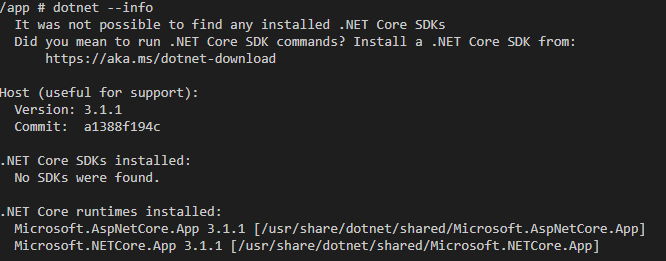
Can you get on the container and run dotnet info to confirm that it’s got the 3.1.1 runtime?
Pilchie
on 1 Feb 2020
@Pilchie screenshot from a console of the running container that exhibits the issue (runtime, SDK isn't installed since I'm doing a multi-stage build) :
 SeanKilleen
on 1 Feb 2020
SeanKilleen
on 1 Feb 2020
@SeanKilleen with your docker repro, I was able to repro the issue of 500 errors, but I was seeing the failure due to load "Microsoft.AspNetCore.DataProtection.Abstractions", and I was able to fix it by adding a direct package reference as described in the original issue. Your error above is about Razor.Runtime - have you got a more detailed repro for that?
Workaround
Add the following to your .csproj:
<PackageReference Include="Microsoft.AspNetCore.DataProtection.Abstractions" Version="3.1.1" />
Deleted duplicate comment - posting from the bus, and the internet connection isn't always great.
Pilchie
on 5 Feb 2020
@Pilchie what would you be looking for in a more detailed repro?
In order to truly see the specific issue I reported, I'd had to deploy the container to the Web App for Containers service, and then it threw 500 errors in prod and I saw them in the logs.
Let me see if I can get another test site deployed from the repo and a different container tag to see if I can show the full repro. It's going to take a bit though; my schedule is packed the next few days unfortunately.
I will also attempt the workaround you mentioned and see if that resolves things.
SeanKilleen
on 5 Feb 2020
Primarily the exact set of <PackageReference elements in your project. Possibly sharing the objproject.assets.json would help too.
Pilchie
on 5 Feb 2020
@Pilchie while I work on reproducing again locally, the package refs are here -- https://github.com/excellalabs/xluhco/blob/master/src/xluhco.web/xluhco.web.csproj
If you pull the master branch of the project and change the entry for Microsoft.AspNetCore.Authentication.AzureAD.UI to 3.1.1 (regardless of other package version bumps, etc.) and you'll repro the issue.
I'll try to get you the file from my obj folder soon as I'm able.
Thanks for continuing to look at this!
SeanKilleen
on 5 Feb 2020
To be clear -- the project is being built within a container and then copied into the other container, so my local obj files produced may not be the same as those produced in the container.
I'll try to see if I can set it up for the smallest repro possible.
SeanKilleen
on 5 Feb 2020
@SeanKilleen I did that, and was able to repro a 500 error, but it was for a failure to load Microsoft.AspNetCore.DataProtection.Abstractions, and I was able to work around that by adding a package reference to it directly, as I described here.
I can't repro a failure with Razor.Runtime though.
Pilchie
on 5 Feb 2020
vs2019, start new project blazor server side, change Authentication to Individual user accounts.
when it is using 3.1.0 all fine, if you go to manage nuget it will show you 5 updates to 3.1.1, if you update Microsoft.AspNetCore.Identity.UI to 3.1.1 you get an error:
services.AddDefaultIdentity
.AddEntityFrameworkStores
FileNotFoundException: Could not load file or assembly 'Microsoft.AspNetCore.Razor.Runtime, Version=3.1.1.0, Culture=neutral, PublicKeyToken=adb9793829ddae60'. The system cannot find the file specified.
System.ModuleHandle.ResolveTypeHandleInternal(RuntimeModule module, int typeToken, RuntimeTypeHandle[] typeInstantiationContext, RuntimeTypeHandle[] methodInstantiationContext)
 douglassimaodev
on 6 Feb 2020
douglassimaodev
on 6 Feb 2020
@douglassimaodev - I can repro that if I don't have the 3.1.1 runtime installed, but not once I installed the 3.1.1 runtime. This is what is described in the "Updating packages without updating shared runtime" section of https://github.com/aspnet/announcements/issues/401.
You can install the 3.1.1 SDK or Hosting Bundle from https://get.dot.net before it is bundled into VS.
Pilchie
on 6 Feb 2020
Just accidentally reproduced this -- I think -- using an out of the box setup.
My exact steps were:
- Open VS 2019 (mine happens to be 16.4.0 Preview 2)
- Add a new project to a solution (mine only had a .NET standard 2.0 classlib in it at the time)
- Select a .NET Core Web Application
- Select model-view-controller style
- Enable auth for my organization in Azure
- Enable docker support
- Create the project
- Build the project
- Hit F5 to run the project, which runs it within Docker
See the error:

My SDK list includes 3.1.101, and my runtimes include 3.1.1. The docker file that's generated pulls from the containers tagged with :3.1.
As in the past, taking this new project and downgrading Microsoft.AspNetCore.Authentication.AzureAD.UI from 3.1.1 to 3.1.0 works as expected.
result of dotnet --list-sdks:
2.1.202 [C:\Program Files\dotnet\sdk]
2.1.505 [C:\Program Files\dotnet\sdk]
3.1.100-preview1-014459 [C:\Program Files\dotnet\sdk]
3.1.101 [C:\Program Files\dotnet\sdk]
result of dotnet --list-runtimes:
Microsoft.AspNetCore.All 2.1.2 [C:\Program Files\dotnet\shared\Microsoft.AspNetCore.All]
Microsoft.AspNetCore.All 2.1.4 [C:\Program Files\dotnet\shared\Microsoft.AspNetCore.All]
Microsoft.AspNetCore.All 2.1.9 [C:\Program Files\dotnet\shared\Microsoft.AspNetCore.All]
Microsoft.AspNetCore.All 2.1.13 [C:\Program Files\dotnet\shared\Microsoft.AspNetCore.All]
Microsoft.AspNetCore.App 2.1.2 [C:\Program Files\dotnet\shared\Microsoft.AspNetCore.App]
Microsoft.AspNetCore.App 2.1.4 [C:\Program Files\dotnet\shared\Microsoft.AspNetCore.App]
Microsoft.AspNetCore.App 2.1.9 [C:\Program Files\dotnet\shared\Microsoft.AspNetCore.App]
Microsoft.AspNetCore.App 2.1.13 [C:\Program Files\dotnet\shared\Microsoft.AspNetCore.App]
Microsoft.AspNetCore.App 3.1.0-preview1.19508.20 [C:\Program Files\dotnet\shared\Microsoft.AspNetCore.App]
Microsoft.AspNetCore.App 3.1.1 [C:\Program Files\dotnet\shared\Microsoft.AspNetCore.App]
Microsoft.NETCore.App 2.1.4 [C:\Program Files\dotnet\shared\Microsoft.NETCore.App]
Microsoft.NETCore.App 2.1.9 [C:\Program Files\dotnet\shared\Microsoft.NETCore.App]
Microsoft.NETCore.App 2.1.13 [C:\Program Files\dotnet\shared\Microsoft.NETCore.App]
Microsoft.NETCore.App 3.1.0-preview1.19506.1 [C:\Program Files\dotnet\shared\Microsoft.NETCore.App]
Microsoft.NETCore.App 3.1.1 [C:\Program Files\dotnet\shared\Microsoft.NETCore.App]
Microsoft.WindowsDesktop.App 3.1.0-preview1.19506.1 [C:\Program Files\dotnet\shared\Microsoft.WindowsDesktop.App]      Microsoft.WindowsDesktop.App 3.1.1 [C:\Program Files\dotnet\shared\Microsoft.WindowsDesktop.App]
Hi Sean, I set up a VM with 16.4 Preview 2 to try to repro this. I can repro it if I run locally on the machine, but not if I run in the container. This is expected, since 16.4 Preview 2 doesn't contain 3.1.1. Can you verify that you're actually running in the container by looking at the VS launch selector to see what launch profile you have selected?

Pilchie
on 12 Feb 2020
Thank you for contacting us. Due to a lack of activity on this discussion issue we're closing it in an effort to keep our backlog clean. If you believe there is a concern related to the ASP.NET Core framework, which hasn't been addressed yet, please file a new issue.
This issue will be locked after 30 more days of inactivity. If you still wish to discuss this subject after then, please create a new issue!
![msftbot[bot] picture](https://avatars2.githubusercontent.com/in/26612?v=4&s=40) msftbot[bot]
on 24 May 2020
msftbot[bot]
on 24 May 2020
Related issues
 aurokk
·
3Comments
aurokk
·
3Comments
 rbanks54
·
3Comments
rbanks54
·
3Comments
 guardrex
·
3Comments
guardrex
·
3Comments
 githubgitgit
·
3Comments
githubgitgit
·
3Comments
 ermithun
·
3Comments
ermithun
·
3Comments