Aspnetcore: The HTTP response obtained during functional tests with TestServer it doesn't always contain the originated request content
Describe the bug
There are some scenarios when the response.RequestMessage.Content does not contain the content used with the request that led to the response message while using the client created by the TestServer class.
So for example:
- when there are a
controllerand anaction, no matter if the request is with an expected 200 OK or an expected 400 BadRequest, the response won't contain the body used within the original request; the expected behavior is to contain it - if
UseEndpointsandMapare used for mapping and an expected 400 BadRequest is tried, then the response will contain this time the request; this is the expected behavior - if the request is an expected 404 BadRequet, then the response will contain the request's content; also the expected behavior
To Reproduce
I've added a sample repository here, with tests included
I'll copy here the code too
``` C#
using Microsoft.AspNetCore;
using Microsoft.AspNetCore.Builder;
using Microsoft.AspNetCore.Hosting;
using Microsoft.AspNetCore.Mvc;
using Microsoft.AspNetCore.Mvc.Testing;
using Microsoft.AspNetCore.TestHost;
using Microsoft.Extensions.Configuration;
using Microsoft.Extensions.DependencyInjection;
using Microsoft.Extensions.Hosting;
using System.ComponentModel.DataAnnotations;
using System.Net;
using System.Net.Http;
using System.Text;
using System.Threading.Tasks;
using Xunit;
namespace RequestMessageIssueTests
{
public sealed class Program
{
public static void Main(string[] args) => CreateWebHostBuilder(args).Build().Run();
    public static IWebHostBuilder CreateWebHostBuilder(string[] args) =>
        WebHost.CreateDefaultBuilder(args)
            .UseStartup<Startup>();
}

public class Startup
{
    public Startup(IConfiguration configuration)
    {
        Configuration = configuration;
    }

    public IConfiguration Configuration { get; }

    // This method gets called by the runtime. Use this method to add services to the container.
    public static void ConfigureServices(IServiceCollection services)
    {
        services.AddControllers();
    }

    // This method gets called by the runtime. Use this method to configure the HTTP request pipeline.
    public static void Configure(IApplicationBuilder app, IWebHostEnvironment env)
    {
        if (env.IsDevelopment())
        {
            app.UseDeveloperExceptionPage();
        }
        else
        {
            // The default HSTS value is 30 days. You may want to change this for production scenarios, see https://aka.ms/aspnetcore-hsts.
            app.UseHsts();
        }

        app.UseHttpsRedirection();

        app.UseRouting();

        app.UseEndpoints(endpoints =>
        {
            endpoints.MapControllers();
        });
    }
}

public class Comment
{
    [Required]
    public string Author { get; set; }
}

[Route("api/[controller]")]
[ApiController]
public class CommentsController : ControllerBase
{
    [HttpPost]
    public Comment Post([FromBody] Comment value) => value;
}

[Route("api/[controller]")]
[ApiController]
public class IssuesController : ControllerBase
{
}

public class RequestMessagesTests : IClassFixture<WebApplicationFactory<Startup>>
{
    private readonly WebApplicationFactory<Startup> _factory;

    public RequestMessagesTests(WebApplicationFactory<Startup> factory)
    {
        _factory = factory;
    }

    [Fact]
    public async Task GivenAnController_AnAction_And_AValidRequest_WhenAssertingTheRequestContent_ItShouldHaveAvailableTheContent()
    {
        using var client = _factory.CreateClient();

        var response = await client.PostAsync("/api/comments", new StringContent(@"{
                  ""author"": ""John""
                }", Encoding.UTF8, "application/json"));

        // as expected
        Assert.Equal(HttpStatusCode.OK, response.StatusCode);

        // fails, the HttpContent from the originated request doesn't contain the request body
        var requestContent = await response.RequestMessage.Content.ReadAsStringAsync();
        Assert.NotEmpty(requestContent);
    }

    [Fact]
    public async Task Given_ARequest_WithoutACorrespondingMVCAction_WhenAssertingTheRequestContent_ItShouldHaveAvailableTheContent()
    {
        using var client = _factory.CreateClient();

        var response = await client.PostAsync("/api/issues", new StringContent(@"{
                  ""issue"": ""An issue""
                }", Encoding.UTF8, "application/json"));

        // as expected
        Assert.Equal(HttpStatusCode.NotFound, response.StatusCode);

        // passes, the response contains the originated request content
        var requestContent = await response.RequestMessage.Content.ReadAsStringAsync();
        Assert.NotEmpty(requestContent);
    }

    [Fact]
    public async Task GivenAnWebHostBuilderSetupAndA404Request_WhenAssertingTheRequestContent_ItShouldHaveAvailableTheContent()
    {
        var builder = new WebHostBuilder();
        builder.ConfigureServices(services =>
        {
            services.AddRouting();
        });
        builder.Configure(app => app.UseRouting());
        using var testServer = new TestServer(builder);
        using var client = testServer.CreateClient();

        using var response = await client.PostAsync("/endpoint", new StringContent("request body"));

        // expected
        Assert.Equal(HttpStatusCode.NotFound, response.StatusCode);

        // as expected, the response contains the originated request content
        var requestContent = await response.RequestMessage.Content.ReadAsStringAsync();
        Assert.NotEmpty(requestContent);
    }

    [Fact]
    public async Task GivenAnController_AnAction_And_ABadRequestRequest_WhenAssertingTheRequestContent_ItShouldHaveAvailableTheContent()
    {
        using var client = _factory.CreateClient();

        var response = await client.PostAsync("/api/comments", new StringContent(@"{
                  ""comment"": ""some comment""
                }", Encoding.UTF8, "application/json"));

        // as expected
        Assert.Equal(HttpStatusCode.BadRequest, response.StatusCode);

        // fails, the HttpContent from the originated request doesn't contain the request body
        var requestContent = await response.RequestMessage.Content.ReadAsStringAsync();
        Assert.NotEmpty(requestContent);
    }

    [Fact]
    public async Task GivenAnWebHostBuilderSetupAndA400BadRequest_WhenAssertingTheRequestContent_ItShouldHaveAvailableTheContent()
    {
        var builder = new WebHostBuilder();
        builder.ConfigureServices(services =>
        {
            services.AddRouting();
        });
        builder.Configure(app => app.UseRouting()
            .UseEndpoints(endpoints => endpoints.Map("/endpoint",
                context =>
                {
                    context.Response.StatusCode = (int)HttpStatusCode.BadRequest;
                    return Task.CompletedTask;
                })));
        using var testServer = new TestServer(builder);
        using var client = testServer.CreateClient();

        using var response = await client.PostAsync("/endpoint", new StringContent("request body"));

        // expected
        Assert.Equal(HttpStatusCode.BadRequest, response.StatusCode);

        // as expected, the response contains the originated request content
        var requestContent = await response.RequestMessage.Content.ReadAsStringAsync();
        Assert.NotEmpty(requestContent);
    }
}
}
```xml
<Project Sdk="Microsoft.NET.Sdk">

  <PropertyGroup>
    <TargetFramework>netcoreapp3.0</TargetFramework>
    <IsPackable>false</IsPackable>
    <GenerateProgramFile>false</GenerateProgramFile>
  </PropertyGroup>

  <ItemGroup>
    <PackageReference Include="Microsoft.NET.Test.Sdk" Version="16.2.0" />
    <PackageReference Include="Microsoft.AspNetCore.Mvc.Testing" Version="3.0.0" />
    <PackageReference Include="xunit" Version="2.4.0" />
    <PackageReference Include="xunit.runner.visualstudio" Version="2.4.0" />
  </ItemGroup>

</Project>
Further technical details
- ASP.NET Core version
3.0 in this sample, but I found this on 2.2 - Include the output of
dotnet --info
.NET Core SDK (reflecting any global.json):
Version: 3.1.100
Commit: cd82f021f4
Runtime Environment:
OS Name: Windows
OS Version: 10.0.17763
OS Platform: Windows
RID: win10-x64
Base Path: C:\Program Files\dotnet\sdk\3.1.100\
Host (useful for support):
Version: 3.1.0
Commit: 65f04fb6db
.NET Core SDKs installed:
2.1.202 [C:\Program Files\dotnet\sdk]
2.1.500 [C:\Program Files\dotnet\sdk]
2.1.502 [C:\Program Files\dotnet\sdk]
2.1.503 [C:\Program Files\dotnet\sdk]
2.1.504 [C:\Program Files\dotnet\sdk]
2.1.505 [C:\Program Files\dotnet\sdk]
2.1.507 [C:\Program Files\dotnet\sdk]
2.1.508 [C:\Program Files\dotnet\sdk]
2.1.509 [C:\Program Files\dotnet\sdk]
2.1.602 [C:\Program Files\dotnet\sdk]
2.2.101 [C:\Program Files\dotnet\sdk]
2.2.106 [C:\Program Files\dotnet\sdk]
2.2.108 [C:\Program Files\dotnet\sdk]
2.2.202 [C:\Program Files\dotnet\sdk]
2.2.203 [C:\Program Files\dotnet\sdk]
2.2.401 [C:\Program Files\dotnet\sdk]
3.0.101 [C:\Program Files\dotnet\sdk]
3.1.100 [C:\Program Files\dotnet\sdk]
.NET Core runtimes installed:
Microsoft.AspNetCore.All 2.1.6 [C:\Program Files\dotnet\shared\Microsoft.AspNetCore.All]
Microsoft.AspNetCore.All 2.1.7 [C:\Program Files\dotnet\shared\Microsoft.AspNetCore.All]
Microsoft.AspNetCore.All 2.1.8 [C:\Program Files\dotnet\shared\Microsoft.AspNetCore.All]
Microsoft.AspNetCore.All 2.1.9 [C:\Program Files\dotnet\shared\Microsoft.AspNetCore.All]
Microsoft.AspNetCore.All 2.1.11 [C:\Program Files\dotnet\shared\Microsoft.AspNetCore.All]
Microsoft.AspNetCore.All 2.1.12 [C:\Program Files\dotnet\shared\Microsoft.AspNetCore.All]
Microsoft.AspNetCore.All 2.1.13 [C:\Program Files\dotnet\shared\Microsoft.AspNetCore.All]
Microsoft.AspNetCore.All 2.1.14 [C:\Program Files\dotnet\shared\Microsoft.AspNetCore.All]
Microsoft.AspNetCore.All 2.2.0 [C:\Program Files\dotnet\shared\Microsoft.AspNetCore.All]
Microsoft.AspNetCore.All 2.2.3 [C:\Program Files\dotnet\shared\Microsoft.AspNetCore.All]
Microsoft.AspNetCore.All 2.2.4 [C:\Program Files\dotnet\shared\Microsoft.AspNetCore.All]
Microsoft.AspNetCore.All 2.2.6 [C:\Program Files\dotnet\shared\Microsoft.AspNetCore.All]
Microsoft.AspNetCore.All 2.2.8 [C:\Program Files\dotnet\shared\Microsoft.AspNetCore.All]
Microsoft.AspNetCore.App 2.1.6 [C:\Program Files\dotnet\shared\Microsoft.AspNetCore.App]
Microsoft.AspNetCore.App 2.1.7 [C:\Program Files\dotnet\shared\Microsoft.AspNetCore.App]
Microsoft.AspNetCore.App 2.1.8 [C:\Program Files\dotnet\shared\Microsoft.AspNetCore.App]
Microsoft.AspNetCore.App 2.1.9 [C:\Program Files\dotnet\shared\Microsoft.AspNetCore.App]
Microsoft.AspNetCore.App 2.1.11 [C:\Program Files\dotnet\shared\Microsoft.AspNetCore.App]
Microsoft.AspNetCore.App 2.1.12 [C:\Program Files\dotnet\shared\Microsoft.AspNetCore.App]
Microsoft.AspNetCore.App 2.1.13 [C:\Program Files\dotnet\shared\Microsoft.AspNetCore.App]
Microsoft.AspNetCore.App 2.1.14 [C:\Program Files\dotnet\shared\Microsoft.AspNetCore.App]
Microsoft.AspNetCore.App 2.2.0 [C:\Program Files\dotnet\shared\Microsoft.AspNetCore.App]
Microsoft.AspNetCore.App 2.2.3 [C:\Program Files\dotnet\shared\Microsoft.AspNetCore.App]
Microsoft.AspNetCore.App 2.2.4 [C:\Program Files\dotnet\shared\Microsoft.AspNetCore.App]
Microsoft.AspNetCore.App 2.2.6 [C:\Program Files\dotnet\shared\Microsoft.AspNetCore.App]
Microsoft.AspNetCore.App 2.2.8 [C:\Program Files\dotnet\shared\Microsoft.AspNetCore.App]
Microsoft.AspNetCore.App 3.0.1 [C:\Program Files\dotnet\shared\Microsoft.AspNetCore.App]
Microsoft.AspNetCore.App 3.1.0 [C:\Program Files\dotnet\shared\Microsoft.AspNetCore.App]
Microsoft.NETCore.App 2.0.9 [C:\Program Files\dotnet\shared\Microsoft.NETCore.App]
Microsoft.NETCore.App 2.1.6 [C:\Program Files\dotnet\shared\Microsoft.NETCore.App]
Microsoft.NETCore.App 2.1.7 [C:\Program Files\dotnet\shared\Microsoft.NETCore.App]
Microsoft.NETCore.App 2.1.8 [C:\Program Files\dotnet\shared\Microsoft.NETCore.App]
Microsoft.NETCore.App 2.1.9 [C:\Program Files\dotnet\shared\Microsoft.NETCore.App]
Microsoft.NETCore.App 2.1.11 [C:\Program Files\dotnet\shared\Microsoft.NETCore.App]
Microsoft.NETCore.App 2.1.12 [C:\Program Files\dotnet\shared\Microsoft.NETCore.App]
Microsoft.NETCore.App 2.1.13 [C:\Program Files\dotnet\shared\Microsoft.NETCore.App]
Microsoft.NETCore.App 2.1.14 [C:\Program Files\dotnet\shared\Microsoft.NETCore.App]
Microsoft.NETCore.App 2.2.0 [C:\Program Files\dotnet\shared\Microsoft.NETCore.App]
Microsoft.NETCore.App 2.2.3 [C:\Program Files\dotnet\shared\Microsoft.NETCore.App]
Microsoft.NETCore.App 2.2.4 [C:\Program Files\dotnet\shared\Microsoft.NETCore.App]
Microsoft.NETCore.App 2.2.6 [C:\Program Files\dotnet\shared\Microsoft.NETCore.App]
Microsoft.NETCore.App 2.2.8 [C:\Program Files\dotnet\shared\Microsoft.NETCore.App]
Microsoft.NETCore.App 3.0.1 [C:\Program Files\dotnet\shared\Microsoft.NETCore.App]
Microsoft.NETCore.App 3.1.0 [C:\Program Files\dotnet\shared\Microsoft.NETCore.App]
Microsoft.WindowsDesktop.App 3.0.1 [C:\Program Files\dotnet\shared\Microsoft.WindowsDesktop.App]
Microsoft.WindowsDesktop.App 3.1.0 [C:\Program Files\dotnet\shared\Microsoft.WindowsDesktop.App]
To install additional .NET Core runtimes or SDKs:
https://aka.ms/dotnet-download
- The IDE (VS / VS Code/ VS4Mac) you're running on, and it's version
VS2019
 adrianiftode
All 10 comments
Thanks for contacting us.
@javiercn can you please look into this? Thanks!
 mkArtakMSFT
on 9 Dec 2019
mkArtakMSFT
on 9 Dec 2019
Hi. Thanks for contacting us.
We're closing this issue as there was not much community interest in this ask for quite a while now.
You can learn more about our triage process and how we handle issues by reading our Triage Process writeup.
mkArtakMSFT
on 9 Jun 2020
@mkArtakMSFT
A colleague found a work-around by calling the ContentLength property of the request's headers right before making the call to the controller from the test project:
...
var request = new HttpRequestMessage(httpMethod, uri);
var content = new StringContent(JsonConvert.SerializeObject(request), System.Text.Encoding.UTF8, "application/json");

// work-around to fix an issue where ASP.NET Core test HttpClient sends an empty body to the controller
_ = request.Content?.Headers.ContentLength;

var response =  await _client.SendAsync(request).ConfigureAwait(false);
...
Now we test in peace.
 albertoms
on 22 Jun 2020
albertoms
on 22 Jun 2020
@albertoms
Unfortunately, this is not possible for me as I don't really have access to the request before the client is sending it.
Also, there are APIs like PostAsync which don't have this possibility at all.
adrianiftode
on 22 Jun 2020
@adrianiftode
Do you mean that your actual tests implementation is different from the one you shared in the description?
By using one of the failing [Fact] tests you shared, the request could be converted to an object where ContentLength can be called:
        [Fact]
        public async Task GivenAnController_AnAction_And_AValidRequest_WhenAssertingTheRequestContent_ItShouldHaveAvailableTheContent()
        {
            using var client = _factory.CreateClient();

            // Build request as an anonymous type
            var requestObj = new
            {
                author: "John"
            };

            // Maybe System.Text.Json can be used instead of Newtonsoft.Json.
            var stringContent = new StringContent(JsonConvert.SerializeObject(requestObj), System.Text.Encoding.UTF8, "application/json");

            // This is the trick working for us.
            _ = stringContent.Headers.ContentLength;

            var response = await client.PostAsync("/api/comments", stringContent);

            // as expected
            Assert.Equal(HttpStatusCode.OK, response.StatusCode);

            // Hopefully now the test passes
            var requestContent = await response.RequestMessage.Content.ReadAsStringAsync();
            Assert.NotEmpty(requestContent);
        }
I hope it helps.
albertoms
on 22 Jun 2020
I actually checked and doesn't seem to work
The following test still fails
[Fact]
public async Task GivenAnController_AnAction_ABadRequestRequest_AndSendAsync_WhenAssertingTheRequestContent_ItShouldHaveAvailableTheContent()
{
    using var client = _factory.CreateClient();

    var request = new HttpRequestMessage(HttpMethod.Post, "/api/comments")
    {
        Content = new StringContent(@"{
              ""comment"": ""some comment""
            }", Encoding.UTF8, "application/json")
    };

    _ = request.Content?.Headers.ContentLength;

    var response = await client.SendAsync(request);

    // as expected
    Assert.Equal(HttpStatusCode.BadRequest, response.StatusCode);

    // fails, the HttpContent from the originated request doesn't contain the request body
    var requestContent = await response.RequestMessage.Content.ReadAsStringAsync();
    Assert.NotEmpty(requestContent);
}
That's weird. I downloaded the project you shared and it's indeed not working with that work-around, but if I run the failing test in debug mode it strangely passes.
Can you also can get it to green in debug mode?
albertoms
on 22 Jun 2020
Nope, same
adrianiftode
on 23 Jun 2020
Sorry, what I meant was to run the test in debug mode and to add a breakpoint in the controller under test. When the debugger hits that breakpoint, the property value.Author is properly initialized with the value sent from the test.
albertoms
on 23 Jun 2020
I see what you mean, however, this issue is about accessing the Request content via the response.RequestMessage.Content path. This doesn't work, as described in the original comment on this thread.
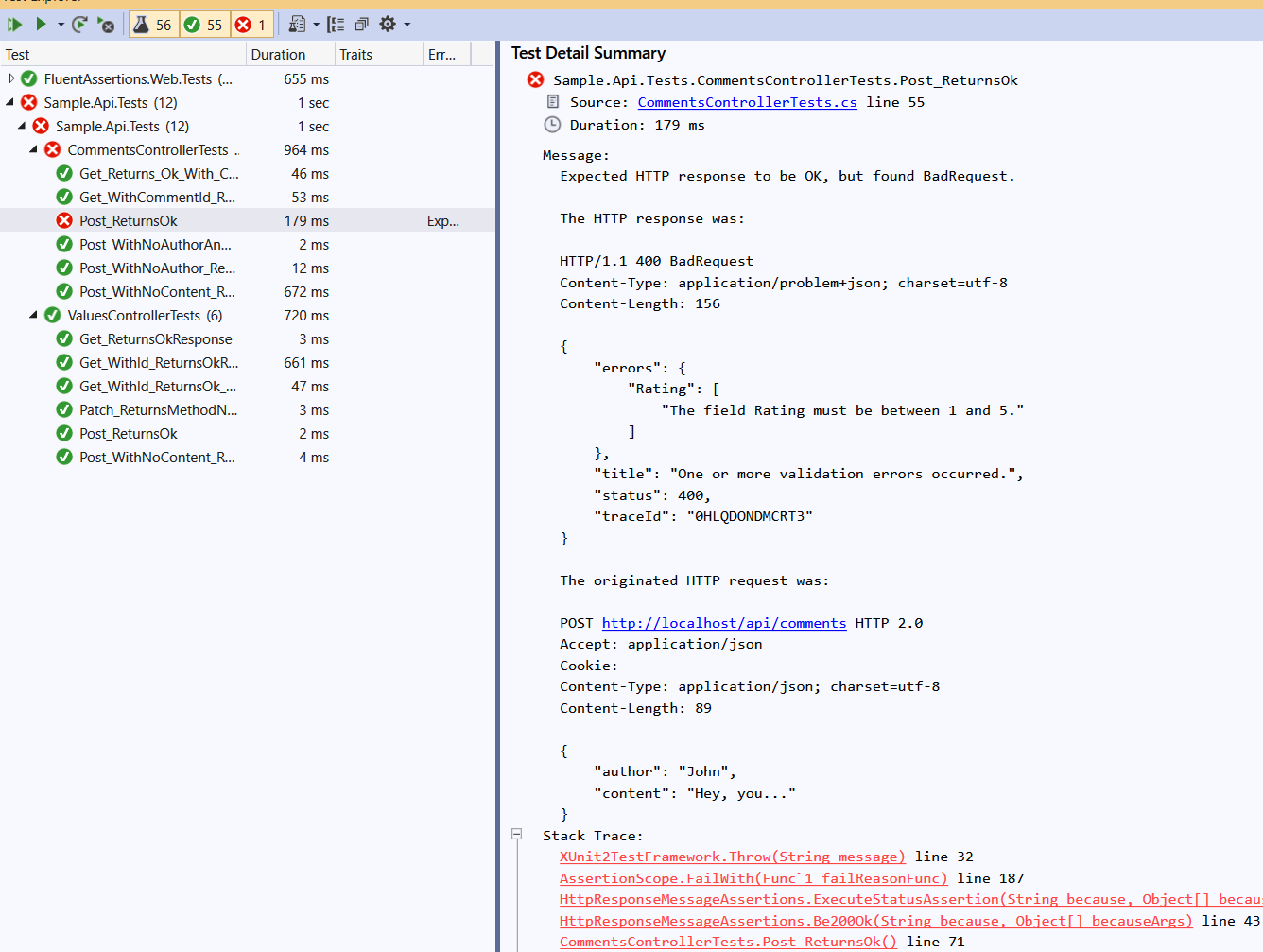
Let me give you an example of why I need this.
I built a Fluent Assertions extension, named FluentAssertions.Web so it can be used to build assertions and to inspect the HttpResponseMessage objects. If a test fails, in this case, because of a BadRequest, it would be really helpful to see the original request, to avoid debugging the test in certain scenarios (if the response does not contain enough information).
This worked for a while, as it can be seen in this print screen
adrianiftode
on 24 Jun 2020
Related issues
 BrennanConroy
·
3Comments
BrennanConroy
·
3Comments
 groogiam
·
3Comments
groogiam
·
3Comments
 rbanks54
·
3Comments
rbanks54
·
3Comments
 mj1856
·
3Comments
mj1856
·
3Comments
 githubgitgit
·
3Comments
githubgitgit
·
3Comments
Most helpful comment
Thanks for contacting us.
@javiercn can you please look into this? Thanks!