Aspnetcore: IHtmlLocalizer<SharedResource> won't work with VS 2019 16.4 Preview 5
_This issue has been moved from a ticket on Developer Community._
[regression] [worked-in:16.4 Preview 2 to 16.4 Preview 5]
Using ASP .Net Core 3.0.
When using IHtmlLocalizer<SharedResource> in view (with AddLocalization(o => o.ResourcesPath = "Resources") in startup.cs) shared localization not work.
If I set AddLocalization(), shared localization work fine but not view localizations that using IViewLocalizer...
Structure :
Project
|-->Resources
|.....| -->Views
|.....| .....| -->Home
|.....| .....| .....| -->Index.fr-fr.resx
|.....| .....| .....| -->Index.en-us.resx
|.....| .....| -->Account
|.....| .....| .....| -->Index.fr-fr.resx
|.....| .....| .....| -->Index.en-us.resx
[...]
|.....| -->SaredResource.cs
|.....| -->SaredResource.fr-fr.resx
|.....| -->SaredResource.en-us.resx
Same code work fine with stable version of VS 2019 (16.3).
Original Comments
Visual Studio Feedback System on 11/20/2019, 01:45 AM:
We have directed your feedback to the appropriate engineering team for further evaluation. The team will review the feedback and notify you about the next steps.
Original Solutions
(no solutions)
 vsfeedback
All 25 comments
@ryanbrandenburg can you please look into this? Thanks!
 mkArtakMSFT
on 20 Nov 2019
mkArtakMSFT
on 20 Nov 2019
Hi,
I don't understand the tag "5.0.0-preview1". Can't wait that much.
It must be fixed in next release of VS, I don't think it's related to ASP Net core since I use .Net Core 3.0 in both VS 2019 16.3 and VS 2019 16.4 Preview 5 ? It's the same csproj and it work fine with current release of VS, the bug appeared in the last preview of VS...
Does the compiler change between version of visual studio ? 🤔
 Safirion
on 21 Nov 2019
Safirion
on 21 Nov 2019
@Safirion Please ensure you're reviewed this documentation. If you've reviewed that and still have trouble, is it a typo in your structure diagram or the code when it says SaredResource, but then your HtmlLocalizer is looking for
If neither of those solve your problem please include a GitHub repo which demonstrates the problem.
 ryanbrandenburg
on 21 Nov 2019
ryanbrandenburg
on 21 Nov 2019
@ryanbrandenburg Effectively it's a typo. File is correctly named in my project.
Not a documentation problem since it works fine until last VS Preview update.
I will try to make a demo project tonight.
Safirion
on 21 Nov 2019
Fail too with VS 2019 16.4 Preview 6.
Project demo:
WebApplication1.zip
Page code:
@using System.Globalization
@{
    ViewData["Title"] = "Demo localization";
}

<div>Current culture : @(CultureInfo.CurrentUICulture.ToString())</div>
<div>Shared localizer : "@SL["HelloWorld"]"</div>
<div>View localizer : "@Localizer["PageLocalization"]" </div>
(_SL_ and _Localizer_ variables are declared in _ViewImport.cshtml)
Results
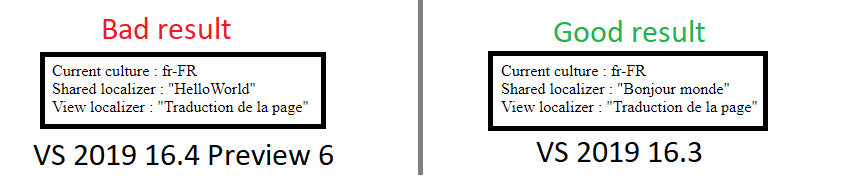
Safirion
on 21 Nov 2019
Any hope that it would be fix before the release of .Net Core 3.1 next week ?
Safirion
on 24 Nov 2019
I think perhaps there is a disconnect between what you're running locally and what you've included in that ZIP. The Startup.cs of your ZIP never called UseRequestLocalization in the Configure method, so I don't believe it ever would have Localized at all or even set your CurrentCulture. You need to do something like the following at the top of your Configure method:
C#
var supportedCultures = new string[]{ "en-US", "fr-FR" };
app.UseRequestLocalization(options =>
    options
        .AddSupportedCultures(supportedCultures)
        .AddSupportedUICultures(supportedCultures)
        .SetDefaultCulture("fr-FR")
        .RequestCultureProviders.Insert(0, new CustomRequestCultureProvider(context =>
        {
            return Task.FromResult(new ProviderCultureResult("fr-FR"));
        }))
);
Also, I don't believe it's the cause of your problems but I highly recommend you remove all the ItemGroup's except the one with the PackageReferences. The Web Sdk will take care of giving everything the appropriate Compile/Embed/etc status, and it should be unnecessary to modify things further in all but the strangest of cases.
Make those changes then if you're still seeing the behavior produce a new repro (preferably as a GitHub project for easy reference) using the exact code that it reproduced under.
ryanbrandenburg
on 25 Nov 2019
@ryanbrandenburg Thank's for reply.
I've patch the project with your suggestions and create a depo here : https://github.com/Safirion/LocalizationBugDemo
Bug is still present in last VS preview.
Safirion
on 25 Nov 2019
I was able to replicate this. It seems that when built with VS SharedResource.fr-FR.resx gets saved as WebApplication.SharedResource.fr-FR instead of WebApplication.Resources.SharedResource.fr-FR. The extra-strange thing is that Index.fr-FR.resx gets saved under the correct resource name regardless. It all seems related to the fact that SharedResource.cs is in the Resources folder. If you move that file out of the Resources folder (taking care to maintain a namespace which still reflects that structure) things work.
That appears to be a bug in VS, possibly related to the way they fold resx files with the same name under the cs file. I'm not sure how is best to report this to them, @mkArtakMSFT will probably know.
ryanbrandenburg
on 3 Dec 2019
@Safirion I talked with @mkArtakMSFT offline and we think the best course is for you to report this through the VS Feedback flow. We suggest including a link to this issue in addition to your description of the issue you're facing. We'll close is as an external issue then. Let us know if you don't hear anything for a while.
ryanbrandenburg
on 3 Dec 2019
Actually it seems we've made a mistake here. Specifically, this issues was mistakenly moved to us from VS Feedback already. Rather than opening a new issue, the right thing to do would be for us to reopen the original VS Feedback issue and try to redirect it to the correct owners.
I'll do this now.
mkArtakMSFT
on 4 Dec 2019
I'm having the same problem with the official release VS 2019 16.4. So for now rolled back to VS 2019 16.3.10.
 gfurtado
on 9 Dec 2019
gfurtado
on 9 Dec 2019
I'm having also the same problem. My Solution worked correctly with VS 2019 16.3.x but don't work after upgrade to VS 2019 16.4.0
It works if it gets compiled with Azure Pipeline Hosted Agent (Windows-2019) which is actually using Microsoft (R) Build Engine version 16.3.0+0f4c62fea for .NET Core
I created a sample ASP.NET Core 3.0 App: https://github.com/pocki/AspNetCore30LocalizationSample
 pocki
on 10 Dec 2019
pocki
on 10 Dec 2019
I'm having also the same problem with the official release VS 2019 16.4.
 fsdevon
on 10 Dec 2019
fsdevon
on 10 Dec 2019
@ryanbrandenburg @mkArtakMSFT, has this issue been moved to another issue? because this one has already been closed.
gfurtado
on 10 Dec 2019
@gfurtado This issue has been moved here : https://developercommunity.visualstudio.com/content/problem/826526/ihtmllocalizer-wont-work-with-vs-2019-164-preview.html
Safirion
on 10 Dec 2019
I face this problem, too. I installed VS Community 16.4.1 and now my web app is completely broken because none of the texts are localized anymore! This is totally unacceptable, I'm really desperate. I cannot downgrade because "we actually only make the links available for the paid versions of Visual Studio." [https://developercommunity.visualstudio.com/idea/747782/need-to-be-able-to-downgrade-visual-studio-version.html].
This is really bad, PLEASE provide a solution.
 egrabitt
on 11 Dec 2019
egrabitt
on 11 Dec 2019
You can downgrade VS using one of these links :
https://docs.microsoft.com/en-us/visualstudio/releases/2019/history#installing-an-earlier-release
It's for professional and enterprise version but there is a trial, so in waiting for a true solution... 🙃
Safirion
on 11 Dec 2019
thanks, but trial won't last very long. VS 16.4.2 has still got the problem.
egrabitt
on 18 Dec 2019
Thank you @Safirion & @pocki for the repro projects! So this bug is due to a change MSBuild made having to do with localized resource files. I'm actively working on this, hopefully targeting 16.5 preview 2.
Culprit: https://github.com/microsoft/msbuild/pull/4853
I created a github issue on the MSBuild repo for further discussion. https://github.com/microsoft/msbuild/issues/4996
 BenVillalobos
on 19 Dec 2019
BenVillalobos
on 19 Dec 2019
thanks, but trial won't last very long. VS 16.4.2 has still got the problem.
Mine is also 16.4.2 and I now also encountered the same problem.
My website was working well previously when user selects languages but now it doesn't work anymore because of this issue:
Live example
The website is built using Azure DevOps build pipelines (windows 2019 agent) before released to Azure App Services.
To summarise, the shared string or HTML localizer now doesn't work when building locally using VS2019 16.4.2 or in Azure DevOps with windows 2019 agent.
 FahaoTang
on 22 Dec 2019
FahaoTang
on 22 Dec 2019
Posting a temporary solution for this where I can. It's also posted (along with a bit of context) at microsoft/msbuild#4996
https://github.com/microsoft/msbuild/issues/4806#issuecomment-541018341
BenVillalobos
on 10 Jan 2020
Posting a temporary solution for this where I can. It's also posted (along with a bit of context) at microsoft/msbuild#4996
That solution worked for me, just create file in the root of the solution named: Directory.Build.props and add:
<Project>
  <PropertyGroup>    <EmbeddedResourceUseDependentUponConvention>false</EmbeddedResourceUseDependentUponConvention>
  </PropertyGroup>
</Project>
gfurtado
on 2 Feb 2020
Okay, so it turns out this was a breaking change we wanted to take as of net core 3.0. For full context and an explanation of how resource names are chosen, see the issue on MSBuild's side and the dotnet docs issue.
BenVillalobos
on 3 Feb 2020
Hi,
I don't understand why EmbeddedResourceUseDependentUponConvention is set to "True" by default. If this parameter was added to improve compatibility with old projects, why change the default behaviour and impact all projects created since the begining of .Net Core ?
Safirion
on 4 Feb 2020
Related issues
 githubgitgit
·
3Comments
githubgitgit
·
3Comments
 aurokk
·
3Comments
aurokk
·
3Comments
 rynowak
·
3Comments
rynowak
·
3Comments
 FourLeafClover
·
3Comments
FourLeafClover
·
3Comments
 Kevenvz
·
3Comments
Kevenvz
·
3Comments
Most helpful comment
Thank you @Safirion & @pocki for the repro projects! So this bug is due to a change MSBuild made having to do with localized resource files. I'm actively working on this, hopefully targeting 16.5 preview 2.
Culprit: https://github.com/microsoft/msbuild/pull/4853
I created a github issue on the MSBuild repo for further discussion. https://github.com/microsoft/msbuild/issues/4996