Aspnetcore: ServerSide Blazor Input onchange issue Core 3.0
Given this slighty modified Counter.razor component (from the default blazor server side template)
<h1>Counter</h1>

<p>Current count: @currentCount</p>

<button class="btn btn-primary" @onclick="IncrementCount">Click me</button>

<input value="@currentCount" @onchange="chg" />

@code {
    int currentCount = 0;

    void IncrementCount()
    {
        currentCount++;
    }

    void chg(ChangeEventArgs e)
    {
        currentCount = 999;
    }
}
I would expect that every time the input is changed (by user input), the value goes back to 999, but this doesn't happen.... It works for just one change, after that... you can keep changing the input entering any number, and it doesn't change anymore.
Regards!
 chrdlx
All 10 comments
@chrdlx thanks for contacting us.
On change only gets triggered when the element looses focus. In this case you can click on the component as much as you want while the textbox doesn't have the focus.
At that point the value on the textbox gets updated.
Then if you go into the textbox, modify the contents and remove the focus (press tab) the onchange event gets triggered.
This behaves the same way in plain HTML.
 javiercn
on 15 Nov 2019
javiercn
on 15 Nov 2019
Hi Javier, the problem is that the event gets triggered but the value in the UI doesn't get updated.
It works for the first time you trigger the event, after that... the UI doesn't get updated anymore...
I attach the gif for you to see the behaviour
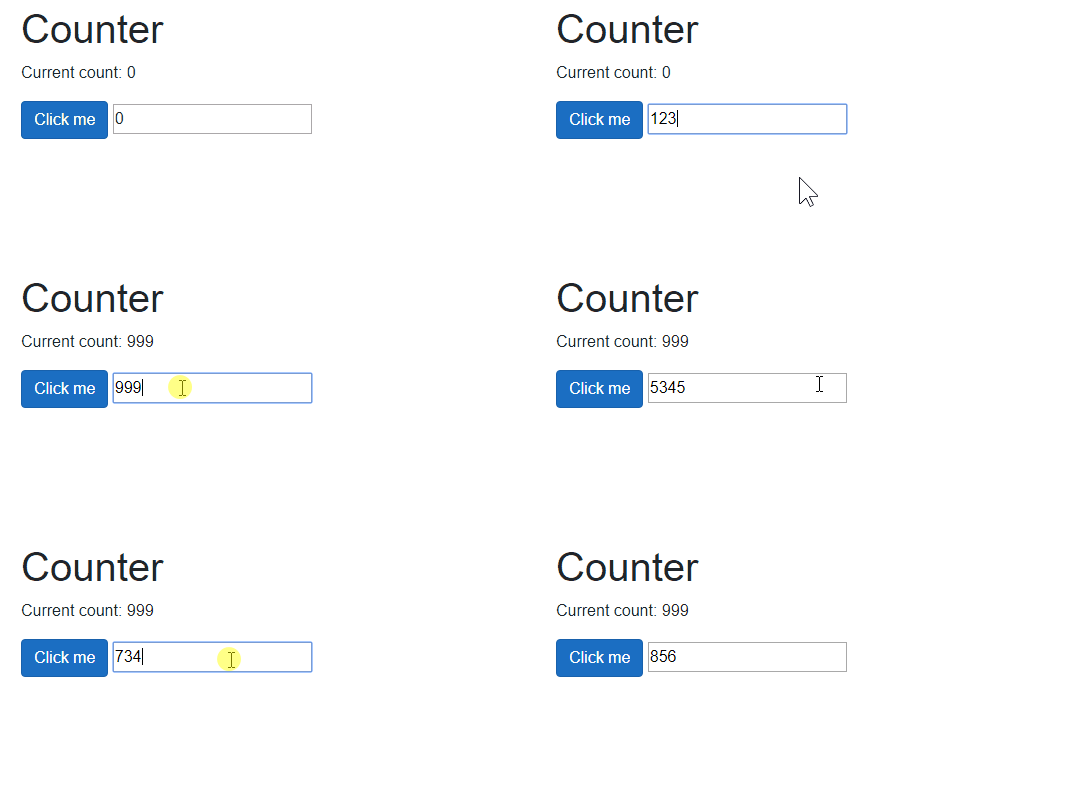
See, when I change the contents of the input field and then click outside, the value goes back to 999 as expected, but this only works for one time only.
Regards
chrdlx
on 15 Nov 2019
@chrdlx Thanks for the clarification, let me take another look.
javiercn
on 15 Nov 2019
It's simpler than that, it changes the first time but it doesn't trigger a re-render because after you change the counter you unconditionally re-assign the same value.
javiercn
on 15 Nov 2019
And how do I trigger a re-render? Because I want to rollback the input entered if for example... the user enters a value > 10. StateHasChanged doesn't change this situation.
My goal is this... let the user enter numbers, and if the number > 10, then rollback to the last number entered. Is this doable with the onchange event?
Regards!
chrdlx
on 15 Nov 2019
@chrdlx thanks for insisting and sorry about the back and forth, it's very rare we find bugs in this area and we tend to dismiss them.
I think this is a bug in the compiler. I believe the compiler is missing
__builder.SetUpdatesAttributeName("value")
namespace BlazorServerApp.Pages
{
    using System;
    using System.Collections.Generic;
    using System.Linq;
    using System.Threading.Tasks;
    using Microsoft.AspNetCore.Components;
    using System.Net.Http;
    using Microsoft.AspNetCore.Authorization;
    using Microsoft.AspNetCore.Components.Authorization;
    using Microsoft.AspNetCore.Components.Forms;
    using Microsoft.AspNetCore.Components.Routing;
    using Microsoft.AspNetCore.Components.Web;
    using Microsoft.JSInterop;
    using BlazorServerApp;
    using BlazorServerApp.Shared;

    [Microsoft.AspNetCore.Components.RouteAttribute("/counter")]
    public partial class Counter : Microsoft.AspNetCore.Components.ComponentBase
    {
        protected override void BuildRenderTree(Microsoft.AspNetCore.Components.Rendering.RenderTreeBuilder __builder)
        {
            __builder.OpenElement(0, "p");
            __builder.AddContent(1, "Current count: ");
            __builder.AddContent(2,
                   currentCount

            );
            __builder.CloseElement();
            __builder.AddMarkupContent(3, "\r\n\r\n");
            __builder.OpenElement(4, "button");
            __builder.AddAttribute(5, "class", "btn btn-primary");
            __builder.AddAttribute(6, "onclick", Microsoft.AspNetCore.Components.EventCallback.Factory.Create<Microsoft.AspNetCore.Components.Web.MouseEventArgs>(
              this,
              IncrementCount
            ));
            __builder.AddContent(7, "Click me");
            __builder.CloseElement();
            __builder.AddMarkupContent(8, "\r\n\r\n");
            __builder.OpenElement(9, "input");
            __builder.AddAttribute(10, "value",
               currentCount

            );
            __builder.AddAttribute(11, "onchange", Microsoft.AspNetCore.Components.EventCallback.Factory.Create<Microsoft.AspNetCore.Components.ChangeEventArgs>(
              this,
              chg
            ));
            __builder.CloseElement();
        }

    int currentCount = 0;

    void IncrementCount()
    {
        currentCount++;
    }

    void chg(ChangeEventArgs e)
    {
        currentCount = 999;
    }

    }
}
after the
            __builder.AddAttribute(11, "onchange", Microsoft.AspNetCore.Components.EventCallback.Factory.Create<Microsoft.AspNetCore.Components.ChangeEventArgs>(
              this,
              chg
            ));
By a strange coincidence I struggled with a very similar issue this week - we wanted to overwrite the contents of a input control (clearing it, in our case), but it only works the first time, because re-writing the class member/property to the same value as it already has doesn't cause a re-render (and, as @chrdlx says, calling StateHasChanged doesn't help, because Blazor appears to be looking at whether the value of the class member has changed and seeing that it hasn't.)
Fortunately in our case we were only trying to clear the input, so we just alternate between assigning null and assigning "", and that tricks Blazor into doing the right thing - but that's not a general solution, though one might be able to alternate between writing (int)999 and "999" to an object property to achieve something similar.
I wasn't particularly sure it was a bug, I just thought it was some inherent limitation of the change-tracking stuff, and couldn't be bothered to wade through a million irrelevant suggestions about using StateHasChanged to see if there was a 'really really force an update' technique. I would have just written to the DOM if I was that desperate.
 willdean
on 16 Nov 2019
willdean
on 16 Nov 2019
@javiercn No worries!, If it's a bug I hope it can be solved for 3.1 release! Regards!
chrdlx
on 19 Nov 2019
I've investigated, and realised this is not strictly a bug, but rather relates to a feature we intend to implement but haven't yet done so.
Why it's not a bug
This comes down to the fact that we want to support both one-way and two-way patterns of binding.
Blazor doesn't know that you're trying to do a two-way binding here, because you're not using @bind. Blazor doesn't know that your onchange handler is going to mutate the same field that also gets output to value.
If we did know this was a two-way binding, we would be using our ability to enforce consistency between the .NET render output and the DOM, so the value would always reset to 999 given your logic. This is what would happen if you were using @bind and were writing 999 to your property in the bound property's setter.
But we can't simply assume that all event handlers represent two-way bindings. If we did that, then consider a case like this:
<input value="My initial value" onchange="@MyHandler" />
Here, the developer intends a one-way binding. That is, they are providing an initial value, but after that, they don't try to write anything from .NET back to the DOM. They are only reading from the DOM in the event handler. For this to work, we can't keep overwriting the DOM values back with the .NET values, because then whenever the user edits the textbox, we'd keep resetting it back to My initial value.
What you're doing in your example can't be differentiated from this case, so Blazor does not try to force the DOM and the .NET side to match.
How you can fix your code now
Use @bind, e.g., <input @bind="currentCount" />. If you want, make currentCount into a property with a get/set pair and do whatever value-overwriting you want in the setter. This will work as you want it to.
The future alternative solution
Longer term, we want to add another option to event handlers so you can tell the framework you want it to treat it as a two-way binding even though you're not using @bind. In other words, to tell the framework you want it to enforce consistency between the .NET side and the DOM even when that means discarding the user's edits.
It would look like this:
<input value="@currentCount" @onchange="chg" @onchange:enforceConsistency />
(or might be called @onchange:sync or @onchange:twoWay or something like that)
This would produce the same behavior as @bind but without having to use @bind.
I've filed https://github.com/aspnet/AspNetCore/issues/17281 to ensure we're tracking this requirement, and so am closing this issue as by design for now.
 SteveSandersonMS
on 21 Nov 2019
SteveSandersonMS
on 21 Nov 2019
Thank you very much for the detailed and clear explanation!! The only downside I see with the use of @bind is that there's no async/await with getters/setters in the case you need to do some IO (database most likely) operation before setting the input to whatever value you need.
Thanks again & Regards!
chrdlx
on 21 Nov 2019
Related issues
 rynowak
·
3Comments
rynowak
·
3Comments
 groogiam
·
3Comments
groogiam
·
3Comments
 bgribaudo
·
3Comments
bgribaudo
·
3Comments
 FourLeafClover
·
3Comments
FourLeafClover
·
3Comments
 snebjorn
·
3Comments
snebjorn
·
3Comments