Aspnetcore: Discussion: .net Core3.0 SignalR AutomaticReconnect not reconnecting after Connection Timeout
The AutomaticReconnect is not working. Whenever there is a connection timeout error (from SQL end), Signarl R stops working and it is not reconnecting.
const connection = new signalR.HubConnectionBuilder().withUrl("/Test").withAutomaticReconnect([0, 2000, 10000, 30000, null]).configureLogging(signalR.LogLevel.Information).build();
Thanks
 mahabirsingh-kis
All 19 comments
Whenever there is a connection timeout error (from SQL end),
Where does SQL come into the picture? Did you turn on client side logs? See the diagnostic guide for help https://docs.microsoft.com/en-us/aspnet/core/signalr/diagnostics?view=aspnetcore-3.0
 davidfowl
on 1 Nov 2019
davidfowl
on 1 Nov 2019
I am using MSSQL as database and whenever there is a change in the data in a table in the database I am using SignalR to track the change and reflect into the UI. Whenever the application faces a connection timeout with the database the SignalR stops working and not reconnecting
mahabirsingh-kis
on 1 Nov 2019
Unfortunately, that's not enough information to figure out what's going on.
I see that you're already using .configureLogging(signalR.LogLevel.Information). Can you switch that to .configureLogging(signalR.LogLevel.Trace) and show us the full console output? https://docs.microsoft.com/en-us/aspnet/core/signalr/diagnostics?view=aspnetcore-3.0#javascript-client-logging
 halter73
on 1 Nov 2019
halter73
on 1 Nov 2019
Thank you for your response @halter73
Following are the logs
Console output
[2019-11-04T06:03:56.896Z] Information: Normalizing '/apiUrl' to 'http://dev01:223/apiUrl'.
app.bundle.js?v=null:10696 [2019-11-04T06:03:58.310Z] Information: SSE connected to http://dev01:223/apiUrl?id=4Gvf0UIuV7WBWlLD4MF2Bw
app.bundle.js?v=null:10696 [2019-11-04T06:03:58.341Z] Information: Using HubProtocol 'json'.
app.bundle.js?v=null:10696 [2019-11-04T06:04:13.370Z] Warning: No client method with the name 'send' found.
ConsoleLogger.log @ app.bundle.js?v=null:10696
app.bundle.js?v=null:10696 [2019-11-04T06:04:28.370Z] Warning: No client method with the name 'send' found.
ConsoleLogger.log @ app.bundle.js?v=null:10696
app.bundle.js?v=null:10696 [2019-11-04T06:04:43.367Z] Warning: No client method with the name 'send' found.
ConsoleLogger.log @ app.bundle.js?v=null:10696
app.bundle.js?v=null:10696 [2019-11-04T06:04:58.388Z] Warning: No client method with the name 'send' found.
ConsoleLogger.log @ app.bundle.js?v=null:10696
app.bundle.js?v=null:10696 [2019-11-04T06:05:13.365Z] Warning: No client method with the name 'send' found.
Backend Log files
2019-11-04T01:03:21.1369861-05:00 [DBG] Registered SignalR Protocol: "json", implemented by "Microsoft.AspNetCore.SignalR.Protocol.JsonHubProtocol". (c8f2a7df)
2019-11-04T01:03:58.0888738-05:00 80000047-0003-fb00-b63f-84710c7967bb [DBG] New connection "4Gvf0UIuV7WBWlLD4MF2Bw" created. (6fadaaee)
2019-11-04T01:03:58.0991875-05:00 80000047-0003-fb00-b63f-84710c7967bb [DBG] Sending negotiation response. (898972b7)
2019-11-04T01:03:58.1178571-05:00 80000048-0003-fb00-b63f-84710c7967bb [DBG] Establishing new connection. (6a968e45)
2019-11-04T01:03:58.1286069-05:00 80000048-0003-fb00-b63f-84710c7967bb [DBG] OnConnectedAsync started. (d90d43b4)
2019-11-04T01:03:58.1652168-05:00 80000048-0003-fb00-b63f-84710c7967bb [DBG] Found protocol implementation for requested protocol: "json". (c5c3bb54)
2019-11-04T01:03:58.1681446-05:00 80000048-0003-fb00-b63f-84710c7967bb [DBG] Completed connection handshake. Using HubProtocol '"json"'. (421947a1)
2019-11-04T01:04:13.1897968-05:00 80000048-0003-fb00-b63f-84710c7967bb [DBG] Received hub invocation: "InvocationMessage { InvocationId: \"0\", Target: \"send\", Arguments: [ 0155,YN ], StreamIds: [ ] }". (a2c9653c)
2019-11-04T01:04:15.0168174-05:00 80000048-0003-fb00-b63f-84710c7967bb [DBG] Received hub invocation: "InvocationMessage { InvocationId: \"1\", Target: \"JoinTest\", Arguments: [ 0155 ], StreamIds: [ ] }". (a2c9653c)
mahabirsingh-kis
on 4 Nov 2019
The logs you provided show that everything is working fine. Where are the reconnect attempts?
 BrennanConroy
on 4 Nov 2019
BrennanConroy
on 4 Nov 2019
Hello @BrennanConroy
Thank you for your response.
The Signal R is not logging after disconnect, so there is no logs for reconnect. Is there any way that I can test the re-connection attempt and check if the Signal R is trying to reconnect
Thanks
mahabirsingh-kis
on 5 Nov 2019
Given the SSE transport (which the logs show you're using) and no modifications to HubConnection.serverTimeoutInMilliseconds, the SignalR JS client should always log a disconnected or reconnecting event whenever no messages are received in a 30 second interval. So even if the transport is buggy or slow to recognize the connection disconnecting, the client should still try to reconnect if it is configured to do so with .withAutomaticReconnect().
How do you know that the SignalR connection is in fact disconnected? The lack of disconnected/reconnecting logs indicates that the client is at least receiving ping messages.
Whenever there is a connection timeout error (from SQL end), Signarl R stops working and it is not reconnecting.
Are you saying it's a SQL connection thats lost rather than the SignalR connection?
P.S. @BrennanConroy what do you think about adding trace-level logging for pings?
halter73
on 6 Nov 2019
P.S. @BrennanConroy what do you think about adding trace-level logging for pings?
We technically do log the Ping when trace is enabled (via the transport logging bytes received), it doesn't look like trace logs were enabled here.
BrennanConroy
on 6 Nov 2019
Hello
Let me explain. I have an application developed in .net core 3.0 and react Js hosted in IIS. I am using SignalR to show any changes in any table column in the sql database to the front end. When I do IISReset, the application works perfectly in the beginning but whenever it fails at the sql end or there is any connection timeout, the changes in the database via signal R stops showing until I do the IISRESET again.
Here is the trace log and it is keep repeating
[2019-11-06T13:27:38.960Z] Trace: (SSE transport) request complete. Response status: 200.
app.bundle.js?v=null:10696 [2019-11-06T13:27:40.237Z] Trace: (SSE transport) data received. String data of length 11.
app.bundle.js?v=null:10696 [2019-11-06T13:27:40.641Z] Trace: (SSE transport) sending data. String data of length 96.
app.bundle.js?v=null:10696 [2019-11-06T13:27:40.660Z] Trace: (SSE transport) data received. String data of length 46.
app.bundle.js?v=null:10696 [2019-11-06T13:27:40.661Z] Trace: (SSE transport) request complete. Response status: 200.
app.bundle.js?v=null:10696 [2019-11-06T13:27:43.239Z] Trace: (SSE transport) data received. String data of length 11.
app.bundle.js?v=null:10696 [2019-11-06T13:27:46.254Z] Trace: (SSE transport) data received. String data of length 11.
app.bundle.js?v=null:10696 [2019-11-06T13:27:49.258Z] Trace: (SSE transport) data received. String data of length 11.
app.bundle.js?v=null:10696 [2019-11-06T13:27:53.261Z] Trace: (SSE transport) data received. String data of length 11.
app.bundle.js?v=null:10696 [2019-11-06T13:27:53.753Z] Trace: (SSE transport) data received. String data of length 51.
backend.js:6 [2019-11-06T13:27:53.753Z] Warning: No client method with the name 'send' found.
r @ backend.js:6
ConsoleLogger.log @ app.bundle.js?v=null:10696
HubConnection.invokeClientMethod @ app.bundle.js?v=null:10696
HubConnection.processIncomingData @ app.bundle.js?v=null:10696
HubConnection.connection.onreceive @ app.bundle.js?v=null:10696
eventSource.onmessage @ app.bundle.js?v=null:10696
app.bundle.js?v=null:10696 [2019-11-06T13:27:53.754Z] Trace: (SSE transport) sending data. String data of length 87.
app.bundle.js?v=null:10696 [2019-11-06T13:27:53.772Z] Trace: (SSE transport) data received. String data of length 97.
backend.js:6 [2019-11-06T13:27:53.772Z] Warning: No client method with the name 'send' found.
r @ backend.js:6
ConsoleLogger.log @ app.bundle.js?v=null:10696
HubConnection.invokeClientMethod @ app.bundle.js?v=null:10696
HubConnection.processIncomingData @ app.bundle.js?v=null:10696
HubConnection.connection.onreceive @ app.bundle.js?v=null:10696
eventSource.onmessage @ app.bundle.js?v=null:10696
app.bundle.js?v=null:10696 [2019-11-06T13:27:53.773Z] Trace: (SSE transport) request complete. Response status: 200.
app.bundle.js?v=null:10696 [2019-11-06T13:27:55.640Z] Trace: (SSE transport) sending data. String data of length 96.
app.bundle.js?v=null:10696 [2019-11-06T13:27:55.653Z] Trace: (SSE transport) data received. String data of length 46.
app.bundle.js?v=null:10696 [2019-11-06T13:27:55.653Z] Trace: (SSE transport) request complete. Response status: 200.
app.bundle.js?v=null:10696 [2019-11-06T13:27:57.252Z] Trace: (SSE transport) data received. String data of length 11.
app.bundle.js?v=null:10696 [2019-11-06T13:28:01.241Z] Trace: (SSE transport) data received. String data of length 11.
app.bundle.js?v=null:10696 [2019-11-06T13:28:04.242Z] Trace: (SSE transport) data received. String data of length 11.
app.bundle.js?v=null:10696 [2019-11-06T13:28:08.243Z] Trace: (SSE transport) data received. String data of length 11.
app.bundle.js?v=null:10696 [2019-11-06T13:28:08.751Z] Trace: (SSE transport) data received. String data of length 51.
backend.js:6 [2019-11-06T13:28:08.752Z] Warning: No client method with the name 'send' found.
r @ backend.js:6
ConsoleLogger.log @ app.bundle.js?v=null:10696
HubConnection.invokeClientMethod @ app.bundle.js?v=null:10696
HubConnection.processIncomingData @ app.bundle.js?v=null:10696
HubConnection.connection.onreceive @ app.bundle.js?v=null:10696
eventSource.onmessage @ app.bundle.js?v=null:10696
app.bundle.js?v=null:10696 [2019-11-06T13:28:08.754Z] Trace: (SSE transport) sending data. String data of length 87.
app.bundle.js?v=null:10696 [2019-11-06T13:28:08.775Z] Trace: (SSE transport) data received. String data of length 97.
backend.js:6 [2019-11-06T13:28:08.776Z] Warning: No client method with the name 'send' found.
r @ backend.js:6
ConsoleLogger.log @ app.bundle.js?v=null:10696
HubConnection.invokeClientMethod @ app.bundle.js?v=null:10696
HubConnection.processIncomingData @ app.bundle.js?v=null:10696
HubConnection.connection.onreceive @ app.bundle.js?v=null:10696
eventSource.onmessage @ app.bundle.js?v=null:10696
app.bundle.js?v=null:10696 [2019-11-06T13:28:08.778Z] Trace: (SSE transport) request complete. Response status: 200.
app.bundle.js?v=null:10696 [2019-11-06T13:28:10.639Z] Trace: (SSE transport) sending data. String data of length 96.
app.bundle.js?v=null:10696 [2019-11-06T13:28:10.652Z] Trace: (SSE transport) data received. String data of length 46.
app.bundle.js?v=null:10696 [2019-11-06T13:28:10.652Z] Trace: (SSE transport) request complete. Response status: 200.
app.bundle.js?v=null:10696 [2019-11-06T13:28:12.238Z] Trace: (SSE transport) data received. String data of length 11.
app.bundle.js?v=null:10696 [2019-11-06T13:28:15.249Z] Trace: (SSE transport) data received. String data of length 11.
app.bundle.js?v=null:10696 [2019-11-06T13:28:18.258Z] Trace: (SSE transport) data received. String data of length 11.
app.bundle.js?v=null:10696 [2019-11-06T13:28:22.254Z] Trace: (SSE transport) data received. String data of length 11.
app.bundle.js?v=null:10696 [2019-11-06T13:28:23.749Z] Trace: (SSE transport) data received. String data of length 51.
backend.js:6 [2019-11-06T13:28:23.749Z] Warning: No client method with the name 'send' found.
r @ backend.js:6
ConsoleLogger.log @ app.bundle.js?v=null:10696
HubConnection.invokeClientMethod @ app.bundle.js?v=null:10696
HubConnection.processIncomingData @ app.bundle.js?v=null:10696
HubConnection.connection.onreceive @ app.bundle.js?v=null:10696
eventSource.onmessage @ app.bundle.js?v=null:10696
app.bundle.js?v=null:10696 [2019-11-06T13:28:23.753Z] Trace: (SSE transport) sending data. String data of length 87.
app.bundle.js?v=null:10696 [2019-11-06T13:28:23.767Z] Trace: (SSE transport) data received. String data of length 97.
mahabirsingh-kis
on 6 Nov 2019
Why do you think that this is a problem with SignalR? The client reports successfully receiving data throughout the log which makes me think the problem is somewhere else. How do you know that SQL change notifications are still firing? Do you need to reconnect your SQL client?
backend.js:6 [2019-11-06T13:28:23.749Z] Warning: No client method with the name 'send' found.
Or could this be the problem? Are you missing calls to "send"?
halter73
on 6 Nov 2019
I tried to disconnect via the browser Offline feature. But nothing was logged.
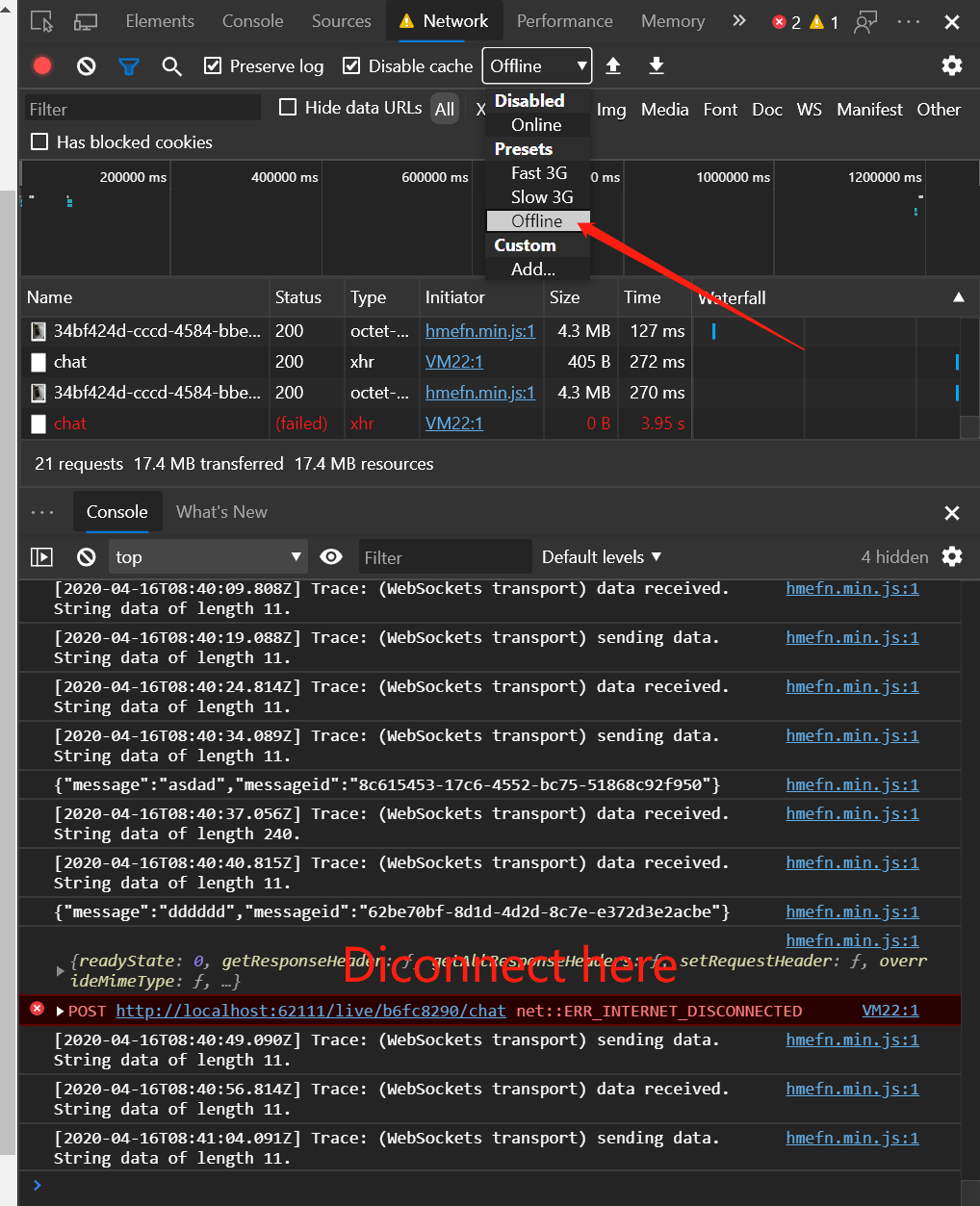
My code:
    var connection = new signalR.HubConnectionBuilder()
        .withAutomaticReconnect()
        .withUrl("/chatHub")
        .configureLogging(signalR.LogLevel.Trace)
        .build();
I feel it very strange that why it still outputs [2020-04-16T08:41:27.825Z] Trace: (WebSockets transport) data received. String data of length 11.Even when I enter the offline mode.
And nothing else outputs.
 Anduin2017
on 16 Apr 2020
Anduin2017
on 16 Apr 2020
Offline mode does not affect websocket connections
davidfowl
on 16 Apr 2020
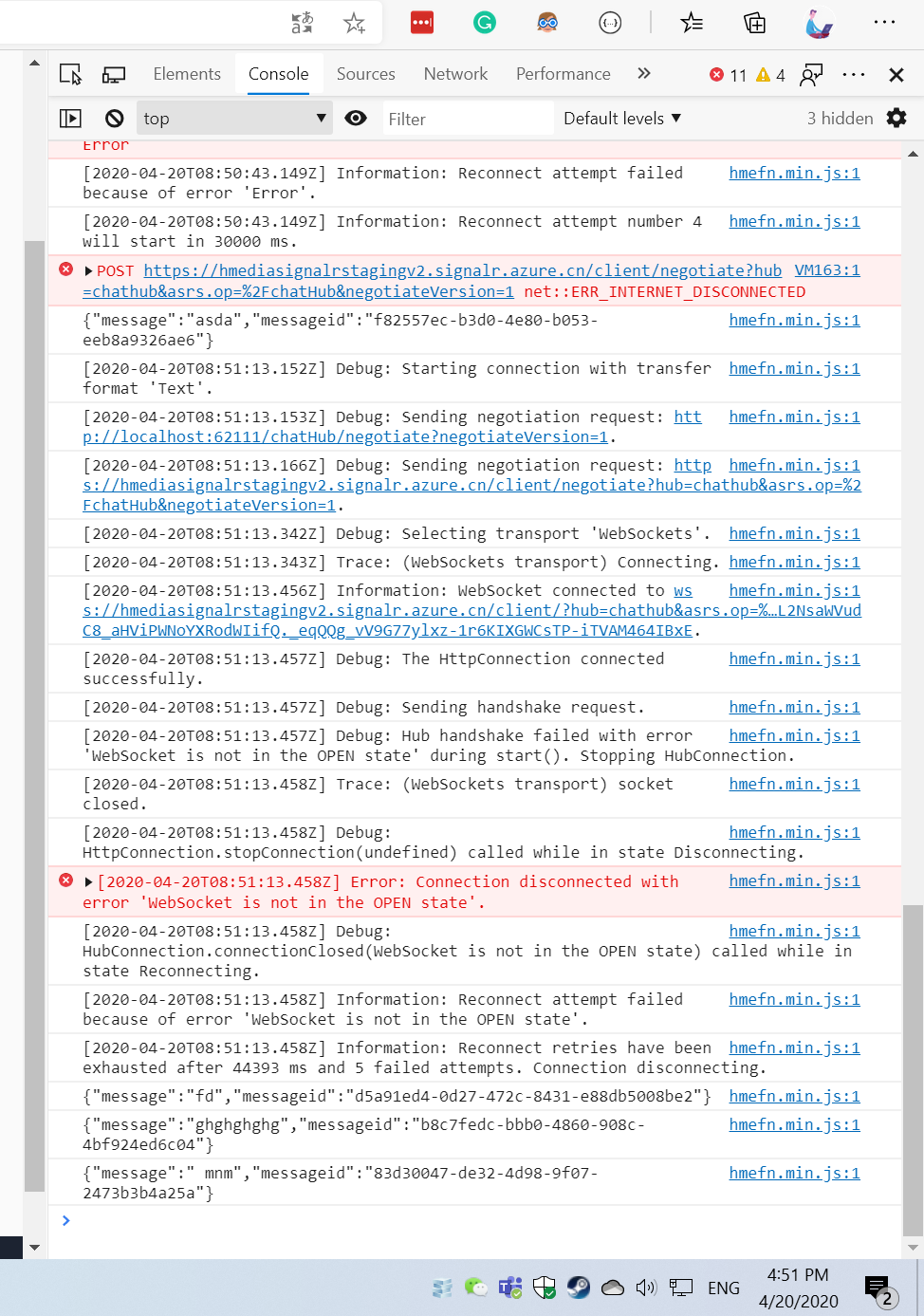
Alright. I just disable my network adaptor and re-enable it. But it seems that the reconnection failed.
Anduin2017
on 20 Apr 2020
Could you try using the 5.0.0-preview.2.20167.3 version of the javascript client? There was a similar issue that we fixed and I would like to see if this is the same issue.
BrennanConroy
on 20 Apr 2020
@BrennanConroy Hi, after upgrading to the version you mentioned, the problem disappeared and I just reconnected successfully.
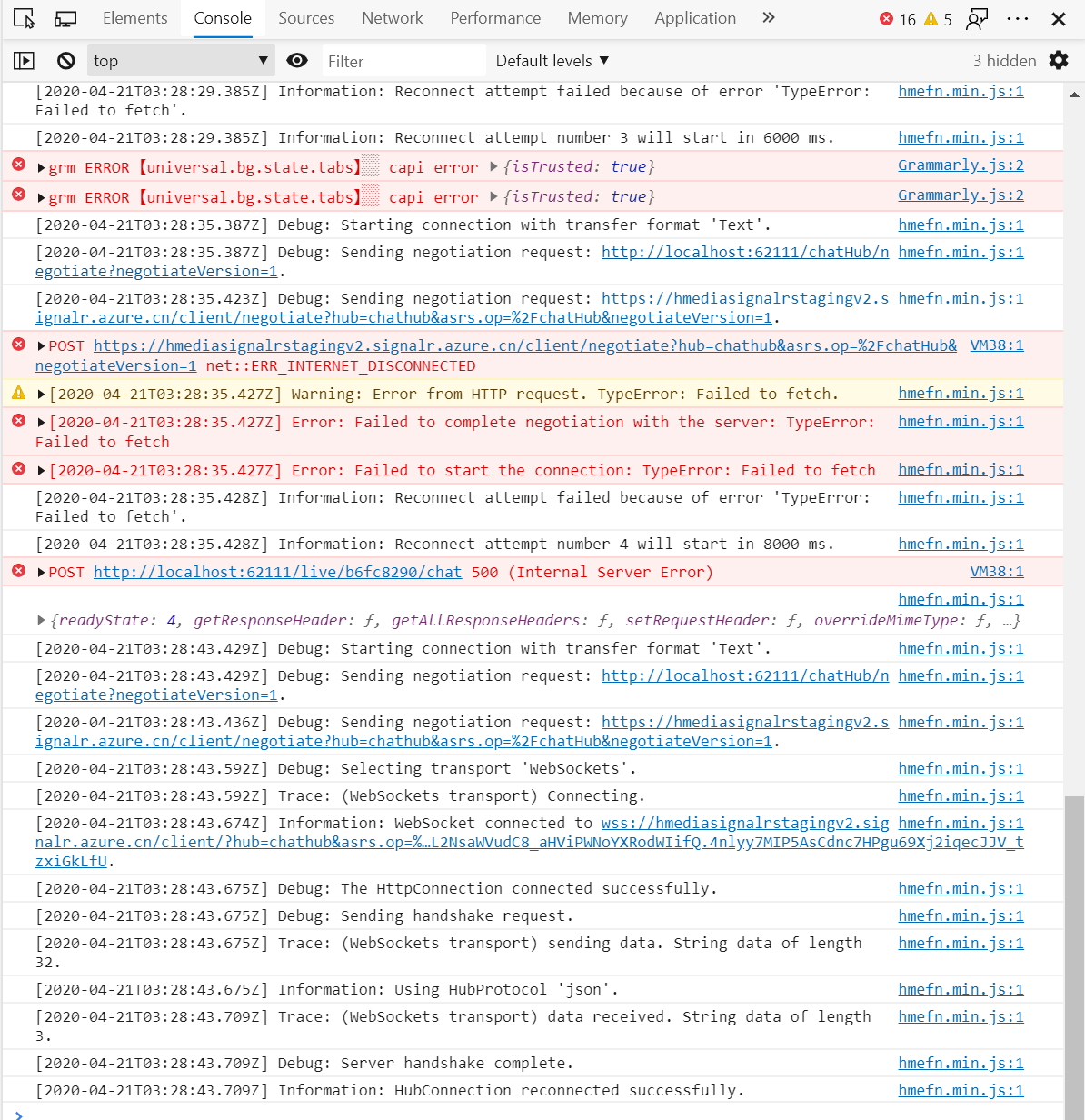
Thanks!
Anduin2017
on 21 Apr 2020
@mahabirsingh-kis can you try out 5.0.0-preview.2.20167.3? If so, does it fix your issue?
halter73
on 28 Apr 2020
Hi, I have tried another way to test it.
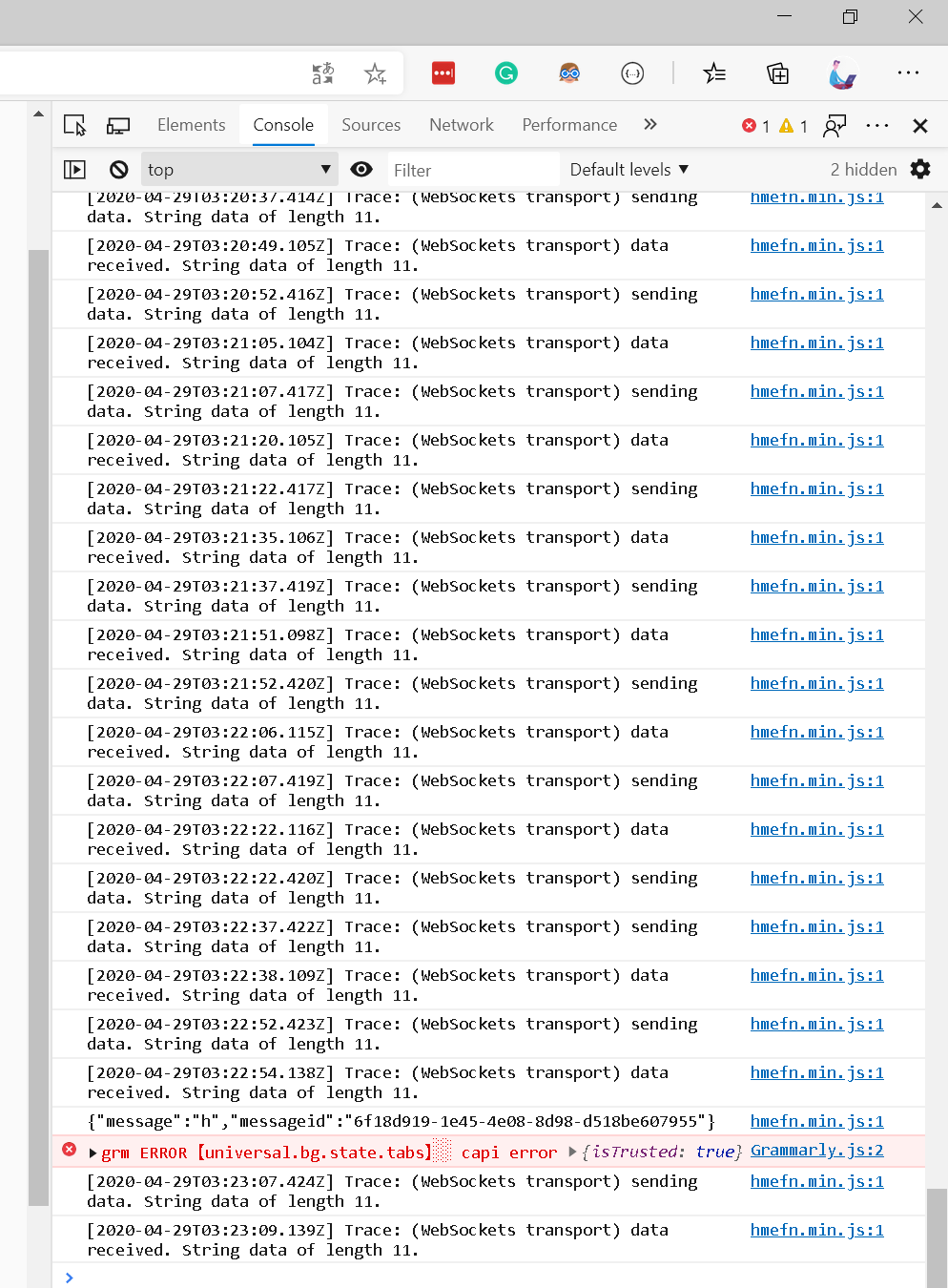
The previous test was based on disabling the network adaptor. And it reconnects fine.
But I tried to wait for 2 hours, just open the page and do nothing, it seems that I can't receive a message now. And the signalr seems just didn't detect it.
Anduin2017
on 29 Apr 2020
@Anduin2017 Could you file a new issue with details of the problem you are seeing?
BrennanConroy
on 30 Apr 2020
This issue has been automatically marked as stale because it has been marked as requiring author feedback but has not had any activity for 4 days. It will be closed if no further activity occurs within 3 days of this comment. If it is closed, feel free to comment when you are able to provide the additional information and we will re-investigate.
See our Issue Management Policies for more information.
![msftbot[bot] picture](https://avatars2.githubusercontent.com/in/26612?v=4&s=40) msftbot[bot]
on 3 May 2020
msftbot[bot]
on 3 May 2020
Related issues
 githubgitgit
·
3Comments
githubgitgit
·
3Comments
 rbanks54
·
3Comments
rbanks54
·
3Comments
 snebjorn
·
3Comments
snebjorn
·
3Comments
 groogiam
·
3Comments
groogiam
·
3Comments
 Kevenvz
·
3Comments
Kevenvz
·
3Comments
Most helpful comment
Could you try using the 5.0.0-preview.2.20167.3 version of the javascript client? There was a similar issue that we fixed and I would like to see if this is the same issue.