Aspnetcore: Issues with current HEAD (044067)
Trying to get the current HEAD to work : https://github.com/aspnet/Blazor/commit/04406759db0b6b94024c9e9c0357544f687f9427
Environment:
Windows: Clean Windows 10 1709 (Build 16.299.309) virtual machine
Node: node-v9.8.0-x64
VS: 2017 15.7 Preview (ASP.NET and Web Development + Visual Studio extension development features workloads)
1) Build.cmd dies on tests even though I didn't run it with /t:Test
2) Opening the solution with VS Package Manager console is spammed with
Error occurred while restoring NuGet packages: '$(InternalAspNetCoreSdkPackageVersion)' is not a valid version string.
3) After hard coding the value of $(InternalAspNetCoreSdkPackageVersion) in Directory.Build.props I get 14 errors
````
Severity Code Description Project File Line Suppression State
Error MSB4236 The SDK 'Microsoft.NET.Sdk.Razor/2.1.0-preview2-30230' specified could not be found. BlazorHosted.CSharp.Client C:\Users\test\Documents\Blazor\src\Microsoft.AspNetCore.Blazor.Templates\content\BlazorHosted.CSharp\BlazorHosted.CSharp.Client\BlazorHosted.CSharp.Client.csproj 1
Error NU1101 Unable to find package Microsoft.AspNetCore.Blazor.Cli. No packages exist with this id in source(s): https://dotnet.myget.org/F/aspnetcore-dev/api/v3/index.json, https://dotnet.myget.org/F/aspnetcore-tools/api/v3/index.json, nuget.org
Error Unable to find package Microsoft.NET.Sdk.Razor. No packages exist with this id in source(s): Microsoft Visual Studio Offline Packages, nuget.org BlazorStandalone.CSharp 1
Error C:\Program Files\dotnet\sdk\2.1.100\Sdks\Microsoft.NET.Sdk.Razor\Sdk not found. Check that a recent enough .NET Core SDK is installed and/or increase the version specified in global.json. BlazorStandalone.CSharp 1
Error Unable to find package Microsoft.NET.Sdk.Razor. No packages exist with this id in source(s): Microsoft Visual Studio Offline Packages, nuget.org BlazorStandalone.CSharp 1
Error C:\Program Files\dotnet\sdk\2.1.100\Sdks\Microsoft.NET.Sdk.Razor\Sdk not found. Check that a recent enough .NET Core SDK is installed and/or increase the version specified in global.json. BlazorStandalone.CSharp 1
Error Unable to find package Microsoft.NET.Sdk.Razor. No packages exist with this id in source(s): Microsoft Visual Studio Offline Packages, nuget.org BlazorHosted.CSharp.Client 1
Error C:\Program Files\dotnet\sdk\2.1.100\Sdks\Microsoft.NET.Sdk.Razor\Sdk not found. Check that a recent enough .NET Core SDK is installed and/or increase the version specified in global.json. BlazorHosted.CSharp.Client 1
Error Unable to find package Microsoft.NET.Sdk.Razor. No packages exist with this id in source(s): Microsoft Visual Studio Offline Packages, nuget.org BlazorHosted.CSharp.Client 1
Error C:\Program Files\dotnet\sdk\2.1.100\Sdks\Microsoft.NET.Sdk.Razor\Sdk not found. Check that a recent enough .NET Core SDK is installed and/or increase the version specified in global.json. BlazorHosted.CSharp.Client 1
Error NU1105 Unable to find project information for 'C:\Users\test\Documents\Blazor\samples\MonoSanityClient\MonoSanityClient.csproj'. The project file may be invalid or missing targets required for restore. MonoSanity (samples\MonoSanity\MonoSanity) C:\Users\test\Documents\Blazor\samples\MonoSanity\MonoSanity.csproj 1
Error MSB4236 The SDK 'Microsoft.NET.Sdk.Razor/2.1.0-preview2-30230' specified could not be found. BlazorStandalone.CSharp C:\Users\test\Documents\Blazor\src\Microsoft.AspNetCore.Blazor.Templates\content\BlazorStandalone.CSharp\BlazorStandalone.CSharp.csproj 1
Error NU1105 Unable to find project information for 'C:\Users\test\Documents\Blazor\samples\MonoSanityClient\MonoSanityClient.csproj'. The project file may be invalid or missing targets required for restore. Microsoft.AspNetCore.Blazor.E2ETest C:\Users\test\Documents\Blazor\test\Microsoft.AspNetCore.Blazor.E2ETest\Microsoft.AspNetCore.Blazor.E2ETest.csproj 1
Error NU1101 Unable to find package Microsoft.AspNetCore.Blazor.Server. No packages exist with this id in source(s): https://dotnet.myget.org/F/aspnetcore-dev/api/v3/index.json, https://dotnet.myget.org/F/aspnetcore-tools/api/v3/index.json, nuget.org BlazorHosted.CSharp.Server C:\Users\test\Documents\Blazor\src\Microsoft.AspNetCore.Blazor.Templates\content\BlazorHosted.CSharp\BlazorHosted.CSharp.Server\BlazorHosted.CSharp.Server.csproj 1
````
4) Removing the tooling and the test folder from the solution gets me down to 1 error
C:\Users\test\Documents\Blazor\samples\MonoSanityClient\MonoSanityClient.csproj : error : Project file is incomplete. Expected imports are missing.
5) Removing the MonoSanity samples from the solution I can finally compile and run the Standaloneapp, but..
After Loading... in the browser shows up for a brief second, I just get a white page in Chrome 65.
In the body Loading... is replaced with <router appassembly="typeof(StandaloneApp.Program).Assembly" pagesnamespace="StandaloneApp.Pages"></router> but nothing shows up.
Console containing nothing useful:
 HTML1300: Navigation occurred. localhost:5000 (1,1)
 CSS3121: The media query -ms-viewport has been deprecated.
Network tab:
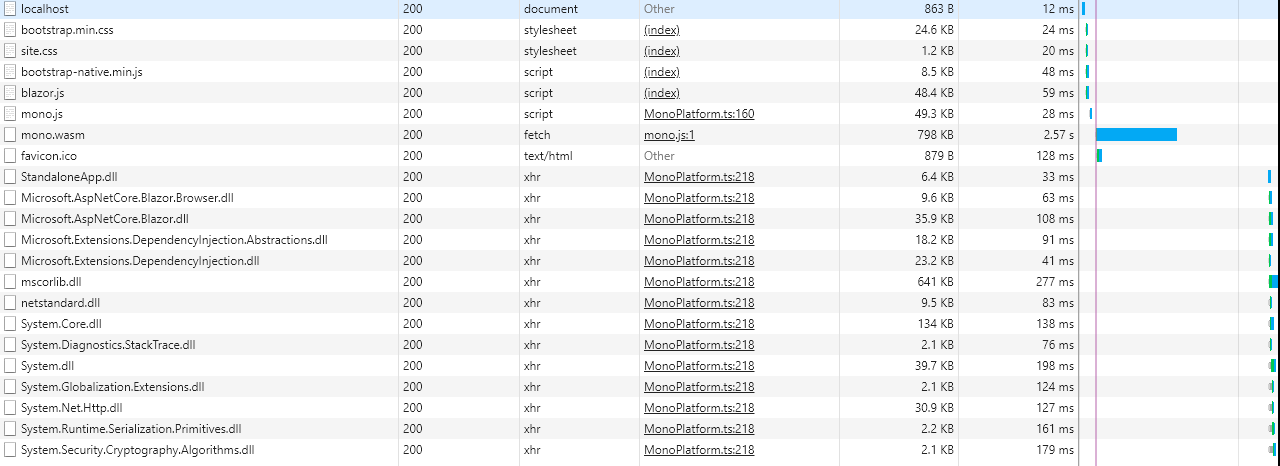
Looks like me and Blazor are off to a rough start...
 leak
leak
All 3 comments
The test failure is the locale-specific one that is a duplicate of aspnet/Blazor#268.
The other issues all follow from KoreBuild stuff, which we're not ready to address immediately. I've been ignoring the '$(InternalAspNetCoreSdkPackageVersion)' is not a valid version string warning and it's been OK.
Looks like me and Blazor are off to a rough start...
If your goal is to build Blazor apps then you won't need to be building Blazor.sln itself! In the next few days we're shipping an actual SDK that you can install and then create projects directly from File->New Project, which is vastly simpler. I'd recommend holding on until then.
 SteveSandersonMS
on 15 Mar 2018
SteveSandersonMS
on 15 Mar 2018
Sounds great.
Will the browser refresh on change functionality you demonstrated already be part of that version?
leak
on 15 Mar 2018
@leak We hit some issues with live reload, so https://github.com/aspnet/Blazor/pull/193 is going to have to wait until those issues are resolved.
 danroth27
on 16 Mar 2018
danroth27
on 16 Mar 2018
Related issues
 ermithun
·
3Comments
ermithun
·
3Comments
 groogiam
·
3Comments
groogiam
·
3Comments
 bgribaudo
·
3Comments
bgribaudo
·
3Comments
 UweKeim
·
3Comments
UweKeim
·
3Comments
 mj1856
·
3Comments
mj1856
·
3Comments
Most helpful comment
The test failure is the locale-specific one that is a duplicate of aspnet/Blazor#268.
The other issues all follow from KoreBuild stuff, which we're not ready to address immediately. I've been ignoring the
'$(InternalAspNetCoreSdkPackageVersion)' is not a valid version stringwarning and it's been OK.If your goal is to build Blazor apps then you won't need to be building Blazor.sln itself! In the next few days we're shipping an actual SDK that you can install and then create projects directly from File->New Project, which is vastly simpler. I'd recommend holding on until then.