Aspnetcore: Less-than operator in Javascript is parsed incorrectly
When you use the '<' operator for an if statement or a for loop in javascript (in the cshtml file) it seems to get parsed weirdly which results in an 'unexpected end of input' error in the console.
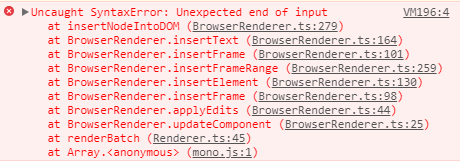
When you look at the Element pane in the browser dev tools you can see that it seems to have split the code on the '<' operator.
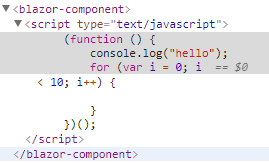
This is what my page looks like:
@page "/grid"

<script type="text/javascript">
    (function () {
        console.log("hello");
        for (var i = 0; i < 10; i++) {

        }
    })();
</script>
I have the following installed:
- Visual Studio Community 2017 Preview (15.7 Preview 3)
- .NET Core 2.1 Preview 1 SDK
- ASP.NET Core Blazor Language Service Extension
A simple workaround for the above code snippet is to reverse the check to '10 > i' as the '>' operator seems to be parsed correctly. However I would expect 'i < 10' to work.
 ig-robstoffers
All 5 comments
@ig-robstoffers You are not allowed to put script tags in components.
 miroslavp
on 17 Apr 2018
miroslavp
on 17 Apr 2018
@miroslavp Interesting... Then if you have javascript that you want to run when your component is initialized, what is the expected process? Do I put the javascript in index.html and then interop to it in my components OnInit?
ig-robstoffers
on 17 Apr 2018
If you upgrade to 0.2.0, it will block script tags in components because they almost certainly aren’t helpful there. Script tags must go into a static context such as index.html.
Please see aspnet/Blazor#552 for more info.
 SteveSandersonMS
on 17 Apr 2018
SteveSandersonMS
on 17 Apr 2018
And yes you are correct in your last comment :)
SteveSandersonMS
on 17 Apr 2018
Thanks for the help! That clears that up.
ig-robstoffers
on 17 Apr 2018
Related issues
 groogiam
·
3Comments
groogiam
·
3Comments
 BrennanConroy
·
3Comments
BrennanConroy
·
3Comments
 TanvirArjel
·
3Comments
TanvirArjel
·
3Comments
 rbanks54
·
3Comments
rbanks54
·
3Comments
 snebjorn
·
3Comments
snebjorn
·
3Comments
Most helpful comment
If you upgrade to 0.2.0, it will block script tags in components because they almost certainly aren’t helpful there. Script tags must go into a static context such as index.html.
Please see aspnet/Blazor#552 for more info.