Aspnetcore: Template fails to run unless global.json is deleted
Following the Getting Started Guide: https://blazor.net/docs/get-started.html
Blazor Language Services Version:
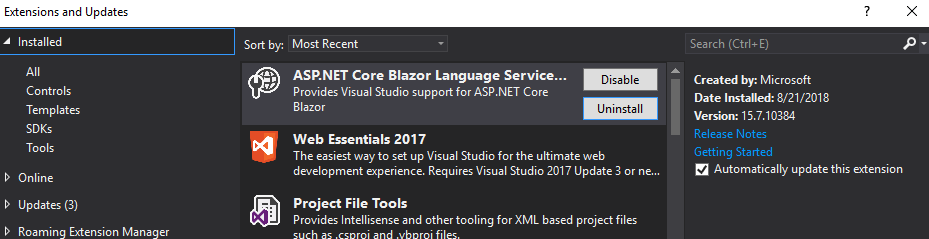
dotnet version:

Creating a new blazor project, the solution successfully builds but when run (Ctrl+F5) the ASP.NET Core Web Server outputs this error:

and the page itself shows a 502 error:

So far the only way to solve this for me was to delete the global.json file that comes with the template. Other than deleting the global.json file no other changes were made
I did not see this mentioned in any of the other issues, so please let me know if this is a known issue or if i've got something configured incorrectly or if there is a better way to work around this 502 issue
Thanks!
 JacksonHamner
All 4 comments
I faced the same issue yesterday after i updated my .NET core version to 2.1.400. The global.json file has the following definition by default in the template project.
"sdk": {
    "version": "2.1.300"
  }
Hence it won't run on 2.1.400
You can have following two solution to this problem -
- Install .NET core sdk 2.1.300 and it will allow you to run the template project.
- update global.json manually to
"sdk": {
"version": "2.1.400"
}
 AnkitSharma-007
on 22 Aug 2018
AnkitSharma-007
on 22 Aug 2018
Looks like the same as aspnet/Blazor#1324
 danroth27
on 5 Sep 2018
danroth27
on 5 Sep 2018
In case it helps, is your startup object set? It seems that may be cleared under certain conditions, changing startup project for instance, not restricted to Blazor.
 footysteve
on 5 Sep 2018
footysteve
on 5 Sep 2018
AnkitSharma-007 was correct, it was a problem with the version of the sdk that the template provides. updating that value to
"sdk": { "version": "2.1.400" }
resolves my problem
Thank you
JacksonHamner
on 6 Sep 2018
Related issues
 rynowak
·
3Comments
rynowak
·
3Comments
 UweKeim
·
3Comments
UweKeim
·
3Comments
 bgribaudo
·
3Comments
bgribaudo
·
3Comments
 ermithun
·
3Comments
ermithun
·
3Comments
 snebjorn
·
3Comments
snebjorn
·
3Comments
Most helpful comment
I faced the same issue yesterday after i updated my .NET core version to 2.1.400. The global.json file has the following definition by default in the template project.
"sdk": {
    "version": "2.1.300"
  }
Hence it won't run on 2.1.400
You can have following two solution to this problem -
"sdk": {
"version": "2.1.400"
}