Aspnetcore: Unable to run blazor app - get 502.5 error
VS 15.8.1
Blazor 0.5.1
Create new blazor app.
Ctrl-F5 run using IIS express/Edge

I'm pretty sure I've configured IIS correctly as specified at https://go.microsoft.com/fwlink/?LinkID=808681.
The event log says
Application 'MACHINE/WEBROOT/APPHOST/WEBAPPLICATION2' with physical root 'C:\Users\xxxx\source\repos\WebApplication2\WebApplication2\' failed to start process with commandline 'c:\program files (x86)\microsoft visual studio\2017\enterprise\common7\ide\extensions\microsoft\web tools\projectsystem\VSIISExeLauncher.exe -argFile "C:\Users\xxxx\AppData\Local\Temp\tmp2D5D.tmp"', ErrorCode = '0x80004005 : 0.
Any ideas?
 PhilPJL
All 5 comments
What .NET Core SDK versions do you have installed? You can run dotnet --info to find out.
Can you try removing the global.json file from the generated project and see if that resolves the issue?
 danroth27
on 22 Aug 2018
danroth27
on 22 Aug 2018
Hi and thanks. Removing global.json fixed it.
If it's any use -
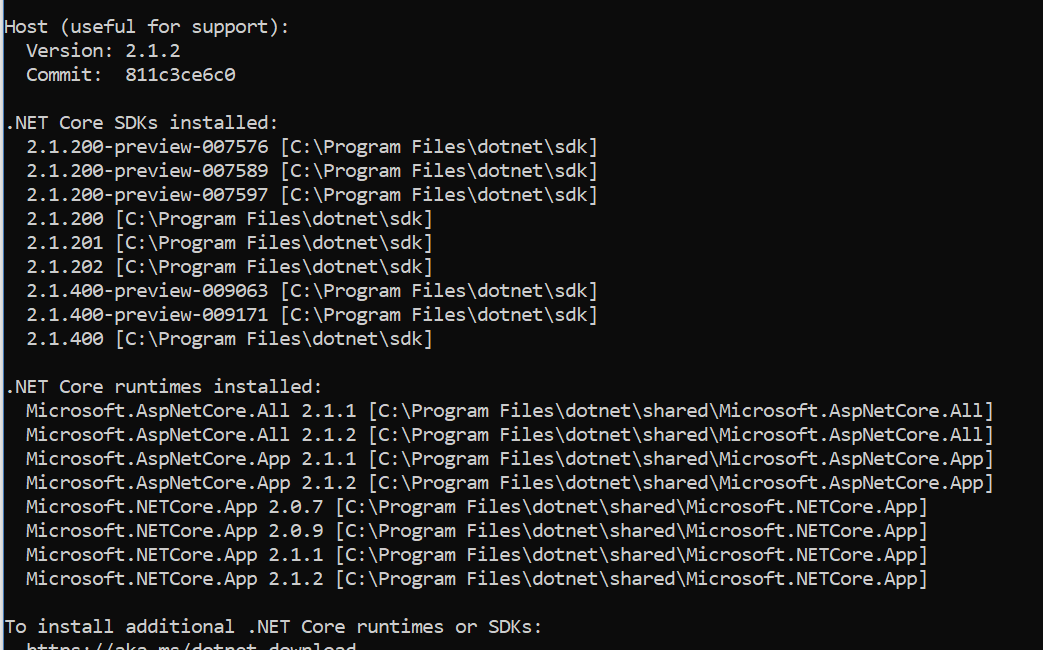
PhilPJL
on 22 Aug 2018
Change your version in global.json file as
{
"sdk": {
"version": "2.1.401"
}
}
 mjganesh
on 3 Sep 2018
mjganesh
on 3 Sep 2018
Bumbled around for 2 hours before I found this suggestion for deleting the global.json (changing to 2.1.401 did not help me) ... would seem logical to have that in the getting started if it's common?
 dsghi
on 14 Sep 2018
dsghi
on 14 Sep 2018
@dsghi Good point. https://github.com/aspnet/Blazor.Docs/pull/244. This is also fixed in 0.6.0 aspnet/Blazor#1386
danroth27
on 14 Sep 2018
Related issues
 rynowak
·
3Comments
rynowak
·
3Comments
 ipinak
·
3Comments
ipinak
·
3Comments
 groogiam
·
3Comments
groogiam
·
3Comments
 UweKeim
·
3Comments
UweKeim
·
3Comments
 FourLeafClover
·
3Comments
FourLeafClover
·
3Comments
Most helpful comment
What .NET Core SDK versions do you have installed? You can run
dotnet --infoto find out.Can you try removing the global.json file from the generated project and see if that resolves the issue?