Aspnetcore: netcore 3.1 preview 1 components namespace unknown
_From @niconico49 on Wednesday, October 16, 2019 8:51:56 AM_
Issue Title
netcore 3.1 preview 1 components namespace unknown
Be as descriptive as you can with your title.
General
After update the visual studio 16.4.0 preview 2 that automatically installed
netcore 3.1 preview1
every reference to the component razor are missed
I'll try to explain:
before if a components razor used another components razor, was only necessary using
the right namespace linked to the folder of the nested components
example:
ComponetA is inside ProjectName/Components/FolderA
ComponetB is inside ProjectName/Components/FolderB
and in the ComponentA.razor
was only necessary to do:
@using ProjectName.Components.FolderB
or
because the visual studio / intellisense and others was able to match the namespace with the folder automatically
Now, for every components there is an error like
ProjectName.Components.FolderB namespace unknown ==> have you forgot some assembly reference and similar.
The solution (for now) is declare inside the every components the namespace too
Is a new request for the 3.1 preview 1 or is a bug?
and in that case, why disable the namespace and folder understating by the runtime / intellisense and other?
_Copied from original issue: dotnet/core#3641_
 scalablecory
All 13 comments
@niconico49 can you zip up and attach a project that demonstrates this? It's a little hard to understand what's going on.
scalablecory
on 16 Oct 2019
/cc @NTaylorMullen
 pranavkm
on 16 Oct 2019
pranavkm
on 16 Oct 2019
Having somewhat the same errors in the default HelloWorld weatherforecast app.
Latest VS version 16.3.5 with Preview Features > Use previews of the .NET Core SDK (requires restart) option checked
Installed SDK's:
PS C:\WINDOWS\system32> dotnet --list-sdks
2.1.801 [C:\Program Files\dotnet\sdk]
2.2.401 [C:\Program Files\dotnet\sdk]
3.0.100 [C:\Program Files\dotnet\sdk]
3.1.100-preview1-014459 [C:\Program Files\dotnet\sdk] > using this version
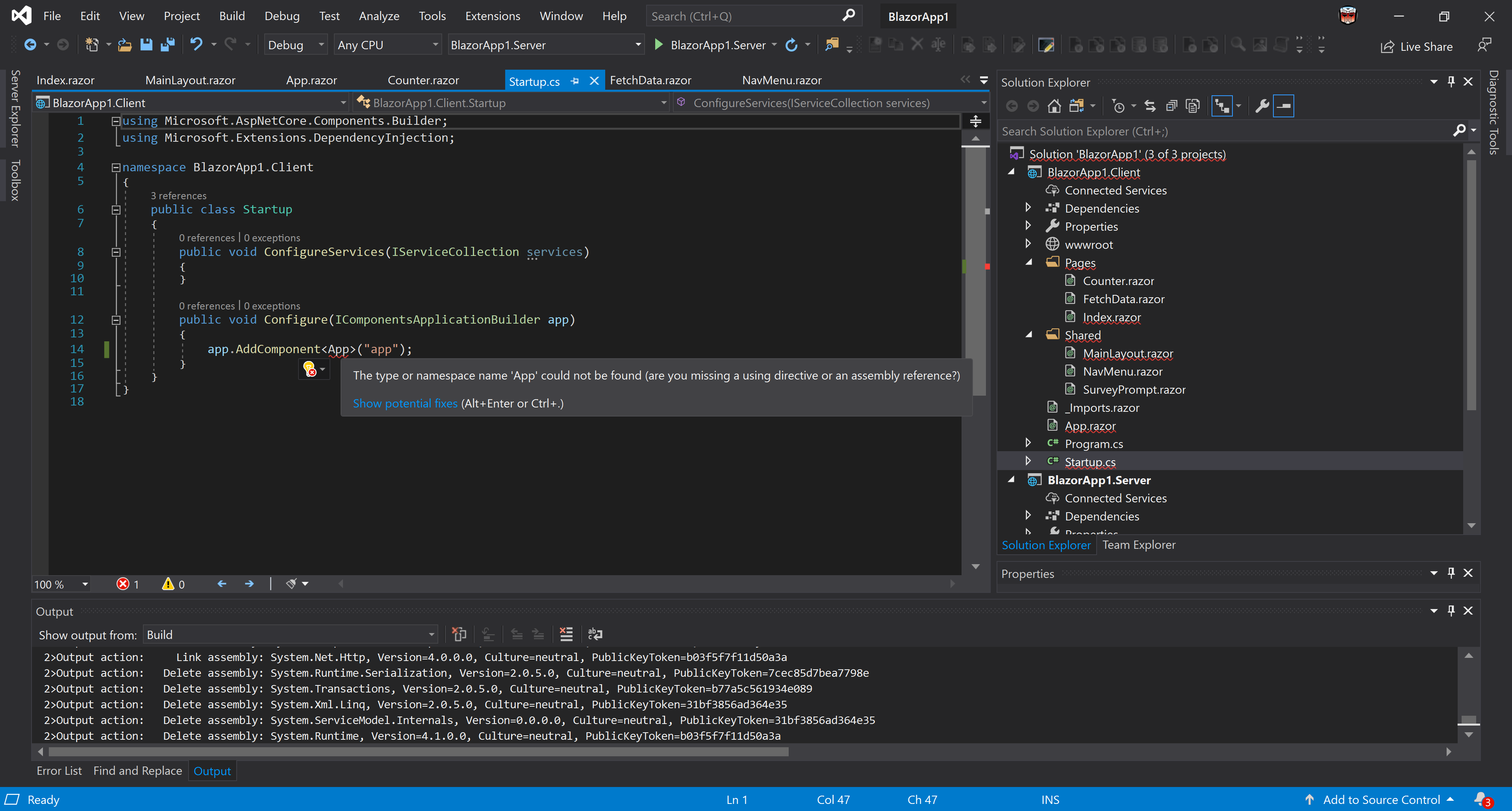
For instance, in Startup.cs intellisense doesn't seem to find App.razor. You can replace this by: "__generated__App" as per intellisense suggestion.... appears to work
Original error
 jeroendee
on 17 Oct 2019
jeroendee
on 17 Oct 2019
Thanks for contacting us folks.
Can you please make sure that you use VS 16.4 preview with .Net Core 3.1 Preview1. If you're seeing issues in VS 16.3, make sure you haven't selected the option to use Preview .NET Core SDK.
@scalablecory can you please share the about dialog screenshot from VS?
 mkArtakMSFT
on 17 Oct 2019
mkArtakMSFT
on 17 Oct 2019
Just to confirm it - I have exactly the same issue.
 YordanYanakiev
on 28 Oct 2019
YordanYanakiev
on 28 Oct 2019
To reproduce the 1st part of the issue :
- Create a folder called "Components".
- Create a Razor page inside called "Test" (or anything else).
- Try to use it inside any other Razor object.
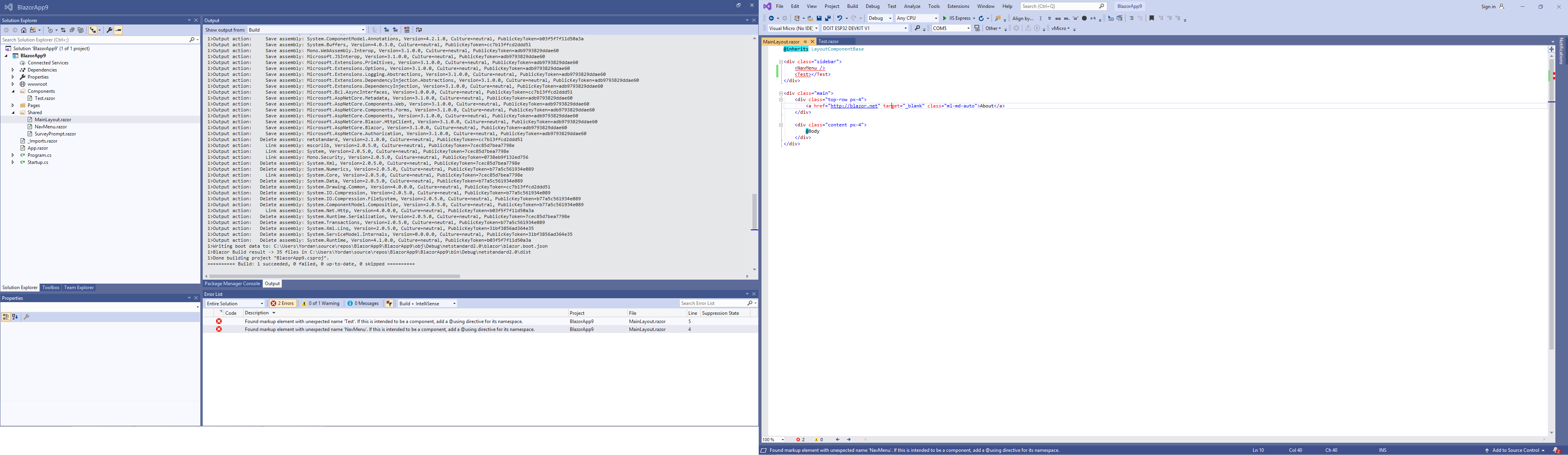
- The markup failing, the namespaces is not resolving directly and there is not working intellisense.
YordanYanakiev
on 28 Oct 2019
@YordanYanakiev Do you have a using for the Test component's namespace? Aka @using BlazorApp9.Components?
As for why NavMenu isn't being found that's quite interesting. What version of VS are you running? Also, if you go to package manager console and type dotnet --info what's the output?
 NTaylorMullen
on 28 Oct 2019
NTaylorMullen
on 28 Oct 2019
yep. I've tried different "@using" configurations. Nothing helps. ( actually at some point it become even worse, and I am trying to find a way to reproduce it - since even the result "*.razor.g.cs" in "obj\Debug\netstandard2.0\Razor\Pages*" folder files start to be messed up ).
Here the info You have requested:
VS 2019 Pro 16.3.6
PM> dotnet --info
.NET Core SDK (reflecting any global.json):
Version: 3.1.100-preview1-014459
Commit: ac3b59712dRuntime Environment:
OS Name: Windows
OS Version: 6.3.9600
OS Platform: Windows
RID: win81-x64
Base Path: C:\Program Files\dotnet\sdk\3.1.100-preview1-014459\Host (useful for support):
Version: 3.1.0-preview1.19506.1
Commit: bbf5542781.NET Core SDKs installed:
1.1.0 [C:\Program Files\dotnet\sdk]
2.0.3 [C:\Program Files\dotnet\sdk]
2.1.2 [C:\Program Files\dotnet\sdk]
2.1.4 [C:\Program Files\dotnet\sdk]
2.1.100 [C:\Program Files\dotnet\sdk]
2.1.202 [C:\Program Files\dotnet\sdk]
2.1.602 [C:\Program Files\dotnet\sdk]
2.1.801 [C:\Program Files\dotnet\sdk]
2.2.202 [C:\Program Files\dotnet\sdk]
2.2.401 [C:\Program Files\dotnet\sdk]
3.0.100 [C:\Program Files\dotnet\sdk]
3.1.100-preview1-014459 [C:\Program Files\dotnet\sdk].NET Core runtimes installed:
Microsoft.AspNetCore.All 2.1.9 [C:\Program Files\dotnet\shared\Microsoft.AspNetCore.All]
Microsoft.AspNetCore.All 2.1.12 [C:\Program Files\dotnet\shared\Microsoft.AspNetCore.All]
Microsoft.AspNetCore.All 2.1.13 [C:\Program Files\dotnet\shared\Microsoft.AspNetCore.All]
Microsoft.AspNetCore.All 2.2.3 [C:\Program Files\dotnet\shared\Microsoft.AspNetCore.All]
Microsoft.AspNetCore.All 2.2.6 [C:\Program Files\dotnet\shared\Microsoft.AspNetCore.All]
Microsoft.AspNetCore.All 2.2.7 [C:\Program Files\dotnet\shared\Microsoft.AspNetCore.All]
Microsoft.AspNetCore.App 2.1.9 [C:\Program Files\dotnet\shared\Microsoft.AspNetCore.App]
Microsoft.AspNetCore.App 2.1.12 [C:\Program Files\dotnet\shared\Microsoft.AspNetCore.App]
Microsoft.AspNetCore.App 2.1.13 [C:\Program Files\dotnet\shared\Microsoft.AspNetCore.App]
Microsoft.AspNetCore.App 2.2.3 [C:\Program Files\dotnet\shared\Microsoft.AspNetCore.App]
Microsoft.AspNetCore.App 2.2.6 [C:\Program Files\dotnet\shared\Microsoft.AspNetCore.App]
Microsoft.AspNetCore.App 2.2.7 [C:\Program Files\dotnet\shared\Microsoft.AspNetCore.App]
Microsoft.AspNetCore.App 3.0.0 [C:\Program Files\dotnet\shared\Microsoft.AspNetCore.App]
Microsoft.AspNetCore.App 3.1.0-preview1.19508.20 [C:\Program Files\dotnet\shared\Microsoft.AspNetCore.App]
Microsoft.NETCore.App 1.0.5 [C:\Program Files\dotnet\shared\Microsoft.NETCore.App]
Microsoft.NETCore.App 1.1.2 [C:\Program Files\dotnet\shared\Microsoft.NETCore.App]
Microsoft.NETCore.App 2.0.3 [C:\Program Files\dotnet\shared\Microsoft.NETCore.App]
Microsoft.NETCore.App 2.0.5 [C:\Program Files\dotnet\shared\Microsoft.NETCore.App]
Microsoft.NETCore.App 2.0.9 [C:\Program Files\dotnet\shared\Microsoft.NETCore.App]
Microsoft.NETCore.App 2.1.9 [C:\Program Files\dotnet\shared\Microsoft.NETCore.App]
Microsoft.NETCore.App 2.1.12 [C:\Program Files\dotnet\shared\Microsoft.NETCore.App]
Microsoft.NETCore.App 2.1.13 [C:\Program Files\dotnet\shared\Microsoft.NETCore.App]
Microsoft.NETCore.App 2.2.3 [C:\Program Files\dotnet\shared\Microsoft.NETCore.App]
Microsoft.NETCore.App 2.2.6 [C:\Program Files\dotnet\shared\Microsoft.NETCore.App]
Microsoft.NETCore.App 2.2.7 [C:\Program Files\dotnet\shared\Microsoft.NETCore.App]
Microsoft.NETCore.App 3.0.0 [C:\Program Files\dotnet\shared\Microsoft.NETCore.App]
Microsoft.NETCore.App 3.1.0-preview1.19506.1 [C:\Program Files\dotnet\shared\Microsoft.NETCore.App]
Microsoft.WindowsDesktop.App 3.0.0 [C:\Program Files\dotnet\shared\Microsoft.WindowsDesktop.App]
Microsoft.WindowsDesktop.App 3.1.0-preview1.19506.1 [C:\Program Files\dotnet\shared\Microsoft.WindowsDesktop.App]
YordanYanakiev
on 28 Oct 2019
Here just a plain application - just created with not working intellisense on the components, and not recognising the NavMenu. Nothing touched - just straight from the template for creating Blazor Client Side App.
TestTheBug.zip
YordanYanakiev
on 28 Oct 2019
@YordanYanakiev ahhhh, 3.1 SDK is not supported in VS 16.3 is why 😄
NTaylorMullen
on 28 Oct 2019
Good heavens. I am not sure where i were supposed to read this, but it was a nightmare 3 days of headbanging the wall..
I've started even questioning my knowledge on C# thanks to this bug :D
- installing VS 2019 preview 2 now *
YordanYanakiev
on 29 Oct 2019
Confirmed - the syntax highlight, namespaces and Intellisense works fine in VS 2019 Preview 2 + Core 3.1 preview 1.
YordanYanakiev
on 29 Oct 2019
+1, 2019 preview 2 with .NET Core 3.1 fixes this issue for me as well.
 cbrit
on 29 Oct 2019
cbrit
on 29 Oct 2019
Related issues
 guardrex
·
3Comments
guardrex
·
3Comments
 aurokk
·
3Comments
aurokk
·
3Comments
 githubgitgit
·
3Comments
githubgitgit
·
3Comments
 FourLeafClover
·
3Comments
FourLeafClover
·
3Comments
 Pixel-Lord
·
3Comments
Pixel-Lord
·
3Comments
Most helpful comment
@YordanYanakiev ahhhh, 3.1 SDK is not supported in VS 16.3 is why 😄