Aspnetcore: # in file paths results in 0 C#/HTML completion
Is this a Bug or Feature request?:
Bug
Steps to reproduce
Write code in cshtml
Description of the problem:
When I write code in cshtml, I don't get tips or errors for code.
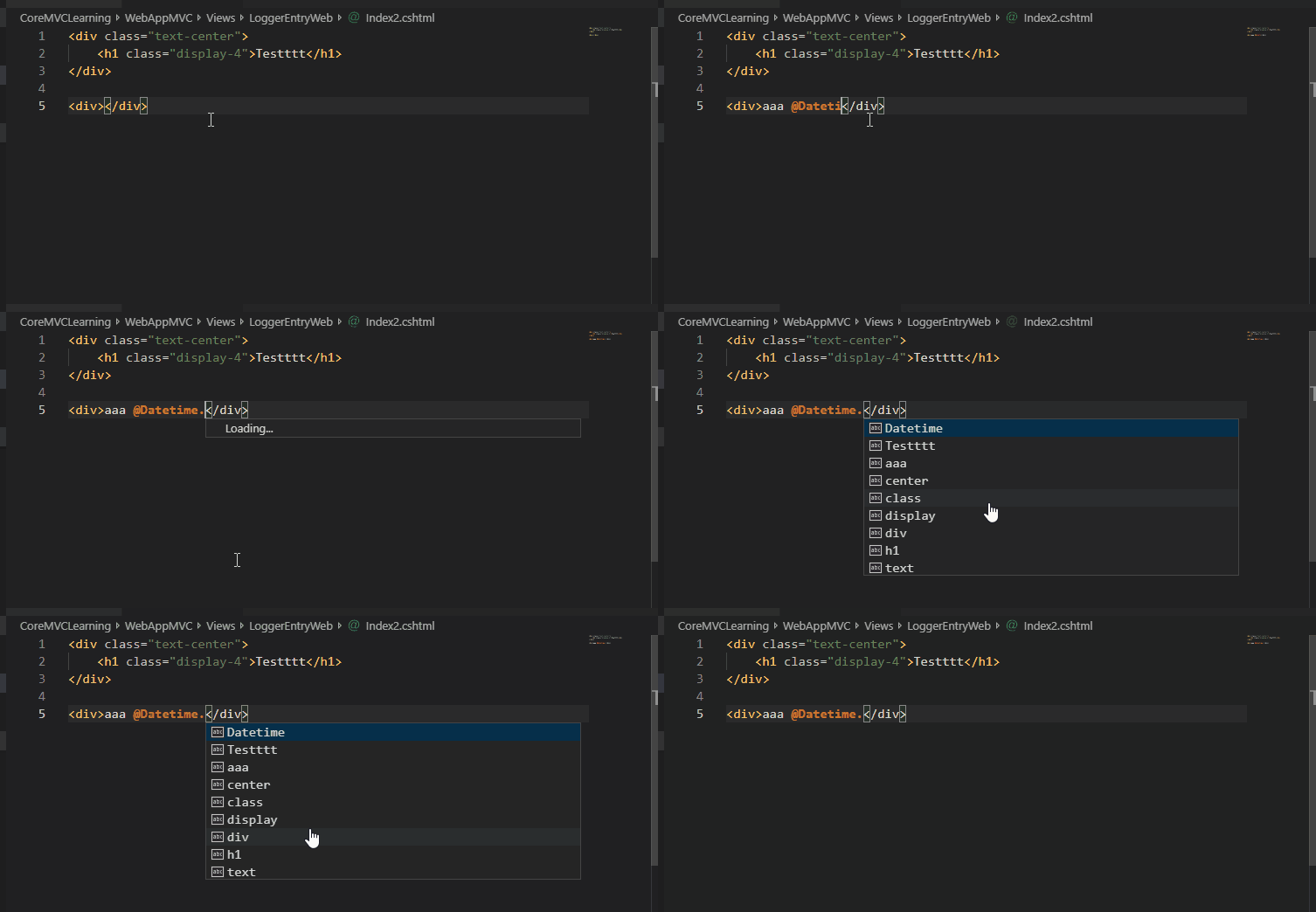
However, I get tips and errors in .cs files.
I use sync extension to sync my extensions and settings.
When I download synced profile on another computer It does works there!
cshtml files are set to "aspnetcorerazor" language.
I'm trying to repair this issue around 3 days. I have scanned google and other bugs tickets but didn't find the solution.
Expected behavior:
Show tips and errors for code
Actual behavior:
Don't show tips and errors for code
My actions
Reinstalled vs code
Reinstalled c# extension
Reinstalled visual studio
Installed MONO
Installed visual studio core tools from visual studio installer
Installed new .net core SDK 2.2.300
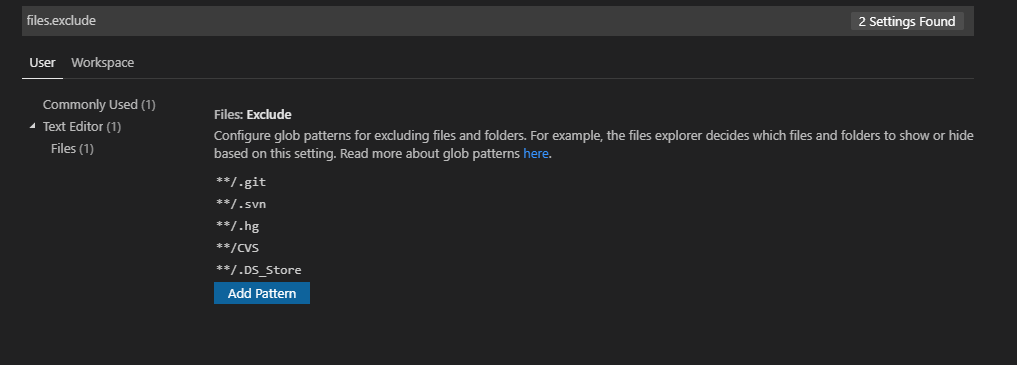
Checked my files.excluded:
Custom settings in vs code
Expand
{ "editor.fontSize": 15, "git.autofetch": true, "gitlens.advanced.messages": { "suppressLineUncommittedWarning": true, "suppressShowKeyBindingsNotice": true }, "explorer.confirmDelete": false, "window.zoomLevel": 0, "explorer.confirmDragAndDrop": false, "breadcrumbs.enabled": true, "files.autoSave": "afterDelay", "window.titleBarStyle": "custom", "liveServer.settings.donotShowInfoMsg": true, "git.enableSmartCommit": true, "git.confirmSync": false, "terminal.integrated.shell.windows": "C:\\WINDOWS\\System32\\WindowsPowerShell\\v1.0\\powershell.exe", "todo-tree.defaultHighlight": { "foreground": "green", "type": "none" }, "todo-tree.customHighlight": { "TODO": { "icon": "pin", "foreground": "green", "type": "line" }, "FIXME": { "foreground": "red", "iconColour": "yellow" } }, "todo-tree.regexCaseSensitive": false, "quicktype.justTypes": false, "gitlens.views.fileHistory.enabled": true, "gitlens.views.lineHistory.enabled": true, "gitlens.views.repositories.files.layout": "tree", "emmet.includeLanguages": { "aspnetcorerazor": "cshtml", "razor": "html" }, "sync.gist": "nope_you_wish_xD", "editor.suggestSelection": "first", "vsintellicode.modify.editor.suggestSelection": "automaticallyOverrodeDefaultValue", "projects.checkDirty": true, "projects.checkPaths": true, "projects.showBranch": true, "todo-tree.showCountsInTree": true, "editor.formatOnSave": true, "dotnet-test-explorer.testProjectPath": "*/*Test*.csproj", "workbench.iconTheme": "vscode-icons", "csharp.format.enable": false, "csharpfixformat.style.braces.onSameLine": false, "csharpfixformat.style.spaces.beforeParenthesis": false, "colorTabs.config": [ { "regex": ".*\\Controllers\\.*", "color": "#0fd034", "label": "Controllers" }, { "regex": "*\\.js", "color": "#f9f305" } ], "colorTabs.statusBarBackground": false, "colorTabs.titleLabel": true, "workbench.colorTheme": "Darcula Theme from IntelliJ", "razor.trace": "Verbose" }
Logs
OmniSharp
Expand
Starting OmniSharp server at 6/6/2019, 2:35:01 PM
Target: d:\c#Projects\CoreMVCLearning2
OmniSharp server started.
Path: C:\Users\Maciej-pc\.vscode\extensions\ms-vscode.csharp-1.19.1\.omnisharp\1.32.19\OmniSharp.exe
PID: 15732
[info]: OmniSharp.Stdio.Host
Starting OmniSharp on Windows 6.2.9200.0 (x64)
[info]: OmniSharp.Services.DotNetCliService
DotNetPath set to dotnet
[info]: OmniSharp.MSBuild.Discovery.MSBuildLocator
Located 2 MSBuild instance(s)
1: Visual Studio Community 2017 15.9.28307.665 - "C:\Program Files (x86)\Microsoft Visual Studio\2017\Community\MSBuild\15.0\Bin"
2: StandAlone 15.0 - "C:\Users\Maciej-pc\.vscode\extensions\ms-vscode.csharp-1.19.1\.omnisharp\1.32.19\.msbuild\Current\Bin"
[info]: OmniSharp.MSBuild.Discovery.MSBuildLocator
Registered MSBuild instance: Visual Studio Community 2017 15.9.28307.665 - "C:\Program Files (x86)\Microsoft Visual Studio\2017\Community\MSBuild\15.0\Bin"
[info]: OmniSharp.Cake.CakeProjectSystem
Detecting Cake files in 'd:\c#Projects\CoreMVCLearning2'.
[info]: OmniSharp.Cake.CakeProjectSystem
Could not find any Cake files
[info]: OmniSharp.WorkspaceInitializer
Project system 'OmniSharp.DotNet.DotNetProjectSystem' is disabled in the configuration.
[info]: OmniSharp.MSBuild.ProjectSystem
No solution files found in 'd:\c#Projects\CoreMVCLearning2'
[info]: OmniSharp.MSBuild.ProjectManager
Queue project update for 'd:\c#Projects\CoreMVCLearning2\CoreMVCLearning\NewAppModules\NewAppModules.csproj'
[info]: OmniSharp.MSBuild.ProjectManager
Queue project update for 'd:\c#Projects\CoreMVCLearning2\CoreMVCLearning\WebAppMVC\WebAppMVC.csproj'
[info]: OmniSharp.Script.ScriptProjectSystem
Detecting CSX files in 'd:\c#Projects\CoreMVCLearning2'.
[info]: OmniSharp.Script.ScriptProjectSystem
Could not find any CSX files
[info]: OmniSharp.WorkspaceInitializer
Invoking Workspace Options Provider: OmniSharp.Roslyn.CSharp.Services.CSharpWorkspaceOptionsProvider
[info]: OmniSharp.MSBuild.ProjectManager
Loading project: d:\c#Projects\CoreMVCLearning2\CoreMVCLearning\NewAppModules\NewAppModules.csproj
[info]: OmniSharp.WorkspaceInitializer
Configuration finished.
[info]: OmniSharp.Stdio.Host
Omnisharp server running using Stdio at location 'd:\c#Projects\CoreMVCLearning2' on host 12720.
[info]: OmniSharp.MSBuild.ProjectManager
Successfully loaded project file 'd:\c#Projects\CoreMVCLearning2\CoreMVCLearning\NewAppModules\NewAppModules.csproj'.
[info]: OmniSharp.MSBuild.ProjectManager
Adding project 'd:\c#Projects\CoreMVCLearning2\CoreMVCLearning\NewAppModules\NewAppModules.csproj'
[info]: OmniSharp.MSBuild.ProjectManager
Loading project: d:\c#Projects\CoreMVCLearning2\CoreMVCLearning\WebAppMVC\WebAppMVC.csproj
[info]: OmniSharp.MSBuild.ProjectManager
Successfully loaded project file 'd:\c#Projects\CoreMVCLearning2\CoreMVCLearning\WebAppMVC\WebAppMVC.csproj'.
[info]: OmniSharp.MSBuild.ProjectManager
Adding project 'd:\c#Projects\CoreMVCLearning2\CoreMVCLearning\WebAppMVC\WebAppMVC.csproj'
[info]: OmniSharp.MSBuild.ProjectManager
Update project: NewAppModules
[info]: OmniSharp.MSBuild.ProjectManager
Update project: WebAppMVC
#### Razor
Expand
[Client - 2:35:14 PM] -- Starting Issue Data Collection--
[Client - 2:35:14 PM] Notifying project 'd:\c#Projects\CoreMVCLearning2\CoreMVCLearning\WebAppMVC\WebAppMVC.csproj' - 'changed'
[Client - 2:35:16 PM] Notifying document 'd:\c#Projects\CoreMVCLearning2\CoreMVCLearning\WebAppMVC\Views\LoggerEntryWeb\Index2.cshtml' changed 'htmlChanged'
[Client - 2:35:16 PM] Notifying document 'd:\c#Projects\CoreMVCLearning2\CoreMVCLearning\WebAppMVC\Views\LoggerEntryWeb\Index2.cshtml' changed 'htmlChanged'
[Client - 2:35:16 PM] Updating the C# document for Razor file '/d:/c#Projects/CoreMVCLearning2/CoreMVCLearning/WebAppMVC/Views/LoggerEntryWeb/Index2.cshtml' (2)
[Client - 2:35:16 PM] Notifying document 'd:\c#Projects\CoreMVCLearning2\CoreMVCLearning\WebAppMVC\Views\LoggerEntryWeb\Index2.cshtml' changed 'csharpChanged'
[Client - 2:35:16 PM] 1 - Synchronizing 'd:\c':
    Currently at 2, synchronizing to version '2'.
    Current host document version: '2'
    Current projected document version: '3'
[Client - 2:35:16 PM] 1 - Projected document in sync with host document
[Client - 2:35:16 PM] 1 - Projected text document not in sync with data type, waiting for update...
    Current projected text document sync version: 0
[Client - 2:35:17 PM] Notifying document 'd:\c#Projects\CoreMVCLearning2\CoreMVCLearning\WebAppMVC\Views\LoggerEntryWeb\Index2.cshtml' changed 'htmlChanged'
[Client - 2:35:17 PM] Updating the C# document for Razor file '/d:/c#Projects/CoreMVCLearning2/CoreMVCLearning/WebAppMVC/Views/LoggerEntryWeb/Index2.cshtml' (3)
[Client - 2:35:17 PM] Notifying document 'd:\c#Projects\CoreMVCLearning2\CoreMVCLearning\WebAppMVC\Views\LoggerEntryWeb\Index2.cshtml' changed 'csharpChanged'
[Client - 2:35:17 PM] Notifying document 'd:\c#Projects\CoreMVCLearning2\CoreMVCLearning\WebAppMVC\Views\LoggerEntryWeb\Index2.cshtml' changed 'htmlChanged'
[Client - 2:35:17 PM] Updating the C# document for Razor file '/d:/c#Projects/CoreMVCLearning2/CoreMVCLearning/WebAppMVC/Views/LoggerEntryWeb/Index2.cshtml' (4)
[Client - 2:35:17 PM] Notifying document 'd:\c#Projects\CoreMVCLearning2\CoreMVCLearning\WebAppMVC\Views\LoggerEntryWeb\Index2.cshtml' changed 'csharpChanged'
[Client - 2:35:17 PM] Notifying document 'd:\c#Projects\CoreMVCLearning2\CoreMVCLearning\WebAppMVC\Views\LoggerEntryWeb\Index2.cshtml' changed 'htmlChanged'
[Client - 2:35:17 PM] Updating the C# document for Razor file '/d:/c#Projects/CoreMVCLearning2/CoreMVCLearning/WebAppMVC/Views/LoggerEntryWeb/Index2.cshtml' (5)
[Client - 2:35:17 PM] Notifying document 'd:\c#Projects\CoreMVCLearning2\CoreMVCLearning\WebAppMVC\Views\LoggerEntryWeb\Index2.cshtml' changed 'csharpChanged'
[Client - 2:35:17 PM] Notifying document 'd:\c#Projects\CoreMVCLearning2\CoreMVCLearning\WebAppMVC\Views\LoggerEntryWeb\Index2.cshtml' changed 'htmlChanged'
[Client - 2:35:17 PM] Updating the C# document for Razor file '/d:/c#Projects/CoreMVCLearning2/CoreMVCLearning/WebAppMVC/Views/LoggerEntryWeb/Index2.cshtml' (6)
[Client - 2:35:17 PM] Notifying document 'd:\c#Projects\CoreMVCLearning2\CoreMVCLearning\WebAppMVC\Views\LoggerEntryWeb\Index2.cshtml' changed 'csharpChanged'
[Client - 2:35:18 PM] Notifying document 'd:\c#Projects\CoreMVCLearning2\CoreMVCLearning\WebAppMVC\Views\LoggerEntryWeb\Index2.cshtml' changed 'htmlChanged'
[Client - 2:35:18 PM] Updating the C# document for Razor file '/d:/c#Projects/CoreMVCLearning2/CoreMVCLearning/WebAppMVC/Views/LoggerEntryWeb/Index2.cshtml' (7)
[Client - 2:35:18 PM] Notifying document 'd:\c#Projects\CoreMVCLearning2\CoreMVCLearning\WebAppMVC\Views\LoggerEntryWeb\Index2.cshtml' changed 'csharpChanged'
[Client - 2:35:18 PM] Notifying document 'd:\c#Projects\CoreMVCLearning2\CoreMVCLearning\WebAppMVC\Views\LoggerEntryWeb\Index2.cshtml' changed 'htmlChanged'
[Client - 2:35:18 PM] Updating the C# document for Razor file '/d:/c#Projects/CoreMVCLearning2/CoreMVCLearning/WebAppMVC/Views/LoggerEntryWeb/Index2.cshtml' (8)
[Client - 2:35:18 PM] Notifying document 'd:\c#Projects\CoreMVCLearning2\CoreMVCLearning\WebAppMVC\Views\LoggerEntryWeb\Index2.cshtml' changed 'csharpChanged'
[Client - 2:35:18 PM] Notifying document 'd:\c#Projects\CoreMVCLearning2\CoreMVCLearning\WebAppMVC\Views\LoggerEntryWeb\Index2.cshtml' changed 'htmlChanged'
[Client - 2:35:18 PM] Updating the C# document for Razor file '/d:/c#Projects/CoreMVCLearning2/CoreMVCLearning/WebAppMVC/Views/LoggerEntryWeb/Index2.cshtml' (9)
[Client - 2:35:18 PM] Notifying document 'd:\c#Projects\CoreMVCLearning2\CoreMVCLearning\WebAppMVC\Views\LoggerEntryWeb\Index2.cshtml' changed 'csharpChanged'
[Client - 2:35:18 PM] Notifying document 'd:\c#Projects\CoreMVCLearning2\CoreMVCLearning\WebAppMVC\Views\LoggerEntryWeb\Index2.cshtml' changed 'htmlChanged'
[Client - 2:35:18 PM] Updating the C# document for Razor file '/d:/c#Projects/CoreMVCLearning2/CoreMVCLearning/WebAppMVC/Views/LoggerEntryWeb/Index2.cshtml' (10)
[Client - 2:35:18 PM] Notifying document 'd:\c#Projects\CoreMVCLearning2\CoreMVCLearning\WebAppMVC\Views\LoggerEntryWeb\Index2.cshtml' changed 'csharpChanged'
[Client - 2:35:18 PM] Notifying document 'd:\c#Projects\CoreMVCLearning2\CoreMVCLearning\WebAppMVC\Views\LoggerEntryWeb\Index2.cshtml' changed 'htmlChanged'
[Client - 2:35:18 PM] 1 - Synchronization failed: Token cancellation requested: undefined
[Client - 2:35:18 PM] Providing completions for document d:\c#Projects\CoreMVCLearning2\CoreMVCLearning\WebAppMVC\Views\LoggerEntryWeb\Index2.cshtml at location (4, 6)
[Client - 2:35:18 PM] Updating the C# document for Razor file '/d:/c#Projects/CoreMVCLearning2/CoreMVCLearning/WebAppMVC/Views/LoggerEntryWeb/Index2.cshtml' (11)
[Client - 2:35:18 PM] Notifying document 'd:\c#Projects\CoreMVCLearning2\CoreMVCLearning\WebAppMVC\Views\LoggerEntryWeb\Index2.cshtml' changed 'csharpChanged'
[Client - 2:35:18 PM] 2 - Synchronizing 'd:\c':
    Currently at 11, synchronizing to version '11'.
    Current host document version: '11'
    Current projected document version: '13'
[Client - 2:35:18 PM] 2 - Projected document in sync with host document
[Client - 2:35:18 PM] 2 - Projected text document not in sync with data type, waiting for update...
    Current projected text document sync version: 0
[Client - 2:35:19 PM] 2 - Synchronization failed: Token cancellation requested: undefined
[Client - 2:35:19 PM] Providing completions for document d:\c#Projects\CoreMVCLearning2\CoreMVCLearning\WebAppMVC\Views\LoggerEntryWeb\Index2.cshtml at location (4, 15)
[Client - 2:35:19 PM] 3 - Synchronizing 'd:\c':
    Currently at 11, synchronizing to version '11'.
    Current host document version: '11'
    Current projected document version: '13'
[Client - 2:35:19 PM] 3 - Projected document in sync with host document
[Client - 2:35:19 PM] 3 - Projected text document not in sync with data type, waiting for update...
    Current projected text document sync version: 0
[Client - 2:35:19 PM] Notifying document 'd:\c#Projects\CoreMVCLearning2\CoreMVCLearning\WebAppMVC\Views\LoggerEntryWeb\Index2.cshtml' changed 'htmlChanged'
[Client - 2:35:21 PM] 3 - Synchronization failed: Synchronization timed out
[Client - 2:35:21 PM] Providing completions for document d:\c#Projects\CoreMVCLearning2\CoreMVCLearning\WebAppMVC\Views\LoggerEntryWeb\Index2.cshtml at location (4, 15)
[Client - 2:35:28 PM] Notifying document 'd:\c#Projects\CoreMVCLearning2\CoreMVCLearning\WebAppMVC\Views\LoggerEntryWeb\Index2.cshtml' changed 'htmlChanged'
[Client - 2:35:28 PM] Notifying document 'd:\c#Projects\CoreMVCLearning2\CoreMVCLearning\WebAppMVC\Views\LoggerEntryWeb\Index2.cshtml' changed 'htmlChanged'
[Client - 2:35:28 PM] Updating the C# document for Razor file '/d:/c#Projects/CoreMVCLearning2/CoreMVCLearning/WebAppMVC/Views/LoggerEntryWeb/Index2.cshtml' (12)
[Client - 2:35:28 PM] Notifying document 'd:\c#Projects\CoreMVCLearning2\CoreMVCLearning\WebAppMVC\Views\LoggerEntryWeb\Index2.cshtml' changed 'csharpChanged'
[Client - 2:35:29 PM] Notifying document 'd:\c#Projects\CoreMVCLearning2\CoreMVCLearning\WebAppMVC\Views\LoggerEntryWeb\Index2.cshtml' changed 'htmlChanged'
[Client - 2:35:31 PM] -- Stopping Issue Data Collection--
Workspace information
Razor document:
Expand
<div class="text-center">
    <h1 class="display-4">Testttt</h1>
</div>

<div>@Datetime. </div>
Projected CSharp document:
Expand
```C#
////////////////////// Projected CSharp as seen by extension ///////////////////////
//
</p>
</details>

#### Projected Html document:
<details><summary>Expand</summary>
<p>

```Html
////////////////////// Projected Html as seen by extension ///////////////////////
<div class="text-center">
    <h1 class="display-4">Testttt</h1>
</div>

<div>@Datetime. </div>


////////////////////// Projected Html as seen by VSCode ///////////////////////

// 0
Machine information
VSCode version: 1.34.0
Razor.VSCode version: 1.19.1
dotnet --info
Expand
.NET Core SDK (reflecting any global.json):
 Version:   2.2.300
 Commit:    73efd5bd87

Runtime Environment:
 OS Name:     Windows
 OS Version:  10.0.17134
 OS Platform: Windows
 RID:         win10-x64
 Base Path:   C:\Program Files\dotnet\sdk\2.2.300\

Host (useful for support):
  Version: 2.2.5
  Commit:  0a3c9209c0

.NET Core SDKs installed:
  2.1.4 [C:\Program Files\dotnet\sdk]
  2.1.201 [C:\Program Files\dotnet\sdk]
  2.1.202 [C:\Program Files\dotnet\sdk]
  2.1.402 [C:\Program Files\dotnet\sdk]
  2.1.504 [C:\Program Files\dotnet\sdk]
  2.1.507 [C:\Program Files\dotnet\sdk]
  2.1.600-preview-009426 [C:\Program Files\dotnet\sdk]
  2.1.602 [C:\Program Files\dotnet\sdk]
  2.1.700 [C:\Program Files\dotnet\sdk]
  2.1.800-preview-009677 [C:\Program Files\dotnet\sdk]
  2.2.101 [C:\Program Files\dotnet\sdk]
  2.2.300 [C:\Program Files\dotnet\sdk]

.NET Core runtimes installed:
  Microsoft.AspNetCore.All 2.1.4 [C:\Program Files\dotnet\shared\Microsoft.AspNetCore.All]
  Microsoft.AspNetCore.All 2.1.6 [C:\Program Files\dotnet\shared\Microsoft.AspNetCore.All]
  Microsoft.AspNetCore.All 2.1.8 [C:\Program Files\dotnet\shared\Microsoft.AspNetCore.All]
  Microsoft.AspNetCore.All 2.1.9 [C:\Program Files\dotnet\shared\Microsoft.AspNetCore.All]
  Microsoft.AspNetCore.All 2.1.11 [C:\Program Files\dotnet\shared\Microsoft.AspNetCore.All]
  Microsoft.AspNetCore.All 2.2.0 [C:\Program Files\dotnet\shared\Microsoft.AspNetCore.All]
  Microsoft.AspNetCore.All 2.2.5 [C:\Program Files\dotnet\shared\Microsoft.AspNetCore.All]
  Microsoft.AspNetCore.App 2.1.4 [C:\Program Files\dotnet\shared\Microsoft.AspNetCore.App]
  Microsoft.AspNetCore.App 2.1.6 [C:\Program Files\dotnet\shared\Microsoft.AspNetCore.App]
  Microsoft.AspNetCore.App 2.1.8 [C:\Program Files\dotnet\shared\Microsoft.AspNetCore.App]
  Microsoft.AspNetCore.App 2.1.9 [C:\Program Files\dotnet\shared\Microsoft.AspNetCore.App]
  Microsoft.AspNetCore.App 2.1.11 [C:\Program Files\dotnet\shared\Microsoft.AspNetCore.App]
  Microsoft.AspNetCore.App 2.2.0 [C:\Program Files\dotnet\shared\Microsoft.AspNetCore.App]
  Microsoft.AspNetCore.App 2.2.5 [C:\Program Files\dotnet\shared\Microsoft.AspNetCore.App]
  Microsoft.NETCore.App 2.0.5 [C:\Program Files\dotnet\shared\Microsoft.NETCore.App]
  Microsoft.NETCore.App 2.0.7 [C:\Program Files\dotnet\shared\Microsoft.NETCore.App]
  Microsoft.NETCore.App 2.0.9 [C:\Program Files\dotnet\shared\Microsoft.NETCore.App]
  Microsoft.NETCore.App 2.1.4 [C:\Program Files\dotnet\shared\Microsoft.NETCore.App]
  Microsoft.NETCore.App 2.1.6 [C:\Program Files\dotnet\shared\Microsoft.NETCore.App]
  Microsoft.NETCore.App 2.1.8 [C:\Program Files\dotnet\shared\Microsoft.NETCore.App]
  Microsoft.NETCore.App 2.1.9 [C:\Program Files\dotnet\shared\Microsoft.NETCore.App]
  Microsoft.NETCore.App 2.1.11 [C:\Program Files\dotnet\shared\Microsoft.NETCore.App]
  Microsoft.NETCore.App 2.2.0 [C:\Program Files\dotnet\shared\Microsoft.NETCore.App]
  Microsoft.NETCore.App 2.2.5 [C:\Program Files\dotnet\shared\Microsoft.NETCore.App]

To install additional .NET Core runtimes or SDKs:
  https://aka.ms/dotnet-download
Extensions
Expand
|Extension|Author|Version| |---|---|---| |add-reference|adrianwilczynski|1.0.2| |asp-net-core-switcher|adrianwilczynski|1.0.2| |auto-using|Fudge|0.7.8| |bracket-pair-colorizer|CoenraadS|1.0.61| |classynaming|reflectiondm|1.2.0| |clipboard-history|Anjali|1.0.7| |code-runner|formulahendry|0.9.10| |code-settings-sync|Shan|3.2.9| |color-highlight|naumovs|2.3.0| |color-tabs-vscode-ext|orepor|0.7.0| |csharp|ms-vscode|1.19.1| |csharp-colors|logerfo|0.1.3| |csharp-workspace|qp|0.0.3| |csharpextensions|jchannon|1.3.0| |csharpfixformat|Leopotam|0.0.81| |docomment|k--kato|0.1.7| |dotnet-test-explorer|formulahendry|0.7.0| |dracula-theme-from-intellij|trinm1709|0.3.0| |es7-react-js-snippets|dsznajder|2.3.0| |githistory|donjayamanne|0.4.6| |gitlens|eamodio|9.8.1| |horizon-theme-vscode|jolaleye|1.8.1| |java|redhat|0.46.0| |json-tools|eriklynd|1.0.2| |LiveServer|ritwickdey|5.6.1| |make-hidden|devine-davies|3.0.3| |markdown-all-in-one|yzhang|2.3.1| |Material-theme|zhuangtongfa|2.24.1| |mongo-runner|JoeyYiZhao|0.5.8| |namespace|adrianwilczynski|1.1.0| |new-moon-vscode|taniarascia|1.8.4| |nuget-reverse-package-search|jesschadwick|0.1.68| |one-monokai|azemoh|0.3.7| |open-in-browser|techer|2.0.0| |output-colorizer|IBM|0.1.2| |partial-diff|ryu1kn|1.4.0| |path-intellisense|christian-kohler|1.4.2| |powershell|ms-vscode|2019.5.0| |quicktype|quicktype|12.0.46| |rest-client|humao|0.21.3| |shades-of-purple|ahmadawais|5.9.0| |supersharp|craigthomas|0.1.4| |todo-tree|Gruntfuggly|0.0.134| |underscore-name|adrianwilczynski|1.1.1| |vsc-material-theme|Equinusocio|2.9.0| |vscode-color-pick|adam-watters|0.6.2| |vscode-css-peek|pranaygp|2.2.0| |vscode-dotnet-auto-attach|DennisMaxJung|1.1.0| |vscode-eslint|dbaeumer|1.9.0| |vscode-extension-auto-import|NuclleaR|1.4.3| |vscode-great-icons|emmanuelbeziat|2.1.47| |vscode-icons|vscode-icons-team|8.7.0| |vscode-import-cost|wix|2.12.0| |vscode-java-debug|vscjava|0.19.0| |vscode-java-dependency|vscjava|0.4.0| |vscode-java-pack|vscjava|0.7.1| |vscode-java-test|vscjava|0.17.0| |vscode-maven|vscjava|0.17.0| |vscode-nuget-package-manager|jmrog|1.1.6| |vscode-projects-plus|fabiospampinato|1.22.0| |vscode-sqlite|alexcvzz|0.6.0| |vscode-theme-onedark|akamud|2.1.0| |vscode-versionlens|pflannery|0.23.0| |vscode-wakatime|WakaTime|2.1.2| |vscodeintellicode|VisualStudioExptTeam|1.1.6| |winteriscoming|johnpapa|1.1.1| |xml|DotJoshJohnson|2.5.0|;
 Puliczek
All 8 comments
@Puliczek If you type @Dat do you get a completion list containing DateTime? I ask because technically you wont get any completions after a misspelled Datetime
 NTaylorMullen
on 6 Jun 2019
NTaylorMullen
on 6 Jun 2019
@NTaylorMullen Yes, you are right. Sorry for that example.

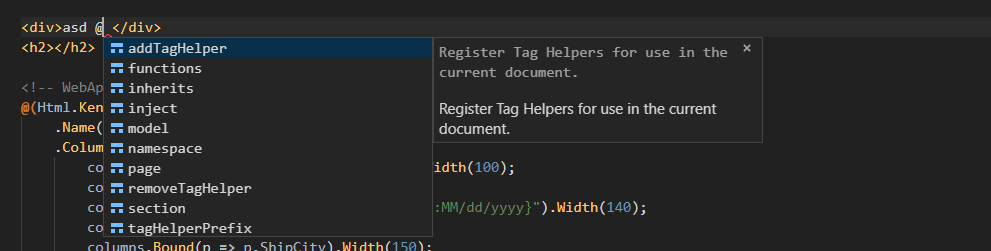
When I use only @ I have some tips:
Puliczek
on 6 Jun 2019
@Puliczek that's very interesting hmmm.... Everything else in the issue looks fine; however, something is causing the C# completion requests to timeout.
The only recommendation I can give is to 1-by-1 uninstall your other extensions to see which one is responsible.
NTaylorMullen
on 6 Jun 2019
@NTaylorMullen Ok, I'm going to try that. Although I use Sync extension in order to have the same settings and extensions everywhere, so another computer has the same extensions and settings and It works there...
Puliczek
on 6 Jun 2019
Full settings.json commented + "Extensions: Disable all installed extensions" then I restarted vs code and enabled the only "C#" extension, didn't do a job. Still, do not work.
I forced to switch OmniSharp.MSBuild.Discovery.MSBuildLocator to StandAlone or Visual studio 2019. But the same problem.
I created a new project because the last one has # in the path... Same problem.
I restarted Omnisharp via "Omnisharp: Restart Omnisharp" and selected project by "Omnisharp: Select Project". Same problem.
Puliczek
on 6 Jun 2019
Super interesting... if you do dotnet new webapp at the command line and then open that in VSCode do you get the same behavior (lacking C# completion in Razor files)?
Sorry for the scavenger hunt, i'm just at a loss for what could be going wrong on your box.
NTaylorMullen
on 6 Jun 2019
It is working! Mate, you are a genius @NTaylorMullen ! 🥇
Ok, so my predictions were good. Nevertheless, I failed on choosing an example, I tried on dotnet new console with cshtml, and Omnisharp didn't trigger It, so I thought It just doesn't work. My bad...
If I create dotnet new webapp or dotnet new mvc on my desktop It works like a charm.
But when I add character " # " to the path, It is broken again.
In conclusion, If there is # character in the path of the project, Omnisharp Razor Intellisense doesn't work. At least in my situation, I use Windows 10. I would be glad if someone could check it 👍
I switched the path of my projects from /c#project/ to /csharpproject/ . Right now, everything works as It should. Thank you for help.
Puliczek
on 6 Jun 2019
In conclusion, If there is # character in the path of the project, Omnisharp Razor Intellisense doesn't work
Great find! Going to rename this issue and track this as a bug.
NTaylorMullen
on 6 Jun 2019
Related issues
 BrennanConroy
·
3Comments
BrennanConroy
·
3Comments
 bgribaudo
·
3Comments
bgribaudo
·
3Comments
 TanvirArjel
·
3Comments
TanvirArjel
·
3Comments
 rbanks54
·
3Comments
rbanks54
·
3Comments
 mj1856
·
3Comments
mj1856
·
3Comments