Aspnetcore: [SelectListItem] Missing hidden
I want to have a select with the first option hidden, like this one:
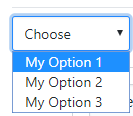
I can generate it with this code:
<select name="mySelect" id="mySelect" class="form-control">
    <option value="" disabled selected hidden>Choose</option>
    <option value="0">My Option 1</option>
    <option value="1">My Option 2</option>
    <option value="2">My Option 3</option>
</select>
But how can I get it to work using @Html.DropDownList?
c#
@{
    var myOptions= SelectListHelper.myOptions().ToList();
    myOptions.Insert(0 , (new SelectListItem { Text = "Choose", Value = "", Disabled = true, Selected = true, Hidden = true }));
}
@Html.DropDownList("mySelect", myOptions, new { @class = "form-control" })
https://developer.mozilla.org/en-US/docs/Web/HTML/Global_attributes/hidden
https://developer.mozilla.org/en-US/docs/Web/API/HTMLElement/hidden
 eduardogoncalves
All 3 comments
Thanks for contacting us, @eduardogoncalves.
@NTaylorMullen isn't this possible today? If it is, can you please suggest how, and close this ? Thanks!
 mkArtakMSFT
on 18 Sep 2019
mkArtakMSFT
on 18 Sep 2019
It's not possible with Html.DropDownList. However @eduardogoncalves you could make this work with the select TagHelper:
@{
    var myOptions = new[]
    {
        new SelectListItem { Text = "Choose 1", Value = "", },
        new SelectListItem { Text = "Choose 2", Value = "", },
        new SelectListItem { Text = "Choose 3", Value = "", }
    };
}


<select asp-items="@myOptions">
    <option value="" disabled selected hidden>Choose</option>
</select>
 NTaylorMullen
on 18 Sep 2019
NTaylorMullen
on 18 Sep 2019
Thanks @NTaylorMullen!
eduardogoncalves
on 18 Sep 2019
Related issues
 fayezmm
·
3Comments
fayezmm
·
3Comments
 farhadibehnam
·
3Comments
farhadibehnam
·
3Comments
 aurokk
·
3Comments
aurokk
·
3Comments
 FourLeafClover
·
3Comments
FourLeafClover
·
3Comments
 BrennanConroy
·
3Comments
BrennanConroy
·
3Comments
Most helpful comment
It's not possible with
Html.DropDownList. However @eduardogoncalves you could make this work with the select TagHelper: