Aspnetcore: Question: How to use static assets in server side Blazor (From a Blazor library?)
While working on https://github.com/Joelius300/ChartJSBlazor, @Joelius300 and I didn't find a nice way to integrate static assets from a Blazor library to a server side example Blazor project.
The only way I know to achieve this, is using the https://github.com/SamProf/EmbeddedBlazorContent library from @SamProf to integrate the files into the project.
We don't want to simply copy the assets into the wwwroot folder of the Blazor server side project during build (This won't help people using the library in their projects either), neither copying them to the target project before creating a new one.
I found a comment (https://github.com/aspnet/AspNetCore/issues/11174#issuecomment-507515137) on that topic as well, where something like <script src="_content/LIBRARY_NAME/example.js> was mentioned. We tried that and it didn't work.
Is there a standard way yet in Blazor (NetCore 3-preview9) to get the static assets from a library to a server side project easily without the need to copy them (programatically or manually)?
EDIT: There is an old stackoverflow question as well: https://stackoverflow.com/questions/54782249/css-in-blazor-component-library-doesnt-load.
 SeppPenner
All 20 comments
I think this is already possible since Preview 6. Please read danroth's blog post about Static assets in Razor class libraries here
I always recommend to check this blog every week 😄
Edit: I can confirm that this works because DevExpress is using this in its Blazor UI
 sven5
on 10 Sep 2019
sven5
on 10 Sep 2019
Ok, I will have to check this again.
SeppPenner
on 10 Sep 2019
From looking at the readme of blazor UI it doesn't seem like they are. There are a few statements which let me believe they solved it in some other way. @sven5
Make sure the following folder is automatically created in your project’s wwwroot directory
If you just use the library, no folder should be created automatically.
lib/dx-blazor/dx-blazor.js
Their links are not referencing _content like they should be if this feature was used.
Are you sure that they are using this?
 Joelius300
on 10 Sep 2019
Joelius300
on 10 Sep 2019
Thanks for contacting us, @SeppPenner.
Have you checked out the Static Assets docs at: https://docs.microsoft.com/en-us/aspnet/core/razor-pages/ui-class?view=aspnetcore-3.0&tabs=visual-studio#create-an-rcl-with-static-assets
 mkArtakMSFT
on 10 Sep 2019
mkArtakMSFT
on 10 Sep 2019
I think I have found the error. When running the application from visual studio or a non-published version, you need to include webBuilder.UseStaticWebAssets(); otherwise it won't work. That also explains why I got different results depending on the way I deployed the project (I didn't always use dotnet publish).
That should fix the issue, thank you.
Will the need for webBuilder.UseStaticWebAssets(); be removed in later versions?
Joelius300
on 10 Sep 2019
However, I have a quick follow up question. One of the things that confused me most about this issue was the fact that a freshly created blazor library _always_ worked, without calling UseStaticWebAssets() and without dotnet run or dotnet publish; it always worked even when just starting from visual studio.
I thought I might be missing some package or I might not have specified what kind of content my static assets were but the .csproj of that new library is very simple:
<Project Sdk="Microsoft.NET.Sdk.Razor">
<PropertyGroup>
<TargetFramework>netstandard2.0</TargetFramework>
<RazorLangVersion>3.0</RazorLangVersion>
<GeneratePackageOnBuild>true</GeneratePackageOnBuild>
<Version>1.0.0-preview</Version>
</PropertyGroup>
<ItemGroup>
<PackageReference Include="Microsoft.AspNetCore.Components" Version="3.0.0-preview9.19424.4" />
<PackageReference Include="Microsoft.AspNetCore.Components.Web" Version="3.0.0-preview9.19424.4" />
</ItemGroup>
</Project>
When packing this library (using the GeneratePackageOnBuild option) and adding a nuget-reference to the built package in my consuming server-side blazor application, the link to the static assets worked immediately without adding that extra call. When I added my packed library (which is also packed using the GeneratePackageOnBuild option) I made sure that my csproj-file contains the same references, uses the same SDK and doesn't mention the static content at all (just like the fresh library). However when I tried to consume the static content of my own library by starting the app from VS, it would always result in a 404. After adding a call to UseStaticWebAssets() it finally worked (same with dotnet run) but not before that.
Is there something I'm missing about my csproj-file which makes this not work or why does the freshly created library not require that additional call?
My csproj-file (which doesn't work):
<Project Sdk="Microsoft.NET.Sdk.Razor">
<PropertyGroup>
<TargetFramework>netstandard2.0</TargetFramework>
<IsPackable>true</IsPackable>
<LangVersion>default</LangVersion>
<RazorLangVersion>3.0</RazorLangVersion>
<VersionPrefix>0.3</VersionPrefix>
<Title>ChartJs.Blazor</Title>
<RequireLicenseAcceptance>false</RequireLicenseAcceptance>
<Company>Joel Liechti</Company>
<Authors>Joel Liechti</Authors>
<Description>-</Description>
<RepositoryUrl>https://github.com/Joelius300/ChartJSBlazor</RepositoryUrl>
<PackageProjectUrl>https://github.com/Joelius300/ChartJSBlazor</PackageProjectUrl>
<PackageTags>ChartJS; Blazor; ASP.Net-Core</PackageTags>
<PackageSummary>ChartJS port to Blazor.</PackageSummary>
<PackageReleaseNotes>-</PackageReleaseNotes>
<AssemblyName>ChartJs.Blazor</AssemblyName>
<RootNamespace>ChartJs.Blazor</RootNamespace>
<GeneratePackageOnBuild>true</GeneratePackageOnBuild>
<Version>0.10.3-preview</Version>
<AssemblyVersion>0.10.3.0</AssemblyVersion>
<FileVersion>0.10.3.0</FileVersion>
<PackageLicenseExpression>MIT</PackageLicenseExpression>
<PackageId>ChartJs.Blazor.Fork</PackageId>
<Copyright>Joel Liechti © 2019</Copyright>
<PackageRequireLicenseAcceptance>false</PackageRequireLicenseAcceptance>
</PropertyGroup>
<PropertyGroup Condition="'$(Configuration)|$(Platform)'=='Debug|AnyCPU'">
<DocumentationFile>.\ChartJs.Blazor.xml</DocumentationFile>
</PropertyGroup>
<PropertyGroup Condition="'$(Configuration)|$(Platform)'=='Release|AnyCPU'">
<DocumentationFile>.\ChartJs.Blazor.xml</DocumentationFile>
</PropertyGroup>
<ItemGroup>
<PackageReference Include="Microsoft.AspNetCore.Components" Version="3.0.0-preview9.19424.4" />
<PackageReference Include="Microsoft.AspNetCore.Components.Web" Version="3.0.0-preview9.19424.4" />
<PackageReference Include="Microsoft.CSharp" Version="4.6.0-preview9.19421.4" />
<PackageReference Include="Newtonsoft.Json" Version="12.0.3-beta1" />
</ItemGroup>
</Project>
This csproj-file has no mention of the static assets, includes the same packages and is packed the same way. The target framework and the SDK are also the same. However it still doesn't behave the same way the razor components library template does.
The original csproj-file (which does contain mentions of static assets and some other stuff) can be found here but this didn't work either.
What's the reason my library requires this additional call while the template one doesn't?
Joelius300
on 10 Sep 2019
Thanks for contacting us, @SeppPenner.
Have you checked out the Static Assets docs at: https://docs.microsoft.com/en-us/aspnet/core/razor-pages/ui-class?view=aspnetcore-3.0&tabs=visual-studio#create-an-rcl-with-static-assets
I actually didn't find that page :D
SeppPenner
on 10 Sep 2019
But as far as I can see, the questions from @Joelius300 are legit...
SeppPenner
on 10 Sep 2019
/cc @javiercn
mkArtakMSFT
on 10 Sep 2019
@SeppPenner
Let me extract the important part for you from the doc link above :
Create an RCL with static assets
An RCL may require companion static assets that can be referenced by the consuming app of the RCL. ASP.NET Core allows creating RCLs that include static assets that are available to a consuming app.
To include companion assets as part of an RCL, create a wwwroot folder in the class library and include any required files in that folder.
When packing an RCL, all companion assets in the wwwroot folder are automatically included in the package.
sven5
on 11 Sep 2019
To include companion assets as part of an RCL, create a wwwroot folder in the class library and include any required files in that folder.
When packing an RCL, all companion assets in the wwwroot folder are automatically included in the package.
That's how it should work. I need to check this again, but the last time I tried it, it didn't work like that.
SeppPenner
on 11 Sep 2019
Again. This doesn't work:

And there is no js file under _content/ChartJs.Blazor...
I have created a branch that uses the library like in the blog post here: https://github.com/SeppPenner/ChartJSBlazor/tree/test-static-assets. Honestly, I don't see the issue yet. @Joelius300 had the same problem. @sven5 If you have the time, you can try it out...
EDIT: I have tried it with deleted bin and obj folders and restarting VS. Didn't change a thing.
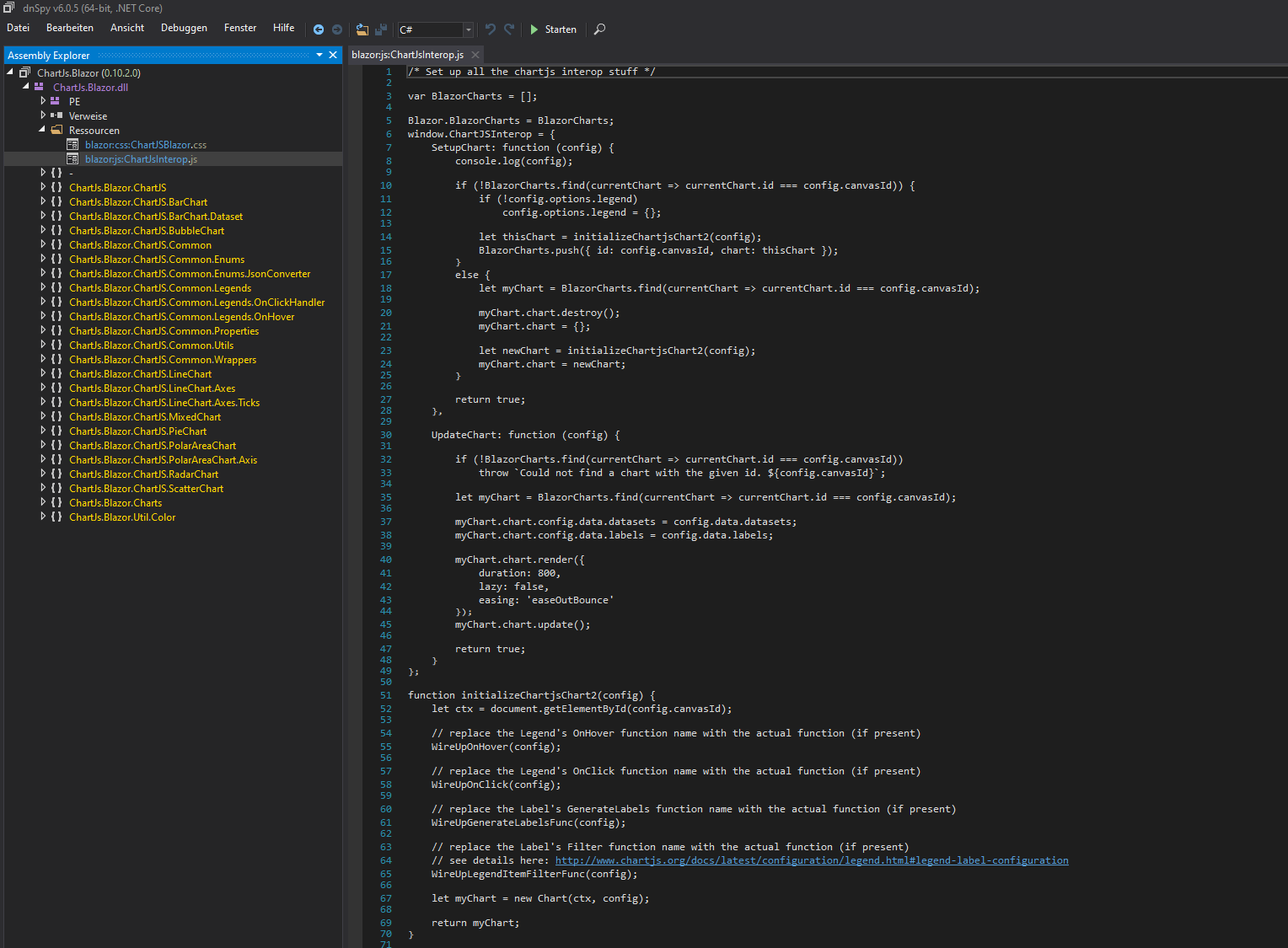
EDIT 2: I have looked into the dll with dnSpy. It seems like the assets are in there:
SeppPenner
on 11 Sep 2019
Hi,
https://github.com/SeppPenner/ChartJSBlazor/tree/test-static-assets works for me without issue. can you print out the output from dotnet --info? Can you do dotnet build /bl and share the msbuild.binlog file?
 javiercn
on 11 Sep 2019
javiercn
on 11 Sep 2019
dotnet --info:
.NET Core SDK (gemäß "global.json"):
Version: 3.0.100-preview9-014004
Commit: 8e7ef240a5
Laufzeitumgebung:
OS Name: Windows
OS Version: 10.0.18362
OS Platform: Windows
RID: win10-x64
Base Path: C:\Program Files\dotnet\sdk\3.0.100-preview9-014004\
Host (useful for support):
Version: 3.0.0-preview9-19423-09
Commit: 2be172345a
.NET Core SDKs installed:
1.1.14 [C:\Program Files\dotnet\sdk]
2.1.202 [C:\Program Files\dotnet\sdk]
2.1.508 [C:\Program Files\dotnet\sdk]
2.1.801 [C:\Program Files\dotnet\sdk]
2.2.401 [C:\Program Files\dotnet\sdk]
3.0.100-preview8-013656 [C:\Program Files\dotnet\sdk]
3.0.100-preview9-014004 [C:\Program Files\dotnet\sdk]
.NET Core runtimes installed:
Microsoft.AspNetCore.All 2.1.12 [C:\Program Files\dotnet\shared\Microsoft.AspNetCore.All]
Microsoft.AspNetCore.All 2.2.6 [C:\Program Files\dotnet\shared\Microsoft.AspNetCore.All]
Microsoft.AspNetCore.App 2.1.12 [C:\Program Files\dotnet\shared\Microsoft.AspNetCore.App]
Microsoft.AspNetCore.App 2.2.6 [C:\Program Files\dotnet\shared\Microsoft.AspNetCore.App]
Microsoft.AspNetCore.App 3.0.0-preview7.19365.7 [C:\Program Files\dotnet\shared\Microsoft.AspNetCore.App]
Microsoft.AspNetCore.App 3.0.0-preview8.19405.7 [C:\Program Files\dotnet\shared\Microsoft.AspNetCore.App]
Microsoft.AspNetCore.App 3.0.0-preview9.19424.4 [C:\Program Files\dotnet\shared\Microsoft.AspNetCore.App]
Microsoft.NETCore.App 1.0.16 [C:\Program Files\dotnet\shared\Microsoft.NETCore.App]
Microsoft.NETCore.App 1.1.13 [C:\Program Files\dotnet\shared\Microsoft.NETCore.App]
Microsoft.NETCore.App 2.0.9 [C:\Program Files\dotnet\shared\Microsoft.NETCore.App]
Microsoft.NETCore.App 2.1.12 [C:\Program Files\dotnet\shared\Microsoft.NETCore.App]
Microsoft.NETCore.App 2.2.6 [C:\Program Files\dotnet\shared\Microsoft.NETCore.App]
Microsoft.NETCore.App 3.0.0-preview7-27912-14 [C:\Program Files\dotnet\shared\Microsoft.NETCore.App]
Microsoft.NETCore.App 3.0.0-preview8-28405-07 [C:\Program Files\dotnet\shared\Microsoft.NETCore.App]
Microsoft.NETCore.App 3.0.0-preview9-19423-09 [C:\Program Files\dotnet\shared\Microsoft.NETCore.App]
Microsoft.WindowsDesktop.App 3.0.0-preview7-27912-14 [C:\Program Files\dotnet\shared\Microsoft.WindowsDesktop.App]
Microsoft.WindowsDesktop.App 3.0.0-preview8-28405-07 [C:\Program Files\dotnet\shared\Microsoft.WindowsDesktop.App]
Microsoft.WindowsDesktop.App 3.0.0-preview9-19423-09 [C:\Program Files\dotnet\shared\Microsoft.WindowsDesktop.App]
To install additional .NET Core runtimes or SDKs:
https://aka.ms/dotnet-download
msbuild.binlog:
https://drive.google.com/drive/folders/1iuYcKvn7eI76299WNl-3h0Hc2HBAKtui?usp=sharing
SeppPenner
on 11 Sep 2019
@SeppPenner It seems that the binlog is from an incremental build. Could you produce a binlog for a clean build? (no bin,obj folders anywhere).
Could you also try a couple of things?
- Could you try and set the culture of your system to en-US? The logs are (I think) in German and its hard to understand what's going on.
- Could you see if everything works for you when the culture is en-US? (That would help us pinpoint the root cause)
javiercn
on 11 Sep 2019
@SeppPenner It seems that the binlog is from an incremental build. Could you produce a binlog for a clean build? (no bin,obj folders anywhere).
Sorry. I can do that.
Could you try and set the culture of your system to en-US? The logs are (I think) in German and its hard to understand what's going on.
Yes, is done.
Could you see if everything works for you when the culture is en-US? (That would help us pinpoint the root cause).
I get the same error in the browser. Check the details below.
The new log is here: https://drive.google.com/open?id=1iuYcKvn7eI76299WNl-3h0Hc2HBAKtui. I renamed the old one to msbuild_old.binlog and the new one is msbuild.binlog.
When I run the project referencing the library, I get the following error on the command line (The browser shows the same error as before, 404 not found with the js and css stuff):
warn: Microsoft.AspNetCore.Components.Server.Circuits.RemoteRenderer[100]
Unhandled exception rendering component: Could not find 'getAvailableMomentLocales' in 'window'.
Error: Could not find 'getAvailableMomentLocales' in 'window'.
at http://localhost:5000/_framework/blazor.server.js:8:28065
at Array.forEach (<anonymous>)
at p (http://localhost:5000/_framework/blazor.server.js:8:28026)
at http://localhost:5000/_framework/blazor.server.js:8:28733
at new Promise (<anonymous>)
at e.beginInvokeJSFromDotNet (http://localhost:5000/_framework/blazor.server.js:8:28707)
at http://localhost:5000/_framework/blazor.server.js:1:19148
at Array.forEach (<anonymous>)
at e.invokeClientMethod (http://localhost:5000/_framework/blazor.server.js:1:19119)
at e.processIncomingData (http://localhost:5000/_framework/blazor.server.js:1:17165)
Microsoft.JSInterop.JSException: Could not find 'getAvailableMomentLocales' in 'window'.
Error: Could not find 'getAvailableMomentLocales' in 'window'.
at http://localhost:5000/_framework/blazor.server.js:8:28065
at Array.forEach (<anonymous>)
at p (http://localhost:5000/_framework/blazor.server.js:8:28026)
at http://localhost:5000/_framework/blazor.server.js:8:28733
at new Promise (<anonymous>)
at e.beginInvokeJSFromDotNet (http://localhost:5000/_framework/blazor.server.js:8:28707)
at http://localhost:5000/_framework/blazor.server.js:1:19148
at Array.forEach (<anonymous>)
at e.invokeClientMethod (http://localhost:5000/_framework/blazor.server.js:1:19119)
at e.processIncomingData (http://localhost:5000/_framework/blazor.server.js:1:17165)
at Microsoft.JSInterop.JSRuntime.InvokeWithDefaultCancellation[T](String identifier, Object[] args)
at WebCore.Pages.LineTimeExample.TryChangeLocale() in C:\Users\Tim Hammer\OneDrive - IVU Softwareentwicklung GmbH\Git\Misc\ChartJSBlazor\WebCore\Pages\LineTimeExample.razor:line 30
at WebCore.Pages.LineTimeExample.OnAfterRenderAsync(Boolean firstRender) in C:\Users\Tim Hammer\OneDrive - IVU Softwareentwicklung GmbH\Git\Misc\ChartJSBlazor\WebCore\Pages\LineTimeExample.razor:line 119
at Microsoft.AspNetCore.Components.RenderTree.Renderer.GetErrorHandledTask(Task taskToHandle)
fail: Microsoft.AspNetCore.Components.Server.Circuits.CircuitHost[111]
Unhandled exception in circuit 'Ysjo0RejbMSQZNNByrmLWJ5ZGq-sTeJB9_N2OPKjeLw'.
Microsoft.JSInterop.JSException: Could not find 'getAvailableMomentLocales' in 'window'.
Error: Could not find 'getAvailableMomentLocales' in 'window'.
at http://localhost:5000/_framework/blazor.server.js:8:28065
at Array.forEach (<anonymous>)
at p (http://localhost:5000/_framework/blazor.server.js:8:28026)
at http://localhost:5000/_framework/blazor.server.js:8:28733
at new Promise (<anonymous>)
at e.beginInvokeJSFromDotNet (http://localhost:5000/_framework/blazor.server.js:8:28707)
at http://localhost:5000/_framework/blazor.server.js:1:19148
at Array.forEach (<anonymous>)
at e.invokeClientMethod (http://localhost:5000/_framework/blazor.server.js:1:19119)
at e.processIncomingData (http://localhost:5000/_framework/blazor.server.js:1:17165)
at Microsoft.JSInterop.JSRuntime.InvokeWithDefaultCancellation[T](String identifier, Object[] args)
at WebCore.Pages.LineTimeExample.TryChangeLocale() in C:\Users\Test\Git\Misc\ChartJSBlazor\WebCore\Pages\LineTimeExample.razor:line 30
at WebCore.Pages.LineTimeExample.OnAfterRenderAsync(Boolean firstRender) in C:\Users\Test\Git\Misc\ChartJSBlazor\WebCore\Pages\LineTimeExample.razor:line 119
at Microsoft.AspNetCore.Components.RenderTree.Renderer.GetErrorHandledTask(Task taskToHandle)
info: Microsoft.AspNetCore.Routing.EndpointMiddleware[1]
Executed endpoint '/_blazor'
info: Microsoft.AspNetCore.Hosting.Diagnostics[2]
Request finished in 18143.0622ms 101
Running with Visual Studio has the same effect. I hope, this helps you somehow @javiercn
SeppPenner
on 12 Sep 2019
Any updates on this? @javiercn
SeppPenner
on 16 Sep 2019
@SeppPenner I found your issue.
You are changing the package id to ChartJs.Blazor.Fork which means that static web assets are located at _content/ChartJs.Blazor.Fork/.....
In your project you reference them in _Host.cshtml as
    <script src="_content/ChartJs.Blazor/ChartJsInterop.js" type="text/javascript" language="javascript"></script>
    <link rel="stylesheet" href="_content/ChartJs.Blazor/ChartJsBlazor.css" />
Changing that to follow the _content/<<PackageId>> convention described in the docs, fixes the issue
    <script src="_content/ChartJs.Blazor.Fork/ChartJsInterop.js" type="text/javascript" language="javascript"></script>
    <link rel="stylesheet" href="_content/ChartJs.Blazor.Fork/ChartJsBlazor.css" />
@javiercn Thanks. That was a stupid issue actually... The nuget is renamed to ChartJs.Blazor.Fork because ChartJs.Blazor already exists, but the project itself wasn't. Well, I will provide a pull request for this @Joelius300.
SeppPenner
on 16 Sep 2019
Damn that was a stupid mistake.. Thanks @javiercn
Joelius300
on 16 Sep 2019
Related issues
 ermithun
·
3Comments
ermithun
·
3Comments
 FourLeafClover
·
3Comments
FourLeafClover
·
3Comments
 guardrex
·
3Comments
guardrex
·
3Comments
 Pixel-Lord
·
3Comments
Pixel-Lord
·
3Comments
 rbanks54
·
3Comments
rbanks54
·
3Comments
Most helpful comment
@SeppPenner I found your issue.
You are changing the package id to
ChartJs.Blazor.Forkwhich means that static web assets are located at_content/ChartJs.Blazor.Fork/.....In your project you reference them in _Host.cshtml as
Changing that to follow the
_content/<<PackageId>>convention described in the docs, fixes the issue