Aspnetcore: Server Side Blazor Preview9 Azure - Intermittent disconnection Android Chrome
I'm trying the free Azure's plan with Blazor, and I've found that if I host any Blazor app (Without SignalR service which means long polling), I get intermittent blazor's disconnection messages... it's 1 disconnect message each 2 seconds (aproximately) and it lasts 1 second... so it makes the app unusable.
But I've found the issue... which is that Chrome on Android has the lite-mode which supposedly saves data.... disabling this mode in the Chrome's configuration makes the Blazor (without SignalR service) app work correctly.
I report this because I think this data saver mode (lite mode) is ON by default, and given that mostly if not all Android phones have chrome, it can be a big issue using Blazor apps in a mobile device.
So briefly:
1) A Blazor app hosted in Azure without SignalR service (long polling) causes intermittent disconnections if Android's Chrome's lite-mode is enabled (I have 50ms ping to Brazil servers).
2) A Blazor app hosted in Azure with SignalR (Websocket) works fine with or without lite-mode on.
3) My own Windows Server 2008 R2 servers work fine without websocket (maybe because I have much lower latency than connecting to Azure servers (20ms/30ms). And I've been hosting Blazor Server Side apps for months in these servers without this issue.
Regards!
 chrdlx
All 10 comments
Thanks for contacting us. @danroth27 can you please look into this? Thanks.
 mkArtakMSFT
on 10 Sep 2019
mkArtakMSFT
on 10 Sep 2019
@chrdlx - Could you try to enable web sockets in your Azure Web app and see if that fixes the issue? I do that and I have not had any issues with Android.
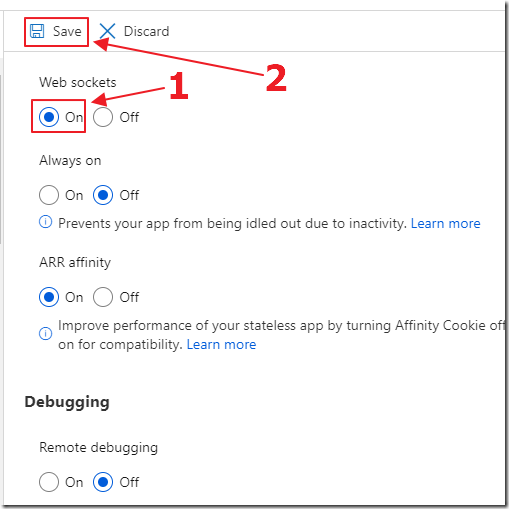
 ADefWebserver
on 12 Sep 2019
ADefWebserver
on 12 Sep 2019
Hello Michael @ADefWebServer, I don't have issues with websockets either, as I said in the 2nd point:
- A Blazor app hosted in Azure with SignalR (Websocket) works fine with or without lite-mode on.
So the issue appears when you don't use websockets. When using websockets (With or without SignalR azure service) it works fine.
Regards!
chrdlx
on 12 Sep 2019
I don't have issues with websockets either, as I said in the 2nd point:
- A Blazor app hosted in Azure with SignalR (Websocket) works fine with or without lite-mode on.
@chrdlx - Sorry, I saw that but was not sure that was web sockets 'without' SignalR Service. I just wanted anyone else to know that this is a fix because otherwise this would be a 'showstopper' for them.
ADefWebserver
on 12 Sep 2019
Thanks @chrdlx for bringing this issue to our attention!
@bradygaster @anurse Have you heard any other reports of this issue with using long-polling on Android devices due to lite mode? I believe lite mode is not always enabled by default (at least it's not on my phone), but it may automatically kick in if Chrome predicts that the page load will take a long time. It may be that long-polling triggers this check.
In general we do recommend using WebSockets whenever possible. It may be that the best we can do here is provide guidance on this issue.
 danroth27
on 14 Sep 2019
danroth27
on 14 Sep 2019
Based on the description on Google's own page about lite mode, it definitely seems likely that long polling would be negatively affected:
When you use Lite mode, some of your web traffic may go through Google servers before being downloaded to your device. If the page is loading slowly, Google servers may simplify it so that less data gets downloaded to your device.
I don't see anything off-hand that allows us to bypass this behavior, though it's possible we could do so (with some headers or something). If Google is trying to intercept requests and "cache" things, it would definitely mess with (and even completely break) long polling.
Our best bet here would probably just be guidance and documentation until we can get more information on if it's possible to bypass lite mode and if so, how to do it. There's some further information under the feature's old name, "Data Saver" (https://developer.chrome.com/multidevice/data-compression).
 anurse
on 16 Sep 2019
anurse
on 16 Sep 2019
@mkArtakMSFT At this point I believe the main action here is to make sure we guide folks toward using WebSockets whenever possible, and to highlight this issue with long-polling and data lite mode mode on Android. Assigning over to you to handle the doc updates.
danroth27
on 17 Sep 2019
What do you think about this, @danroth27 : https://github.com/aspnet/AspNetCore/wiki/Common-Problems-and-Solutions-in-Blazor#problem-intermittent-disconnections-in-server-side-blazor
mkArtakMSFT
on 18 Sep 2019
One nice detail I've discovered is that this only happens when you use HTTP.... with HTTPS it works fine....
So this would be limited to sites hosted with HTTP & Long Polling which may be a very weird combo nowadays I guess...
chrdlx
on 18 Sep 2019
One nice detail I've discovered is that this only happens when you use HTTP.... with HTTPS it works fine....
Yeah, the Google Lite Mode proxy is effectively a "man-in-the-middle" which won't work with an end-to-end encrypted system like HTTPS :).
That's a good point though, it does limit the broken scenario down to a pretty narrow edge case.
anurse
on 18 Sep 2019
Related issues
 guardrex
·
3Comments
guardrex
·
3Comments
 UweKeim
·
3Comments
UweKeim
·
3Comments
 TanvirArjel
·
3Comments
TanvirArjel
·
3Comments
 groogiam
·
3Comments
groogiam
·
3Comments
 FourLeafClover
·
3Comments
FourLeafClover
·
3Comments