Aspnetcore: Blazor Server Side App deployed on App Service need web socket on App Service.
I use .net Core 3 Preview 8, and have this strange behavior when running Blazor Server Side app i Azure App Service.
When not using Azure SignalR, I must use Web Socket on App Service in Azure. If not I got "Object reference not set to an instance of an object." when navigate to a page from a menu item. Everything work great on my localhost.
If I go to the address line, and set the cursor at the end of the line and push enter, it work as expected.
After added Azure SignalR, everything was fine when running app from server (without Web Socket), but this time, I got "Object reference not set to an instance of an object." when I'm running on localhost. And as with the server version without Web Socket or Azure SignalR I can set my cursor at end of the browsers address bar and push enter, everything work well.
My Setup is like this.
```
public void ConfigureServices(IServiceCollection services)
{
var identityServerConfig =
Configuration.GetSection("auth:internal").Get
var apiManagementInfo = Configuration.GetSection("ApiManagement").Get
services.AddAuthentication(options =>
{
options.DefaultScheme = CookieAuthenticationDefaults.AuthenticationScheme;
options.DefaultChallengeScheme = OpenIdConnectDefaults.AuthenticationScheme;
})
.AddCookie()
.AddOpenIdConnect(options =>
{
options.SignInScheme = CookieAuthenticationDefaults.AuthenticationScheme;
options.Authority = identityServerConfig.Authority;
options.ClientId = identityServerConfig.ClientId;
options.ClientSecret = identityServerConfig.ClientPwd;
options.ResponseType = OpenIdConnectResponseType.Code;
options.SaveTokens = true;
            foreach (var scope in identityServerConfig.Scopes.Split(";"))
            {
                options.Scope.Add(scope);
            }
            options.CallbackPath = "/signin-oidc";
        });

        services.AddSignalR().AddAzureSignalR(Configuration["Azure:SignalR:ConnectionString"]);

        services.AddControllersWithViews(options =>
        {
            var policy = new AuthorizationPolicyBuilder()
                .RequireAuthenticatedUser()
                .Build();
            options.Filters.Add(new AuthorizeFilter(policy));
        });

        services.AddRazorPages();
        services.AddServerSideBlazor();

        // HttpContextAccessor
        services.AddHttpContextAccessor();
        services.AddScoped<HttpContextAccessor>();

        services.AddSingleton(new HttpClient
        {
            BaseAddress = new Uri(apiManagementInfo.Url)
        });
        services.AddSingleton(apiManagementInfo);

        services.AddScoped<IUserManagement, UserManagementHttp>();
    }

    // This method gets called by the runtime. Use this method to configure the HTTP request pipeline.
    public void Configure(IApplicationBuilder app, IWebHostEnvironment env)
    {
        app.UseEmbeddedBlazorContent(typeof(MatBlazor.BaseMatComponent).Assembly);
        if (env.IsDevelopment())
        {
            app.UseDeveloperExceptionPage();
        }
        else
        {
            app.UseExceptionHandler("/Home/Error");
            // The default HSTS value is 30 days. You may want to change this for production scenarios, see https://aka.ms/aspnetcore-hsts.
            app.UseHsts();
        }

        app.UseHttpsRedirection();
        app.UseStaticFiles();

        app.UseRouting();
        app.UseAuthentication();
        app.UseAuthorization();

        app.UseEndpoints(endpoints =>
        {
            endpoints.MapControllers();
            endpoints.MapBlazorHub();
            endpoints.MapFallbackToPage("/_Host");
        });
    }
````
 snerting
All 12 comments
Thanks for contacting us, @snerting .
Can you please share the error stack trace so we can better understand what's going on here.
@BrennanConroy is this a known issue in SignalR?
 mkArtakMSFT
on 3 Sep 2019
mkArtakMSFT
on 3 Sep 2019
I don't know of any null refs currently. The stack traces for them would be great.
When not using Azure SignalR, I must use Web Socket on App Service in Azure.
You shouldn't be required to enable WebSockets as the connections should fall back to LongPolling, but it is definitely prefered to use WebSockets.
And when you add the Azure SignalR Service you no longer need to turn on WebSockets because the Service is the one accepting WebSocket connections now and not the App Server.
 BrennanConroy
on 3 Sep 2019
BrennanConroy
on 3 Sep 2019
Her is what i see in console log for browser when SignalR is enabled and running local, I have also added output from Visual Studio. Hope this can help.
Image below show what happend when click on Home, then on Customer(tenants)

Output from the web server (Visual Studio):
info: Management.Ui.Services.UserManagementHttp[0]
Retrieve all tenant who user has access to
info: Management.Ui.Services.UserManagementHttp[0]
Calling rest api with following request: tenants
Her is the log, if I refresh the site when i stand on the Customer(tenants).

Output from the web server (Visual Studio):
info: Microsoft.AspNetCore.Hosting.Diagnostics[1]
Request starting HTTP/2.0 GET https://localhost:44336/Tenant/Tenants
info: Microsoft.AspNetCore.Routing.EndpointMiddleware[0]
Executing endpoint '/_Host'
info: Microsoft.AspNetCore.Mvc.RazorPages.Infrastructure.PageActionInvoker[3]
Route matched with {page = "/_Host", area = ""}. Executing page /_Host
info: Microsoft.AspNetCore.Authorization.DefaultAuthorizationService[1]
Authorization was successful.
info: Microsoft.AspNetCore.Mvc.RazorPages.Infrastructure.PageActionInvoker[103]
Executing an implicit handler method - ModelState is Valid
info: Microsoft.AspNetCore.Mvc.RazorPages.Infrastructure.PageActionInvoker[104]
Executed an implicit handler method, returned result Microsoft.AspNetCore.Mvc.RazorPages.PageResult.
info: Microsoft.AspNetCore.Authorization.DefaultAuthorizationService[1]
Authorization was successful.
info: Management.Ui.Services.UserManagementHttp[0]
Retrieve all tenant who user has access to
info: Management.Ui.Services.UserManagementHttp[0]
Calling rest api with following request: tenants
info: Microsoft.AspNetCore.Mvc.RazorPages.Infrastructure.PageActionInvoker[4]
Executed page /_Host in 64.1579ms
info: Microsoft.AspNetCore.Routing.EndpointMiddleware[1]
Executed endpoint '/_Host'
info: Microsoft.AspNetCore.Hosting.Diagnostics[2]
Request finished in 67.23ms 200 text/html; charset=utf-8
info: Microsoft.AspNetCore.Hosting.Diagnostics[1]
Request starting HTTP/2.0 GET https://localhost:44336/css/bootstrap/bootstrap.min.css
info: Microsoft.AspNetCore.StaticFiles.StaticFileMiddleware[6]
The file /css/bootstrap/bootstrap.min.css was not modified
info: Microsoft.AspNetCore.Hosting.Diagnostics[2]
Request finished in 1.0857ms 304 text/css
info: Microsoft.AspNetCore.Hosting.Diagnostics[1]
Request starting HTTP/2.0 GET https://localhost:44336/css/site.css
info: Microsoft.AspNetCore.StaticFiles.StaticFileMiddleware[6]
The file /css/site.css was not modified
info: Microsoft.AspNetCore.Hosting.Diagnostics[2]
Request finished in 0.5834ms 304 text/css
info: Microsoft.AspNetCore.Hosting.Diagnostics[1]
Request starting HTTP/2.0 GET https://localhost:44336/_framework/blazor.server.js
info: Microsoft.AspNetCore.StaticFiles.StaticFileMiddleware[6]
The file /_framework/blazor.server.js was not modified
info: Microsoft.AspNetCore.Hosting.Diagnostics[2]
Request finished in 0.1685ms 304 application/javascript
info: Microsoft.AspNetCore.Hosting.Diagnostics[1]
Request starting HTTP/2.0 GET https://localhost:44336/css/open-iconic/font/css/open-iconic-bootstrap.min.css
info: Microsoft.AspNetCore.StaticFiles.StaticFileMiddleware[6]
The file /css/open-iconic/font/css/open-iconic-bootstrap.min.css was not modified
info: Microsoft.AspNetCore.Hosting.Diagnostics[2]
Request finished in 0.5411ms 304 text/css
info: Microsoft.AspNetCore.Hosting.Diagnostics[1]
Request starting HTTP/2.0 GET https://localhost:44336/css/bootstrap/bootstrap.min.css.map
info: Microsoft.AspNetCore.StaticFiles.StaticFileMiddleware[6]
The file /css/bootstrap/bootstrap.min.css.map was not modified
info: Microsoft.AspNetCore.Hosting.Diagnostics[2]
Request finished in 0.8864000000000001ms 304 text/plain
info: Microsoft.AspNetCore.Hosting.Diagnostics[1]
Request starting HTTP/2.0 POST https://localhost:44336/_blazor/negotiate text/plain;charset=UTF-8 0
info: Microsoft.AspNetCore.Routing.EndpointMiddleware[0]
Executing endpoint '(null)'
info: Microsoft.AspNetCore.Routing.EndpointMiddleware[1]
Executed endpoint '(null)'
info: Microsoft.AspNetCore.Hosting.Diagnostics[2]
Request finished in 5.333ms 200 application/json
info: Microsoft.AspNetCore.Hosting.Diagnostics[1]
Request starting HTTP/2.0 GET https://localhost:44336/favicon.ico
info: Microsoft.AspNetCore.StaticFiles.StaticFileMiddleware[2]
Sending file. Request path: '/favicon.ico'. Physical path: 'C:\Projects\Net\Src-Code\Web\management-ui\src\Management.Ui\wwwroot\favicon.ico'
info: Microsoft.AspNetCore.Hosting.Diagnostics[2]
Request finished in 3.8057000000000003ms 200 image/x-icon
info: Microsoft.AspNetCore.SignalR.HubConnectionContext[1]
Completed connection handshake. Using HubProtocol 'blazorpack'.
info: Microsoft.AspNetCore.Authorization.DefaultAuthorizationService[1]
Authorization was successful.
snerting
on 3 Sep 2019
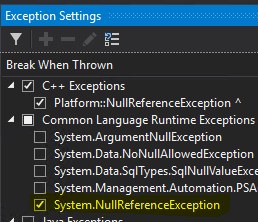
Could you check System.NullReferenceException in the Exception Settings in VS so you are able to see the null ref when it occurs? It looks like you might have a null ref in UserManagementHttp but it's hard to tell from the info here so far.
BrennanConroy
on 3 Sep 2019
Hi @BrennanConroy
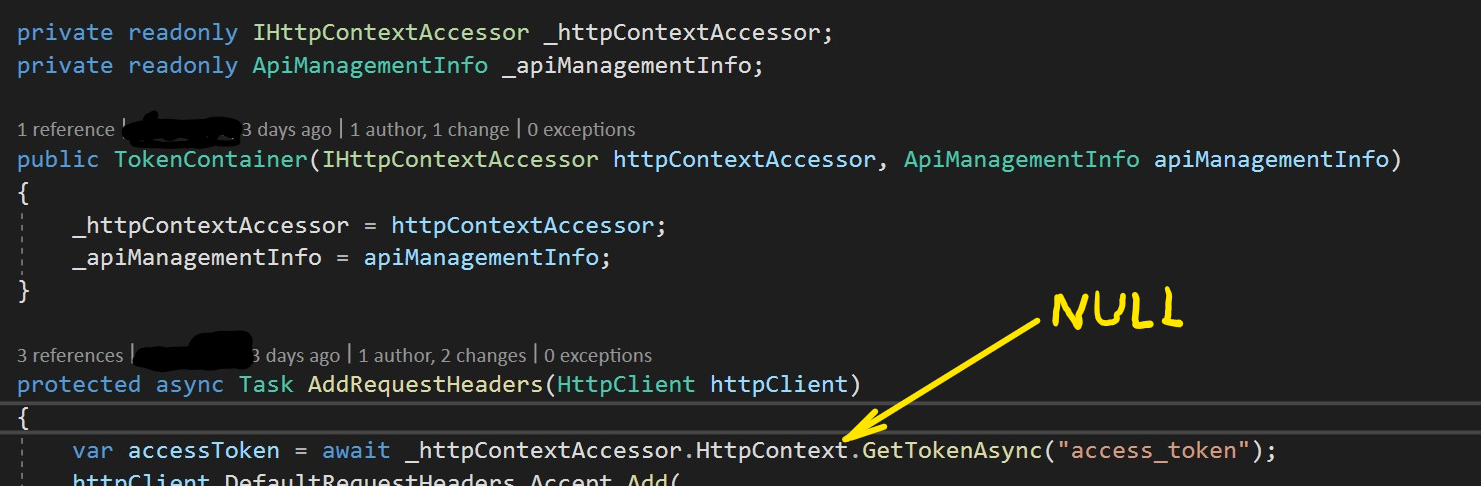
You have right, it's a null pointer. And reason is that HttpContectAccessor don't have any HttpContext, so this is the line of code who cause the problem:
var accessToken = await _httpContextAccessor.HttpContext.GetTokenAsync("access_token");
This give the following output:
Microsoft.AspNetCore.Routing.EndpointMiddleware: Information: Executing endpoint '(null)'
Microsoft.AspNetCore.Routing.EndpointMiddleware: Information: Executed endpoint '(null)'
Microsoft.AspNetCore.Hosting.Diagnostics: Information: Request finished in 30.7194ms 200 application/json
Microsoft.AspNetCore.SignalR.HubConnectionContext: Information: Completed connection handshake. Using HubProtocol 'blazorpack'.
Microsoft.AspNetCore.Authorization.DefaultAuthorizationService: Information: Authorization was successful.
Management.Ui.Services.UserManagementHttp: Information: Retrieve all tenant who user has access to
Management.Ui.Services.UserManagementHttp: Information: Calling rest api with following request: tenants
Exception thrown: 'System.NullReferenceException' in Microsoft.AspNetCore.Authentication.Abstractions.dll
Object reference not set to an instance of an object.
Why this behavior only when using SignalR, on local machine?
My questions now is, why does this problem only happen when SignalR is added, and why is it only problem when running on my developer machine (localhost), because it's running fine when it's deployed on App Service (Azure).
snerting
on 4 Sep 2019
IHttpContextAccessor does not work with SignalR very well or in some cases, at all. This is because oftentimes you will be trying to access the HttpContext outside of the scope of an actual HTTP request.
Where are you using the TokenContainer from? And is it possible to refactor it to not rely on IHttpContextAccessor?
BrennanConroy
on 4 Sep 2019
Hi @BrennanConroy
I use IHttpContextAccessor to reach HttpContext, so I can get the JWT token who is retrieved when I has logget inn through IdentityServer4. This JWT token is used (and this is where TokenContainer come into pictue, a very bad name by the way...) , when calling a API who require this Access token.
I'm gladly for a advise on how to do this in another way, and avoid IHttpContextAccessor if possible.
snerting
on 6 Sep 2019
Could you show your usage of the TokenContainer class? Specifically how SignalR is involved when it is called into.
Even better would be if you had a repro app that we could take a look at.
BrennanConroy
on 6 Sep 2019
@BrennanConroy
I have now created a trimmed version of My Code on github.
As describe in Readme.md you must add valid info for Azure SignalR.
When running code, set a breakpoint in TokenContainer.cs (on first line in code below)
protected async Task AddRequestHeaders(HttpClient httpClient)
        {
            var accessToken = await _httpContextAccessor.HttpContext.GetTokenAsync("access_token");
            httpClient.DefaultRequestHeaders.Accept.Add(
            new MediaTypeWithQualityHeaderValue("application/json"));
            httpClient.DefaultRequestHeaders.Add("Ocp-Apim-Subscription-Key",_apiManagementInfo.OcpApimSubscriptionKey);
            httpClient.DefaultRequestHeaders.Authorization = new AuthenticationHeaderValue("Bearer", accessToken);
        }
To have the HttpContext be NULL (and cause the error), just use the Hamburger bar in the app and select Customers.
To have it work as expected (HttpContext is not null), I refresh the browser when address is https://localhost:44336/Customer/Customers
I don't understand why implementing Azure SignalR cause trouble, and hope you can help me out.
Hope code work without problems
snerting
on 8 Sep 2019
You should be grabbing the tokens during your auth process and setting them on the principal. This would avoid the usage of HttpContextAccessor and also you wouldn't need to get the tokens every time you want to call your API.
Also, you're using a Singleton HttpClient and setting sensitive headers on it.
This is a bad idea because another user could also be using the HttpClient and accidentally use the tokens from another connection.
BrennanConroy
on 10 Sep 2019
@BrennanConroy Thanks a lot for all your help and for the tip on my bad use of HttpClient 👍
snerting
on 10 Sep 2019
Thanks @BrennanConroy!
Closing this issue as resolved.
mkArtakMSFT
on 10 Sep 2019
Related issues
 Pixel-Lord
·
3Comments
Pixel-Lord
·
3Comments
 farhadibehnam
·
3Comments
farhadibehnam
·
3Comments
 ermithun
·
3Comments
ermithun
·
3Comments
 rbanks54
·
3Comments
rbanks54
·
3Comments
 bgribaudo
·
3Comments
bgribaudo
·
3Comments