Aspnetcore: API Validation error for Dictionary with null value since Preview 8
Describe the bug
API validation of model with Dictionary containing null value is not correct and return this error "The Value field is required" since Preview 8.
To Reproduce
Steps to reproduce the behavior:
- Using this version of ASP.NET Core 3.0 Preview 8
- Post a json to a web api controler taking from body model containing a dictionary with null value.
My model :
public enum ADSyncObjectType
    {
        User,
        Contact,
        Computer,
        Group
    }

    public class ADSyncObject
    {
        public ADSyncObjectType Type { get; set; }
        public Dictionary<string, object> Attributes { get; set; } = new Dictionary<string, object>();
        public List<string> Members { get; set; }
    }

    public class ADSyncFullRequest
    {
        public string IdentityAttribute { get; set; }
        public List<ADSyncObject> MonitoredObjects { get; set; }
    }
And my JSON
{
   "identityAttribute":"mail",
   "monitoredObjects":[
      {
         "type":0,
         "attributes":{
            "sAMAccountName":"marie.duchatel",
            "userPrincipalName":"[email protected]",
            "sn":"Duchatel",
            "givenName":"Marie",
            "displayName":"Marie Duchatel",
            "initials":"MD",
            "proxyAddresses":[

            ],
            "userAccountControl":"66048",
            "physicalDeliveryOfficeName":"Porte d'entrée 56",
            "department":"Egouts",
            "mail":"[email protected]",
            "description":[
               "Plomp"
            ],
            "telephoneNumber":"0122523252",
            "wWWHomePage":"http://lol.com1",
            "company":"Carglass",
            "co":"France",
            "streetAddress":"Porte blanche 22",
            "postOfficeBox":[
               "192"
            ],
            "l":"Paris",
            "st":"IDF",
            "postalCode":"75017",
            "homePhone":null,
            "pager":null,
            "mobile":null,
            "facsimileTelephoneNumber":null,
            "ipPhone":null,
            "title":"Plombier"
         },
         "members":null
      }
   ]
}
Expected behavior
No validation error.
Screenshots
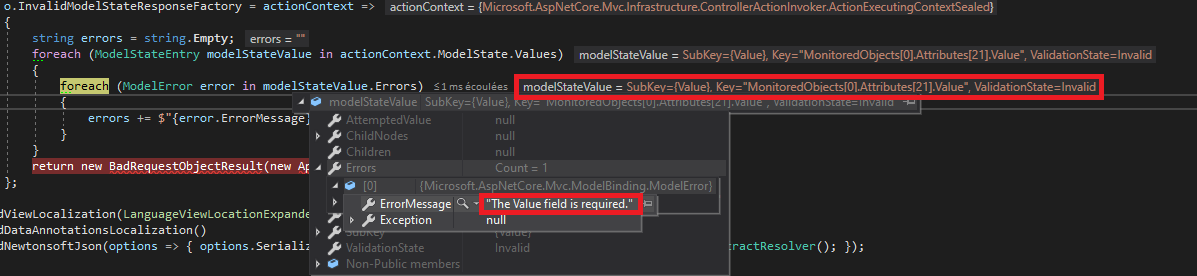
First occurence is "homePhone":null but every field with value null give me the error.
Additional context
I use NewtonSoft.Json 12.0.2 in my API with .AddNewtonsoftJson(options => { options.SerializerSettings.ContractResolver = new CamelCasePropertyNamesContractResolver(); })
I haven't this error before Preview 8.
 Safirion
All 9 comments
Thanks for contacting us, @Safirion .
@pranavkm can you please look into this? Thanks!
 mkArtakMSFT
on 28 Aug 2019
mkArtakMSFT
on 28 Aug 2019
@Safirion you're likely running in to effects of this - https://github.com/aspnet/AspNetCore/commit/51d8ef35ebdf061a9db37b7c0b2ec815c3851783. MVC infers properties and parameters to be Required if you enable C# 8.0 nullability in your project. Do you perhaps have that enabled in your project?
 pranavkm
on 28 Aug 2019
pranavkm
on 28 Aug 2019
Hi @pranavkm, I don't think that I have enabled C# 8.0 nullability on my project.
It is set in the .csproj ? Because I haven't see anything about this in my project .csproj.
Does VisualStudio 2019 16.3.0 Preview 2 enable it by default ?
If not, I confirme that I haven't activated it.
Safirion
on 28 Aug 2019
It's not on by default so unless you opted in, this shouldn't be a problem. Could you share a minimal app that reproduces the issue?
pranavkm
on 28 Aug 2019
Ok, I have reproduced the bug with the default .Net Core Web API Project Template.
Here is the project (I have just add a TestModel and a TestController) :
DictionaryBugDemo.zip
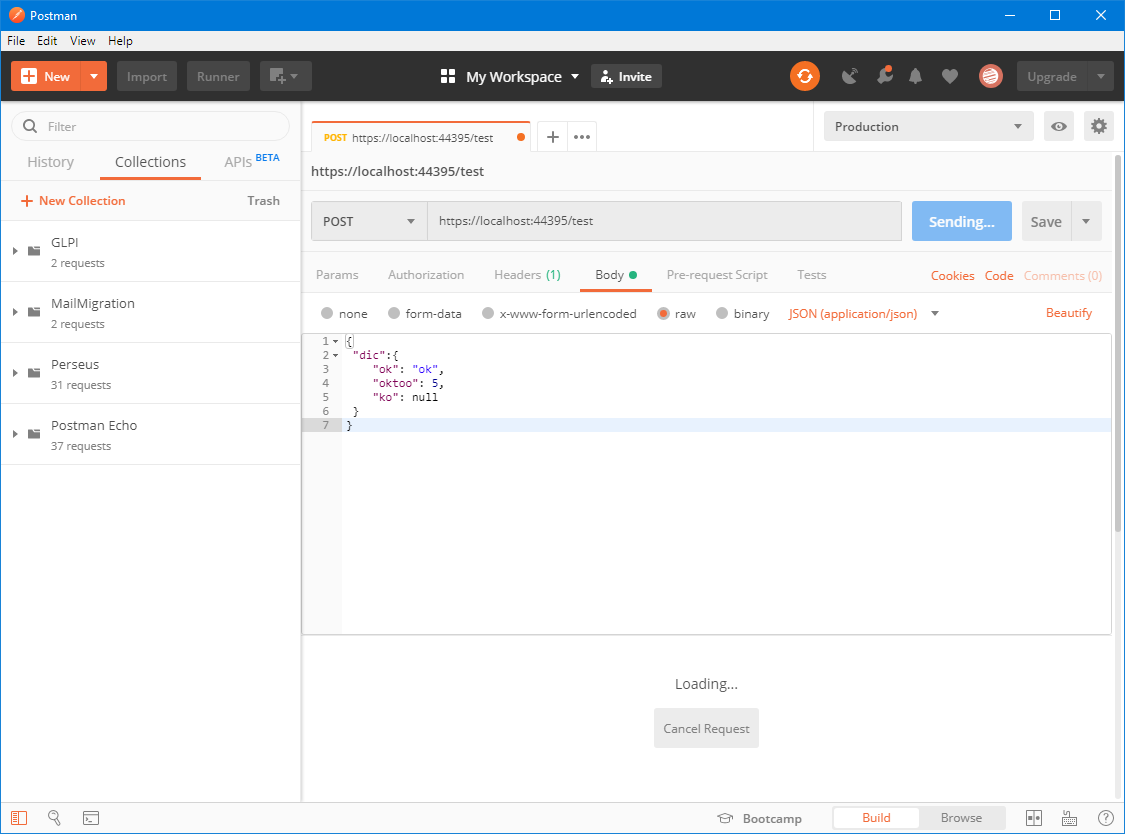
I post this json on https://localhost:44395/test with Postman
{
 "dic":{
    "ok": "ok",
    "oktoo": 5,
    "ko": null
 }
}
Like this :
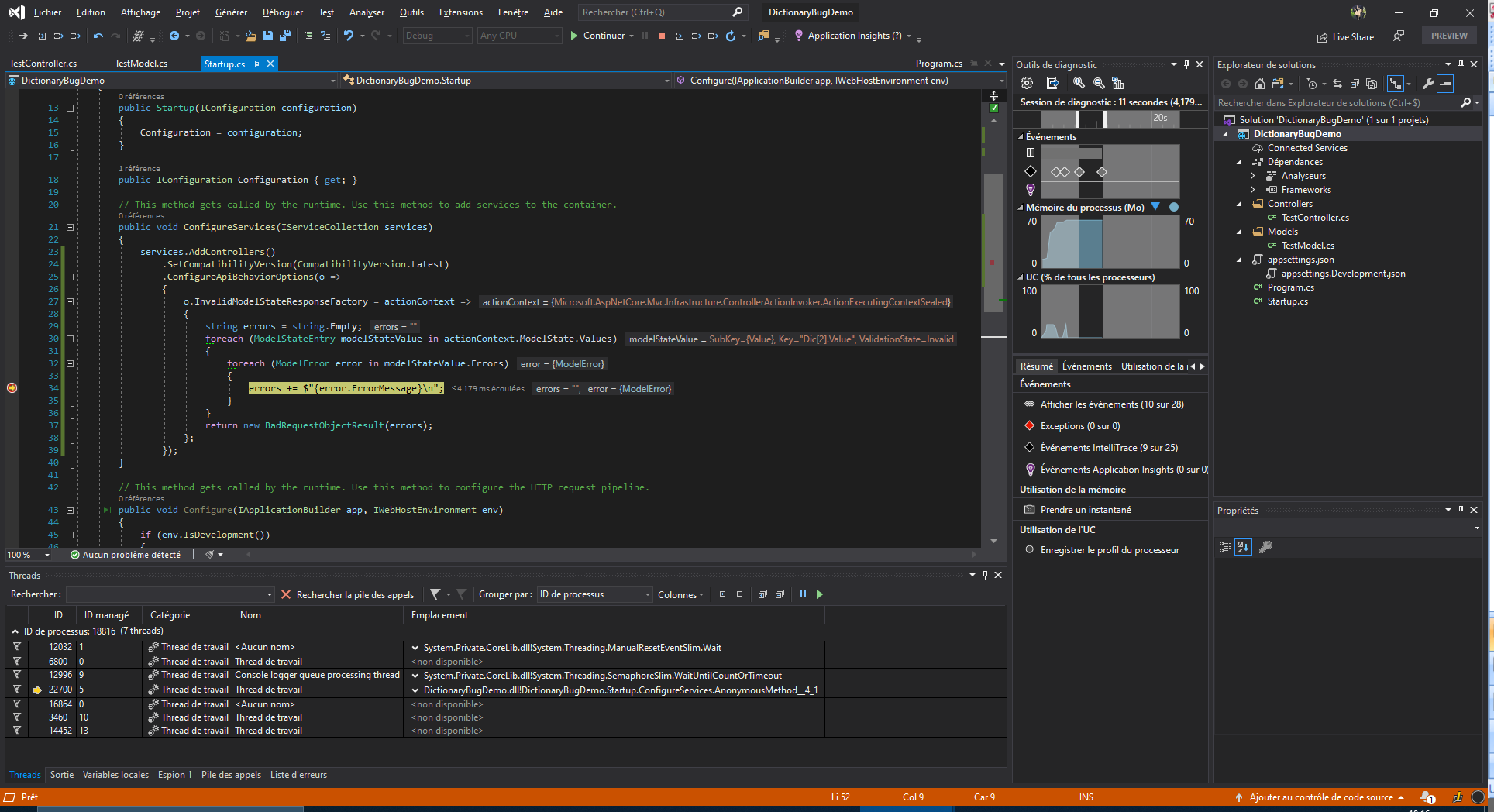
And this give me the same error as before :
Safirion
on 28 Aug 2019
Thanks for the repro app @Safirion. We're able to reproduce your issue and clearly it's incorrect behavior.
pranavkm
on 29 Aug 2019
@Safirion you can unblock yourself in the meanwhile by setting MvcOptions.SuppressImplicitRequiredAttributeForNonNullableReferenceTypes = true in your startup code:
services.AddMvc(options => options.SuppressImplicitRequiredAttributeForNonNullableReferenceTypes = true);
pranavkm
on 29 Aug 2019
@pranavkm Thank you for the workaround. It works perfectly now 👍
Safirion
on 29 Aug 2019
From a very quick look, it seems that the demo project indeed doesn't turn on non-nullable references in any way. However, if it did, then Dictionary<string, object> would indeed mean that there can be no null keys or values.
 roji
on 29 Aug 2019
roji
on 29 Aug 2019
Related issues
 Kevenvz
·
3Comments
Kevenvz
·
3Comments
 FourLeafClover
·
3Comments
FourLeafClover
·
3Comments
 Pixel-Lord
·
3Comments
Pixel-Lord
·
3Comments
 rynowak
·
3Comments
rynowak
·
3Comments
 ipinak
·
3Comments
ipinak
·
3Comments