Aspnetcore: File path IntelliSense adds ~ preceding the directory (for Blazor)
Using Blazor
Describe the bug
Say if I want to add the source of an image and I rely on IntelliSense to complete the directory for me, it adds a ~ at the beginning of the file path. This will not load the file, and if you remove the ~ it works. I believe this was an issue over a year ago, however it was closed, perhaps it was solved, but IntelliSense itself still adds the ~ to the beginning for users.
To Reproduce
Steps to reproduce the behavior:
- Using this version of .NET Core '3.0.100-preview7-012821'
- Paste this code in, and have the necessary filename in the directory that is being referenced, retype the filepath but let IntelliSenseautocomplete the directory on the final bit
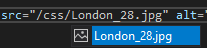
- You can see that ~ was added preceding the directory

- Try run the web application
- It wont work
- Remove the ~

- It works
Expected behavior
That it shouldn't have the ~ added with IntelliSense
Screenshots
This is what works

Additional context
Sorry if it's already been reported, couldn't find it anywhere
 salmanmkc
All 8 comments
This is for Blazor, just edited post
salmanmkc
on 7 Aug 2019
Thanks for contacting us, @salmanmkc.
@jodavis can you please handle this one? The ~/ should be missing for .razor files after completion.
 mkArtakMSFT
on 7 Aug 2019
mkArtakMSFT
on 7 Aug 2019
Example of an expected tag:
<img src="somedir/file.png" />
Note how the value does not start with either ~/ or /, since the URLs should be base-relative, not root-relative.
 SteveSandersonMS
on 7 Aug 2019
SteveSandersonMS
on 7 Aug 2019
We can take a look at this.
@mkArtakMSFT (or others) - How does Blazor handle URLs in layout pages? The reason we default to app-relative ("~/") URLs is because we can't always predict what the base URL of a file is going to be, especially in a layout page where the base URL changes depending on the page using the layout, or in a routing situation where "localhost/" and "localhost/Index" can refer to the same page.
In a sample app, I see something is setting <base href="/" /> in the page. Is that configurable, or is it guaranteed to be there in all Blazor apps?
 jodavis
on 7 Aug 2019
jodavis
on 7 Aug 2019
In a sample app, I see something is setting
<base href="/" />in the page. Is that configurable, or is it guaranteed to be there in all Blazor apps?
It is there in the templates, and it's the developer's responsibility to keep it there and/or update it to whatever base URL they are using. Since .razor files are primarily for use in SPAs, base-relative routing is standard everywhere in the framework.
SteveSandersonMS
on 7 Aug 2019
Thanks for contacting us, @salmanmkc.
@jodavis can you please handle this one? The~/should be missing for.razorfiles after completion.
No problem! Thanks for getting back so soon ☺
salmanmkc
on 8 Aug 2019
I see it now. I don't know why I didn't find the _Host.cshtml file when I searched earlier.
That makes things a little complicated for the editor. From the context of a component, we don't really know what page the component will be hosted in, so we can't really know what the base URL will be when completing a URL.
We could assume that the base maps to the wwwroot folder, and make URLs relative to that. If the user customizes their base URL, then the editor will start inserting the wrong URLs. Would that be a reasonable compromise? How common do you think it will be for users to customize their base URL?
jodavis
on 8 Aug 2019
We could assume that the base maps to the wwwroot folder
👍 That's what to do.
If the user changes their base URL, they reason they will do that is because they are hosting the entire site on some non-root path. And in that case, the wwwroot still corresponds to the base URL.
Example: for a site hosted at http://domain/mydir/, the base URI would be /mydir/, so the file in wwwroot/a/b/c.gif would be reachable at the URL http://domain/mydir/a/b/c/gif, which as a base-relative URL is still a/b/c.gif. So in summary you can ignore what the base URI actually is.
If a user creates a more nonstandard setup where the base URI doesn't match the site's content root, they will have other problems to solve too and the tooling isn't expected to know about that.
SteveSandersonMS
on 8 Aug 2019
Related issues
 fayezmm
·
3Comments
fayezmm
·
3Comments
 ermithun
·
3Comments
ermithun
·
3Comments
 ipinak
·
3Comments
ipinak
·
3Comments
 BrennanConroy
·
3Comments
BrennanConroy
·
3Comments
 Kevenvz
·
3Comments
Kevenvz
·
3Comments