Aspnetcore: Failed to start platform. Reason: [object ProgressEvent]
Describe the bug
Often times when I start my client side blazor app the browser console throws Failed to start platform. Reason: [object ProgressEvent] and the app never loads. Just stays on the splash screen.
To Reproduce
I wish I could confidently reproduce this but it just happens sometimes, and a few browser refreshes makes it work again.
Screenshots

Additional context
Using FireFox 69.0b3
.NET Core SDK (reflecting any global.json):
Version: 3.0.100-preview6-012264
Commit: be3f0c1a03
Runtime Environment:
OS Name: Windows
OS Version: 10.0.18362
OS Platform: Windows
RID: win10-x64
Base Path: C:\Program Filesdotnet\sdk\3.0.100-preview6-012264\
Host (useful for support):
Version: 3.0.0-preview6-27804-01
Commit: fdf81c6faf
.NET Core SDKs installed:
2.1.700 [C:\Program Filesdotnet\sdk]
2.1.800-preview-009696 [C:\Program Filesdotnet\sdk]
3.0.100-preview6-012264 [C:\Program Filesdotnet\sdk]
.NET Core runtimes installed:
Microsoft.AspNetCore.All 2.1.11 [C:\Program Filesdotnet\shared\Microsoft.AspNetCore.All]
Microsoft.AspNetCore.App 2.1.11 [C:\Program Filesdotnet\shared\Microsoft.AspNetCore.App]
Microsoft.AspNetCore.App 3.0.0-preview6.19307.2 [C:\Program Filesdotnet\shared\Microsoft.AspNetCore.App]
Microsoft.NETCore.App 2.1.11 [C:\Program Filesdotnet\shared\Microsoft.NETCore.App]
Microsoft.NETCore.App 3.0.0-preview6-27804-01 [C:\Program Filesdotnet\shared\Microsoft.NETCore.App]
Microsoft.WindowsDesktop.App 3.0.0-preview6-27804-01 [C:\Program Filesdotnet\shared\Microsoft.WindowsDesktop.App]
 GerritBergen
All 21 comments
Thanks for contacting us, @GerritBergen.
It would help, if you could provide some more details and/or logs, if you have any.
 mkArtakMSFT
on 10 Jul 2019
mkArtakMSFT
on 10 Jul 2019
Also, do you see any failed requests in the Network tab?
mkArtakMSFT
on 10 Jul 2019
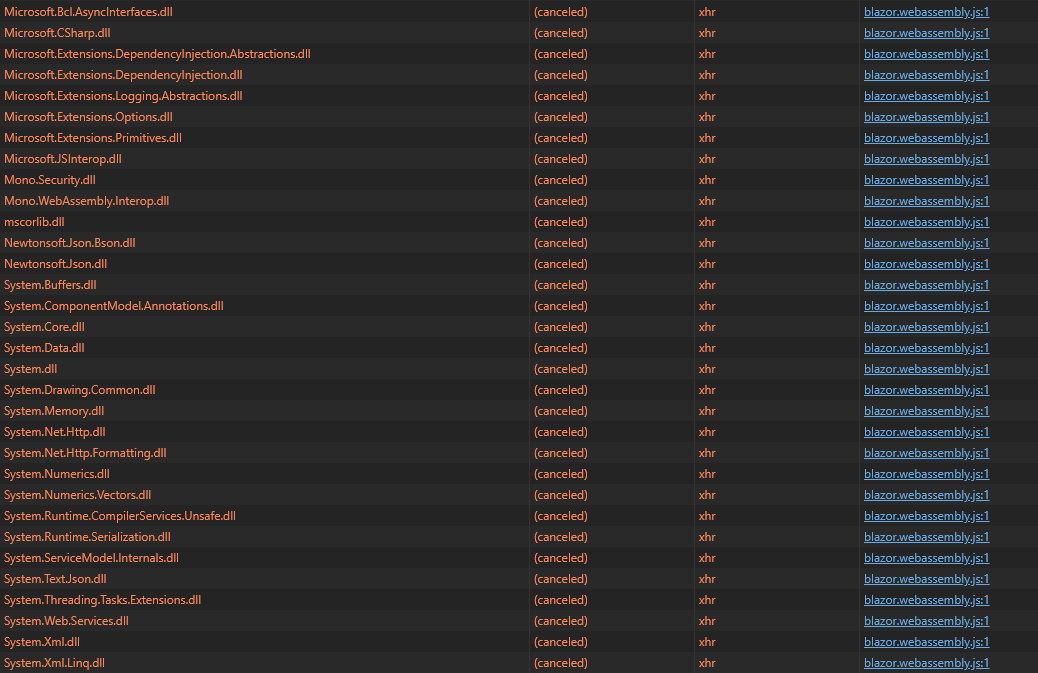
Running in Edge Dev gives a bit more info. Most of the dll files are returning 304.
As of this run, Mono.WebAssembly.Interop.Dll & Microsoft.AspNetCore.Components.Browser.Dll shows (cancelled) in the status column. But that's just the weird thing, this changes with each refresh. Sometimes they all come in. Other times more/different ones show cancelled.

I'm sure I've got something setup wrong somewhere. I forgot to mention in the original post that I am running using Kestral if that helps.
EDIT: I've rerun using IIS (no kestral) and it still happens
GerritBergen
on 10 Jul 2019
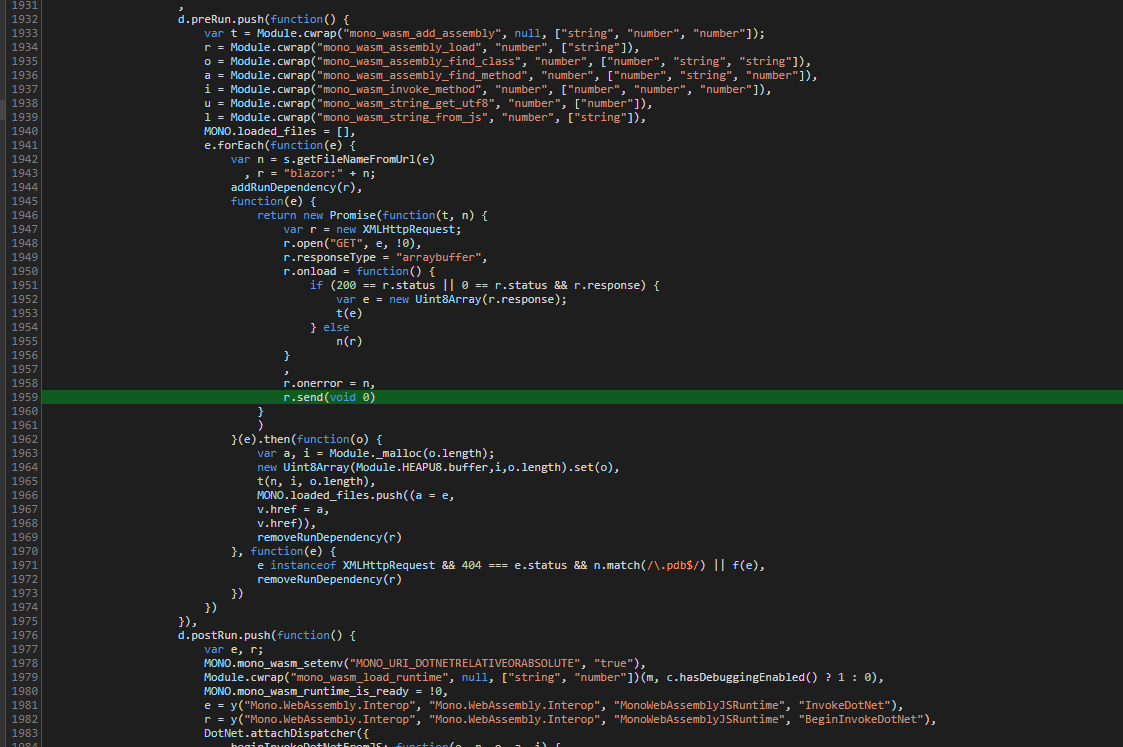
Probably useless information because it's minified JS, but this is where the error occurs in blazor.webassembly.js:
GerritBergen
on 10 Jul 2019
@SteveSandersonMS do you have any recommendations regarding this?
mkArtakMSFT
on 10 Jul 2019
It definitely appears to be a problem with serving files to the browser, not a problem with any code running inside the browser. This is separate from Blazor I'm afraid.
You'll need to figure out why your server is unable to send static files to your browser.
 SteveSandersonMS
on 10 Jul 2019
SteveSandersonMS
on 10 Jul 2019
Do you have any suggestions as to what could cause that?
GerritBergen
on 10 Jul 2019
It could be that your web server is faulty or misconfigured in some way, your browser is faulty or misconfigured in some way, or that some other thing such as anti malware software is interfering. I’m afraid that’s all I can suggest.
SteveSandersonMS
on 10 Jul 2019
A bunch of debugging later, I found this error in my server console right when the browser fails.
Microsoft.AspNetCore.Server.Kestrel.Core.Internal.Http2.Http2Connection ErrorException: HTTP/2 connection error (PROTOCOL_ERROR): Pseudo-header field found in request headers after regular header fields.
Not really sure what's going on, but disabling Http2 made the issue go away for me.
Not ideal, but I think I'll stick with that for now.
Thanks for your help
GerritBergen
on 10 Jul 2019
@anurse FYI
mkArtakMSFT
on 11 Jul 2019
Oof, that is a weird one. @GerritBergen would you be up for doing a little additional diagnostics here to see if we can track down the server issue? I'm glad disabling HTTP/2 worked for you but would like to figure out if we can track down the original issue.
Since you're using the Edge Dev version (I presume you mean the Chromium-based version?), there is a way to export raw networking data from that. These instructions would also work in Google Chrome (replace edge:// with chrome://)
- Open a new Edge window and navigate to
edge://net-export. - I think you can leave the "Strip private information" option button checked. We may end up needing more detail (raw bytes) though and if that's the case, I'll check in with you on how to avoid unintentionally sharing private data.
- Click "Start Logging to Disk"
- Reproduce the scenario.
- Click "Stop Logging"
Then attach the file by renaming it to end .txt and dragging-and-dropping it on to the GitHub comment box (don't paste the file as it will be very large!).
If you have concerns about sharing this publicly, feel free to email it to me at [my github username]@microsoft.com.
I'm going to re-open and move to area-servers to investigate there.
 anurse
on 11 Jul 2019
anurse
on 11 Jul 2019
@anurse Sure! I need a couple days as I'm swamped right now. I'll update this thread when I send the email :)
GerritBergen
on 12 Jul 2019
@anurse Email has been sent.
GerritBergen
on 14 Jul 2019
@GerritBergen thanks for the email! I think I've been able to identify that this is a known HTTP/2 protocol corruption issue that we introduced in 3.0 and _should_ have resolved in preview 7. If you'd like to verify that, you can check out our CI nightly builds from https://github.com/dotnet/core-sdk#installers-and-binaries (The "master" column is currently versioned preview 8 but the "release/3.0.1xx" column should have our "candidate" preview 7 release) or you can wait for the official preview 7 release.
If you are still seeing this after preview 7, please let us know in a new issue!
anurse
on 15 Jul 2019
@anurse I seem to have hit the same (or a similar issue), see #12190. My issue does not appear to be fixed in preview 7. I tried the nightly docker image and I still receive the same exception.
 coryflucas
on 15 Jul 2019
coryflucas
on 15 Jul 2019
@GerritBergen I'm going to close this now as I think we've got your scenario covered.
@coryflucas We'll cover your issue in the linked thread. It looks like your proxy (envoy) is corrupting the frames.
anurse
on 16 Jul 2019
@anurse I've just updated to Preview 7 and unfortunately the issue is still here, although the error in the console is different. Once again keeping HTTP 2 disabled solves the problem for me, so no hurry.
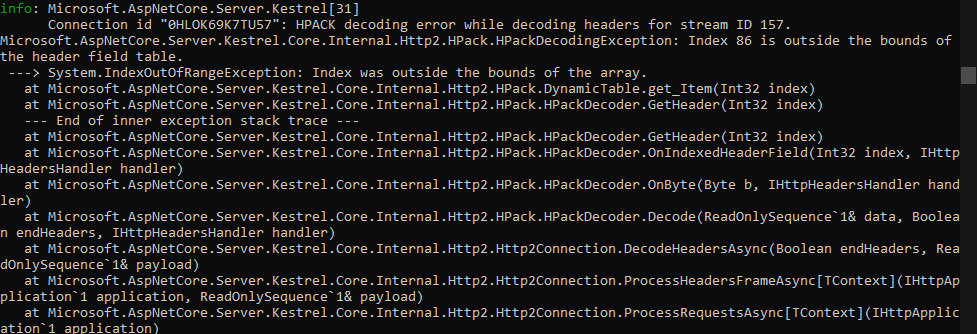
info: Microsoft.AspNetCore.Server.Kestrel[31]
Connection id "0HLOK69K7TU57": HPACK decoding error while decoding headers for stream ID 157.
Microsoft.AspNetCore.Server.Kestrel.Core.Internal.Http2.HPack.HPackDecodingException: Index 86 is outside the bounds of the header field table.
---> System.IndexOutOfRangeException: Index was outside the bounds of the array.
at Microsoft.AspNetCore.Server.Kestrel.Core.Internal.Http2.HPack.DynamicTable.get_Item(Int32 index)
at Microsoft.AspNetCore.Server.Kestrel.Core.Internal.Http2.HPack.HPackDecoder.GetHeader(Int32 index)
--- End of inner exception stack trace ---
at Microsoft.AspNetCore.Server.Kestrel.Core.Internal.Http2.HPack.HPackDecoder.GetHeader(Int32 index)
at Microsoft.AspNetCore.Server.Kestrel.Core.Internal.Http2.HPack.HPackDecoder.OnIndexedHeaderField(Int32 index, IHttpHeadersHandler handler)
at Microsoft.AspNetCore.Server.Kestrel.Core.Internal.Http2.HPack.HPackDecoder.OnByte(Byte b, IHttpHeadersHandler handler)
at Microsoft.AspNetCore.Server.Kestrel.Core.Internal.Http2.HPack.HPackDecoder.Decode(ReadOnlySequence1& data, Boolean endHeaders, IHttpHeadersHandler handler) at Microsoft.AspNetCore.Server.Kestrel.Core.Internal.Http2.Http2Connection.DecodeHeadersAsync(Boolean endHeaders, ReadOnlySequence1& payload)
at Microsoft.AspNetCore.Server.Kestrel.Core.Internal.Http2.Http2Connection.ProcessHeadersFrameAsyncTContext
at Microsoft.AspNetCore.Server.Kestrel.Core.Internal.Http2.Http2Connection.ProcessRequestsAsyncTContext
New dotnet info:
.NET Core SDK (reflecting any global.json):
Version: 3.0.100-preview7-012821
Commit: 6348f1068a
Runtime Environment:
OS Name: Windows
OS Version: 10.0.18362
OS Platform: Windows
RID: win10-x64
Base Path: C:\Program Filesdotnet\sdk\3.0.100-preview7-012821\
Host (useful for support):
Version: 3.0.0-preview7-27912-14
Commit: 4da6ee6450
.NET Core SDKs installed:
2.1.700 [C:\Program Filesdotnet\sdk]
2.1.701 [C:\Program Filesdotnet\sdk]
2.1.800-preview-009696 [C:\Program Filesdotnet\sdk]
2.1.800 [C:\Program Filesdotnet\sdk]
3.0.100-preview7-012821 [C:\Program Filesdotnet\sdk]
.NET Core runtimes installed:
Microsoft.AspNetCore.All 2.1.11 [C:\Program Filesdotnet\shared\Microsoft.AspNetCore.All]
Microsoft.AspNetCore.All 2.1.12 [C:\Program Filesdotnet\shared\Microsoft.AspNetCore.All]
Microsoft.AspNetCore.App 2.1.11 [C:\Program Filesdotnet\shared\Microsoft.AspNetCore.App]
Microsoft.AspNetCore.App 2.1.12 [C:\Program Filesdotnet\shared\Microsoft.AspNetCore.App]
Microsoft.AspNetCore.App 3.0.0-preview7.19365.7 [C:\Program Filesdotnet\shared\Microsoft.AspNetCore.App]
Microsoft.NETCore.App 2.1.11 [C:\Program Filesdotnet\shared\Microsoft.NETCore.App]
Microsoft.NETCore.App 2.1.12 [C:\Program Filesdotnet\shared\Microsoft.NETCore.App]
Microsoft.NETCore.App 3.0.0-preview7-27912-14 [C:\Program Filesdotnet\shared\Microsoft.NETCore.App]
Microsoft.WindowsDesktop.App 3.0.0-preview7-27912-14 [C:\Program Filesdotnet\shared\Microsoft.WindowsDesktop.App]
GerritBergen
on 29 Jul 2019
HPackDecodingException: Index 86 is outside the bounds of the header field table.
That's a new exception. It may still be related to the prior one that we're tracking in #12190, but I'm going to re-open this to ensure we track both.
 Tratcher
on 29 Jul 2019
Tratcher
on 29 Jul 2019
Yep, sounds different. We're continuing HTTP/2 hardening through the final previews and GA so we'll keep investigating.
anurse
on 29 Jul 2019
@GerritBergen can you capture a network trace of some kind? Wireshark would be nice (but you'll need to use unencrypted HTTP/2, and I'm not sure you can do that with Chrome), or you could use the 'net-export' stuff I referenced above
anurse
on 31 Jul 2019
After investigating https://github.com/aspnet/AspNetCore/issues/12190#issuecomment-517029076 I've found that it could also lead to this IndexOutOfRangeException depending on how many times DynamicTable.Insert is called.
Closing as a duplicate.
Tratcher
on 1 Aug 2019
Related issues
 rynowak
·
3Comments
rynowak
·
3Comments
 Kevenvz
·
3Comments
Kevenvz
·
3Comments
 UweKeim
·
3Comments
UweKeim
·
3Comments
 mj1856
·
3Comments
mj1856
·
3Comments
 snebjorn
·
3Comments
snebjorn
·
3Comments
Most helpful comment
That's a new exception. It may still be related to the prior one that we're tracking in #12190, but I'm going to re-open this to ensure we track both.