Aspnetcore: Custom event handlers in Blazor components not updating after render tree changes
I have a PropertyChangedEventHandler attached to an object in a custom component representing a table cell that works as expected until rows in the table are added or removed.
When a row is added or removed the custom events in components following that row are not attached to the correct cells.
To be clear, the normal UI events, 'onclick' etc, work correctly. However if a field in my underlying object is changed then the PropertyChanged event will be fired in a component on an incorrect table row. Depending on where I register the event it may be fired on the last row of the table or from a row above the correct row.
I have tried registering the PropertyChanged event in the component's OnInit and OnParametersSet events but they both produce incorrect behavior.
I've attached a sample project that reproduces this behavior and traces the output to the console. After inserting rows into the table, the first two rows will continue report the correct PropertChanged information, but further rows will not.
Additional context:
Blazor v3.0.0-preview6.190307.2
Cheers.
 vaughanroberts
All 5 comments
Thanks for contacting us, @vaughanroberts.
You need to call StateHasChanged() from the current handler, so it notifies the runtime to re-render.
 mkArtakMSFT
on 8 Jul 2019
mkArtakMSFT
on 8 Jul 2019
Thanks @mkArtakMSFT for the follow up, it's my first issue submission and it looks like it could of been a bit clearer. :)
I had tried StateHasChanged() in a number of places without success, but had removed them from my code sample to try and make it as simple as possible. I've attached an updated sample with comments for further explanation and clearer logging.
The following screenshots should help illustrate the issue.
The first screenshot shows the result of clicking on each row before inserting any new rows. This works as expected with the click event updating the counter, the PropertyChanged event being fired, and the PropertyChanged event been handled by the component.

After inserting a new row into position 3, clicking on the first two rows work as above, however the (new) third and (existing) fourth row's change property events aren't handled correctly. The component in row 3 doesn't handle the event at all. The component in row 4 appears to receive the event for row 3 as well as it's own.
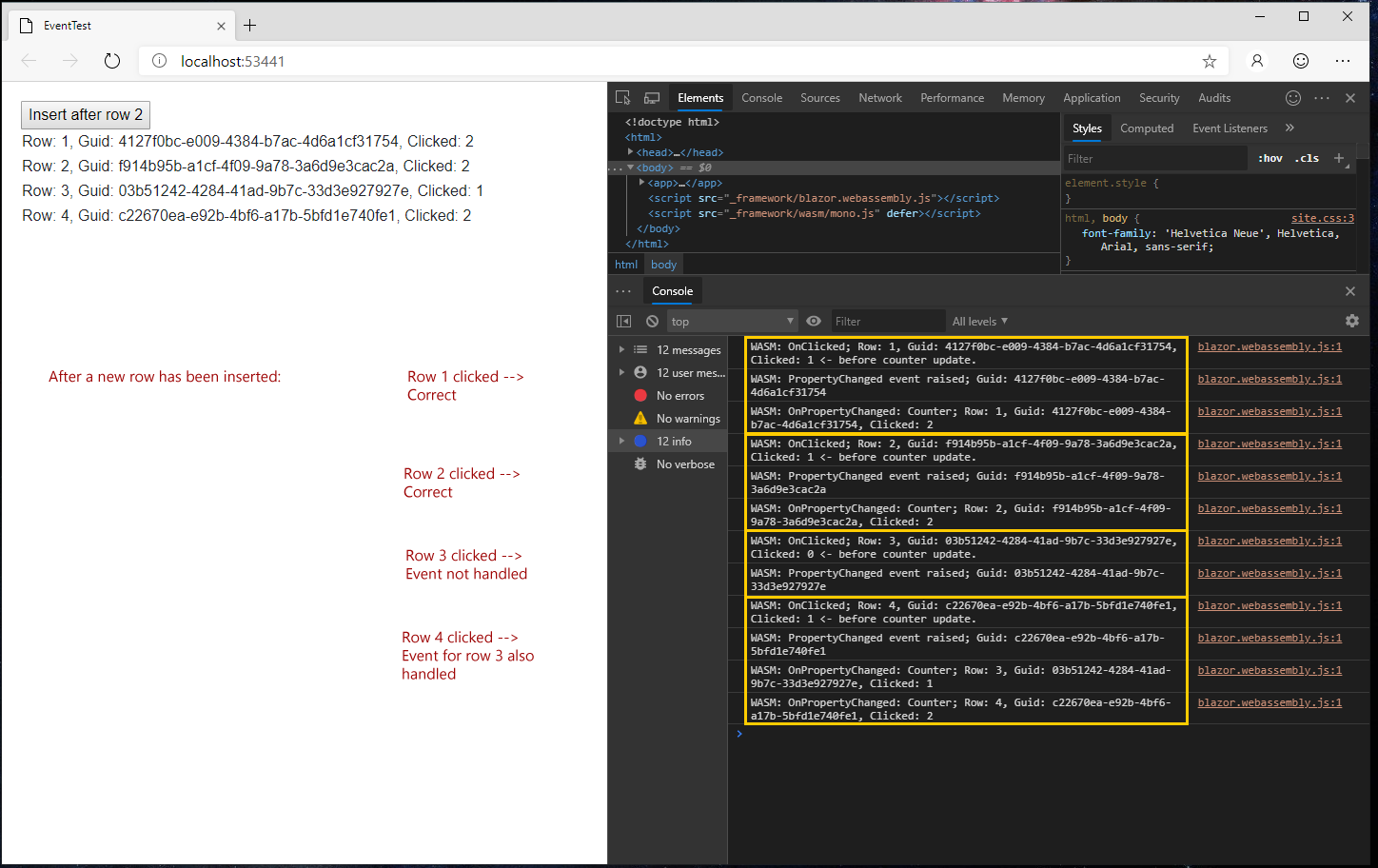
Inserting (or removing) further rows continues to increase this issue.
You can see from the code sample where I have tried calling StateHasChanged(). All other aspects of the table row's components and underlying data objects update correctly, just not the PropertyChanged event handlers attached to altered row components.
I can't see where else calling StateHasChanged() would help, but would love to be corrected. :)
Cheers.
vaughanroberts
on 9 Jul 2019
Thanks for the details, @vaughanroberts.
Seems like the @key keyword is designed to solve this very issue you're facing: https://github.com/aspnet/AspNetCore/issues/8232
Having said that, we'll review this with the team one more time to see whether there is something else going on here. In the meantime, please look into the referenced feature and see whether that would help.
mkArtakMSFT
on 9 Jul 2019
Thanks @mkArtakMSFT, this looks like exactly what I needed, apologies for overlooking it.
I've tested it with my sample code and the much more complicated scenario I'm working with, with great results.
For other reader's benefit, I also had to implement IDisposable to remove any PropertyChanged events with DataSource.PropertyChanged -= onPropertyChanged; from existing components that are reordered after the row insert.
Cheers.
vaughanroberts
on 9 Jul 2019
@vaughanroberts It is a little late but you can also read this #11908. It was fixed and will be available in Preview 8.
 Andrzej-W
on 29 Jul 2019
Andrzej-W
on 29 Jul 2019
Related issues
 zorthgo
·
136Comments
zorthgo
·
136Comments
 davidfowl
·
126Comments
davidfowl
·
126Comments
 reduckted
·
91Comments
reduckted
·
91Comments
 oliverjanik
·
91Comments
oliverjanik
·
91Comments
 danroth27
·
130Comments
danroth27
·
130Comments