Aspnetcore: Guideline - How should a large app be broken into?
I have an app, that should logically be broken into 4 modules, depending on the role of logged in user. If anonymous, the website module and it's related should be available. If Admin is logged in, then all the pages related to Admin. Same with Vendor and Consumer.
Overall, the app might have over 100 pages. What is the guideline of setting up such application that they all share the same DB (including identity).
As a server-Side Blazor:
A) should all pages go into a single Blazor app, just like we would do in MVC?
B) Or create 4 projects (Website be the default when app starts) and when user logs in, then the related project gets called?
C) Or other ideas?
Thanks!
 BenHayat
All 5 comments
In further details, when we build a server-side Blazor app with pages, and a user launches that app, Does the entire app with all the pages get transferred to the browser, just like a SPA app written in Angular or Vue?
Or does each page get transferred to browser like MVC app, as the user tries to use the page?
In a small test I did last night and watched the network, seems like once the initial app is loaded into browser, when I'd click on the menu to show other pages, nothing was showing on Chrome's network area, like it would if I were accessing an MVC page.
This has got me confused. So if our app, for example has 100 pages and a user launches the app from a Mobile, is Blazor going to load ALL the 100 pages to the Mobile on the initial load?
Another words, does the Server-side Blazor, behave like Client-side Blazor when loading app to browser initially?
I hope this clarifies my initial post.
Thanks!
BenHayat
on 1 Jul 2019
Blazor server side uses WebSockets for communication. In short it works like this:
- Browser sends request to the server and loads first page. This page can be prerendered so it looks like normal Blazor page but it is not interactive.
- Page includes link to blazor.server.js file. Browser loads this file and code in this file makes WebSocket connection. In Chrome you can see it here:
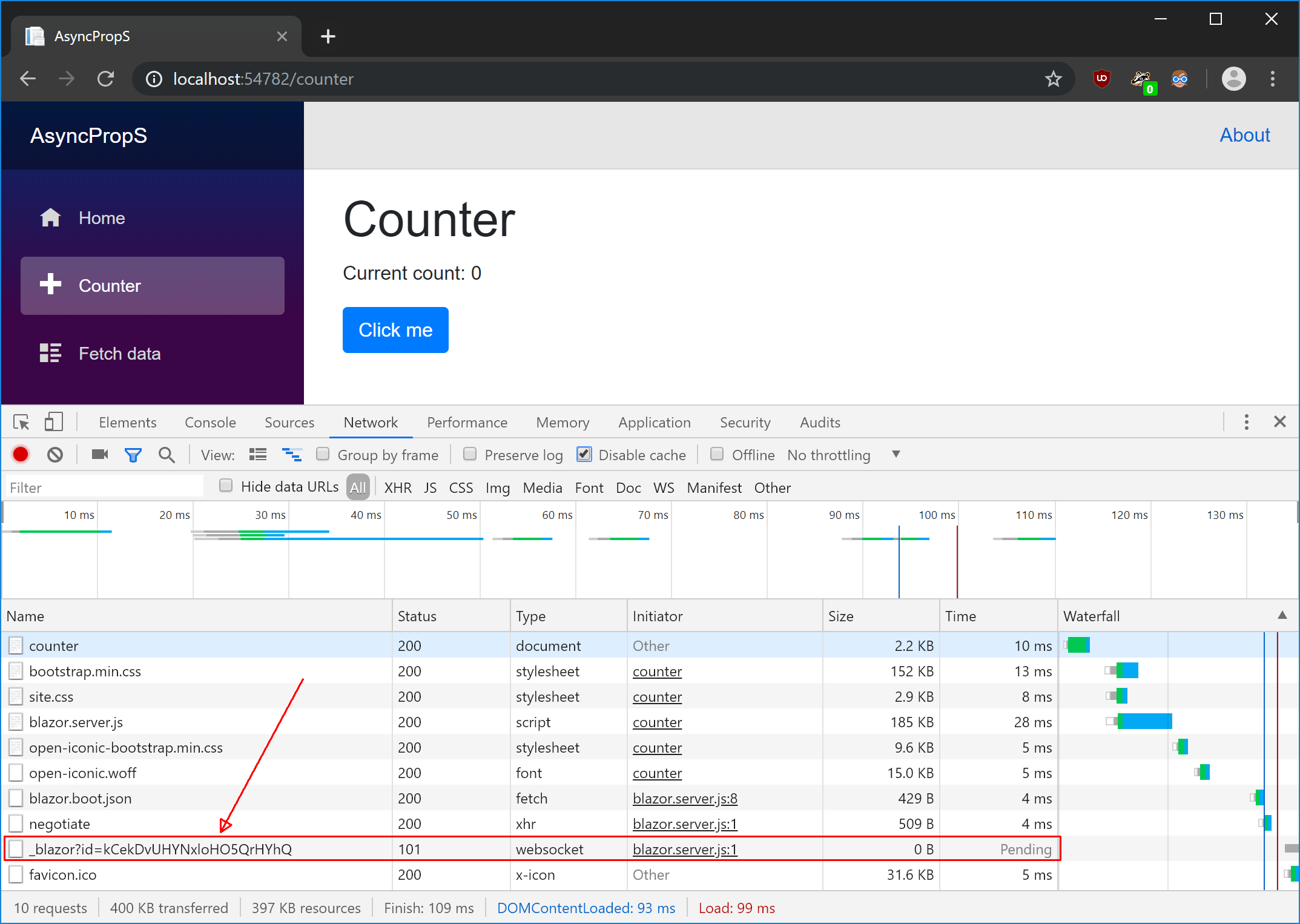
Click on it and the select Messages on the right to see all WebSockets messages. You can click on a message to see content below. You can click on a circle to clear messages.
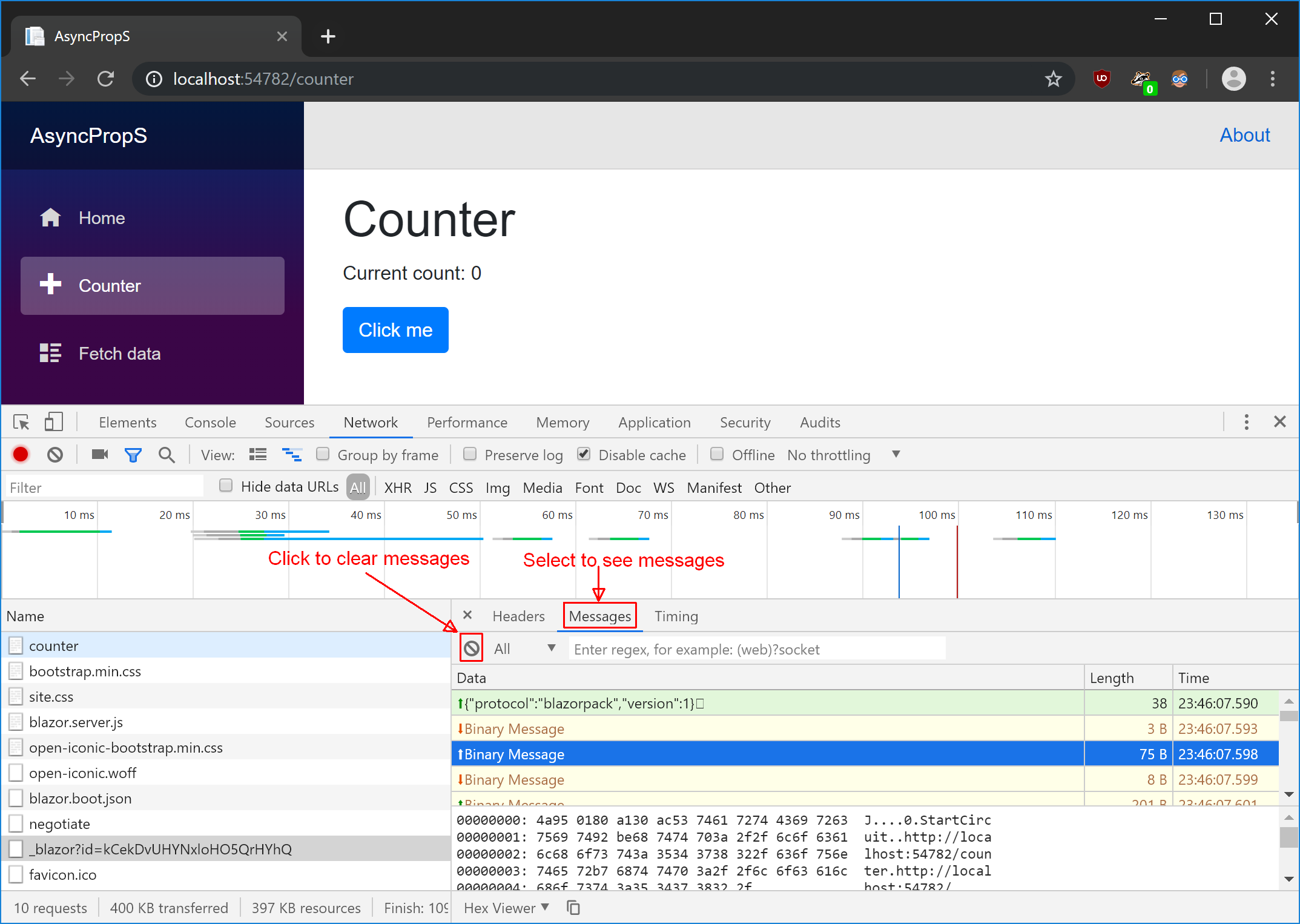
- When connection is established your application is interactive. You can click the button to increment counter and observe messages: browser will send "click event" to the server, server will update application state and send "render tree" changes to the browser. Code in blazor.server.js will interpret those changes and update DOM.
Answers to your questions:
Does the entire app with all the pages get transferred to the browser, just like a SPA app written in Angular or Vue?
No. Only single page is transferred initially. You can also see that there is only one Blazor specific file blazor.server.js (185KB). Blazor client side is more comparable to Angular.
Or does each page get transferred to browser like MVC app, as the user tries to use the page?
Yes and no. Each time user changes page something has to be transferred from server to the browser, but there are differences if you compare it to MVC:
- WebSockets is used to transfer data, not HTTP.
- Server sends "render tree" data structure and not HTML.
- Server sends only diff between current page view and new page view. That means for example that if you have exactly the same header and footer on every page Blazor will send only your article (main page content) because header and footer doesn't have to be changed.
I don't use Blazor server side (I prefer client side) but I think that all I have written above is correct.
 Andrzej-W
on 2 Jul 2019
Andrzej-W
on 2 Jul 2019
@Andrzej-W
I appreciate your time but it didn't address my core question.
Overall, the app might have over 100 pages. What is the guideline of setting up such application that they all share the same DB (including identity).
As a server-Side Blazor:
A) should all pages go into a single Blazor app, just like we would do in MVC?
B) Or create 4 projects (Website be the default when app starts) and when user logs in, then the related project gets called?
C) Or other ideas?
BenHayat
on 2 Jul 2019
@BenHayat We're having similar issues with our Blazor experiments. We expected Razor Class Libraries to help split a large, complex web app into manageable projects, but so far we haven't been able to find a way to load these at runtime (and ideally only on-demand). Blazor 1.0 / Core 3.0 seems to require that everything be known at compile-time. The monolithic model is understandable for a 1.0 release, but is unsustainable for larger apps.
Issue #5465 seems potentially related. It started out about lazy-loading but at least one use-case comment is clearly about plugin-style support. I also noticed a closed request at #11463 specifically about plugin support, which seems to indicate Router discovery is coming in 3.1, so maybe we're both in luck.
Although it isn't clear that the "plugin" part of that last one is actually under discussion, or if it got diluted into Router / page-tag discovery. Maybe @mkArtakMSFT can clarify for us?
 mv10-work
on 27 Aug 2019
mv10-work
on 27 Aug 2019
Thank you for contacting us. Due to no activity on this issue we're closing it in an effort to keep our backlog clean. If you believe there is a concern related to the ASP.NET Core framework, which hasn't been addressed yet, please file a new issue.
![msftbot[bot] picture](https://avatars2.githubusercontent.com/in/26612?v=4&s=40) msftbot[bot]
on 7 Dec 2019
msftbot[bot]
on 7 Dec 2019
Related issues
 moodya
·
153Comments
moodya
·
153Comments
 barrytang
·
89Comments
barrytang
·
89Comments
 pekkah
·
200Comments
pekkah
·
200Comments
 KerolosMalak
·
269Comments
KerolosMalak
·
269Comments
 glennc
·
117Comments
glennc
·
117Comments
Most helpful comment
@BenHayat We're having similar issues with our Blazor experiments. We expected Razor Class Libraries to help split a large, complex web app into manageable projects, but so far we haven't been able to find a way to load these at runtime (and ideally only on-demand). Blazor 1.0 / Core 3.0 seems to require that everything be known at compile-time. The monolithic model is understandable for a 1.0 release, but is unsustainable for larger apps.
Issue #5465 seems potentially related. It started out about lazy-loading but at least one use-case comment is clearly about plugin-style support. I also noticed a closed request at #11463 specifically about plugin support, which seems to indicate Router discovery is coming in 3.1, so maybe we're both in luck.
Although it isn't clear that the "plugin" part of that last one is actually under discussion, or if it got diluted into Router / page-tag discovery. Maybe @mkArtakMSFT can clarify for us?