Aspnetcore: Docker Image Failing for Default Web API (3.0)
Describe the bug
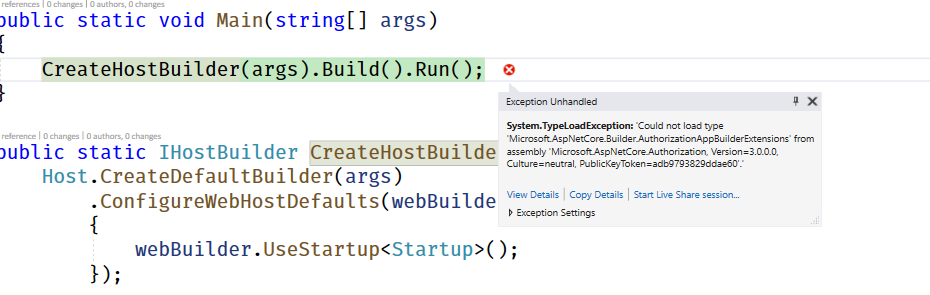
When a new ASP.NET Core Web API project is created with Docker support for Linux the project fails to run in debug mode and provides the displayed error.
To Reproduce
Steps to reproduce the behavior:
- Open VS 2019 and create a new ASP.NET Core 3 application and enable Docker Support (Linux)
- Build Solution and debug in Docker configuration
- See error
'Could not load type 'Microsoft.AspNetCore.Builder.AuthorizationAppBuilderExtensions' from assembly 'Microsoft.AspNetCore.Authorization, Version=3.0.0.0, Culture=neutral, PublicKeyToken=adb9793829ddae60'.'
Expected behavior
Solution successfully builds and displays api/values in the default browser
Screenshots
Additional context
- Works when the solution is debugged in IIS Express configuration (leads me to think this might be a problem with the Docker Image)
 nheinbaugh
All 8 comments
Could you report this via the VS Feedback tool as well? The docker tooling is owned by a different team and that will help get it on their radar.
Meanwhile, could you share a runnable sample project that reproduces the issue (including the Dockerfile, etc.)? It sounds like it's simple from your description, but a specific repro that we can look at in detail helps ensure we're looking at the same thing.
 anurse
on 25 Jun 2019
anurse
on 25 Jun 2019
@HaoK does that exception look like one of the changes we made?
 davidfowl
on 25 Jun 2019
davidfowl
on 25 Jun 2019
@anurse here is a minimum reproduction (note that this is just from the add project flow in VS without any customization) https://github.com/nheinbaugh/vs-2019-docker-failure
I have also created a feedback item in the VS Feedback tool.
nheinbaugh
on 25 Jun 2019
Hrm, I'm not able to repro this. I ran the provided app in Docker and get the correct result.
Frequently this kind of problem occurs because you have a version mismatch of some kind. The latest 3.0 docker images are targeting 3.0.0-preview6. Do you have that version installed on your machine? Can you provide the output of dotnet --info on the command line?
anurse
on 25 Jun 2019
So it does look related to us moving the Policy middleware to Authorization and back out, it looks like it is expecting https://github.com/aspnet/AspNetCore/blob/master/src/Security/Authorization/Policy/src/AuthorizationAppBuilderExtensions.cs to be in the core authorization dll when its back to Authorization.Policy
Is this an app upgrade from preview5 perhaps? I think it was only preview5 that had AppBuildExtensions in the core Authorization.dll
 HaoK
on 25 Jun 2019
HaoK
on 25 Jun 2019
My dotnet info does have preview5
.NET Core SDK (reflecting any global.json):
 Version:   3.0.100-preview5-011568
 Commit:    b487ff10aa
@HaoK when I originally came across this problem I was using preview5 build for my app.
I will upgrade my global 3.0 sdk and attempt to reproduce the error. I'm hoping it was just a mismatch like that :)
nheinbaugh
on 25 Jun 2019
Yep, updating the SDK fixed the problem. In case anybody else comes across this type of problem:
This was caused by Docker pulling a more updated version of .NET than what I was building the solution with. Updating my build version of .NET locally fixed everything
nheinbaugh
on 25 Jun 2019
One option to help prevent this in the future is to pin your Dockerfile images to a specific preview. There are a number of granularity levels you can use in the image reference (see https://hub.docker.com/_/microsoft-dotnet-core-aspnet/ for a full list). For example you could use mcr.microsoft.com/dotnet/core/aspnet:3.0.0-preview6-buster-slim instead of mcr.microsoft.com/dotnet/core/aspnet:3.0-buster-slim. Then, when a new preview is release, you won't automatically move to it (but you can do so by simply updating the base image reference).
I'm going to close this issue now since it sounds like you've resolved the issue. Hope that helps!
anurse
on 25 Jun 2019
Related issues
 UweKeim
·
3Comments
UweKeim
·
3Comments
 mj1856
·
3Comments
mj1856
·
3Comments
 ermithun
·
3Comments
ermithun
·
3Comments
 farhadibehnam
·
3Comments
farhadibehnam
·
3Comments
 FourLeafClover
·
3Comments
FourLeafClover
·
3Comments