Aspnetcore: [Preview 6] Blazor (Server Side) overriding identity via scaffolding throws error
[Preview 6] Blazor Server Side overriding identity via scaffolding throws an error.
dotnet 3.0.100-preview6-012264
- Upgrade to .net core 3.0.100-preview6-012264
- Create a new asp.net core web application project, select server side blazor.
- Change Identity to individual user account
After project creation right click Areas/Identity folder, Add New Scaffold Item, Override all files throws error.

 muheebhussain
All 5 comments
Microsoft.VisualStudio.Web.CodeGeneration.Design nuget package must be updated to 3.0.0-preview6 also.
 mihaimyh
on 14 Jun 2019
mihaimyh
on 14 Jun 2019
This error occurs when the page layout field is left blank. You can get around it by creating a dummy layout page and using that as your layout file. But the bigger problem is once the scaffolding templates are generated your Blazor project wont run. I created #11228.
 sidebarpronto
on 14 Jun 2019
sidebarpronto
on 14 Jun 2019
This specific error should now be fixed with the latest preview version of Visual Studio.
 danroth27
on 27 Jun 2019
danroth27
on 27 Jun 2019
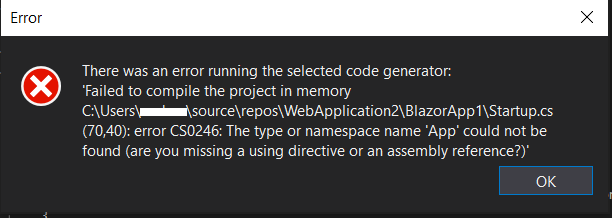
@danroth27 Still not able be overriding identity with scaffolding
dotnet 3.0.100-preview8
Upgrade to .net core 3.0.100-preview8-
Create a new asp.net core web application project, select blazor app.
Change Identity to individual user account
After project creation right click Areas/Identity folder, Add New Scaffold Item, Override all files throws error.
muheebhussain
on 26 Aug 2019
I have this same issue. I've updated to the latest Version of Visual Studio Preview and Core framework as well.
net core 3.0.100-preview8
Microsoft Visual Studio Community 2019 Preview
Version 16.3.0 Preview 2.0
VisualStudio.16.Preview/16.3.0-pre.2.0+29209.152
 Gpd1969
on 29 Aug 2019
Gpd1969
on 29 Aug 2019
Related issues
 snebjorn
·
3Comments
snebjorn
·
3Comments
 bgribaudo
·
3Comments
bgribaudo
·
3Comments
 fayezmm
·
3Comments
fayezmm
·
3Comments
 markrendle
·
3Comments
markrendle
·
3Comments
 Kevenvz
·
3Comments
Kevenvz
·
3Comments
Most helpful comment
I have this same issue. I've updated to the latest Version of Visual Studio Preview and Core framework as well.
net core 3.0.100-preview8
Microsoft Visual Studio Community 2019 Preview
Version 16.3.0 Preview 2.0
VisualStudio.16.Preview/16.3.0-pre.2.0+29209.152