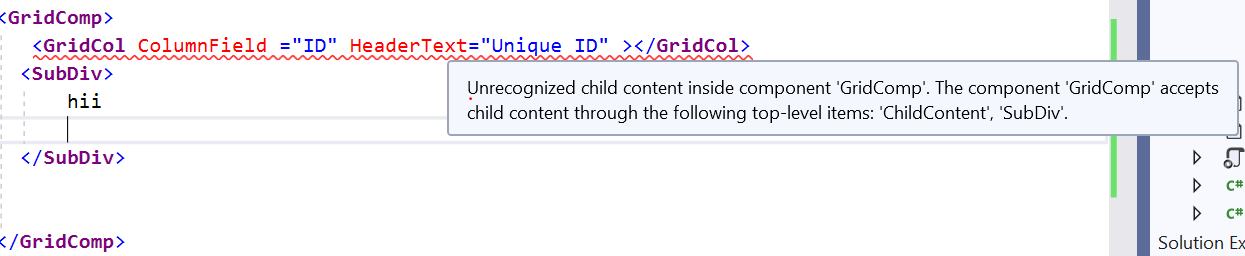
Aspnetcore: Unrecognized child content inside component 'GridComp'. The component 'GridComp' accepts child content through the following top-level items: 'ChildContent', 'SubDiv'.
Creating a Div component by inherits the componentBase class of blazor. Also, we have created a childcomponent for that parent component.
Now, we have defined another component using RenderFragment inside that parent component. If we access that both child component(one defined as childContent and another is using RenderFragment) then it throws the compile time issue.
please refer to the following steps for understanding the issue and reproducing procedure.
To Reproduce
Steps to reproduce the behavior:
- Create a DivComponent like as follows
@using Microsoft.AspNetCore.Components;
@using System.ComponentModel;

@inherits ComponentBase;

<div id="@ID">
    <CascadingValue Value="@this" Name="CompParent">
        @ChildContent
    </CascadingValue>
</div>

@functions{
    [Parameter]
    protected  string ID { get; set; }

    [Parameter]
    protected RenderFragment ChildContent { get; set; }

    [Parameter]
    [DefaultValue(null)]
    public RenderFragment<dynamic> SubDiv{ get; set; }

}
- Now Create a child component like as follows
@using Microsoft.AspNetCore.Components;

@using System.ComponentModel;

@inherits ComponentBase;

<CascadingValue Value="@this" Name="CompParent">
    @ChildContent

</CascadingValue>

@functions {

    [CascadingParameter(Name = "CompParent")]
    protected GridComp Parent { get; set; }

    [Parameter]
    protected RenderFragment ChildContent { get; set; }

    [Parameter]
    [DefaultValue("")]
    public string ColumnField { get; set; } = "";

    [Parameter]
    [DefaultValue("")]
    public object Text { get; set; } = " ";

}
- then while accessing that component in Index.razor page like as follows
<GridComp>
   <GridCol ColumnField ="ID" HeaderText="Unique ID" ></GridCol>
  <SubDiv>
      hii

  </SubDiv>


</GridComp>
4 Now build the solution and see the error
Screenshots

 Venkat4655
All 3 comments
Thank you for your feedback.
We're closing this issue as the behavior discussed is by design.
You need to wrap your ChildContent element.
 mkArtakMSFT
on 4 Jun 2019
mkArtakMSFT
on 4 Jun 2019
@mkArtakMSFT Instead of wrapping sub components inside ChildContent, may be the blazor should provide constrain on allowed child components for a component and handle it by design.
The below code doesn`t look good for me.
<GridComp>
   <ChildContent>
       <GridCol ColumnField ="ID" HeaderText="Unique ID" ></GridCol>
  </ChildConent>
  <SubDiv>
      hii
  </SubDiv>
</GridComp>
I expect the RenderFragment to work similar to the NgTemplate of Angular. The equivalent code of the above component in Angular is as below.
<grid >
<columns>
    <column field='EmployeeImage'></column>
</columns>
<ng-template #rowTemplate let-data>
    {{EmployeeImage}}
</ng-template>
</grid>
 Madhust
on 6 Jun 2019
Madhust
on 6 Jun 2019
Thanks for your feedback, @Venkat4655.
We'll keep this in mind and will observe how the rest of the community reacts to the current design choice we've made. If we hear a lot of feedback similar to your, we will reconsider our approach.
mkArtakMSFT
on 6 Jun 2019
Related issues
 aurokk
·
3Comments
aurokk
·
3Comments
 groogiam
·
3Comments
groogiam
·
3Comments
 fayezmm
·
3Comments
fayezmm
·
3Comments
 ipinak
·
3Comments
ipinak
·
3Comments
 TanvirArjel
·
3Comments
TanvirArjel
·
3Comments
Most helpful comment
Thanks for your feedback, @Venkat4655.
We'll keep this in mind and will observe how the rest of the community reacts to the current design choice we've made. If we hear a lot of feedback similar to your, we will reconsider our approach.