Aspnetcore: I am willing to contribute in taking VB.NET to ASP.NET MVC Core
Hi.
I want to use VB.NET in ASP.NET MVC Core. I'm tired of waiting, so I am willing to contribute in writing/modifying VB razor (.vbhtml files) and any other necessary tasks needed to make it work in MVC Core.
I need a ToDo list, and some guideness to where to start.
Thanks.
 VBAndCs
All 23 comments
This seems not an easy task, I already have this in my mind from the beginning, but while Razor written for C# in ASP.NET Core, the solution is write template language to compile `.vbhtml`` files
BTW VB.NET is supported in ASP.NET Core, but it's not supported in views
 hishamco
on 16 Mar 2019
hishamco
on 16 Mar 2019
This seems not an easy task, I already have this in my mind from the beginning, but while Razor written for C# in ASP.NET Core, the solution is write template language to compile `.vbhtml`` files
BTW VB.NET is supported in ASP.NET Core, but it's not supported in views
I think it is not that hard. Every thing is already done in ASP.NET MVC 5 for vbhtml files and just copy it to the dot core project. I need a little push about what files need to be modified in c# asp.net project and I wiil convert the parser and any related conponents to work on vb syntax
VBAndCs
on 16 Mar 2019
I don't think so, there 're many things changed in ASP.NET Core from the previous version, may be looking to the current Razor implementation is better
hishamco
on 16 Mar 2019
No problem . I will start with the current C# razor and change the CSharp parser to Vb parser which is already written for asp.net 5. There will be changes in the editor / deugger also, and of corse the project template. I asked for guideness becuase the team is aware of all other spots that need modifications.
VBAndCs
on 16 Mar 2019
Have a look to this issue #2738 it has a long discussion
hishamco
on 16 Mar 2019
Saw it b4. Nothing new. MS thinks vb.net is less needed and doesn't want to spend money and waste resources on it. No real technical issues prevent Vb.net from moving to dot core.
So, I can solve the money and resources issue by assigning myself to this task :) I just want some guidelines not to go through all unnecessary parts of the project.
VBAndCs
on 16 Mar 2019
I would guess (based on comments that hishamco kindly linked, like this one: https://github.com/aspnet/AspNetCore/issues/2738#issuecomment-362948733) that is is a big job with plenty of technical issues (read: design and development to do), and that writing a "todo list" for you to pick up would be the result of many hours or days of discussion/work. Once it's down to a simple todo list, I'd imagine it would be fairly straightforward.
That issue seemed to point at some good starting points..
 kierenj
on 16 Mar 2019
kierenj
on 16 Mar 2019
@kierenj
I don't want to reinvent the wheel. Both VB Razor and C# razor use Roslyn to parse, compile and debug. This means I will not rewrite the compiler here. The task is to replace all parts that deals with c# syntax with those dealing with VB syntax. And I am not expecting to finish this in a week or two. I can give this task up to 6 months if necessary. So, give me a place to start, because when I looked at C# Razor source I couldn't find the C# parser! It seems that the project uses an internal sdk that I can't find its source! I don't want to go back to ASP.NET 5 and reinvent the wheel!
So, If ASP team cares, please show me the path, so I can start walking!
VBAndCs
on 17 Mar 2019
I looked at C# Razor source I couldn't find the C# parser!
MVC is using Roslyn with C# infrastructure behind the scene
hishamco
on 17 Mar 2019
Hi, the work to add support for VBHTML is enormous - that's one of the reasons that it is not supported in ASP.NET Core. But the work to maintain it is also substantial. As the VB language evolves, and as ASP.NET Core / Razor requirements and features evolve, the cost of having support for two languages takes away time that can be spent on other features, fixes, and enhancements (this includes ancillary things such as documentation, performance work, etc.).
So for those reasons, while we appreciate the willingness of people to contribute such a feature, it is not a feature we can accept at this time.
 Eilon
on 19 Mar 2019
Eilon
on 19 Mar 2019
@hishamco @kierenj @Eilon @shanselman
I want to simplify the problem of vbhtml, by using a code behind file.. suppose we have this cshml file:
@model IEnumerable<MvcMusicStore.Models.Genre>
@{
ViewBag.Title = "Store";
}
<h3>Browse Genres</h3>
<p>
Select from @Model.Count()
genres:</p>
<ul>
@foreach (var genre in Model)
{
<li>@genre.Name</li>
}
</ul>
I want to write the vbhtml file as:
<CodeBehind ClassName = "View1Code" FileName= "View1.vb"/>
<h3>Browse Genres</h3>
<p>
Select from @ModelCount genres:
</p>
<ul>
@Genres
</ul>
and view1.vb:
```VB.NET
Friend Shared Class View1Code
Dim Model As IEnumerable(Of MvcMusicStore.Models.Genre)
Public Sub New(model as IEnumerable(Of MvcMusicStore.Models.Genre)
Me.Model = model
ViewBag.Title = "Store"
End sub
Public Property Model.Count As integer = Model.Count( )
Public ReadOnly Property Model.Count As String
Get
Dim s = "";
For Each genre in Model
s += &"<li>{genre.Name}</li>{vbCrLf}"
Next
Return s
End Get
End Property
End Class
```
1- This will eliminate the need for parsing, compiling and debugging the vbhtml file, because it only contains a static placeholders that will be replaced with the evaluated properties at runtime. This will leave this file as a prototype html file.
2- The code-behind file is a normal vb file which doesn't need any special treatment!
This allows to use this model to write a razor for F# or any other language without any further coding!
3- No new effort needed in every new ASP.NET Core version. Any change in other parts of the framework will not affect the way we write these razor pages.
4- This is a simple divide and conquer approach, which makes the problem too simple. We may need to write some longer code in the code behind file, but it is direct and most of it can be generated with snippets or code generators. On the other hand, the vbhtml file will be cleaner. The @variable parts can view the actual code in tool tips or in a peak definition window.
If some one is willing to help me do this, we can have VB razor up and running in a few days. My problem is that I am lost in the ASPNETCore source code, and even failed to build the project on my PC! I am not experienced in project templates, and can't integrate the vbthml file and its code-behind in the MVC project.
I can write parts of this works, put I can't put the whole parts together! So, I need help.
VBAndCs
on 19 Mar 2019
FYI you can do this with current bits without .vbhtml extension
As I mentioned earlier ASP.NET Core supports VB.NET except for views
hishamco
on 20 Mar 2019
Hope this sample https://github.com/DamianEdwards/AspNetCoreVbHybrid make you happy
hishamco
on 20 Mar 2019
@hishamco
Thanks for the sample, but I am aware of that.
Still .bvthml is needed becuase this is not a pure html file (the @name parts will be syntax errors in html files).
VBAndCs
on 20 Mar 2019
Hopefully I will start contributing on this because I am a VB fan 😊
hishamco
on 20 Mar 2019
@hishamco
Thanks, this will be helpful. But I discovered a surprise: VB.NET has built-in razor pages! Look at this:
```VB.NET
Friend Class View1
Dim Model As IEnumerable(Of MvcMusicStore.Models.Genre)
Public Sub New(model As IEnumerable(Of MvcMusicStore.Models.Genre))
Me.Model = model
ViewBag.Title = "Store"
End Sub
'ViewBag.Title = "Store"
Public ReadOnly Property Razor
Get
Return _
<html>
<h3> Browse Genres</h3>
<p>
Select from <%= Model.Count() %> genres:
</p>
<ul>
<%= (From genre In Model Select <li><%= genre.Name %></li>) %>
</ul>
</html>
End Get
End Property
End Class
```
The only thing we need is an ASP.NET core template for VB, and a little adjustments to generate the render HTML page from the View1.Razor property! Voila!
VBAndCs
on 20 Mar 2019
@kierenj @Eilon @shanselman
I oppened a new proposal for this:
https://github.com/aspnet/AspNetCore/issues/8674
VBAndCs
on 20 Mar 2019
What you did is generating a markup from within the class, this should be sort of generated file from view compilation
hishamco
on 20 Mar 2019
@hishamco
It is also the razor view itself. If the linQ is not claer, thi is much clearer:
VB.NET
Public ReadOnly Property Razor As XElement
Get
Return _
<html>
<h3> Browse Genres</h3>
<p>
Select from <%= Model.Count() %> genres:
</p>
<ul>
<%= (Iterator Function()
For Each genre In Model
Yield <li><%= genre %></li>
Next
End Function)() %>
</ul>
</html>
End Get
End Property
This is nearly the vbhtml view, with just few deffernces.
We can live with that, and use it to generate html pages. I want to integrate this in the MVC Core, but I can't do it alone, becuase I am not aware of the structure of the project. What I want is to:
1- Craete a VB.NET template for ASV.NET MVC Core.
2- Create the view as a VB.NET class as showed in here.
3- Create an instance of this calss in the controller's action method.
4- Use the Razor property to generate the Html page.
other than that, every thing should work as usual.
I need some help to show me where to start, and what parts of the MVC project need to change to make this new approach, encloding the erasing all about cshtml (and vbhtml) files, replacing them with the new vb classes.
VBAndCs
on 20 Mar 2019
@hishamco @kierenj @Eilon @shanselman
Finally: A working VB.NET ASP.NET MVC Core Razor sample!
https://github.com/VBAndCs/VB.NET-Razor
I implemented a simple VBRazorViewEngine in the VbRazor project.
To use VBRazorViewEngine in the project, I added these two statements to the Startup.ConfigureServices method:
```VB.NET
services.AddTransient(Of IConfigureOptions(Of MvcViewOptions), VBRazor.VBRazorMvcViewOptionsSetup)()
services.AddSingleton(Of IViewEngine, VBRazor.VBRazorViewEngine)()
The VBRazor is just a VB class that implements the IVBRazor Interface:
```VB.NET
Public Interface IVBRazor
    ReadOnly Property Razor As String

End Interface
The Razor property uses the xml literals to compose the HTML code and returns it as a string.. Example:
```VB.NET
Imports VbRazor
Public Class IndexView
Implements IVBRazor
Dim students As List(Of Student)

Public Sub New(students As List(Of Student))
    Me.students = students
End Sub

Public ReadOnly Property Razor As String Implements IVBRazor.Razor
    Get
        Dim x = <html>
                    <h3> Browse Students</h3>
                    <p>Select from <%= students.Count() %> students:</p>
                    <ul>
                        <%= (Iterator Function()
                                 For Each std In students
                                     Yield <li><%= std.Name %></li>
                                 Next
                             End Function)() %>
                    </ul>
                </html>
        Return x.ToString()

    End Get
End Property
End Class
To use the IndexView from the Controller, I passed it to the View method as the model data in the action method, and passed the actual model data to its constructor:
```VB.NET
Public Function Index() As IActionResult
    Return View(New IndexView(Students))
End Function
That’s all!! If you run the project, you will see this web page:
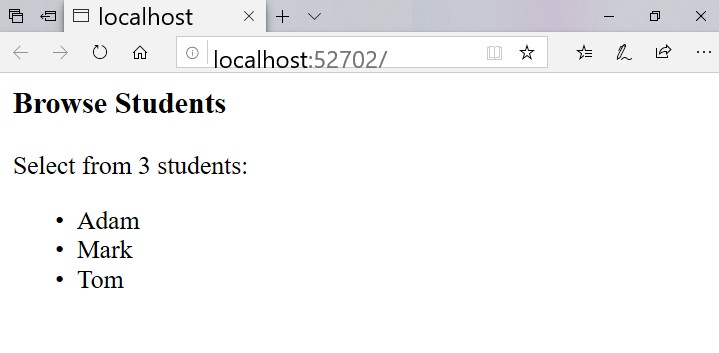
This was really easy, but needs more work, so I hope you start contribute to this project to make it a real productive tool!
The first thing to do, it to create a VB.NET template for ASP.NET MVC Core. I had to create a C# project then convert it to VB!
The second thing to do, is to add intellisense support for html attributes in xml literals in VB!
VBAndCs
on 21 Mar 2019
Great Job !!!!
 HarolGomezM
on 30 Mar 2019
HarolGomezM
on 30 Mar 2019
Thanks @HarolGomezM
I used another approach to let Razor take care of Tag helpers and other stuff, by using a virtual file provider to deliver to Razor the generated html from Vazor as if it is a cshtml file!
It works fine and it allows you ti use both cshtml files and Vazor View classes together in the VB.NET project!
I published the source here:
https://github.com/VBAndCs/Vazor
VBAndCs
on 30 Mar 2019
Vazor now have project and item templates:
Download this file:
https://github.com/VBAndCs/Vazor/blob/master/VazorTemplateSetup.zip?raw=true
then unzip it. Double-click the file VazorTemplateSetup.vsix to setuo the Vazor templates:
1- A Vazor project template for ASP.NET MVC Core 2.2 .
2- A Vazor project template for ASP.NET MVC Core 3.0 .
3- A Vazor project template for ASP.NET Web Pages Core 2.2 .
4- A Vazor project template for ASP.NET Web Pages Core 3.0 .
5- A VazorView item template to add a new vazor view (.vazor and .vbxml files) to the MVC project.
6- A VazorPage item template to add a new vazor page (.cshtml, .cshtml.vb, .vazor and .vbxml files) to the Razor Pages project.
After installation, open .net and create a new project. In the search box, write Vazor, and choose one of the 4 vazor project templates. In the project created, right-click a folder in solution explorer and select Add/New Item. From the dialoge box select VazorView (if this is an MVC project) or VazorPage (if this is a Razor Pages project).
VBAndCs
on 9 Apr 2019
Related issues
 aurokk
·
3Comments
aurokk
·
3Comments
 BrennanConroy
·
3Comments
BrennanConroy
·
3Comments
 markrendle
·
3Comments
markrendle
·
3Comments
 fayezmm
·
3Comments
fayezmm
·
3Comments
 Pixel-Lord
·
3Comments
Pixel-Lord
·
3Comments
Most helpful comment
@hishamco @kierenj @Eilon @shanselman
Finally: A working VB.NET ASP.NET MVC Core Razor sample!
https://github.com/VBAndCs/VB.NET-Razor
I implemented a simple VBRazorViewEngine in the VbRazor project.
To use VBRazorViewEngine in the project, I added these two statements to the Startup.ConfigureServices method:
```VB.NET
services.AddTransient(Of IConfigureOptions(Of MvcViewOptions), VBRazor.VBRazorMvcViewOptionsSetup)()
services.AddSingleton(Of IViewEngine, VBRazor.VBRazorViewEngine)()
The Razor property uses the xml literals to compose the HTML code and returns it as a string.. Example:
```VB.NET
Imports VbRazor
Public Class IndexView
Implements IVBRazor
End Class
That’s all!! If you run the project, you will see this web page:

This was really easy, but needs more work, so I hope you start contribute to this project to make it a real productive tool!
The first thing to do, it to create a VB.NET template for ASP.NET MVC Core. I had to create a C# project then convert it to VB!
The second thing to do, is to add intellisense support for html attributes in xml literals in VB!