Aspnetcore: Integration tests are not working if using inherited Startup and reference to Microsoft.AspNetCore.App without version specified
Describe the bug
We use integration tests in our AspNetCore application. We use inherited Startup class in our test project, so we can easily modify things in it for the testing purposes. The SUT is web API project that references Microsoft.AspNetCore.App. Everything works, if this reference has version specified. If we remove the version specification, the tests stop working. Requests to the test server keep returning 404 NotFound.
Version specification of this package is not recommended. If it is there, the compiler generates warning:
Warning NETSDK1071 A PackageReference to 'Microsoft.AspNetCore.App' specified a Version of 2.2.0. Specifying the version of this package is not recommended. For more information, see https://aka.ms/sdkimplicitrefs
Integration tests are always working (regardless of reference version specification) if they directly use Startup class from SUT.
To Reproduce
- Create a simple web API project. Make sure, the reference to
Microsoft.AspNetCore.Appin.csprojis without version specified:<PackageReference Include="Microsoft.AspNetCore.App" /> - Create integration tests project, that references web API project.
- Create a
Startupclass in test project, which is inherited form API's projectStartup. - Make a simple test which uses test
Startupand makes a request to correct API in test server. - The request should return
200 OK, but returns404 NotFound. - Modify the refeference in API project to have version specified:
<PackageReference Include="Microsoft.AspNetCore.App" Version="2.2.0" />The test will work.
Expected behavior
Integration tests should work as expected even if the package is without version.
Additional context
I created a full (yet simple) demo repository so you can clone it, run the tests and see the results.
There are two web API projects, which are the same. The only difference is how the Microsoft.AspNetCore.App package is referenced. And there are 4 sets of 2 test projects, where one project references API with version, the other test project API without version. 4 sets are because I used different approaches:
- Direct using of
Startupclass in API project. In this case, always everything works. - Using inherited
Startupclass. Non of these approaches works with API project without version.
- Using this inherited class directly.
- Using inherited
WebApplicationFactory. - Using
TestServer.
 satano
All 18 comments
I believe there are some prerequisites missing. You can take a look at this link
https://docs.microsoft.com/en-us/aspnet/core/test/integration-tests?view=aspnetcore-2.2#test-app-prerequisites
and see if that solves your issue.
 javiercn
on 20 Mar 2019
javiercn
on 20 Mar 2019
@javiercn No, this is not an issue. I have all the prerequisites. The projects with tests and the SUT projects are completely the same. The only difference is in the package reference in the SUT projects:
<PackageReference Include="Microsoft.AspNetCore.App" Version="2.2.0" />- the tests are working.<PackageReference Include="Microsoft.AspNetCore.App" />- the tests are not working.
Package references in the projects with the tests are the same - without version specification. So if the tests work or not depends only on if there is a version specification of Microsoft.AspNetCore.App in tested project or there is not.
satano
on 20 Mar 2019
From the prerequisites section:
_Specify the Web SDK in the project file (
javiercn
on 20 Mar 2019
OK. My fault - I am sorry. I looked only at the tested project (SUT) and there is correct SDK. But anyway, this still is not the issue. I changed it in all the projects and the results are the same.
But even if this would have solved it, it would be strange. Because really, the tests are working even if the SDK of test project is just Microsoft.NET.Sdk. They will stop working if I remove Version="x.y.z" from the package reference in the SUT. No other changes are made and this change is only in the SUT project - it does not matter if version is specified or not in the test project.
satano
on 20 Mar 2019
I'm pretty sure it's an issue with dependency context. There's likely a mismatch between the version resolved in the app vs the version resolved in the test.
javiercn
on 20 Mar 2019
Probably it is. We need inherited Startup class in test project and we do not want that warning about version. I will do anything what will help - just do not know what to do.
The strange thing (for me) is that the tests are working correctly even if the package version is not specified if you use Startup class directly from SUT.
satano
on 21 Mar 2019
@natemcmaster can you try to repro this and see what's going on?
 Eilon
on 5 Apr 2019
Eilon
on 5 Apr 2019
I can confirm what @satano has reported - MVC is not discovering the controllers as expected. The source of the problem is one we've seen in a variety of ways before, and as @javiercn guessed, it is a problem with interpreting dependency context.
_Context_: when user code calls .AddMvc() inside Startup.ConfigureServices, MVC attempts to answer the question, "which assemblies contain controllers?" It does this through a variety of methods, one of which includes reading the .deps.json file to determine if the assembly references Microsoft.AspNetCore.Mvc. This eventually calls into this code: https://github.com/aspnet/AspNetCore/blob/release/2.2/src/Mvc/Mvc.Core/src/ApplicationParts/ApplicationAssembliesProvider.cs
_What's broken:_ Because of the way the .NET Core SDK implemented versionless PackageReference, the .deps.json file is generated with the dependency information omitted. In @satano's repro, this is visible if you compare InheritedStartupTests/bin/Debug/netcoreapp2.2/InheritedStartupTests.deps.json and InheritedStartupTests_WithVersion/bin/Debug/netcoreapp2.2/InheritedStartupTests_WithVersion.deps.json. On the left, the .deps.json generated when using the SDK as directed. On the right, the result of adding the Version attribute.
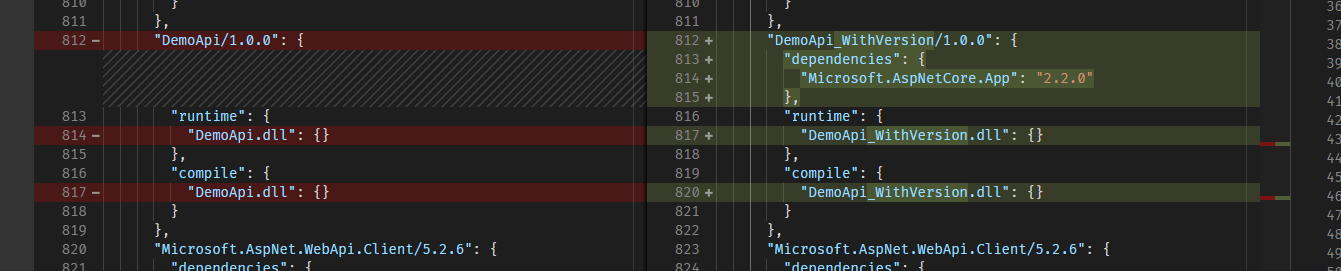
In the scenario on the left (the versionless package ref), MVC skips controller discover on the app's entry assembly because it does not think MVC is used.
_One potential workaround:_
You could try manually telling MVC which assemblies have controllers by using ConfigureApplicationPartManager like this.
        public void ConfigureServices(IServiceCollection services)
        {
            services
                .AddMvc()
                .SetCompatibilityVersion(CompatibilityVersion.Version_2_2)
                .ConfigureApplicationPartManager(p =>
                {
                    var assembly = typeof(Startup).Assembly;
                    var partFactory = ApplicationPartFactory.GetApplicationPartFactory(assembly);
                    foreach (var part in partFactory.GetApplicationParts(assembly))
                    {
                        p.ApplicationParts.Add(part);
                    }
                });
        }
cc @javiercn @pranavkm
 natemcmaster
on 8 Apr 2019
natemcmaster
on 8 Apr 2019
@natemcmaster thank you for your investigation and workaround.
I have one more questions - basically just for me to understand it more. The .deps.json files are generated this way also for projects which references Startup class directly from SUT (ProjectStartupTests...). There is no "Microsoft.AspNetCore.App": "2.2.0" dependency in ProjectStartupTests.deps.json, but the tests are working. Why?
satano
on 8 Apr 2019
The difference is that in ProjectStartupTests you are using WebApplicationFactory<DemoApi.Startup>. This makes DemoApi.dll the "entry assembly" because this is the assembly containing the startup type, and MVC always searches the entry assembly for controllers. On the other hand, the MVC entry assembly in InheritedStartupTests is the test assembly itself, InheritedStartupTests.dll , because you are using WebApplicationFactory<InheritedStartupTests.TestsStartup>
natemcmaster
on 9 Apr 2019
@rynowak @javiercn @pranavkm - a few months ago, we talked about ways to improve controller discovery which would be better than reading the .deps.json file. What was the outcome of these ideas?
This particular bug is another manifestation of .deps.json insufficiently describing what an assembly actually depends on (and as a result, MVC skipping the assembly during the default application part discovery.)
natemcmaster
on 18 Apr 2019
We have some plans to address this in 3.0. Assigning this to myself, and I can post an update once we've vetted the design.
 pranavkm
on 18 Apr 2019
pranavkm
on 18 Apr 2019
Does using TProgram instead of TStartup not solve this issue? Where TProgram is the entry point for the app.
javiercn
on 22 Apr 2019
@javiercn Enrtypoint for which app? We use TStartup, because we use Startup class defined in test project and this class is inherited from Startup class in SUT project.
satano
on 22 Apr 2019
WAF only uses a class to figure out the entry point for the app. You should not give it your test startup but the Program class for your app.
javiercn
on 22 Apr 2019
On second thought. It won’t matter.
javiercn
on 22 Apr 2019
Closing as a dupe of the referenced issue.
 mkArtakMSFT
on 1 May 2019
mkArtakMSFT
on 1 May 2019
This problem is also reproducible when you want to load controllers from another referenced project.
According to documentation:
By default MVC will search the dependency tree and find controllers (even in other assemblies).
But it turns out that the sentence is not true when the referenced project does not directly depend on any of reference assemblies listed in the source code.
In that case, an alternative of using application part as pointed by @natemcmaster, you can simply add a direct reference to "Microsoft.AspNetCore.Mvc" in the project which contains the controller you need to load, like this:
 <ItemGroup>
    <PackageReference Include="Microsoft.AspNetCore.App" />
    <PackageReference Include="Microsoft.AspNetCore.Mvc" />
  </ItemGroup>
Good to mention that, although it is not recommended, when you use an explicit package reference version, the problem does not occur, so you don't need any workaround:
<ItemGroup>
    <PackageReference Include="Microsoft.AspNetCore.App" Version="2.2.0" />
</ItemGroup>
 natenho
on 17 Jul 2019
natenho
on 17 Jul 2019
Related issues
 Pixel-Lord
·
3Comments
Pixel-Lord
·
3Comments
 rynowak
·
3Comments
rynowak
·
3Comments
 mj1856
·
3Comments
mj1856
·
3Comments
 TanvirArjel
·
3Comments
TanvirArjel
·
3Comments
 groogiam
·
3Comments
groogiam
·
3Comments
Most helpful comment
I can confirm what @satano has reported - MVC is not discovering the controllers as expected. The source of the problem is one we've seen in a variety of ways before, and as @javiercn guessed, it is a problem with interpreting dependency context.
_Context_: when user code calls
.AddMvc()insideStartup.ConfigureServices, MVC attempts to answer the question, "which assemblies contain controllers?" It does this through a variety of methods, one of which includes reading the .deps.json file to determine if the assembly references Microsoft.AspNetCore.Mvc. This eventually calls into this code: https://github.com/aspnet/AspNetCore/blob/release/2.2/src/Mvc/Mvc.Core/src/ApplicationParts/ApplicationAssembliesProvider.cs_What's broken:_ Because of the way the .NET Core SDK implemented versionless PackageReference, the .deps.json file is generated with the dependency information omitted. In @satano's repro, this is visible if you compare
InheritedStartupTests/bin/Debug/netcoreapp2.2/InheritedStartupTests.deps.jsonandInheritedStartupTests_WithVersion/bin/Debug/netcoreapp2.2/InheritedStartupTests_WithVersion.deps.json. On the left, the .deps.json generated when using the SDK as directed. On the right, the result of adding theVersionattribute.In the scenario on the left (the versionless package ref), MVC skips controller discover on the app's entry assembly because it does not think MVC is used.
_One potential workaround:_
You could try manually telling MVC which assemblies have controllers by using
ConfigureApplicationPartManagerlike this.cc @javiercn @pranavkm