Aspnetcore: Internal error in the .NET Runtime at IP 00007FF8E1FDD149 (00007FF8E1E20000) with ASP.NET Core 2.2
Describe the bug
Getting below error msgs from Eventlog. After 5 times repeated messages, the specific application pool completely shuts down (no restarting).
Entry 1 (in event log)
Application: w3wp.exe
CoreCLR Version: 4.6.27110.4
Description: The process was terminated due to an internal error in the .NET Runtime at IP 00007FF8E1FDD149 (00007FF8E1E20000) with exit code c0000005.
Entry 2
Faulting application name: w3wp.exe, version: 10.0.14393.0, time stamp: 0x57899b8a
Faulting module name: coreclr.dll, version: 4.6.27110.4, time stamp: 0x5be75633
Exception code: 0xc0000005
Fault offset: 0x00000000001bd149
Faulting process id: 0x172c
Faulting application start time: 0x01d49964aeaaca09
Faulting application path: c:\windows\system32\inetsrv\w3wp.exe
Faulting module path: C:\Program Files\dotnet\shared\Microsoft.NETCore.App\2.2.0\coreclr.dll
Report Id: 9693a536-e15e-4c29-bb23-eee06a89815d
Faulting package full name:
Faulting package-relative application ID:
Entry 3 - note: WER and TEMP folders does not contain the stated files:
Fault bucket , type 0
Event Name: APPCRASH
Response: Not available
Cab Id: 0Problem signature:
P1: w3wp.exe
P2: 10.0.14393.0
P3: 57899b8a
P4: coreclr.dll
P5: 4.6.27110.4
P6: 5be75633
P7: c0000005
P8: 00000000001bd149
P9:
P10:Attached files:
\?C:\Windows\Temp\WER7FC4.tmp.appcompat.txt
\?C:\ProgramData\Microsoft\Windows\WER\Temp\WER8022.tmp.WERInternalMetadata.xml
WERGenerationLog.txtThese files may be available here:
C:\ProgramData\Microsoft\Windows\WER\ReportQueue\AppCrash_w3wp.exe_9d888ac04d24e4ae9ba23c5f7762b4ddf95248f_ed19be39_cab_0b048031Analysis symbol:
Rechecking for solution: 0
Report Id: 9693a536-e15e-4c29-bb23-eee06a89815d
Report Status: 131076
Hashed bucket:
Entry 4
Fault bucket 2071344263271118212, type 4
Event Name: APPCRASH
Response: Not available
Cab Id: 0Problem signature:
P1: w3wp.exe
P2: 10.0.14393.0
P3: 57899b8a
P4: coreclr.dll
P5: 4.6.27110.4
P6: 5be75633
P7: c0000005
P8: 00000000001bd149
P9:
P10:Attached files:
\?C:\Windows\Temp\WER7FC4.tmp.appcompat.txt
\?C:\ProgramData\Microsoft\Windows\WER\Temp\WER8022.tmp.WERInternalMetadata.xml
WERGenerationLog.txtThese files may be available here:
C:\ProgramData\Microsoft\Windows\WER\ReportArchive\AppCrash_w3wp.exe_9d888ac04d24e4ae9ba23c5f7762b4ddf95248f_ed19be39_11f88503Analysis symbol:
Rechecking for solution: 0
Report Id: 9693a536-e15e-4c29-bb23-eee06a89815d
Report Status: 0
Hashed bucket: ba850d50d8e1d2fd9cbee4a20bd17584
Now after 4th entry log, I see the specific application pool is restarted. This entire process happens 3 times in total - in about 2-3 minutes time total. In this particular case, 8 hours pass and we see a similar process repeating again.
To Reproduce
Steps to reproduce the behavior:
Using ASP.NET Core 2.2 on Windows 2016 Server.
Running InProcess
Site runs normally but suddenly we get this error - don't know what code triggers the error.
From web.config:
<configuration>
<system.webServer>
<handlers>
<add name="aspNetCore" path="*" verb="*" modules="AspNetCoreModuleV2" resourceType="Unspecified" requireAccess="Script" />
</handlers>
<aspNetCore processPath=".\myproject.exe" arguments="exec "C:\Web\myproject\myproject\bin\Release\netcoreapp2.2\myproject.dll"" stdoutLogEnabled="true" stdoutLogFile=".\logs\log" hostingModel="InProcess">
<handlerSettings>
<handlerSetting name="debugLevel" value="file" />
<handlerSetting name="debugFile" value=".\logs\ancm.log" />
</handlerSettings>
<environmentVariables>
<environmentVariable name="ASPNETCORE_HTTPS_PORT" value="443" />
<environmentVariable name="ASPNETCORE_ENVIRONMENT" value="Production" />
</environmentVariables>
</aspNetCore>
We have a bunch of these errors in the stdout log - but they have been there in ASP.NET Core 2.1.x as well:
warn: Microsoft.AspNetCore.Antiforgery.Internal.DefaultAntiforgery[8]
      The 'Cache-Control' and 'Pragma' headers have been overridden and set to 'no-cache, no-store' and 'no-cache' respectively to prevent caching of this response. Any response that uses antiforgery should not be cached.
FROM ANCM log
[aspnetcorev2_inprocess.dll] Starting app_offline monitoring in application 'C:\inetpub\sites\www.myproject.com\'
[aspnetcorev2_inprocess.dll] Starting file watcher thread
[aspnetcorev2.dll] Initializing logs for 'C:\Program FilesIIS\Asp.Net Core Module\V2aspnetcorev2.dll'. Process Id: 2480.. File Version: 12.2.18316.0. Description: IIS ASP.NET Core Module V2. Commit: ce8cf65589734f82b0536c543aba5bd60d0a5a98.
[aspnetcorev2.dll] Resolving hostfxr parameters for application: '.\myproject.exe' arguments: 'exec "C:\Web\myproject\myprojectbin\Release\netcoreapp2.2\myproject.dll"' path: 'C:\inetpub\sites\www.myproject.com\'
[aspnetcorev2.dll] Known dotnet.exe location: ''
[aspnetcorev2.dll] Process path '.\myproject.exe' is not dotnet, treating application as standalone or portable with bootstrapper
[aspnetcorev2.dll] Checking application.dll at 'C:\inetpub\sites\www.myproject.com.\myproject.dll'
[aspnetcorev2.dll] Checking hostfxr.dll at 'C:\inetpub\sites\www.myproject.com.\hostfxr.dll'
[aspnetcorev2.dll] hostfxr.dll found app local at 'C:\inetpub\sites\www.myproject.com.\hostfxr.dll', treating application as standalone
[aspnetcorev2.dll] Parsed hostfxr options: dotnet location: '' hostfxr path: 'C:\inetpub\sites\www.myproject.com.\hostfxr.dll' arguments:
[aspnetcorev2.dll] Argument[0] = 'C:\inetpub\sites\www.myproject.com.\myproject.exe'
[aspnetcorev2.dll] Argument[1] = 'exec'
[aspnetcorev2.dll] Argument[2] = 'C:\Web\myproject\myprojectbin\Release\netcoreapp2.2\myproject.dll'
[aspnetcorev2.dll] c:\b\w\e37dd45d8cd1eaf4\src\iisintegration\srcaspnetcoremodulev2\commonlib\fileoutputmanager.cpp:142 Operation failed with LastError: 32 HR: 0x80070020
[aspnetcorev2.dll] Loading request handler: 'C:\Program Files\dotnet\shared\Microsoft.AspNetCore.App\2.2.0aspnetcorev2_inprocess.dll'
[aspnetcorev2.dll] Creating handler application
[aspnetcorev2_inprocess.dll] Initializing logs for 'C:\Program Files\dotnet\shared\Microsoft.AspNetCore.App\2.2.0aspnetcorev2_inprocess.dll'. Process Id: 2480.. File Version: 12.2.18316.0. Description: IIS ASP.NET Core Module V2 Request Handler. Commit: ce8cf65589734f82b0536c543aba5bd60d0a5a98.
[aspnetcorev2_inprocess.dll] Waiting for initialization
[aspnetcorev2_inprocess.dll] Starting in-process worker thread
[aspnetcorev2_inprocess.dll] Resolving hostfxr parameters for application: '.\myproject.exe' arguments: 'exec "C:\Web\myproject\myprojectbin\Release\netcoreapp2.2\myproject.dll"' path: 'C:\inetpub\sites\www.myproject.com\'
[aspnetcorev2_inprocess.dll] Known dotnet.exe location: ''
[aspnetcorev2_inprocess.dll] Process path '.\myproject.exe' is not dotnet, treating application as standalone or portable with bootstrapper
[aspnetcorev2_inprocess.dll] Checking application.dll at 'C:\inetpub\sites\www.myproject.com.\myproject.dll'
[aspnetcorev2_inprocess.dll] Checking hostfxr.dll at 'C:\inetpub\sites\www.myproject.com.\hostfxr.dll'
[aspnetcorev2_inprocess.dll] hostfxr.dll found app local at 'C:\inetpub\sites\www.myproject.com.\hostfxr.dll', treating application as standalone
[aspnetcorev2_inprocess.dll] Parsed hostfxr options: dotnet location: '' hostfxr path: 'C:\inetpub\sites\www.myproject.com.\hostfxr.dll' arguments:
[aspnetcorev2_inprocess.dll] Argument[0] = 'C:\inetpub\sites\www.myproject.com.\myproject.exe'
[aspnetcorev2_inprocess.dll] Argument[1] = 'exec'
[aspnetcorev2_inprocess.dll] Argument[2] = 'C:\Web\myproject\myprojectbin\Release\netcoreapp2.2\myproject.dll'
[aspnetcorev2_inprocess.dll] In-process callbacks set
[aspnetcorev2_inprocess.dll] Event Log: 'Application 'C:\inetpub\sites\www.myproject.com\' started the coreclr in-process successfully.'
End Event Log Message.
Attached is WER file I managed to find.
Report.wer.log
We are using the temp bug fix for getting CurrentDirectory (see https://github.com/aspnet/AspNetCore/issues/4206#issuecomment-445612167) in Program.cs
using Microsoft.AspNetCore;
using Microsoft.AspNetCore.Hosting;
using myproject.Helpers;

namespace myproject
{
    public static class Program
    {
        public static void Main(string[] args)
        {
            CurrentDirectoryHelpers.SetCurrentDirectory(); // asp.net core 2.2 hack. In 3.0 this will be fixed: https://github.com/aspnet/AspNetCore/issues/4206#issuecomment-445612167
            CreateWebHostBuilder(args).Build().Run();
        }

        public static IWebHostBuilder CreateWebHostBuilder(string[] args) =>
           WebHost.CreateDefaultBuilder(args)
                .UseStartup<Startup>();
    }
}
Additional context
dotnet --info
.NET Core SDK (reflecting any global.json):
Version: 2.2.100
Commit: b9f2fa0ca8Runtime Environment:
OS Name: Windows
OS Version: 10.0.14393
OS Platform: Windows
RID: win10-x64
Base Path: C:\Program Files\dotnet\sdk\2.2.100\Host (useful for support):
Version: 2.2.0
Commit: 1249f08fed.NET Core SDKs installed:
2.1.300 [C:\Program Files\dotnet\sdk]
2.1.301 [C:\Program Files\dotnet\sdk]
2.2.100 [C:\Program Files\dotnet\sdk].NET Core runtimes installed:
Microsoft.AspNetCore.All 2.1.0 [C:\Program Files\dotnet\shared\Microsoft.AspNetCore.All]
Microsoft.AspNetCore.All 2.1.1 [C:\Program Files\dotnet\shared\Microsoft.AspNetCore.All]
Microsoft.AspNetCore.All 2.1.2 [C:\Program Files\dotnet\shared\Microsoft.AspNetCore.All]
Microsoft.AspNetCore.All 2.1.3 [C:\Program Files\dotnet\shared\Microsoft.AspNetCore.All]
Microsoft.AspNetCore.All 2.1.4 [C:\Program Files\dotnet\shared\Microsoft.AspNetCore.All]
Microsoft.AspNetCore.All 2.1.5 [C:\Program Files\dotnet\shared\Microsoft.AspNetCore.All]
Microsoft.AspNetCore.All 2.2.0 [C:\Program Files\dotnet\shared\Microsoft.AspNetCore.All]
Microsoft.AspNetCore.App 2.1.0 [C:\Program Files\dotnet\shared\Microsoft.AspNetCore.App]
Microsoft.AspNetCore.App 2.1.1 [C:\Program Files\dotnet\shared\Microsoft.AspNetCore.App]
Microsoft.AspNetCore.App 2.1.2 [C:\Program Files\dotnet\shared\Microsoft.AspNetCore.App]
Microsoft.AspNetCore.App 2.1.3 [C:\Program Files\dotnet\shared\Microsoft.AspNetCore.App]
Microsoft.AspNetCore.App 2.1.4 [C:\Program Files\dotnet\shared\Microsoft.AspNetCore.App]
Microsoft.AspNetCore.App 2.1.5 [C:\Program Files\dotnet\shared\Microsoft.AspNetCore.App]
Microsoft.AspNetCore.App 2.2.0 [C:\Program Files\dotnet\shared\Microsoft.AspNetCore.App]
Microsoft.NETCore.App 2.0.5 [C:\Program Files\dotnet\shared\Microsoft.NETCore.App]
Microsoft.NETCore.App 2.1.0 [C:\Program Files\dotnet\shared\Microsoft.NETCore.App]
Microsoft.NETCore.App 2.1.1 [C:\Program Files\dotnet\shared\Microsoft.NETCore.App]
Microsoft.NETCore.App 2.1.2 [C:\Program Files\dotnet\shared\Microsoft.NETCore.App]
Microsoft.NETCore.App 2.1.3 [C:\Program Files\dotnet\shared\Microsoft.NETCore.App]
Microsoft.NETCore.App 2.1.4 [C:\Program Files\dotnet\shared\Microsoft.NETCore.App]
Microsoft.NETCore.App 2.1.5 [C:\Program Files\dotnet\shared\Microsoft.NETCore.App]
Microsoft.NETCore.App 2.2.0 [C:\Program Files\dotnet\shared\Microsoft.NETCore.App]
 shapeh
All 21 comments
Hi @mikaelm12 - do you know if there are any updates to this bug? It continues in ASP.NET Core 2.2.1. The application pool is automatically shut down when this bug happens, forcing us to manually restart the pool.
Application: w3wp.exe
CoreCLR Version: 4.6.27207.3
Description: The process was terminated due to an internal error in the .NET Runtime at IP 00007FFB9C33D149 (00007FFB9C180000) with exit code c0000005.
Faulting application name: w3wp.exe, version: 10.0.14393.0, time stamp: 0x57899b8a
Faulting module name: coreclr.dll, version: 4.6.27207.3, time stamp: 0x5c0a9582
Exception code: 0xc0000005
Fault offset: 0x00000000001bd149
Faulting process id: 0x8e0
Faulting application start time: 0x01d4a94432a71991
Faulting application path: c:\windows\system32\inetsrv\w3wp.exe
Faulting module path: C:\Program Files\dotnet\shared\Microsoft.NETCore.App\2.2.1\coreclr.dll
Report Id: fd747767-6bd9-47e1-bf18-25ae8099d996
Faulting package full name:
Faulting package-relative application ID:
shapeh
on 11 Jan 2019
@shapeh sorry we missed this. Can you try to capture a dump of the crashing process? We don't see anything obvious on why the process is crashing.
If this problem continues to persist, we'd recommend reverting to OutOfProcess until we can find the root cause.
 jkotalik
on 11 Jan 2019
jkotalik
on 11 Jan 2019
@jkotalik - I am not sure how to do that - but I'd be happy to if you can give some instructions. It does not happen on a daily basis - sometimes weeks pass by.
shapeh
on 11 Jan 2019
If you have access to the server, can you try running Debug Diag: https://support.microsoft.com/en-us/help/919792/how-to-use-the-debug-diagnostics-tool-to-troubleshoot-a-process-that-h. Once you get the dump, please email me at my microsoft email listed on my github profile.
jkotalik
on 11 Jan 2019
If you have access to the server, can you try running Debug Diag: https://support.microsoft.com/en-us/help/919792/how-to-use-the-debug-diagnostics-tool-to-troubleshoot-a-process-that-h. Once you get the dump, please email me at my microsoft email listed on my github profile.
Super. I will forward the crash dump once it is there. I just set up a rule to monitor that specific app pool for any exceptions.
shapeh
on 12 Jan 2019
Another crash happened but Debug Diag tool did not capture it.
System Event Log says:
WAS:
A process serving application pool 'www.example.org' suffered a fatal communication error with the Windows Process Activation Service. The process id was '4944'. The data field contains the error number.
- there is 5 of above.
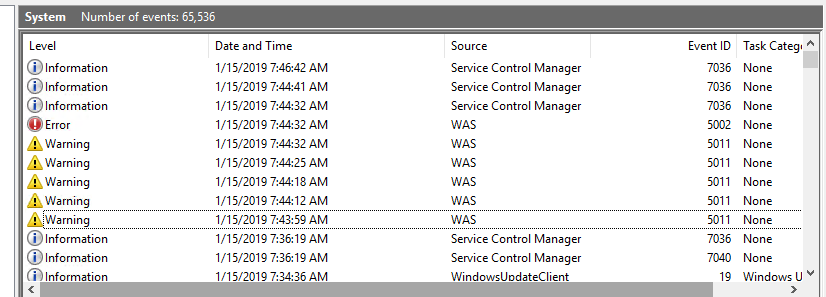
WAS:
Application pool 'www.example.org' is being automatically disabled due to a series of failures in the process(es) serving that application pool.
Application log says nothing this time.
I am now trying this: https://blogs.msdn.microsoft.com/parvez/2016/08/06/iis-application-pool-crash-and-debug-diag/
Any feedback welcome.
shapeh
on 15 Jan 2019
Hi guys,
We're jumping in here because we're seeing a very similar issue. We too are running Asp.Net Core 2.2.1 using the in-process option and get a "Access violation - code c0000005" exception which kills our w3wp.exe process. We're hosted on App Services on Azure.
We only started seeing these issues after upgrading to 2.2.x and switching to the In-Processs hosting model.
The crashes happens "rarely" (perhaps once or twice a day), but definitely enough to be taking up most of our attention because it causes restarts on our production servers.
Importantly, we managed to get a dump file (using the CrashDiag Azure extension) and can open it in Visual Studio locally which points the finger at a particular call in this framework. For security reasons I assume I shouldn't give too many details here, just in case it might get exploited in some way.
We'd be happy to share the dump file with the team for analysis. We're not really experts at looking at such files so we'd be glad if we got some assistance resolving this problem (and presumably you guys have a motivation to fix it).
Perhaps somebody could provide an email address to reach out to me about sharing the dump file and working together to fix this.
For now, we'll try to switch back to Out-Of-Process (as suggested above by @jkotalik ) and see if things calm down on our side.
We look forward to hearing back from someone!
Thanks
 samcic
on 16 Jan 2019
samcic
on 16 Jan 2019
Please send it to my email listed on my GitHub profile. Thanks.
jkotalik
on 16 Jan 2019
This issue was caused by a combination of https://github.com/dotnet/coreclr/issues/21450 and https://github.com/dotnet/roslyn/issues/26567. Closing as external.
 pakrym
on 24 Jan 2019
pakrym
on 24 Jan 2019
Reopening, my previous comment applies to @samcic issue only.
pakrym
on 24 Jan 2019
Just an update - I am still waiting for the app pool to crash. IIS has been running fine for 10-11 days now (still counting) - several Windows Updates have been installed in that time-frame.
Will send debug once I have it.
shapeh
on 25 Jan 2019
@shapeh Re-open if you see the issue again
 shirhatti
on 31 Jan 2019
shirhatti
on 31 Jan 2019
Today I got another crash:
A process serving application pool 'www.example.org' suffered a fatal communication error with the Windows Process Activation Service. The process id was '2612'. The data field contains the error number.
- but Debug Diag is not pickup that crash. Can you let me know what settings I should add to Debug Diag to capture this crash?
This is my setting:

shapeh
on 4 Feb 2019
I believe I have the same issue
I can easily reproduce it, and Debug Diag makes a dmp file
When I open the dump file in Visual Studio, the error occurs in Microsoft.AspNetCore.Mvc.ModelBinding.ParameterBinder.BindModelAsync
Unhandled exception at 0x00007FFB7614906A (coreclr.dll) in w3wp__MyApp__PID__2524__Date__02_07_2019__Time_10_28_54AM__950__Second_Chance_Exception_C0000005.dmp: 0xC0000005: Access violation writing location 0x000000A9261C0ED0.
I'm using 2.2 with in process hosting
What do we do from here?
 mbp
on 7 Feb 2019
mbp
on 7 Feb 2019
@mbp can you please share you crash dump to [email protected]
pakrym
on 7 Feb 2019
Done
mbp
on 7 Feb 2019
@mbp your failure is a combination of two issues:
https://github.com/dotnet/coreclr/issues/21450
and
https://github.com/dotnet/roslyn/issues/26567
When running InProcess IIS you get smaller stack size then dotnet does by default (512K vs 1M) in addition because of the issue in compiler async stack machines use much more stack space when exceptions are thrown then in a successful case.
Until one or both of the issues are solved the workaround would be to revert to using out of process hosting model.
pakrym
on 8 Feb 2019
Thanks @pakrym
I was suspecting a stack overflow exception, but would have thought this would could be seen from the exception instead of "Access violation"
mbp
on 8 Feb 2019
We are still getting this error have captured a dump with this method https://docs.microsoft.com/en-us/aspnet/core/host-and-deploy/iis/troubleshoot?view=aspnetcore-2.2
1
Application: w3wp.exe
CoreCLR Version: 4.6.27414.5
Description: The process was terminated due to an internal error in the .NET Runtime at IP 00007FFBE37CE8FB (00007FFBE3620000) with exit code c0000005.
2
Faulting application name: w3wp.exe, version: 10.0.14393.0, time stamp: 0x57899b8a
Faulting module name: coreclr.dll, version: 4.6.27414.5, time stamp: 0x5c65dbe5
Exception code: 0xc0000005
Fault offset: 0x00000000001ae8fb
Faulting process id: 0x1230
Faulting application start time: 0x01d4e30531a65643
Faulting application path: c:\windows\system32\inetsrv\w3wp.exe
Faulting module path: C:\Program Files\dotnet\shared\Microsoft.NETCore.App\2.2.3\coreclr.dll
Report Id: 32f0db5a-8ab4-42a5-a27b-e5fa5df2eb31
Faulting package full name:
Faulting package-relative application ID:
@pakrym - can I share the dump file with you?
shapeh
on 25 Mar 2019
@shapeh go ahead and share the dump with me to my email listed on my github profile.
jkotalik
on 25 Mar 2019
Shared.
shapeh
on 25 Mar 2019
Related issues
 TanvirArjel
·
3Comments
TanvirArjel
·
3Comments
 rynowak
·
3Comments
rynowak
·
3Comments
 groogiam
·
3Comments
groogiam
·
3Comments
 markrendle
·
3Comments
markrendle
·
3Comments
 githubgitgit
·
3Comments
githubgitgit
·
3Comments
Most helpful comment
Hi guys,
We're jumping in here because we're seeing a very similar issue. We too are running Asp.Net Core 2.2.1 using the in-process option and get a "Access violation - code c0000005" exception which kills our w3wp.exe process. We're hosted on App Services on Azure.
We only started seeing these issues after upgrading to 2.2.x and switching to the In-Processs hosting model.
The crashes happens "rarely" (perhaps once or twice a day), but definitely enough to be taking up most of our attention because it causes restarts on our production servers.
Importantly, we managed to get a dump file (using the CrashDiag Azure extension) and can open it in Visual Studio locally which points the finger at a particular call in this framework. For security reasons I assume I shouldn't give too many details here, just in case it might get exploited in some way.
We'd be happy to share the dump file with the team for analysis. We're not really experts at looking at such files so we'd be glad if we got some assistance resolving this problem (and presumably you guys have a motivation to fix it).
Perhaps somebody could provide an email address to reach out to me about sharing the dump file and working together to fix this.
For now, we'll try to switch back to Out-Of-Process (as suggested above by @jkotalik ) and see if things calm down on our side.
We look forward to hearing back from someone!
Thanks