Aspnetcore: Building source code fails
Build process fails with the message saying "Could not find a version of MSBuild which satisfies the requirements specified in korebuild.json."
To Reproduce
Steps to reproduce the behavior:
Using this version of ASP.NET Core 'v3.0.0-preview-18579-0056'
- git clone --recursive https://github.com/aspnet/AspNetCore
- git submodule update --init –recursive
- .build.cmd
Expected behavior
All the build processes complete.
Screenshots

Additional context
Here is the console output including error message.
C:\Users\Administrator\Documents\GitHub\AspNetCore>.\build.cmd
WARNING: No default group of projects was specified, so building the 'managed' and 'native' subset of projects. Run
`build.cmd -help` for more details.
Using KoreBuild 3.0.0-build-20181214.1
WARNING: dotnet found on the system PATH is 'C:\Program Files\dotnet\dotnet.exe' but KoreBuild will use
'C:\Users\Administrator\.dotnet\x64\dotnet.exe'.
WARNING: Adding 'C:\Users\Administrator\.dotnet\x64' to system PATH permanently may be required for applications like
Visual Studio or VS Code to work correctly.
Adding C:\Users\Administrator\.dotnet\x64 to PATH
.NET Core SDK 3.0.100-preview-009750 is already installed. Skipping installation.
Could not find a version of MSBuild which satisfies the requirements specified in korebuild.json.
発生場所 C:\Users\Administrator\.dotnet\buildtools\korebuild\3.0.0-build-20181214.1\scripts\KoreBuild.psm1:511 文字:5
+     throw 'Could not find a version of MSBuild which satisfies the re ...
+     ~~~~~~~~~~~~~~~~~~~~~~~~~~~~~~~~~~~~~~~~~~~~~~~~~~~~~~~~~~~~~~~~~
    + CategoryInfo          : OperationStopped: (Could not find ...korebuild.json.:String) [], RuntimeException
    + FullyQualifiedErrorId : Could not find a version of MSBuild which satisfies the requirements specified in korebu
   ild.json.
The output of dotnet --info
C:\Users\Administrator\Documents\GitHub\AspNetCore>dotnet --info
A compatible SDK version for global.json version: [3.0.100-preview-009750] from [C:\Users\Administrator\Documents\GitHub\AspNetCore\global.json] was not found

Host (useful for support):
  Version: 2.2.0
  Commit:  1249f08fed

.NET Core SDKs installed:
  1.0.4 [C:\Program Files\dotnet\sdk]
  1.1.0 [C:\Program Files\dotnet\sdk]
  2.1.4 [C:\Program Files\dotnet\sdk]
  2.1.202 [C:\Program Files\dotnet\sdk]
  2.1.300 [C:\Program Files\dotnet\sdk]
  2.1.402 [C:\Program Files\dotnet\sdk]
  2.1.502 [C:\Program Files\dotnet\sdk]
  2.1.600-preview-009426 [C:\Program Files\dotnet\sdk]
  2.2.101 [C:\Program Files\dotnet\sdk]

.NET Core runtimes installed:
  Microsoft.AspNetCore.All 2.1.0 [C:\Program Files\dotnet\shared\Microsoft.AspNetCore.All]
  Microsoft.AspNetCore.All 2.1.4 [C:\Program Files\dotnet\shared\Microsoft.AspNetCore.All]
  Microsoft.AspNetCore.All 2.1.6 [C:\Program Files\dotnet\shared\Microsoft.AspNetCore.All]
  Microsoft.AspNetCore.All 2.2.0 [C:\Program Files\dotnet\shared\Microsoft.AspNetCore.All]
  Microsoft.AspNetCore.App 2.1.0 [C:\Program Files\dotnet\shared\Microsoft.AspNetCore.App]
  Microsoft.AspNetCore.App 2.1.4 [C:\Program Files\dotnet\shared\Microsoft.AspNetCore.App]
  Microsoft.AspNetCore.App 2.1.6 [C:\Program Files\dotnet\shared\Microsoft.AspNetCore.App]
  Microsoft.AspNetCore.App 2.2.0 [C:\Program Files\dotnet\shared\Microsoft.AspNetCore.App]
  Microsoft.NETCore.App 1.0.5 [C:\Program Files\dotnet\shared\Microsoft.NETCore.App]
  Microsoft.NETCore.App 1.1.2 [C:\Program Files\dotnet\shared\Microsoft.NETCore.App]
  Microsoft.NETCore.App 2.0.5 [C:\Program Files\dotnet\shared\Microsoft.NETCore.App]
  Microsoft.NETCore.App 2.0.9 [C:\Program Files\dotnet\shared\Microsoft.NETCore.App]
  Microsoft.NETCore.App 2.1.0 [C:\Program Files\dotnet\shared\Microsoft.NETCore.App]
  Microsoft.NETCore.App 2.1.4 [C:\Program Files\dotnet\shared\Microsoft.NETCore.App]
  Microsoft.NETCore.App 2.1.6 [C:\Program Files\dotnet\shared\Microsoft.NETCore.App]
  Microsoft.NETCore.App 2.2.0 [C:\Program Files\dotnet\shared\Microsoft.NETCore.App]

To install additional .NET Core runtimes or SDKs:
  https://aka.ms/dotnet-download
I refer to this thread https://gitter.im/aspnet/Home/~iframe and "Desktop development with C++" has been installed.
 ymita
ymita
All 25 comments
Please give our instructions here a try: https://github.com/aspnet/AspNetCore/blob/master/docs/BuildFromSource.md#install-pre-requistes
 natemcmaster
on 21 Dec 2018
natemcmaster
on 21 Dec 2018
@natemcmaster
Thank you for your quick reply! I still have problem with the process. And for the time being, I will continue to work on that on my end.
ymita
on 25 Dec 2018
I am facing the exact same issue. Installed the pre-requisites and that seems to have solved the issue to a large extent. But the build process still ends up failing with the following errors
C:\Program Files (x86)\Microsoft Visual Studio\2017\Enterprise\MSBuild\15.0\Bin\Microsoft.Common.CurrentVersion.targets(4551,5)
: error MSB3030: Could not copy the file "C:\Kapil\work\AspNetCore\src\Servers\IIS\src\AspNetCoreModuleV1\AspNetCore\bin\Debug\
x64\aspnetcore.dll" because it was not found. [C:\Kapil\work\AspNetCore\src\Servers\IIS\src\Microsoft.AspNetCore.Server.Integra
tionTesting.IIS\Microsoft.AspNetCore.Server.IntegrationTesting.IIS.csproj]
C:\Program Files (x86)\Microsoft Visual Studio\2017\Enterprise\MSBuild\15.0\Bin\Microsoft.Common.CurrentVersion.targets(4551,5)
: error MSB3030: Could not copy the file "C:\Kapil\work\AspNetCore\src\Servers\IIS\src\AspNetCoreModuleV1\AspNetCore\bin\Debug\
Win32\aspnetcore.dll" because it was not found. [C:\Kapil\work\AspNetCore\src\Servers\IIS\src\Microsoft.AspNetCore.Server.Integ
rationTesting.IIS\Microsoft.AspNetCore.Server.IntegrationTesting.IIS.csproj]
C:\Program Files (x86)\Microsoft Visual Studio\2017\Enterprise\MSBuild\15.0\Bin\Microsoft.Common.CurrentVersion.targets(4551,5)
: error MSB3030: Could not copy the file "C:\Kapil\work\AspNetCore\src\Servers\IIS\src\AspNetCoreModuleV2\AspNetCore\bin\Debug\
x64\aspnetcorev2.dll" because it was not found. [C:\Kapil\work\AspNetCore\src\Servers\IIS\src\Microsoft.AspNetCore.Server.Integ
rationTesting.IIS\Microsoft.AspNetCore.Server.IntegrationTesting.IIS.csproj]
C:\Program Files (x86)\Microsoft Visual Studio\2017\Enterprise\MSBuild\15.0\Bin\Microsoft.Common.CurrentVersion.targets(4551,5)
: error MSB3030: Could not copy the file "C:\Kapil\work\AspNetCore\src\Servers\IIS\src\AspNetCoreModuleV2\OutOfProcessRequestHa
ndler\bin\Debug\x64\aspnetcorev2_outofprocess.dll" because it was not found. [C:\Kapil\work\AspNetCore\src\Servers\IIS\src\Micr
osoft.AspNetCore.Server.IntegrationTesting.IIS\Microsoft.AspNetCore.Server.IntegrationTesting.IIS.csproj]
C:\Program Files (x86)\Microsoft Visual Studio\2017\Enterprise\MSBuild\15.0\Bin\Microsoft.Common.CurrentVersion.targets(4551,5)
: error MSB3030: Could not copy the file "C:\Kapil\work\AspNetCore\src\Servers\IIS\src\AspNetCoreModuleV2\OutOfProcessRequestHa
ndler\bin\Debug\x86\aspnetcorev2_outofprocess.dll" because it was not found. [C:\Kapil\work\AspNetCore\src\Servers\IIS\src\Micr
osoft.AspNetCore.Server.IntegrationTesting.IIS\Microsoft.AspNetCore.Server.IntegrationTesting.IIS.csproj]
C:\Program Files (x86)\Microsoft Visual Studio\2017\Enterprise\MSBuild\15.0\Bin\Microsoft.Common.CurrentVersion.targets(4551,5)
: error MSB3030: Could not copy the file "C:\Kapil\work\AspNetCore\src\Servers\IIS\src\AspNetCoreModuleV2\AspNetCore\bin\Debug\
Win32\aspnetcorev2.dll" because it was not found. [C:\Kapil\work\AspNetCore\src\Servers\IIS\src\Microsoft.AspNetCore.Server.Int
egrationTesting.IIS\Microsoft.AspNetCore.Server.IntegrationTesting.IIS.csproj]
C:\Program Files (x86)\Microsoft Visual Studio\2017\Enterprise\MSBuild\15.0\Bin\Microsoft.Common.CurrentVersion.targets(4551,5)
: error MSB3030: Could not copy the file "C:\Kapil\work\AspNetCore\src\Servers\IIS\src\AspNetCoreModuleV2\InProcessRequestHandl
er\bin\Debug\x64\aspnetcorev2_inprocess.dll" because it was not found. [C:\Kapil\work\AspNetCore\src\Servers\IIS\src\Microsoft.
AspNetCore.Server.IIS\Microsoft.AspNetCore.Server.IIS.csproj]
C:\Program Files (x86)\Microsoft Visual Studio\2017\Enterprise\MSBuild\15.0\Bin\Microsoft.Common.CurrentVersion.targets(4551,5)
: error MSB3030: Could not copy the file "C:\Kapil\work\AspNetCore\src\Servers\IIS\src\AspNetCoreModuleV2\InProcessRequestHandl
er\bin\Debug\x86\aspnetcorev2_inprocess.dll" because it was not found. [C:\Kapil\work\AspNetCore\src\Servers\IIS\src\Microsoft.
AspNetCore.Server.IIS\Microsoft.AspNetCore.Server.IIS.csproj]
Thanks @natemcmaster
 kapilbhudhia
on 26 Dec 2018
kapilbhudhia
on 26 Dec 2018
I am also facing the same issue on windows 10 after following the instruction.
Build FAILED.

C:\Users\weweng\.dotnet\x64\x64\sdk\3.0.100-preview-009750\Sdks\Microsoft.NET.Sdk\targets\Microsoft.NET.Sdk.FSharp.targ
ets(29,3): warning MSB4011: "C:\Program Files (x86)\Microsoft Visual Studio\2017\Community\MSBuild\Microsoft\VisualStud
io\v15.0\FSharp\Microsoft.FSharp.NetSdk.targets" cannot be imported again. It was already imported at "C:\Users\weweng\
.dotnet\x64\x64\sdk\3.0.100-preview-009750\Sdks\Microsoft.NET.Sdk\targets\Microsoft.NET.Sdk.FSharpTargetsShim.targets (
63,3)". This is most likely a build authoring error. This subsequent import will be ignored. [C:\Users\weweng\Documents
\GitHub\AspNetCore\src\Mvc\test\WebSites\FSharpWebSite\FSharpWebSite.fsproj]
C:\Users\weweng\.dotnet\x64\x64\sdk\3.0.100-preview-009750\Sdks\Microsoft.NET.Sdk\targets\Microsoft.NET.Sdk.FSharp.targ
ets(29,3): warning MSB4011: "C:\Program Files (x86)\Microsoft Visual Studio\2017\Community\MSBuild\Microsoft\VisualStud
io\v15.0\FSharp\Microsoft.FSharp.NetSdk.targets" cannot be imported again. It was already imported at "C:\Users\weweng\
.dotnet\x64\x64\sdk\3.0.100-preview-009750\Sdks\Microsoft.NET.Sdk\targets\Microsoft.NET.Sdk.FSharpTargetsShim.targets (
63,3)". This is most likely a build authoring error. This subsequent import will be ignored. [C:\Users\weweng\Documents
\GitHub\AspNetCore\src\Mvc\test\WebSites\FSharpWebSite\FSharpWebSite.fsproj]
C:\Program Files (x86)\Microsoft Visual Studio\2017\Community\MSBuild\15.0\Bin\Microsoft.Common.CurrentVersion.targets(
4551,5): error MSB3030: Could not copy the file "C:\Users\weweng\Documents\GitHub\AspNetCore\src\Servers\IIS\src\AspNet
CoreModuleV2\InProcessRequestHandler\bin\Debug\x64\aspnetcorev2_inprocess.dll" because it was not found. [C:\Users\wewe
ng\Documents\GitHub\AspNetCore\src\Servers\IIS\src\Microsoft.AspNetCore.Server.IIS\Microsoft.AspNetCore.Server.IIS.cspr
oj]
C:\Program Files (x86)\Microsoft Visual Studio\2017\Community\MSBuild\15.0\Bin\Microsoft.Common.CurrentVersion.targets(
4551,5): error MSB3030: Could not copy the file "C:\Users\weweng\Documents\GitHub\AspNetCore\src\Servers\IIS\src\AspNet
CoreModuleV2\InProcessRequestHandler\bin\Debug\x86\aspnetcorev2_inprocess.dll" because it was not found. [C:\Users\wewe
ng\Documents\GitHub\AspNetCore\src\Servers\IIS\src\Microsoft.AspNetCore.Server.IIS\Microsoft.AspNetCore.Server.IIS.cspr
oj]
C:\Program Files (x86)\Microsoft Visual Studio\2017\Community\MSBuild\15.0\Bin\Microsoft.Common.CurrentVersion.targets(
4551,5): error MSB3030: Could not copy the file "C:\Users\weweng\Documents\GitHub\AspNetCore\src\Servers\IIS\src\AspNet
CoreModuleV1\AspNetCore\bin\Debug\Win32\aspnetcore.dll" because it was not found. [C:\Users\weweng\Documents\GitHub\Asp
NetCore\src\Servers\IIS\src\Microsoft.AspNetCore.Server.IntegrationTesting.IIS\Microsoft.AspNetCore.Server.IntegrationT
esting.IIS.csproj]
C:\Program Files (x86)\Microsoft Visual Studio\2017\Community\MSBuild\15.0\Bin\Microsoft.Common.CurrentVersion.targets(
4551,5): error MSB3030: Could not copy the file "C:\Users\weweng\Documents\GitHub\AspNetCore\src\Servers\IIS\src\AspNet
CoreModuleV2\OutOfProcessRequestHandler\bin\Debug\x64\aspnetcorev2_outofprocess.dll" because it was not found. [C:\User
s\weweng\Documents\GitHub\AspNetCore\src\Servers\IIS\src\Microsoft.AspNetCore.Server.IntegrationTesting.IIS\Microsoft.A
spNetCore.Server.IntegrationTesting.IIS.csproj]
C:\Program Files (x86)\Microsoft Visual Studio\2017\Community\MSBuild\15.0\Bin\Microsoft.Common.CurrentVersion.targets(
4551,5): error MSB3030: Could not copy the file "C:\Users\weweng\Documents\GitHub\AspNetCore\src\Servers\IIS\src\AspNet
CoreModuleV2\OutOfProcessRequestHandler\bin\Debug\x86\aspnetcorev2_outofprocess.dll" because it was not found. [C:\User
s\weweng\Documents\GitHub\AspNetCore\src\Servers\IIS\src\Microsoft.AspNetCore.Server.IntegrationTesting.IIS\Microsoft.A
spNetCore.Server.IntegrationTesting.IIS.csproj]
C:\Program Files (x86)\Microsoft Visual Studio\2017\Community\MSBuild\15.0\Bin\Microsoft.Common.CurrentVersion.targets(
4551,5): error MSB3030: Could not copy the file "C:\Users\weweng\Documents\GitHub\AspNetCore\src\Servers\IIS\src\AspNet
CoreModuleV1\AspNetCore\bin\Debug\x64\aspnetcore.dll" because it was not found. [C:\Users\weweng\Documents\GitHub\AspNe
tCore\src\Servers\IIS\src\Microsoft.AspNetCore.Server.IntegrationTesting.IIS\Microsoft.AspNetCore.Server.IntegrationTes
ting.IIS.csproj]
C:\Program Files (x86)\Microsoft Visual Studio\2017\Community\MSBuild\15.0\Bin\Microsoft.Common.CurrentVersion.targets(
4551,5): error MSB3030: Could not copy the file "C:\Users\weweng\Documents\GitHub\AspNetCore\src\Servers\IIS\src\AspNet
CoreModuleV2\AspNetCore\bin\Debug\Win32\aspnetcorev2.dll" because it was not found. [C:\Users\weweng\Documents\GitHub\A
spNetCore\src\Servers\IIS\src\Microsoft.AspNetCore.Server.IntegrationTesting.IIS\Microsoft.AspNetCore.Server.Integratio
nTesting.IIS.csproj]
C:\Program Files (x86)\Microsoft Visual Studio\2017\Community\MSBuild\15.0\Bin\Microsoft.Common.CurrentVersion.targets(
4551,5): error MSB3030: Could not copy the file "C:\Users\weweng\Documents\GitHub\AspNetCore\src\Servers\IIS\src\AspNet
CoreModuleV2\AspNetCore\bin\Debug\x64\aspnetcorev2.dll" because it was not found. [C:\Users\weweng\Documents\GitHub\Asp
NetCore\src\Servers\IIS\src\Microsoft.AspNetCore.Server.IntegrationTesting.IIS\Microsoft.AspNetCore.Server.IntegrationT
esting.IIS.csproj]
    2 Warning(s)
    8 Error(s)
 weng271190436
on 30 Dec 2018
weng271190436
on 30 Dec 2018
@weng271190436 @kapilbhudhia try build.cmd -native -managed.
Adding @jkotalik as another assignee since he's been doing work relevant to the latest issues. One of the problems we should address is the mix of C++ and .NET projects. dotnet build is unable to build C++ projects, but is the default command most contributors prefer to use. We're trying to find a sensible default for what should happen in this case. Should dotnet build fail or succeed but with warnings telling you to use msbuild.exe instead?
Regardless, we should make build.cmd without arguments succeed without errors.
natemcmaster
on 31 Dec 2018
@natemcmaster It works! Thanks.
weng271190436
on 31 Dec 2018
@natemcmaster depending on how much work it takes, we may want to consider splitting korebuild.json up into subfolders again rather than having a top level json file. Calling subdirectory build.cmd will fail on projects that it really should pass on, causing even more developer friction.
 jkotalik
on 2 Jan 2019
jkotalik
on 2 Jan 2019
I wouldn't invest any time in improving korebuild.json. We're trying to convert to Arcade soon. Arcade handle's prereq checks differently, so this may not be an issue once we do that.
natemcmaster
on 2 Jan 2019
Faced the same problem, and that's how I handled with it:
insert following code
return 'C:\Program Files (x86)\Microsoft VisualStudio\2017\Community\MSBuild\15.0\Bin\MSbuild.exe'
to KoreBuild.psm1 as first line of Get-MSBuildPath() function (line number 457 in my case).
 AlexanderZverev
on 3 Jan 2019
AlexanderZverev
on 3 Jan 2019
Closing because I believe our code should build just fine if you first follow the instructions for installing pre-requisites. https://github.com/aspnet/AspNetCore/blob/master/docs/BuildFromSource.md#install-pre-requistes.
If the instructions don't work, please let us know and we can look into this more.
natemcmaster
on 3 Jan 2019
@natemcmaster I went through all the steps for installing the prerequisites, and tried to follow the building steps, but also for me it errors out telling me it can't find the correct msbuild version.
Using KoreBuild 3.0.0-build-20190104.3
.NET Core SDK 3.0.100-preview-009750 is already installed. Skipping installation.
Could not find a version of MSBuild which satisfies the requirements specified in korebuild.json.
At C:\Users\SebastianGingter\.dotnet\buildtools\korebuild\3.0.0-build-20190104.3\scripts\KoreBuild.psm1:511 char:5
+     throw 'Could not find a version of MSBuild which satisfies the re ...
+     ~~~~~~~~~~~~~~~~~~~~~~~~~~~~~~~~~~~~~~~~~~~~~~~~~~~~~~~~~~~~~~~~~
    + CategoryInfo          : OperationStopped: (Could not find ...korebuild.json.:String) [], RuntimeException
    + FullyQualifiedErrorId : Could not find a version of MSBuild which satisfies the requirements specified in korebuild.json.
 gingters
on 7 Jan 2019
gingters
on 7 Jan 2019
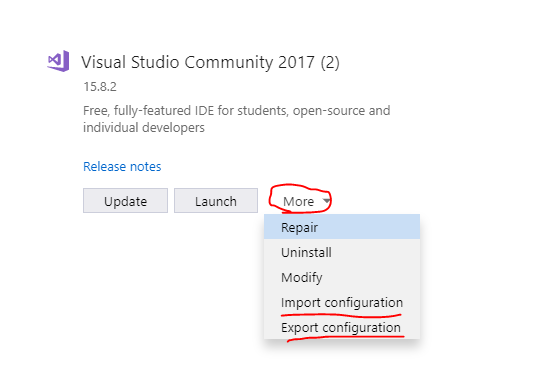
@gingters can you share your Visual Studio configuration? Open the VS installer and click 'Export Configuration'. This will produce a JSON file.
natemcmaster
on 7 Jan 2019
Of course. Here it is:
{
    "version": "1.0",
    "components": [
        "Microsoft.VisualStudio.Workload.ManagedDesktop",
        "Microsoft.VisualStudio.Workload.NativeDesktop",
        "Microsoft.VisualStudio.Workload.Universal",
        "Microsoft.VisualStudio.Workload.NetWeb",
        "Microsoft.VisualStudio.Workload.Azure",
        "Microsoft.VisualStudio.Workload.Data",
        "Microsoft.VisualStudio.Workload.NetCrossPlat",
        "Microsoft.VisualStudio.Workload.ManagedGame",
        "Microsoft.VisualStudio.Workload.VisualStudioExtension",
        "Microsoft.VisualStudio.Workload.NetCoreTools",
        "microsoft.net.componentgroup.targetingpacks.common",
        "microsoft.visualstudio.component.entityframework",
        "microsoft.visualstudio.component.fsharp.desktop",
        "microsoft.net.component.4.6.2.sdk",
        "microsoft.net.component.4.6.2.targetingpack",
        "microsoft.net.component.4.7.sdk",
        "microsoft.net.component.4.7.targetingpack",
        "microsoft.net.component.4.7.1.sdk",
        "microsoft.net.component.4.7.2.sdk",
        "microsoft.net.component.4.7.2.targetingpack",
        "microsoft.visualstudio.component.wcf.tooling",
        "microsoft.visualstudio.component.vc.diagnostictools",
        "microsoft.visualstudio.component.vc.cmake.project",
        "microsoft.visualstudio.component.vc.atl",
        "microsoft.visualstudio.component.vc.testadapterforboosttest",
        "microsoft.visualstudio.component.vc.testadapterforgoogletest",
        "microsoft.visualstudio.component.windows81sdk",
        "microsoft.visualstudio.component.vc.cli.support",
        "microsoft.visualstudio.component.windows10sdk.17134",
        "microsoft.visualstudio.component.windows10sdk.15063.desktop",
        "microsoft.visualstudio.componentgroup.web.cloudtools",
        "microsoft.visualstudio.component.aspnet45",
        "microsoft.visualstudio.component.webdeploy",
        "microsoft.component.azure.datalake.tools",
        "microsoft.visualstudio.componentgroup.azure.resourcemanager.tools",
        "microsoft.visualstudio.componentgroup.azure.cloudservices",
        "microsoft.visualstudio.component.azure.mobileappssdk",
        "microsoft.visualstudio.component.azure.servicefabric.tools",
        "microsoft.visualstudio.component.azure.storage.azcopy",
        "microsoft.visualstudio.component.testtools.core",
        "component.redgate.sqlsearch.vsextension",
        "component.google.android.emulator.api27",
        "component.unityengine.x64",
        "component.unityengine.x86",
        "component.javajdk",
        "microsoft.visualstudio.component.nuget.buildtools",
        "microsoft.component.codeanalysis.sdk",
        "component.mdd.linux",
        "component.linux.cmake",
        "microsoft.visualstudio.component.dependencyvalidation.community",
        "microsoft.visualstudio.component.typescript.3.0",
        "component.microsoft.visualstudio.blazorextension",
        "component.microsoft.visualstudio.liveshare"
    ]
}
Thanks. It appears your list of installed workloads does not include these, which are required to build this project:
Please try running the eng/scripts/InstallVisualStudio.ps1 script to install these. (see https://github.com/aspnet/AspNetCore/blob/master/docs/BuildFromSource.md#install-pre-requistes)
natemcmaster
on 7 Jan 2019
You may be having the same problem I am having. I am running Windows Server 2012 R2. I tracked it down to vswhere returning blank when -requires Microsoft.VisualStudio.ComponentGroup.NativeDesktop.Win81 is present.
When I run InstallVisualStudio.ps1, I get an error that my operating system is not supported. Apparently, the 462 SDK is not supported on Windows OS less than 10 via the Visual Studio Installer (In the installer, I see checkboxes for 461 only). I followed instructions to download the 462 SDK manually, and it installed successfully. However, when I manually run vswhere, it fails to detect "Microsoft.Net.Component.4.6.2.TargetingPack" and "Microsoft.Net.Component.4.6.2.SDK", even though those components are listed in my "Programs and Features" (I get blank result).
(REFERENCE: Net462 SDK - OS not supported and manual install)
https://developercommunity.visualstudio.com/content/problem/96517/vs-professionalexe-refuses-to-install-microsoftnet.html
I still get the _"Could not find a version of MSBuild which satisfies the ...."_ error. It does detect all the other components listed in korebuild.js, but still no Microsoft.VisualStudio.ComponentGroup.NativeDesktop.Win81. Since InstallVisualStudio.ps1 only fails for the 2 SDK 462 items, I assume those items might be related to Microsoft.VisualStudio.ComponentGroup.NativeDesktop.Win81. I have not tried to reboot since manually installing those components, so may try that later.
My vswhere version: Visual Studio Locator version 2.5.2+gebb9f26a3d [query version 1.18.21.37008]
 hybridview
on 8 Jan 2019
hybridview
on 8 Jan 2019
@natemcmaster I think we can remove Microsoft.VisualStudio.ComponentGroup.NativeDesktop.Win81 from the component list. It was used for building installers which I believe has been upgraded to the latest version of the win sdk.
jkotalik
on 8 Jan 2019
To test, I removed Microsoft.VisualStudio.ComponentGroup.NativeDesktop.Win81 from korebuild.json, and restore.cmd appears to be working now. I just have an npm version issue that I need to research. Thanks for the help.
hybridview
on 8 Jan 2019
I think we can remove Microsoft.VisualStudio.ComponentGroup.NativeDesktop.Win81 from the component list.
👍 awesome. The fewer pre-reqs, the better.
natemcmaster
on 8 Jan 2019
@natemcmaster Indeed, updating my VS installation with the script did help and the build started. Thanks. I thought manually selecting the Workloads and Components would do, but somehow I missed that.
gingters
on 9 Jan 2019
I had to fix the KoreBuild script to make this work for me (see https://github.com/aspnet/BuildTools/pull/903#issuecomment-453488786). The parsing of the vswhere output failed so KoreBuild wasn’t able to properly detect and verify my component set. – Maybe this helps someone who has a similar problem.
 poke
on 11 Jan 2019
poke
on 11 Jan 2019
@natemcmaster I had the same initial problem(MSBuild related one), then I tried to run the InstallVisualStudio.ps1 script and now powershell is complaining about not finding the Get-RemoteFile cmdlet:

Thanks for the help in advance.
 TKharaishvili
on 12 Jan 2019
TKharaishvili
on 12 Jan 2019
You should be able to install all dependencies for Visual Studio by running
"C:\Program Files (x86)\Microsoft Visual Studio\Installer\vs_installer.exe" --installPath "C:\Program Files (x86)\Microsoft Visual Studio\2017\Enterprise" modify --add Microsoft.VisualStudio.Component.VC.Tools.x86.x64 --add Microsoft.VisualStudio.Component.VC.ATL --add Microsoft.VisualStudio.Component.Windows10SDK.17134
(Adjust the path for your respective VS installation)
You can get the component list you need from the korebuild.json file in the root.
poke
on 12 Jan 2019
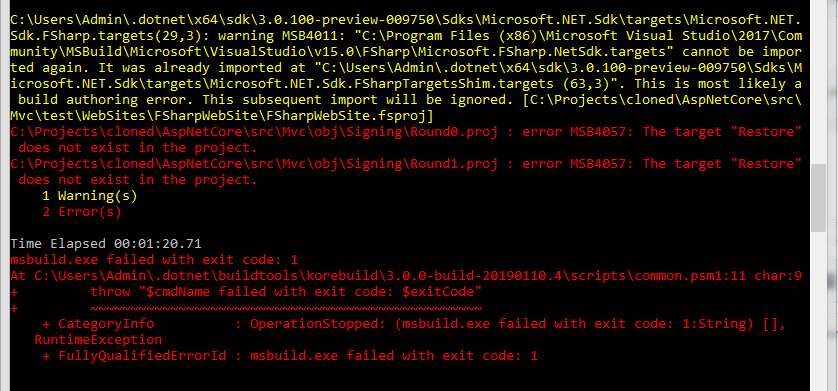
@poke thanks for that. I managed to get past that MSBuild version related error but I've stumbled upon a new one now. I'm trying to build the Mvc solution and here's what happens:
TKharaishvili
on 14 Jan 2019
@TKharaishvili can you open a new issue describing how to reproduce this problem? This issue has been closed and I believe the original problem was addressed, which means there is no one tracking this anymore.
natemcmaster
on 14 Jan 2019
@natemcmaster sorry about that. I will.
TKharaishvili
on 14 Jan 2019
Related issues
 TanvirArjel
·
3Comments
TanvirArjel
·
3Comments
 Pixel-Lord
·
3Comments
Pixel-Lord
·
3Comments
 ipinak
·
3Comments
ipinak
·
3Comments
 rynowak
·
3Comments
rynowak
·
3Comments
 markrendle
·
3Comments
markrendle
·
3Comments
Most helpful comment
Please give our instructions here a try: https://github.com/aspnet/AspNetCore/blob/master/docs/BuildFromSource.md#install-pre-requistes